Image Replicator - Recreate Visual Styles Instantly
Use one image as a base to generate similar visuals. Perfect for designers, content creators, and branding needs.
Get started for free
*No credit card required
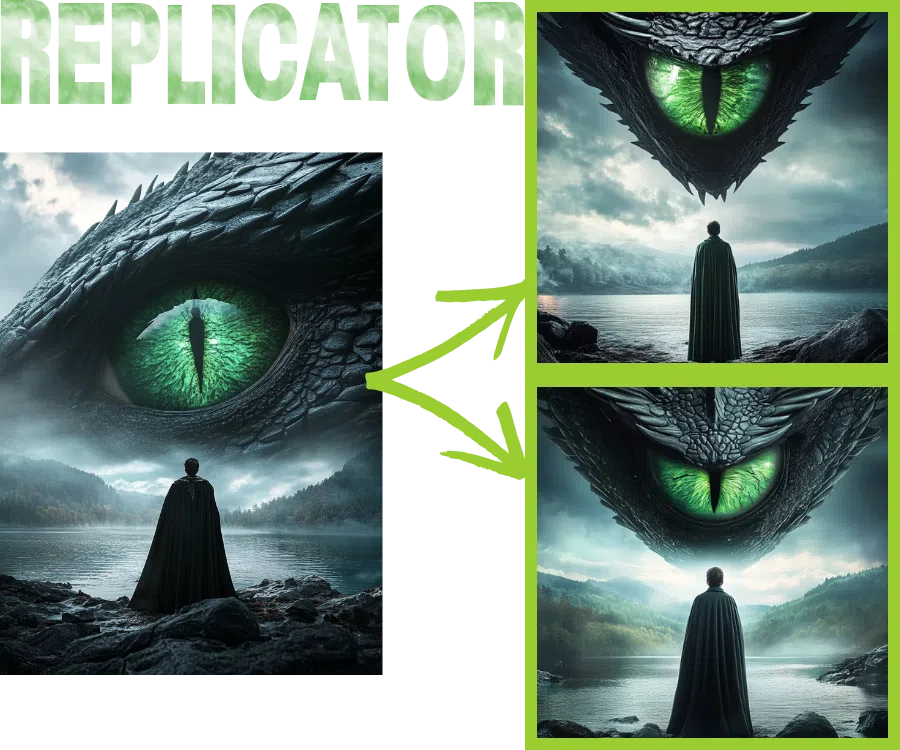

Preserve Style, Mood, and Composition
Our AI captures lighting, textures, layout, and artistic tone — allowing you to recreate consistent-looking images.
Smart Visual Matching
No need for manual adjustments. The AI understands visual elements and replicates them intelligently with your custom input.

Why use iCreat image replicator
Use as a Creative Starting Point
Design new visuals inspired by a reference image — great for thumbnails, social media templates, and product design concepts.
Image-to-Image Generation in Seconds
Upload a reference image and let iCreat AI generate a visually matched output with minimal input from you.
Perfect for Consistent Branding
Maintain visual consistency across your marketing content, even across multiple formats or channels.
Ideal for Style Transfer and Mood Boards
Turn reference images into a series of unique but cohesive visuals — perfect for design inspiration and prototyping.
Fast, Lightweight & Web-Based
No need to install anything. Works in your browser with lightning-fast performance.
How to Use the Image Replicator (3 Easy Steps)
Upload a Reference Image
Select an image whose style or mood you want to replicate. Simply drag and drop or click to upload.
Let the AI Analyze and Generate
Our AI reads the structure, lighting, and artistic style from the original image, then recreates a similar visual from scratch.
Download Your New Image
Once processing is done, download your newly generated image and use it however you like.
FAQ
1. What is the Image Replicator tool?
keyboard_arrow_down
2. What image formats can I upload to use image replicator?
keyboard_arrow_down
3. Will the generated image be an exact copy?
keyboard_arrow_down
4. What types of images work best?
keyboard_arrow_down
5. Can I upload illustrations, anime, or designs?
keyboard_arrow_down
6. Is any technical knowledge required?
keyboard_arrow_down
7. How long does image generation take?
keyboard_arrow_down
8. What if the results don’t look right?
keyboard_arrow_down
Ready to Start?
Create a free iCreat account and start the image replicator now
Try Image Replicator for FreeCopyright © 2026 iCreat.ai All right reserved.
Secure Payment: 