

In AI image editing communities, more users are running into a problem that is not about model quality. Their images never even reach the editing stage.
A normal swimwear product photo may return IMAGE_SAFETY. Outfit changes,
pose changes, or local retouching may trigger content filters. Medical anatomy images,
classical figure art, and horror makeup can also be blocked during upload because of
skin, body structure, or blood-like details.
The harder part is that the same image and the same prompt may work once, then fail another time after the model starts running.
In 2026, users in the Google AI developer community have continued to report that Nano Banana Pro may reject normal swimwear, underwear, sleepwear, and fashion product images. These posts are community feedback, not an official Google confirmation of a system-wide issue. Still, they show a real business problem: false safety blocks can break fashion ecommerce and people-editing workflows.
So users who search for AI Photo Editor No Restrictions are usually not looking for a simple "unlimited edits" website. They are looking for an AI photo editor with lighter content review, fewer prompt and upload blocks, and better support for adult, body, outfit, horror, medical, and other topics that often trigger safety filters.
The problem is that terms like "no restrictions," "uncensored," and "no filter" are often just marketing labels. What matters in real use is where the platform applies safety checks, how often legal content gets blocked by mistake, and how much retrying and manual cleanup each failure creates.
Why Do AI Photo Editors Reject Normal Images?
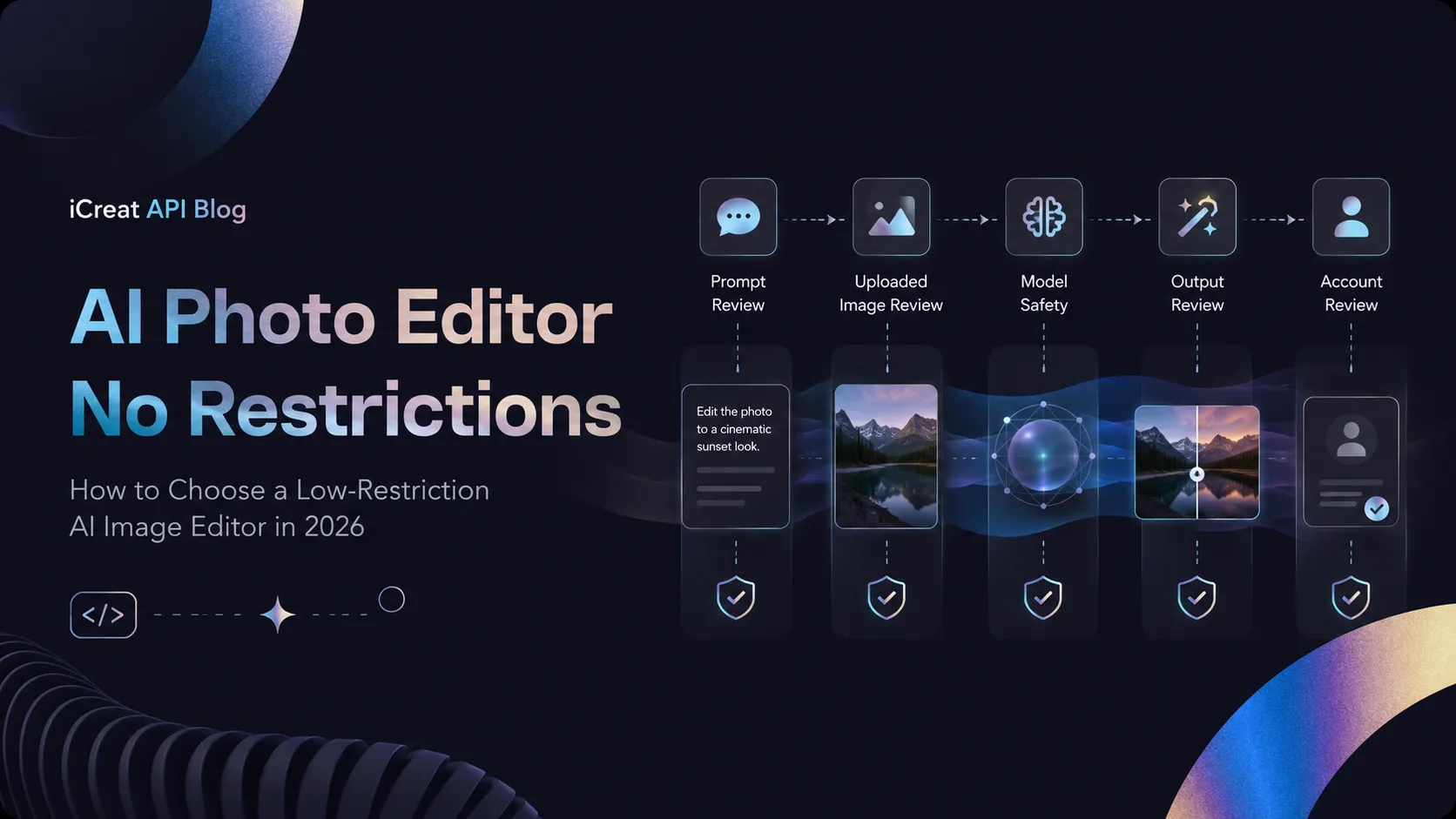
Many users blame every rejection on sensitive words. In reality, one AI photo editing task may pass through five different safety layers.
Layer 1: Prompt Review
Prompt review happens before the model starts generating.
The system may analyze keywords, meaning, people, clothing, body areas, and actions in the editing instruction. For example, "change the outfit" may not be rejected by itself. But when the instruction also involves a real person, body parts, removing cover, or changing a pose, the system may assign a higher risk score.
The Gemini API safety settings group part of its adjustable safety filters into four categories: harassment, hate speech, sexually explicit content, and dangerous content. Developers can adjust blocking thresholds for different requests and read safety ratings in the response. At the same time, core protections, such as child safety protections, cannot be turned off.
Modern safety systems do not only search for single blocked words. Even if users replace a few words, semantic classifiers may still judge the full sentence by its editing intent.
Layer 2: Uploaded Image Review
A normal prompt does not mean the source image will pass.
Uploaded image review may check:
- How much visible skin the image contains;
- Clothing type and body area;
- Human pose and number of people;
- Blood, wounds, or anatomy;
- Age-related visual signals;
- Whether the image includes a real person.
This is why a simple instruction like "change the background to a beach" may fail when the original image shows swimwear, underwear, or body photography.
For fashion ecommerce teams, this type of false block is especially painful. The classifier sees skin, clothing, and body structure, but it may not understand that the image is a product catalog or ad asset.
Layer 3: Model-Level Safety
Some APIs allow developers to adjust or disable extra safety filters. That does not mean the model itself will follow every editing request.
Google's official documentation separates adjustable safety settings from built-in model protections. Even if the adjustable filter is set to a looser level, the model may still reject a request because of non-configurable core safety mechanisms.
This means the same base model may behave differently in a consumer web app, a native API, or a third-party platform. But changing the access point does not guarantee that built-in model limits disappear.
Layer 4: Output Image Review
Even after the prompt and uploaded image pass, the generated image may be checked again.
This creates a common pattern:
- The image uploads successfully;
- The prompt submits successfully;
- The model starts running;
- No final image is returned.
The reason may not be the original request. It may be that the generated result triggered output review because of a random body pose, skin ratio, composition, or graphic detail.
In one ecommerce case from the Google developer community, the user had already set
the safety parameter to BLOCK_NONE, but the task still failed because
the generated result triggered IMAGE_SAFETY.
OpenAI has also stated that its image systems run content safety checks during generation and apply stronger protections to images involving real people.
This means a single run is not enough to judge how restrictive a tool really is.
Layer 5: Account-Level Review
Some platforms do not block every task right away. Instead, they may review account-level history, including prompts, uploaded images, and generated outputs.
The Adobe Generative AI User Guidelines state that prompts, inputs, and generated outputs may be reviewed by automated systems and humans. Adobe also bans pornographic material, explicit nudity, and the glorification of serious graphic violence, and it may suspend accounts.
Midjourney requires all content to stay Safe For Work. It clearly bans adult content, nudity, sexualized images, graphic content, and disturbing violent images. The platform also blocks some text and image inputs automatically.
So judging whether a tool works for low-restriction image editing should not depend on one successful task. The better question is whether the full review process fits the target workflow.
Which Normal Editing Scenarios Get Blocked Most Often?
Fashion, Swimwear, and Underwear Product Images
This is one of the most common business cases for false safety blocks.
The actual tasks are usually simple:
- Change clothing color;
- Replace the model background;
- Change fabric or texture;
- Fix clothing edges;
- Generate different colorways of the same item;
- Adjust the model pose or camera angle.
But before the model understands the editing task, the skin ratio and clothing type in the source image may already trigger input review.
For teams that process hundreds or thousands of images each month, even a small failure rate can create a lot of manual checking, prompt rewriting, and resubmission.
Artistic Figure Work and Classical Art
Figure drawing, classical sculpture, oil painting, and art photography may include body structure or nudity.
Platforms that apply one strict SFW standard usually do not make special exceptions just because the content has an artistic purpose. Midjourney's public rules are a clear example: users must avoid nudity, sexualized images, and adult content.
Medical, Skin, and Cosmetic Surgery Images
Medical images can easily trigger several categories at once: body, skin, wounds, and blood.
Common tasks include:
- Anatomy diagrams;
- Skin symptom labels;
- Before-and-after surgery simulations;
- Wound care images;
- Body area explanations;
- Medical education posters.
These tasks need a higher input pass rate, but they also need the model to edit only the selected area while keeping the rest of the medical information unchanged.
Horror, Game, and Film Design
Horror makeup, fake blood, monsters, battle wounds, and film props may trigger violence or graphic content checks.
The purpose may be game concept design, film pre-production, or ad creative. But safety systems mainly judge the image itself, not always the real production context.
Real-Person Outfit Changes and People Editing
Real-person images usually face stricter review than fictional characters.
Even when the task is only to change hair, clothing, makeup, background, or pose, the system may first check age, identity, and body areas. For people-editing workflows, pass rate and identity preservation are both important.
Four AI Photo Editor No Restrictions Solutions
Solution 1: Use Seedream 5.0 Pro Through iCreat
For users searching directly for AI Photo Editor No Restrictions, Seedream 5.0 Pro on iCreat is one of the core online image editing models to test first for this type of workflow.
It is not a basic editor that only replaces backgrounds or applies simple filters.
ByteDance officially released Seedream 5.0 Pro on July 8, 2026, and positioned it as a multimodal image generation and editing model for professional visual production. Its main strengths include complex information visualization, interactive precise editing, realistic human texture, and native multilingual generation.
For image editing, Seedream 5.0 Pro supports:
- Point selection, lasso selection, and box selection;
- Local object addition and removal;
- Color changes;
- Material replacement;
- Sketch-driven redraws;
- Intelligent image layering;
- Multi-image reference fusion;
- Spatial position and region understanding;
- Human, skin, clothing, and lighting texture generation.
ByteDance's official explanation says Seedream 5.0 Pro can first identify the editing area, then apply local changes based on point selection, lasso, boxes, and doodle-like control signals. It can also split a complete poster into more than ten transparent layers that can be moved and resized separately.
These abilities matter a lot for low-restriction image editing.
Users do not only need the request to enter the model. They also need the model to understand:
- Which area should change;
- Which human features must stay the same;
- Which background areas must not change;
- How clothing, skin, and materials should blend naturally;
- Whether the subject stays consistent after multiple edits.
In iCreat's workflow, Seedream 5.0 Pro is a strong first test for these tasks:
- Outfit changes and styling edits;
- Swimwear, underwear, and fashion model images;
- Figure art and character design;
- Horror, game, and film assets;
- Medical or body-structure images;
- Complex visuals that need several rounds of local editing.
Users can start by uploading real target images in the iCreat online Playground, then test input pass rate, local editing accuracy, and character consistency before moving to API-based batch production.
With iCreat, users can access Seedream image models through one account and run tests with prepaid, pay-per-call billing. Different models and generation settings may have different prices. Each API call can be tracked in usage records, and users can set spending limits for API keys.
Seedream 5.0 Pro also has clear trade-offs. ByteDance says the model still has room to improve in fine-grained text rendering and pixel-level editing consistency. So complex group photos, detailed hands, and long multi-step local edits should still be tested with real samples.
Solution 2: Commercial Image Editors With Strict Review
Representative options include Adobe Firefly, Midjourney, and OpenAI image models.
These products usually offer:
- Mature user interfaces;
- Stable general image quality;
- Full team collaboration features;
- Clear account and commercial policies;
- Convenient post-editing tools.
They are better for regular product images, ad assets, brand visuals, posters, and people editing that does not involve edge-case topics.
The downside is that their review scope is usually broader.
Adobe may review prompts, inputs, and outputs through automated or human checks. Midjourney follows a full SFW policy. OpenAI's image systems are more cautious with real-person content.
If the main task is standard commercial imagery, these limits may not block production often. But if the workflow often includes bodies, swimwear, medical images, or horror themes, the failure rate can become a bottleneck.
Solution 3: APIs With Partly Adjustable Safety Thresholds
The Gemini API is a typical example of this category.
Developers can set different blocking thresholds for some risk categories and read safety ratings and failure reasons from the response. Compared with consumer web tools that only show "content not allowed," APIs are better for automated workflows.
Teams can use this to:
- Identify failure types automatically;
- Retry recoverable errors;
- Set different parameters for different tasks;
- Measure each model's pass rate;
- Switch to a backup model after failure.
But configurable safety does not mean low review. Multiple cases in the Google
developer community show that even after users set looser filter thresholds, normal
fashion images may still trigger IMAGE_SAFETY at the output stage.
This type of API is better for development teams that need error feedback, logs, and automation. It should not be understood as "no filter" just because it has adjustable parameters.
Solution 4: Local Open-Weight Workflows
Local running gives users the highest workflow control.
Common setups include:
- ComfyUI;
- Qwen-Image-Edit;
- FLUX open-weight models;
- Stable Diffusion;
- Inpainting;
- ControlNet;
- LoRA.
Qwen-Image-Edit is based on the 20B-parameter Qwen-Image model. Its official model card lists semantic editing, appearance editing, and image text editing abilities.
The main advantages of local workflows are:
- Images do not need to be uploaded to a third-party web editor;
- Model versions can stay fixed;
- Masks, nodes, and sampling settings can be combined freely;
- Internal batch processing is possible;
- Users do not keep paying hosted inference fees for every image.
The costs include:
- A suitable GPU and system memory;
- Large model files;
- Node, plugin, and dependency maintenance;
- Self-built task queues and concurrency;
- Final quality that depends heavily on the exact workflow.
Local workflows are a better fit for users with high privacy needs, high volume, or technical teams. They are not always the best choice for individual creators who only edit a few images from time to time.
How to Measure Content Restrictions
Judging whether a tool is "low restriction" from one successful output can be misleading.
A better method is to prepare a fixed test set, run each task at least three times, and record the results in the same format.
| Metric | How to Calculate It | What It Answers |
|---|---|---|
| Prompt pass rate | Prompts that enter generation ÷ total prompts | How strict is the text review? |
| Upload pass rate | Accepted images ÷ total uploaded images | Is the source image often misclassified? |
| Output return rate | Returned images ÷ started tasks | Does filtering happen after generation starts? |
| False block rate for legal content | Rejected normal tasks ÷ total normal tasks | How well does the safety layer handle valid content? |
| Real-person edit pass rate | Completed real-person tasks ÷ total real-person tasks | Do real-person rules affect the business? |
| Repeat stability | Successful runs ÷ repeated runs | Is success random? |
| Non-target area preservation | How well unchanged areas stay the same | Is it truly local editing? |
| Instruction completion rate | Correctly completed requirements ÷ total edit requirements | Is the output useful after it passes? |
| Effective image cost | Total spend ÷ final usable images | What is the real production cost? |
| Manual intervention time | Total time spent rewriting, retrying, and fixing | What are the hidden costs? |
The test set should include at least:
- Normal portraits;
- Swimwear and underwear product images;
- Classical sculpture or artistic figure work;
- Medical anatomy illustrations;
- Horror film makeup;
- Tattoos and body painting;
- Adult real-person background replacement;
- Fictional character outfit changes;
- Complex multi-person poses;
- Poster edits with text.
During testing, do not only record whether an image was generated. Also check whether the person changed, whether the body structure is abnormal, whether clothing edges are natural, and whether the background or other non-target areas were redrawn.
Main Options Compared
| Option | Content Review Pattern | Local Editing Ability | Edge-Case Topic Fit | Privacy Control | Automation Ability | Main Trade-Off |
|---|---|---|---|---|---|---|
| iCreat Seedream 5.0 Pro | Strong first test for low-restriction online editing | Strong, with region targeting, material replacement, sketches, and layering | High | Cloud | Playground + API | No local setup needed, but complex local consistency still needs testing |
| Adobe Firefly | Strict, with possible input and output review | Strong, good for mature design workflows | Low | Cloud | Strong Adobe ecosystem | Mature commercial workflow, but edge-case body and graphic topics may fail |
| Midjourney | Strict SFW | More focused on full-image generation and reimagining | Low | Cloud | No general public API | Strong visual style, but not suitable for low-restriction photo editing |
| OpenAI image models | Relatively strict, with stronger real-person limits | Strong, good for conversational multi-step editing | Medium-low | Cloud | Full API | Strong instruction and text ability, but real-person and body topics face clear limits |
| Gemini / Nano Banana | Some safety thresholds are adjustable | Strong, good for text and complex instructions | Medium, task-dependent | Cloud | Full API | Safety feedback is readable, but some filters cannot be configured |
| FLUX.2 official API | Hosted service follows BFL policy and filters | Strong, supports multi-reference editing | Medium | Cloud | Full API | Lower call cost, but hosted FLUX is not zero-review |
| Local open-weight models | No consumer web platform pre-filter | Depends on model and workflow | High | Local | Highly customizable | More control, but higher hardware and maintenance burden |
Black Forest Labs pricing currently shows FLUX.2 Klein 4B image editing from $0.014 per image, Klein 9B from $0.015, Pro from $0.045, Flex from $0.05, and Max from $0.07.
However, BFL also states that its hosted services apply filters for several content categories, including sexual content, hate, violence, graphic content, and self-harm. So the hosted FLUX service should not be treated as a no-review model.
Do Not Only Compare Per-Call Price. Compare Effective Image Cost.
The cost advantage of a low-restriction tool often comes from fewer failures, not just the lowest call price.
Effective image cost can be calculated like this:
Effective image cost = total call cost ÷ final usable images
Suppose model A costs $0.03 per call, but only 40% of the results are usable. On average, it takes 2.5 generations to get one usable image:
0.03 × 2.5 = $0.075
Model B costs $0.06 per call, but 80% of the results are usable. On average, it takes 1.25 generations:
0.06 × 1.25 = $0.075
The real image cost is the same, but model B reduces retries, waiting time, and manual review.
For AI Photo Editor No Restrictions use cases, safety failures should also be included:
Total effective cost = call cost + retry cost + manual editing cost + development and maintenance cost
If a cheaper model often rejects the source image, it may not be the cheaper production option.
How to Choose by Budget, Hardware, and Usage Volume
Fewer Than 100 Edits per Month
Low-volume individual users usually do not need to deploy a local model right away.
A better path is to test Seedream 5.0 Pro first in iCreat Playground:
- Upload real target images;
- Use the original editing requests;
- Run the same task two or three times;
- Check pass rate and edit quality;
- Decide whether to use it for later tasks.
At this volume, saving time on installation, GPUs, and node maintenance is usually more important than finding the lowest inference price.
100 to 2,000 Edits per Month
At this volume, teams should start building a fixed test set and calculate the effective image cost of each model.
If many tasks involve outfit changes, bodies, medical images, or horror themes, Seedream 5.0 Pro is a strong first model to test. For text-heavy posters, complex commercial layouts, and standard brand images, GPT Image, Nano Banana, or FLUX can also be compared.
iCreat Models provides one place to access and compare different models in the same account, with prepaid, pay-per-call billing to control test costs. Each API call cost can be recorded in the spending history.
More Than 2,000 Edits per Month
High-volume teams should not keep relying on manual upload and download.
A production workflow should include at least:
- API batch processing;
- Automatic retry;
- Failure type logs;
- Backup model fallback;
- Concurrency control;
- Per-task cost records;
- Output quality checks.
For tasks that often trigger safety review, teams can call Seedream 5.0 Pro first. If local editing quality does not meet the requirement, the workflow can route the task to another model.
iCreat API docs help teams call and switch between multiple models through one API entry point. This reduces the work of maintaining separate supplier interfaces, accounts, and bills.
If all tasks rely on one fixed model for a long time, connecting directly to a single model provider may be simpler. A multi-model entry point is more useful when topics vary, model comparison is frequent, or backup models are needed.
When Is Local Deployment Worth It?
The break-even point for local deployment can be estimated with this formula:
Break-even tasks = local fixed cost ÷ (cloud effective cost per image - local variable cost per image)
Suppose this is only a calculation example:
- GPU, deployment, and early maintenance cost: $1,000;
- Cloud effective cost per usable image: $0.08;
- Local power and maintenance cost per image: $0.01.
The break-even volume is about:
1,000 ÷ (0.08 - 0.01) ≈ 14,286 images
If the team already has a suitable GPU and technical staff, local deployment can pay back sooner. If the team needs extra people to maintain models, plugins, and queues, the real break-even point will be higher.
Scenario-Based Recommendations
Swimwear, Underwear, and Outfit Changes
Start by testing Seedream 5.0 Pro in iCreat.
For this type of task, first check:
- Whether the source image uploads normally;
- Whether the editing prompt enters the model;
- Whether the person's identity stays the same;
- Whether the body structure looks natural;
- Whether clothing edges are complete;
- Whether the background is redrawn by mistake.
Run the same task three times and count final usable images, instead of only checking whether one image was returned.
Artistic Figure Work and Character Concept Design
Users without a local GPU can test Seedream 5.0 Pro first.
Teams that need full control over model version, workflow, and asset storage are better suited for ComfyUI and local open-weight models.
Medical, Skin, and Cosmetic Surgery Images
For this type of task, content pass rate is not enough. Local editing accuracy is also critical.
Seedream 5.0 Pro's region targeting, lasso editing, and local reconstruction are a stronger fit for these needs, but professional medical information in the output still needs human review.
Horror, Game, and Film Design
For fake blood, monsters, battle wounds, and horror makeup, Seedream 5.0 Pro, FLUX, and local models should be compared first.
Stricter platforms such as Midjourney and Adobe are more likely to reject these images at the input or output stage.
Regular Ads and Ecommerce Assets
If the images do not involve topics that often trigger safety review, there is no need to only chase lighter restrictions.
GPT Image, Nano Banana, Adobe Firefly, and Seedream 5.0 Pro each have different strengths:
- Seedream 5.0 Pro is better for region control, layering, and complex people editing;
- GPT Image is better for conversational multi-step edits;
- Nano Banana is better for complex prompts, text, and commercial visuals;
- Adobe is better for teams already working in the Photoshop ecosystem.
In this case, choose based on editing quality and effective cost, not only on how loose the review system is.
High-Privacy Internal Assets
If images cannot leave company devices, local workflows should be the first choice.
Any online Playground or API needs to send images to cloud servers. For unreleased products, client portraits, film assets, and internal design drafts, data handling may matter more than lighter content review.
FAQ
Final Decision
No GPU and need online low-restriction image editing: Test Seedream 5.0 Pro in iCreat first.
Main tasks involve swimwear, underwear, bodies, medical images, or horror themes: Compare upload pass rate, output return rate, local editing accuracy, and repeat stability. Do not only check whether a website says "uncensored."
Main tasks are regular ads, posters, and brand images: Compare real editing quality across Seedream 5.0 Pro, GPT Image, Nano Banana, FLUX, and Adobe.
Need to batch-process thousands of images each month: Validate Seedream 5.0 Pro in Playground first, then use the iCreat API to build batch processing, call records, and backup model fallback.
Need images to stay fully local: Choose ComfyUI and open-weight models.
The right solution for AI Photo Editor No Restrictions users should not be just a website that says "no filter" on its homepage.
A more effective path is to use Seedream 5.0 Pro through iCreat first, test the pass rate and edit quality on real images, then decide whether to keep using an online API or move to local deployment based on volume, cost, and privacy needs.