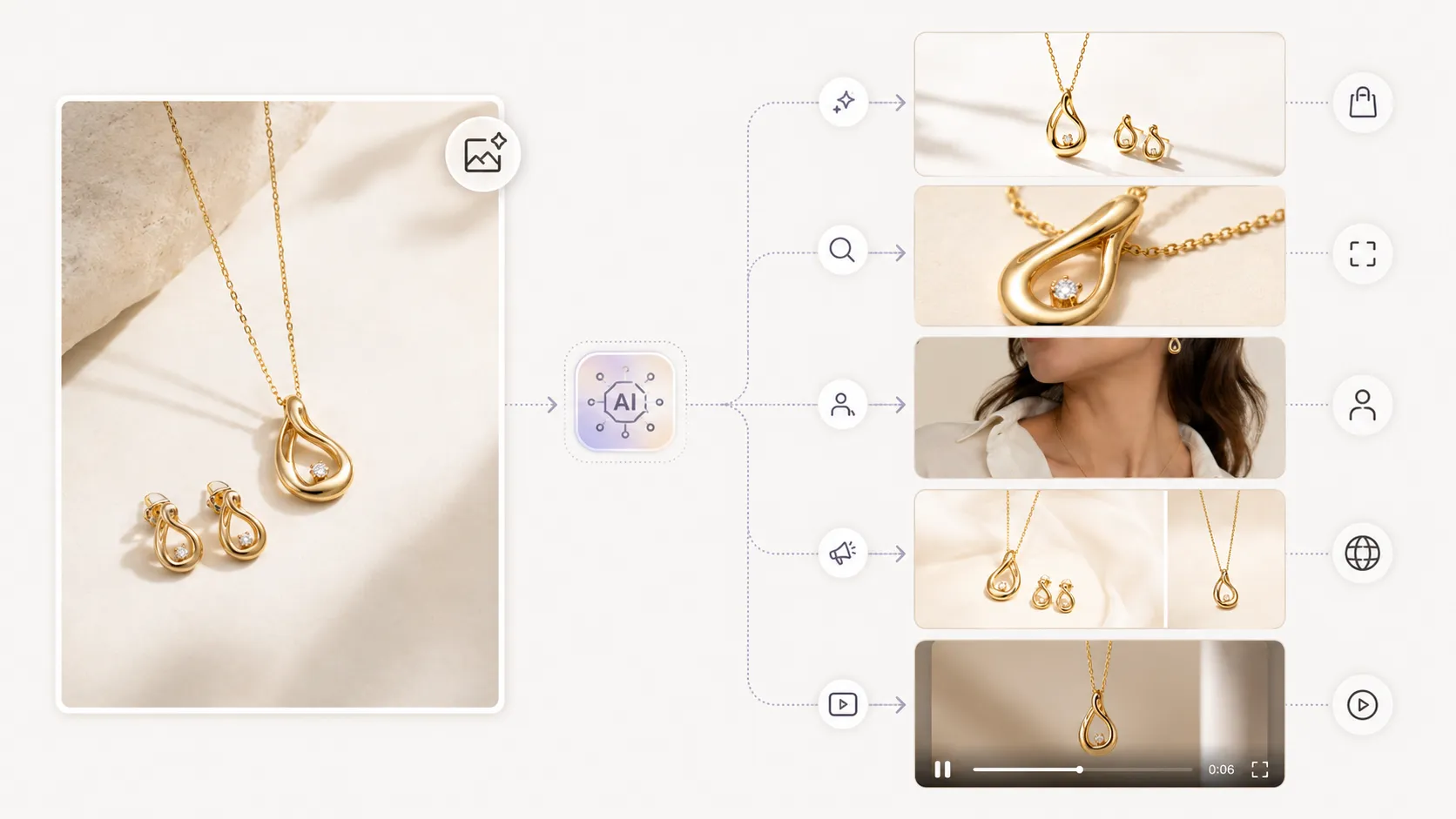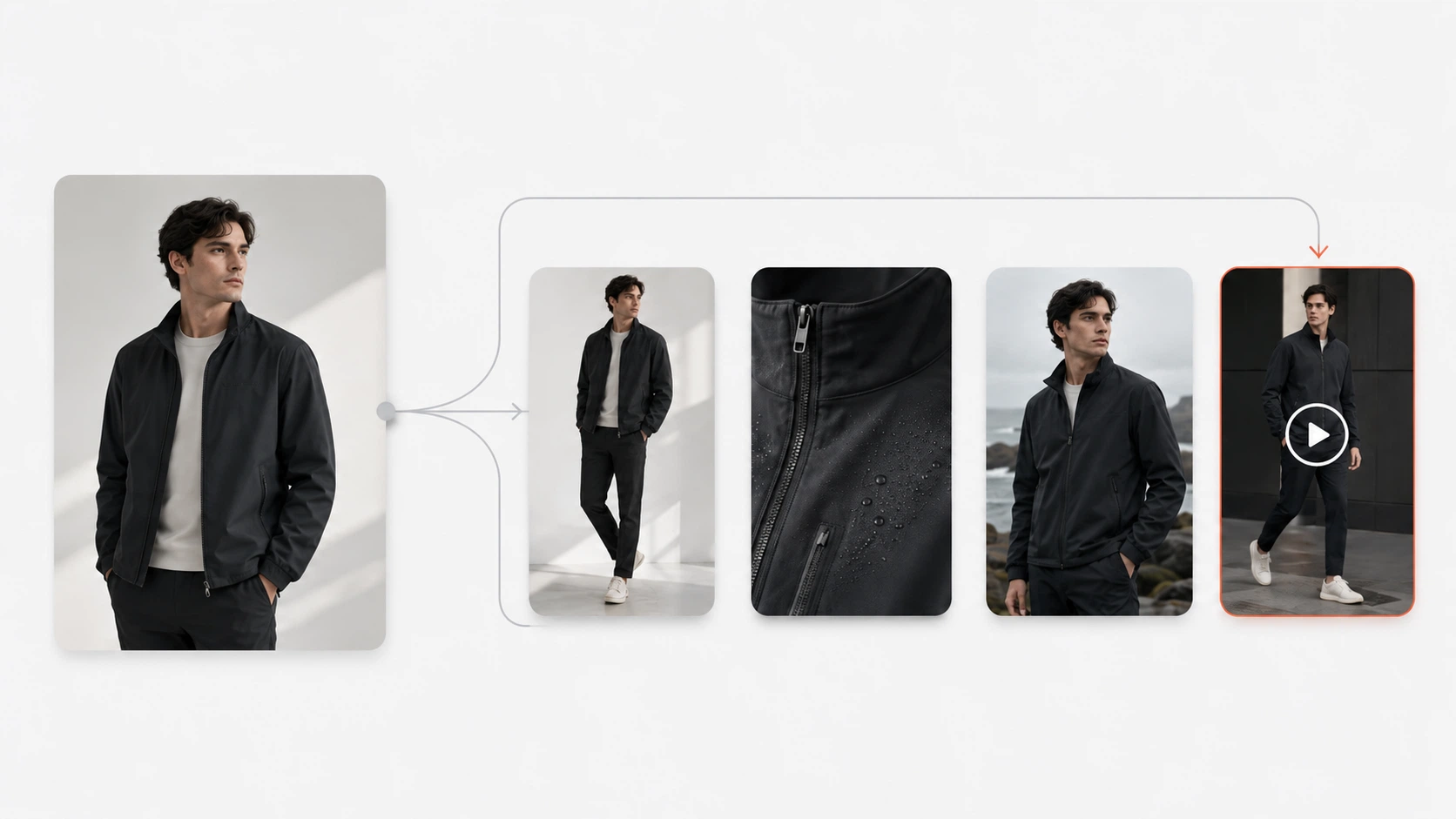


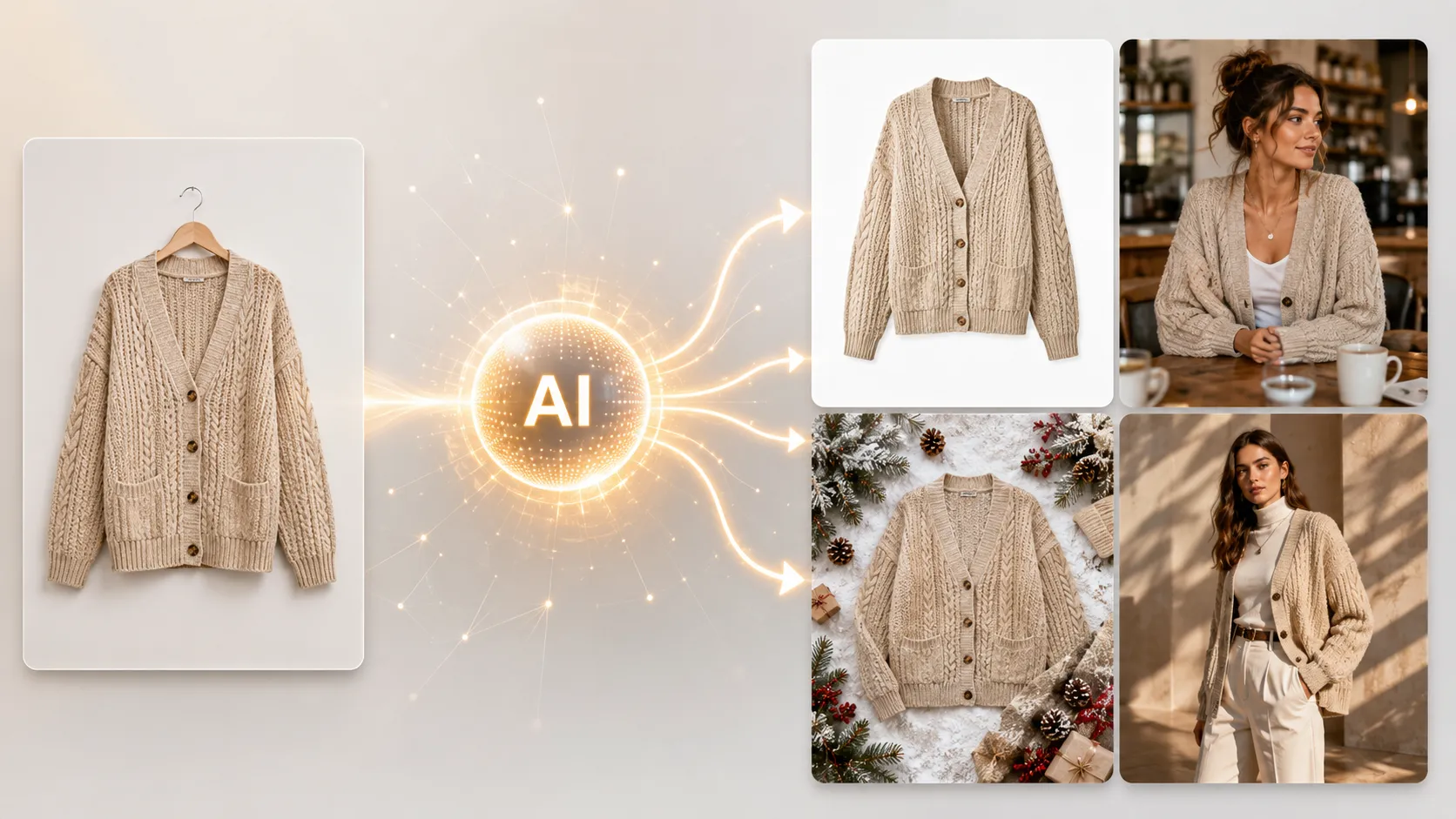
An AI product image generator uses reference images, AI models, and text prompts to create ecommerce product visuals without organizing a traditional photoshoot for every variation. For online sellers and fashion brands, this means turning a small set of product photos into campaign images, product page assets, social creatives, and ad visuals faster than scheduling another studio session.
Traditional product photography works well for hero shots, but it becomes expensive and slow when teams need multiple backgrounds, poses, seasonal variations, or channel-specific formats. This guide covers what an AI product image generator actually does, which workflows fit different ecommerce needs, how AI character and mode selection affects output quality, and how to get started with practical tools.
Key Takeaways
- An AI product image generator creates new ecommerce visuals from reference images, prompts, and AI character or scene settings -- not by applying filters or templates to existing photos.
- Fashion ecommerce teams benefit most when the tool supports garment detail preservation, multiple reference inputs, and an AI model library with diverse on-model characters to choose from.
- The right workflow depends on whether you need campaign images, PDP (product detail page) assets, seasonal variations, or all three.
- Output quality depends on input quality, prompt clarity, AI character selection, and human review -- no AI tool produces publishable results every time without checking.
What Is an AI Product Image Generator for Ecommerce?
An AI product image generator is software that uses AI image generation models to turn product reference images into new commercial visuals. Unlike a basic photo editor that crops, adjusts color, or overlays filters, an AI product image generator creates entirely new compositions: different backgrounds, lighting setups, styling contexts, or presentation formats based on the user's inputs.
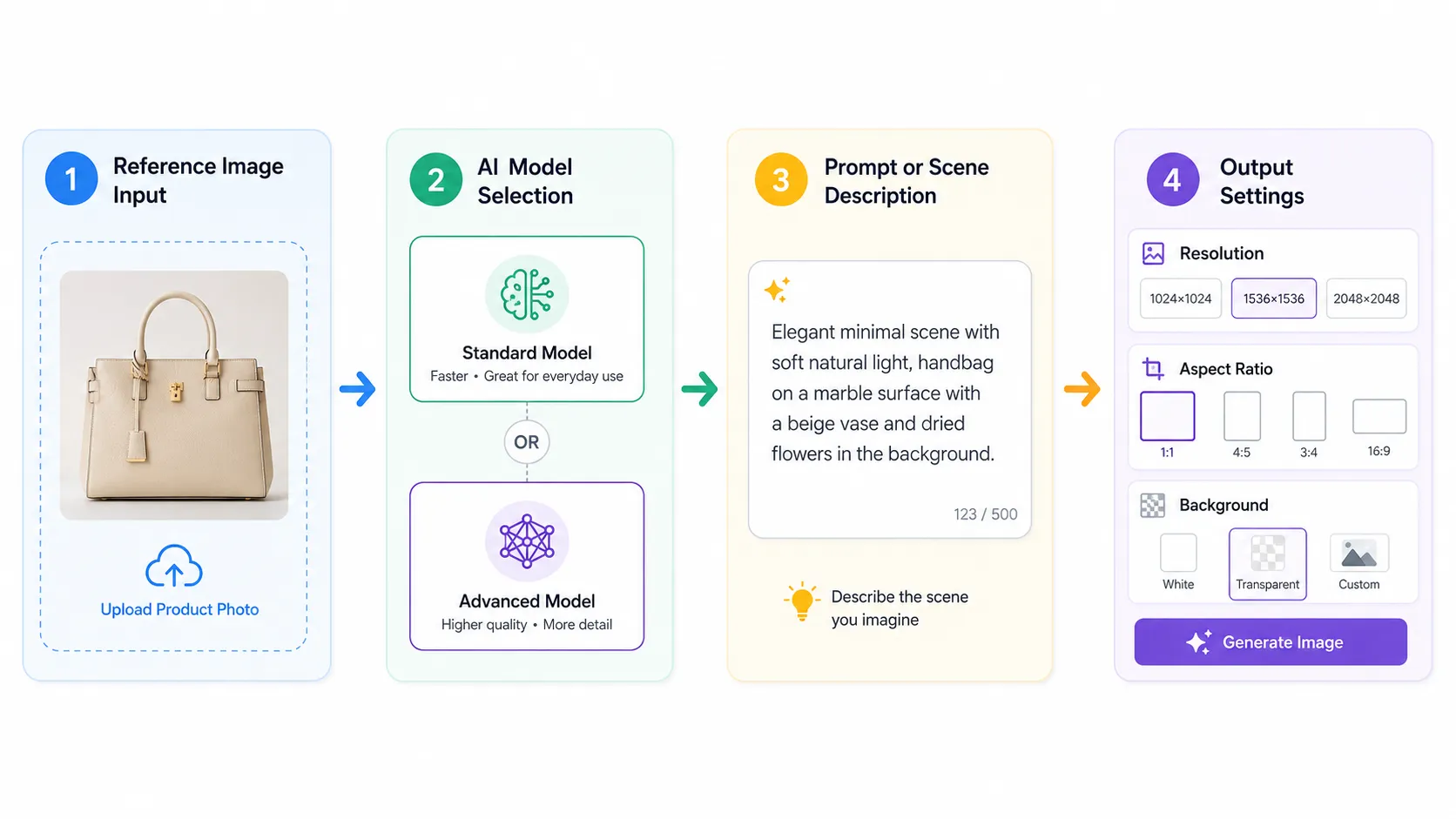
The core workflow has four parts:
- Reference image input -- the user uploads one or more product photos that show the item clearly.
- AI character or mode selection -- choose a generation mode and optionally select an AI character (virtual model) for on-model output.
- Prompt or scene description -- text guidance that tells the AI what kind of output to create.
- Output settings -- resolution, aspect ratio, background format, and other production options.
This differs from traditional product photography in one important way: it does not require a studio, photographer, props, or physical setup for each new image. A seller can upload a single clean product photo and generate lifestyle versions, marketplace-ready white-background shots, or campaign-style visuals from that one starting point.
It also differs from template-based tools. Template tools place a product cutout onto a pre-designed background. AI product image generators use the reference image as visual context and generate a new composition that matches the prompt, which allows more creative flexibility but also requires more careful output review.
Why Ecommerce Sellers Need AI Product Image Generation
Ecommerce product visuals serve multiple purposes at once. A single SKU may need a hero image for the homepage, detail shots for the product page, lifestyle images for social media, ad creatives in several aspect ratios, and seasonal variations for holiday campaigns. Traditional production handles each of these as a separate shoot or editing task.
Cost pressure
A professional product photoshoot can cost hundreds to thousands of dollars depending on location, talent, props, and post-production. When a brand launches 20 SKUs per season and each needs 6--8 images across channels, the total adds up quickly. AI product image generation can reduce the number of full reshoots needed by creating variations from existing references.
Speed
New SKUs arrive throughout the season. Sales events require fresh visuals on short notice. Social ad creative burns out and needs replacement. AI generation can produce initial visual options in seconds or minutes rather than days or weeks of production planning.
Scale
Marketplaces and shoppers expect rich visual content. According to Shopify's own merchant resources, product pages with multiple images tend to perform better than those with only one or two. For fashion ecommerce specifically, shoppers want to see fabric texture, fit, construction details, and styling context before they buy. AI tools help teams scale from 3 reference images to 10+ usable assets without multiplying production costs linearly.
Variety
Different channels need different formats. Instagram favors square and portrait ratios. Pinterest performs well with tall vertical images. Amazon listings have specific size and content requirements. Facebook ads test best when multiple creative variations run simultaneously. An AI product image generator can reformat and restyle the same product for each placement.
Fashion-specific needs
Apparel brands face more visual complexity than most categories. A single garment may need flat-lay shots, on-model images, close-up details, back-view shots, and lifestyle context. Each angle reveals something different about fit, fabric, cut, or branding. Fashion teams that use AI product image generation should look for tools that handle garment-specific concerns like collar accuracy, print preservation, logo placement, and fabric texture.
How AI Product Image Generation Actually Works
Understanding the workflow helps set realistic expectations and produces better results. Here is how each step works in practice.
Step 1: Prepare Your Reference Images
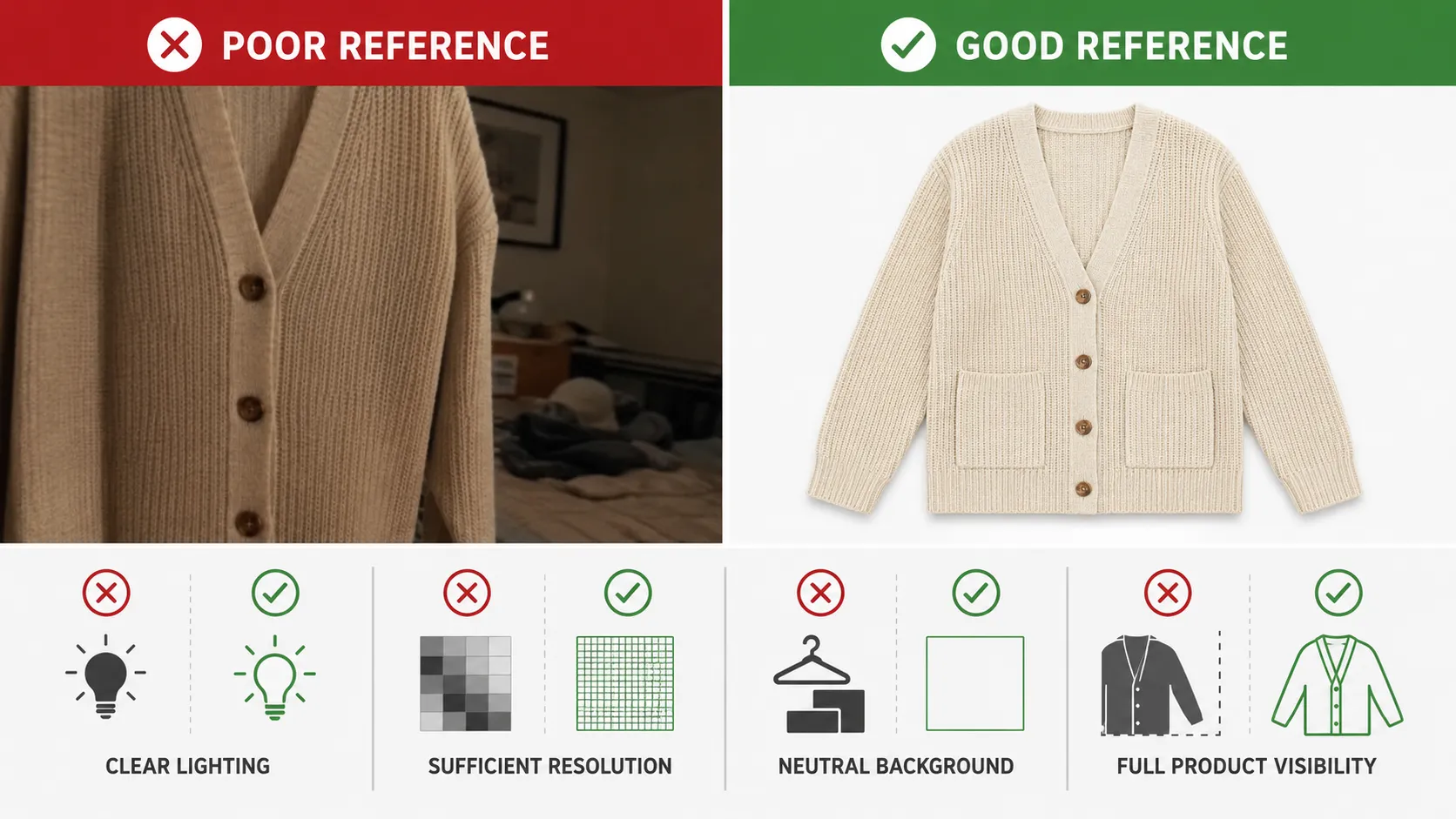
The reference image is the most important input. The AI model uses it to understand product shape, color, texture, design details, and overall appearance. A weak reference usually leads to weaker outputs.
What makes a good reference image:
- Clear lighting -- even, consistent illumination without harsh shadows that obscure product edges.
- Sufficient resolution -- enough pixel detail for the model to read texture, seams, prints, and small features.
- Neutral or simple background -- plain backgrounds help the model isolate the product more easily.
- Full product visibility -- the item should be fully visible, not cropped or partially obscured.
Single-image input works for simple products. Multi-image input works better for complex items like clothing, where a main product image plus a detail shot plus a back-view reference gives the model more information about construction, print placement, and design features.
For fashion products specifically, uploading a detail image alongside the main photo can improve accuracy on logos, collar shape, stitching patterns, and fabric texture. This extra input helps the generated output stay closer to the actual product rather than inventing plausible-looking details that do not match.
Step 2: Choose Your Mode and AI Characters
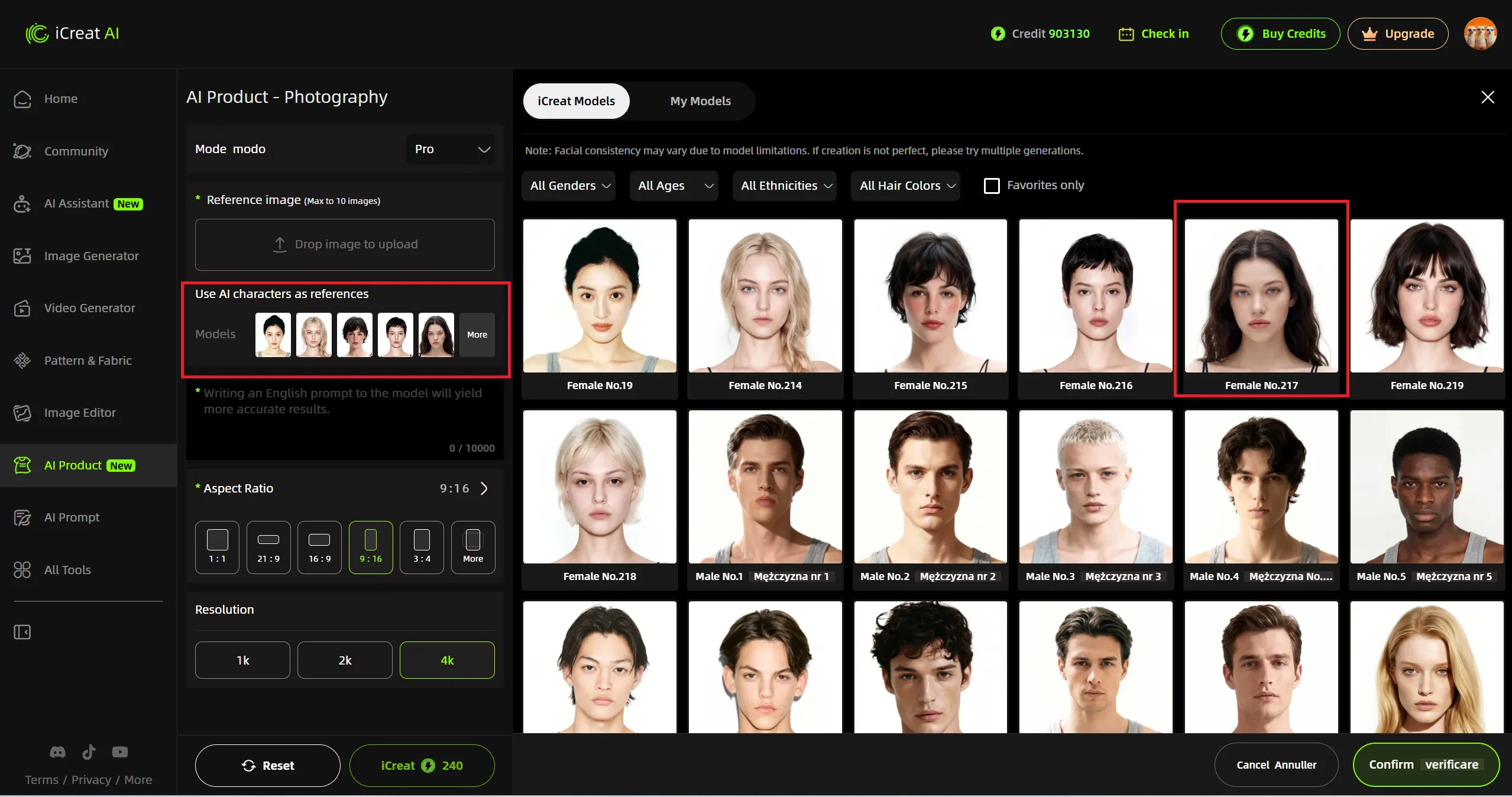
Most AI product image generators offer a mode selector (such as Standard or Pro) and, for fashion and apparel products, an AI character library -- a collection of virtual models that can wear your product in the generated output.
Mode selection controls the generation quality tier. Standard mode works for quick previews, concept tests, and situations where speed matters. Pro or Advanced mode produces higher-detail output with better texture restoration, more natural lighting, and sharper commercial polish. Use Pro mode when the final image will appear on a product page, in ad creatives, or anywhere shoppers will examine it closely.
AI character selection is where fashion ecommerce teams get the most value. Instead of generating a generic figure or hoping the AI invents a plausible model, you pick from a curated library of virtual models organized by gender, age range, ethnicity, and hair color. Each character is a consistent face that can appear across multiple product images, giving your brand visual coherence similar to working with a real model but without scheduling, casting, or per-shoot costs.
How character choice affects output:
| When to Use Characters | Why It Matters |
|---|---|
| On-model lifestyle shots | The AI renders your garment on a specific face and body type, showing fit, drape, and proportions realistically |
| Campaign consistency | Using the same 2--3 characters across a full campaign creates a unified brand look |
| Audience matching | Select characters whose appearance matches your target customer demographic for stronger relatability |
| Flat-lay or product-only shots | Skip character selection entirely -- the AI generates background-only compositions |
For non-fashion products (electronics, home goods, accessories), character selection is usually optional or unavailable. The mode selector (Standard vs Pro) remains the primary quality control knob. For fashion products, combining Pro mode with a well-chosen AI character produces the most commercial-ready results.
Step 3: Write a Prompt or Select a Scene
The prompt tells the AI model what to create. A good prompt includes specific information about product placement, background, lighting, mood, and any styling elements that matter for the output.
Effective prompt components:
- Product description -- what the item is, its key visible features, and any details worth preserving.
- Setting or background -- indoor studio, outdoor lifestyle, minimal white, textured surface, specific environment.
- Lighting direction -- soft natural light, dramatic side lighting, bright even illumination, warm ambient glow.
- Camera framing -- close-up detail, full-body on-model, three-quarter angle, flat lay overhead.
- Mood or style -- editorial, casual, luxury, streetwear, minimalist, commercial catalog.
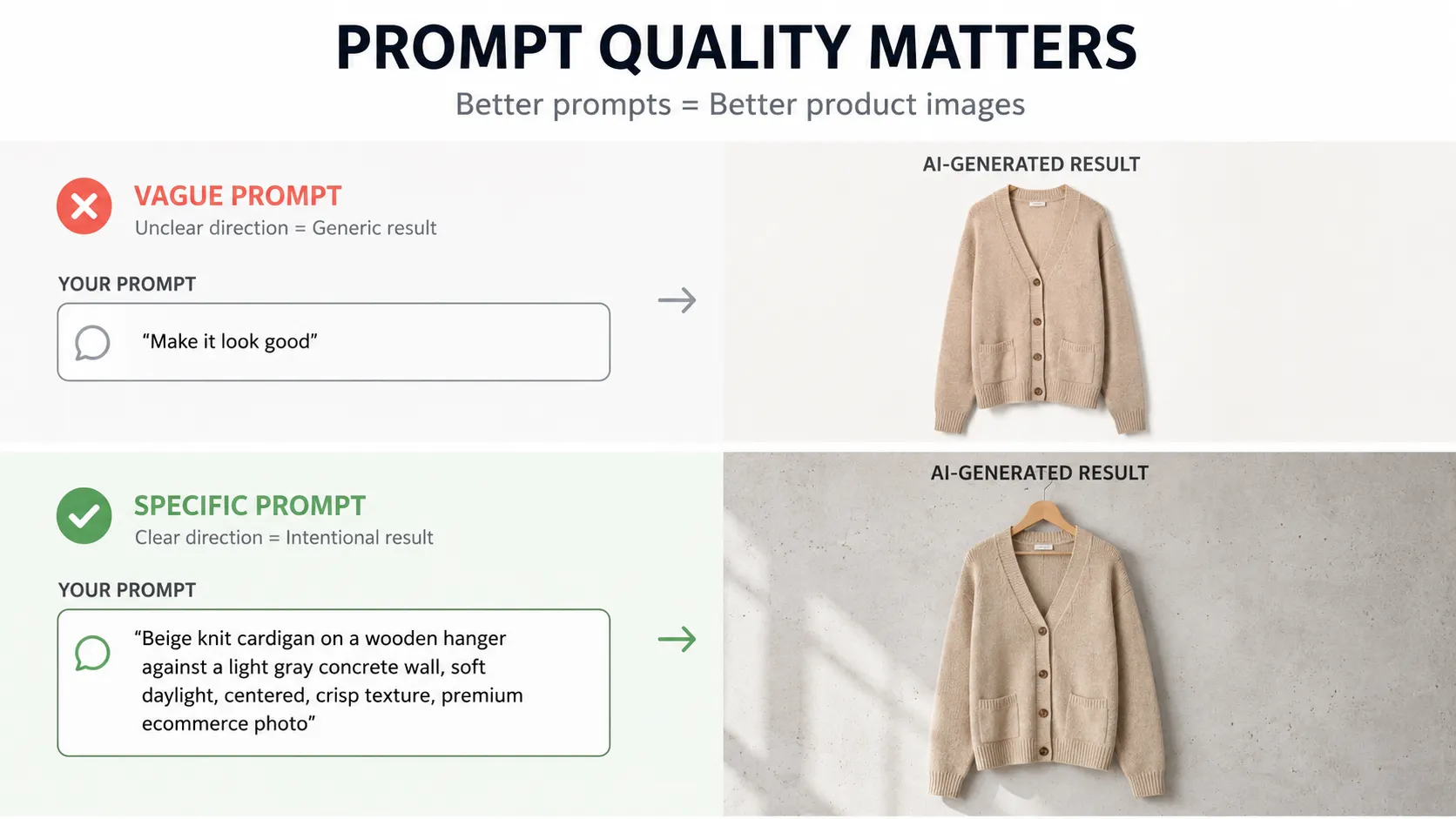
Example of a vague prompt: "Make this look good."
Example of a specific prompt: "White t-shirt on a wooden hanger against a light gray concrete wall, soft natural window lighting from the left, slight shadow below, casual lifestyle feel, camera at eye level."
The second prompt gives the model clear direction on background, lighting, placement, and style. Vague prompts produce inconsistent results because the model fills in the gaps with its own assumptions, which may not match the intended use case.
Some tools also offer template-based scene selection as an alternative to writing custom prompts. Templates work well for common marketplace formats and standard backgrounds. Custom prompts give more control when the output needs to match a specific campaign direction or brand aesthetic.
Step 4: Generate and Review Outputs
Generation takes seconds to minutes depending on the model, resolution, and platform. The output then needs review before any commercial use.
What to check in every generated image:
- Product shape accuracy -- does the item maintain its correct silhouette, proportions, and structure?
- Color fidelity -- are colors consistent with the reference, or has the model shifted tones unexpectedly?
- Logo and print preservation -- if the original has a logo, graphic print, or pattern, does the output keep it recognizable?
- Fabric texture -- for apparel, does the material look like the actual fabric, or has it become generic smooth cloth?
- Lighting consistency -- does the lighting match the prompt intent and look natural for the setting?
Regeneration is normal. Most workflows require two to four generations before finding an output that meets the bar for a given use case. Teams that treat regeneration as part of the process rather than a failure get better results and waste less time trying to fix one imperfect image.
What to Look For in an AI Product Image Generator
Not every AI image tool is built for ecommerce product visuals. When evaluating options, these criteria matter most for commercial use.
Reference Image Support
Check whether the tool accepts single images only or supports multi-image upload. For fashion products, the ability to upload a main image plus detail shots plus back-view references makes a meaningful difference in output accuracy. Tools limited to single-image input may struggle with garments that have important design details on multiple surfaces.
Mode and Character Options
Look for tools that offer both a quality mode selector (Standard vs Pro or equivalent) and, for fashion products, an AI character library with diverse virtual models to choose from. A tool that only offers one mode forces a tradeoff: either overpaying for simple preview tasks or underperforming on final campaign assets. For fashion ecommerce specifically, the AI character library matters as much as image quality -- the ability to pick consistent on-model faces across a full collection creates brand visual coherence that generic AI figures cannot match.
Output Quality and Format
Ecommerce visuals need specific technical specifications:
- Resolution -- 4K support matters for large-format placements, print materials, and zoomed-in product page viewing.
- Aspect ratio options -- square (1:1), portrait (4:5 or 9:16), landscape (16:9), and standard product ratios (3:4 or 4:5) cover most social and marketplace needs.
- Background format -- transparent PNG for compositing, solid white for marketplace listings, lifestyle scenes for campaigns and social content.
Workflow Fit for Ecommerce
Consider batch generation capability, generation speed, and whether the tool integrates with or exports to formats your team already uses. A tool that generates one image at a time with no batch option will slow down teams that need 10--20 variations per SKU.
Fashion-Specific Capabilities
For apparel brands, check whether the tool shows awareness of garment-specific needs: on-model generation, detail preservation, lookbook-style output, pose variation, and fabric texture handling. Generic AI image tools often treat a t-shirt the same as a coffee mug, which works for simple backgrounds but fails when collar shape, sleeve length, or hem accuracy matters.
Common Mistakes When Using AI Product Image Generators
These mistakes show up repeatedly in ecommerce AI image workflows. Avoiding them improves output quality and reduces wasted generations.
Using low-quality or blurry reference images. The model cannot create accurate detail from input that lacks detail. If the reference is dark, low-resolution, or out of focus, the output will inherit those problems and often amplify them. Start with the clearest available product photo.
Writing overly vague prompts. Prompts like "make it professional" or "nice background" leave too much interpretation to the model. Include specific details about setting, lighting, framing, and style. More guidance in the prompt usually means fewer regeneration cycles.
Skipping output review before publishing. AI-generated images can look convincing at first glance but contain errors on closer inspection: distorted logos, mismatched prints, incorrect proportions, or impossible geometry. Review every output at full resolution before using it commercially.
Expecting perfect results without iteration. One generation rarely produces the ideal image. Plan for two to four attempts per target output, and treat the first round as exploration rather than a final deliverable.
Using the same mode and settings for every use case. Standard mode works for quick concept tests and internal previews. Pro mode (or equivalent) produces better detail for final campaign assets, PDP images, and ad creatives. Using Pro mode for everything burns budget unnecessarily. Using Standard mode for everything produces lower-quality finals where shoppers will notice the difference.
Ignoring marketplace or platform requirements. Amazon, Shopify, Etsy, Google Shopping, and social platforms each have different image specifications for size, format, content, and quality. Check requirements before generating so the output matches the destination platform on the first try.
AI Product Image Generator Use Cases by Ecommerce Type
Different ecommerce roles use AI product image generation in different ways. Understanding which use case matches your situation helps choose the right workflow and tool settings.
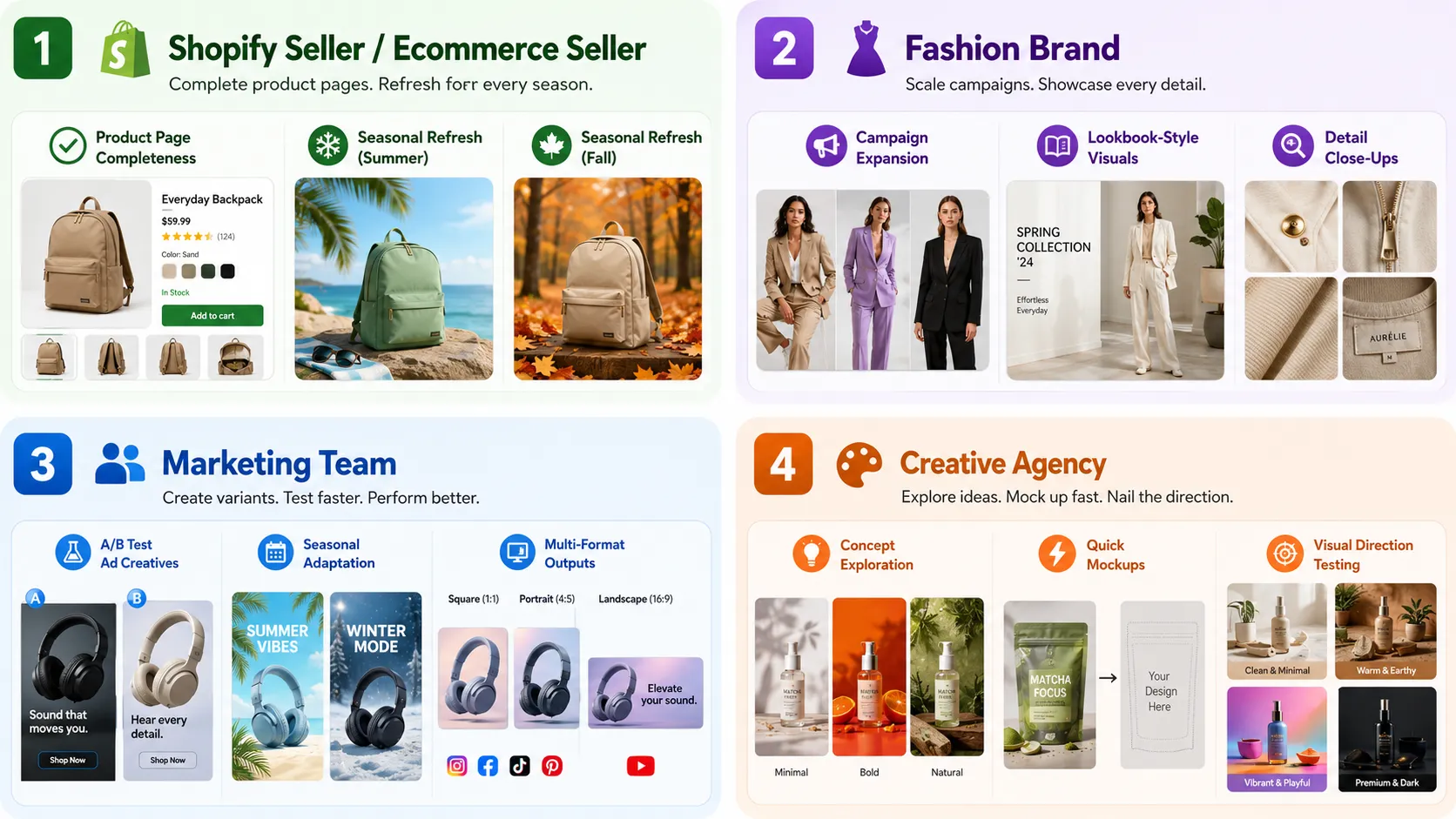
For Shopify and Independent Sellers
Independent sellers often operate with limited photography budgets and small teams. AI product image generation helps in three areas:
- PDP image completeness -- expanding from 2--3 basic photos to a fuller set including hero image, detail shots, lifestyle context, and alternative angles. Tools like AI Fashion Detail Image Generator can help create supporting assets such as white-background images and fabric close-ups.
- Seasonal collection refreshes -- adapting existing product visuals for holiday themes, summer collections, or promotional events without reshooting.
- Social media content between shoots -- generating enough visual content to maintain posting frequency during periods when new photography is not being produced.
A Shopify apparel seller could start with three studio photos from a supplier, use an AI Product Photography tool to generate lifestyle and campaign variations, add pose variety through an AI Pose Generator for product page richness, and upscale final assets with an Image Upscaler for high-resolution storefront display.
For Fashion Brands
Fashion brands face the highest visual volume demands. AI product image generation supports:
- Campaign visual expansion -- taking one strong campaign concept and generating additional variations for different channels, audiences, or regional markets.
- Lookbook-style variations -- creating editorial compositions from product photos that support collection storytelling and brand narrative.
- Detail close-ups for online fitting context -- fabric texture shots, construction details, and feature close-ups that help shoppers evaluate quality and fit before purchasing.
Fashion brands should prioritize tools that accept multiple reference images, offer Pro mode for detail-sensitive outputs, and provide a diverse AI character library for on-model generation. Garment accuracy matters more for fashion than for many other categories because shoppers notice when a collar looks wrong or a print shifts between images.
For Marketing Teams
Marketing teams focus on creative testing, campaign scaling, and channel adaptation:
- Ad creative testing -- generating the same product against five different background concepts, moods, or lighting setups to test which performs better in paid social.
- Seasonal campaign adaptation -- reworking successful creatives for Valentine's Day, Black Friday, summer sale, or back-to-school themes without coordinating new photography.
- Channel-specific formats -- producing 1:1 squares for Instagram feed, 9:16 verticals for Stories and TikTok, 4:5 portraits for Pinterest, and 16:9 landscapes for YouTube or display ads from the same product reference.
Marketing teams benefit most from tools that support batch generation, multiple aspect ratios, and fast iteration between concepts.
For Creative Agencies
Agencies use AI product image generation for client work and internal production:
- Concept exploration -- generating visual directions quickly before committing to a full production plan, helping clients see options faster.
- Rapid mockup generation -- producing campaign mockups, pitch visuals, and presentation assets from client product references without waiting for studio availability.
- Visual direction testing -- comparing aesthetic approaches, color treatments, and styling choices before finalizing creative direction with the client.
Agency workflows should prioritize tools with Pro mode for high-detail output, flexible prompting, AI character variety for on-model needs, and output quality that meets client presentation standards.
How iCreat AI Approaches AI Product Image Generation
iCreat AI's approach to AI product image generation centers on reference-image-driven workflows, AI character selection, and connection to a broader visual production ecosystem. Rather than applying templates to product cutouts, iCreat AI lets users guide generation through reference images, prompts, mode selection, and optional AI character choice.
Core Workflow
Inside the AI Product Photography workspace, users can upload up to 10 reference images, optionally select AI characters from the model library as on-model references, write or select a prompt describing the desired output, choose between Standard and Pro generation modes, select aspect ratios (including 1:1, 16:9, 9:16, and more), and generate ecommerce-ready visuals. The workflow supports common ecommerce and social media aspect ratios and up to 4K output resolution depending on the selected mode and settings.
Mode and AI Character Library
iCreat AI offers a mode selector (Standard / Pro) that controls generation quality and detail level. Standard mode handles routine visuals, concept exploration, and quick iterations efficiently. Pro mode activates higher-detail rendering with stronger texture restoration, more natural lighting integration, and commercial-grade output polish -- the right choice for final campaign assets, PDP images, and ad creatives.
For fashion and apparel products, iCreat AI includes an AI character library (iCreat Models) with a diverse roster of virtual models organized by gender, age, ethnicity, and hair color. Users can browse and favorite characters, then select one or more as on-model references for their product images. The interface note reminds users that facial consistency may vary across generations due to model limitations, and trying multiple generations helps find the best result.
This combination of mode control plus character selection gives fashion teams two independent quality levers: turn up the mode for sharper detail, pick characters that match your brand aesthetic and target audience.
Connected Visual Production Ecosystem
AI product image generation inside iCreat AI connects to supporting tools that cover the rest of the visual workflow:
- generate product detail assets for product page assets like white-background images, fabric close-ups, and mockup-style visuals.
- create pose variations without another shoot for creating pose variations that add product page richness without another photoshoot.
- improve resolution on final assets for improving resolution on final assets before storefront or print use.
- Background Remover for preparing transparent-background cutouts before compositing or mockup creation.
This connected approach means a team can move from product photography to detail images to pose variation to final upscaling within the same workflow rather than switching between unrelated tools.
Transparent Positioning
iCreat AI positions AI product image generation as a production accelerator, not a magic solution. Output quality depends on reference image quality, prompt specificity, mode selection (Standard vs Pro), AI character choice where applicable, and human review. The tool helps teams create more visuals faster, but creative judgment and quality control remain important parts of the process.
FAQ
Conclusion
AI product image generation is a practical workflow for creating ecommerce product visuals faster and at lower cost than organizing a traditional photoshoot for every variation. The best results come from clear reference images, specific prompts, appropriate mode selection (Standard vs Pro), thoughtful AI character choice for fashion products, and consistent output review before publishing.
When evaluating tools, prioritize reference image support, mode flexibility, AI character library depth (for fashion), output format options, and workflow fit for your category. Fashion ecommerce teams should pay extra attention to garment detail handling, multi-image input support, on-model character variety, and connection to supporting tools like detail image generation and pose variation.
If you have product reference images and need to create more ecommerce visuals from them, you can try iCreat AI's AI Product Photography tool to generate product photos, campaign images, and visual variations from your own inputs.