




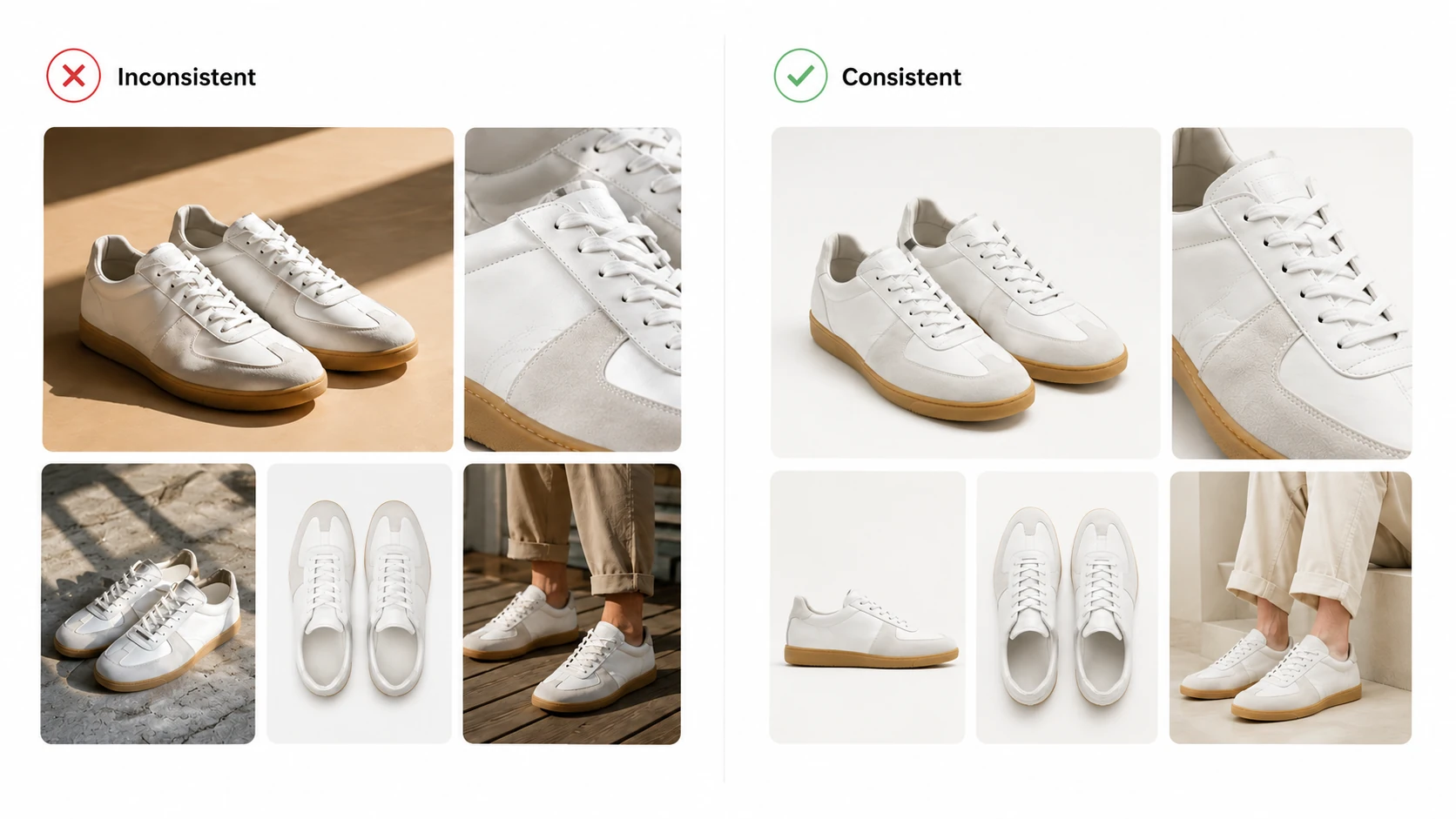
Keeping AI product photos consistent means controlling lighting, style, product fidelity, and brand elements so every hero image, detail shot, campaign variant, and pose variation looks like it belongs to the same brand. When AI-generated visuals on a single product page or across an entire collection start to look like they came from different photoshoots, shoppers notice immediately. Inconsistent imagery weakens trust before a shopper reads the description, checks the price, or compares sizes.
This guide covers why AI product photos drift between generations, where inconsistency hurts your listings most, and five practical techniques to maintain visual coherence across hero shots, detail images, lookbook variations, and campaign assets.
Key Takeaways
- AI product photos drift between generations because of seed variation, prompt ambiguity, and lack of shared visual context
- Reference images are the single most effective consistency lever for reducing generation-to-generation variation
- Cross-asset consistency (hero ↔ detail ↔ lookbook ↔ pose) requires a unified source material strategy, not separate generation sessions
- Model choice affects consistency profile: match the model to the specific consistency goal you need
- A "visual brief" per SKU eliminates the "start over every time" revision loop that wastes production time
Why AI Product Photos Become Inconsistent: 5 Root Causes
Understanding *why* inconsistency happens is the first step toward fixing it. Most drift is not random — it follows predictable patterns tied to how AI image generation works under the hood.
Random Seed Variation
Every AI image generation starts from a seed value — essentially a starting point for the model's noise pattern. If you generate two images from the same prompt without fixing the seed, the model produces different outputs each time. This is by design for creative variety, but it becomes a problem when you need multiple asset types for one SKU to look related. A Shopify seller generating a hero shot today and a detail shot tomorrow with the same prompt will likely get visually divergent results unless they control this variable.
Prompt Ambiguity and Drift
When prompts are rewritten between generation sessions — even with small wording changes — the model interprets them differently. Phrases like "professional lighting" or "clean background" can render as studio softbox in one session and flat daylight in another. The more descriptive freedom a prompt leaves to the model, the wider the output variation between sessions. Teams that write fresh prompts for every new asset type are almost guaranteed to produce inconsistent results.
Lack of Shared Visual Context Between Generations
The biggest consistency killer is generating different asset types in isolation. A team might create hero images in one session using reference set A, then generate lookbook shots in another session using reference set B or no reference at all. Without shared source material anchoring both generations, the model has no reason to make the outputs look related. Each session becomes its own visual universe.
Model Stochasticity
AI image models are probabilistic, not deterministic. Even with identical inputs — same prompt, same reference, same seed — some natural output variation exists between runs. This is inherent to how diffusion-based and transformer-based generation works. The goal is not to eliminate stochasticity entirely (which is not possible), but to reduce it enough that outputs read as belonging to the same visual family.
Asset-Type Silos
Many teams treat hero images, detail shots, lookbook visuals, and pose variations as completely separate projects. Each gets its own briefing, its own reference selection, and often its own prompt style. This siloed approach guarantees visual fragmentation. The solution is to treat all assets for one SKU as part of a single visual system with shared inputs and documented style parameters.
Where Inconsistency Hurts Most: The 3 Problem Zones
Not all inconsistency carries the same cost. Understanding which zones matter most helps you prioritize your consistency efforts where they have the biggest commercial impact.
Zone 1: Within a Single Product Page (Hero vs Detail vs Lifestyle)
When a shopper lands on a product detail page and sees a hero image with warm studio lighting, a detail shot with cool flat light, and a lifestyle image with outdoor ambient tones, the page feels disjointed. Visual inconsistency within a single PDP signals low production quality and can increase bounce before the shopper even reads the product description.
For fashion ecommerce specifically, shoppers need to see fabric texture, fit, cut, and styling coherence across all images on the page. If the collar looks different between the hero and detail shot, or if the garment color shifts noticeably between assets, purchase confidence drops.
Zone 2: Across SKUs in the Same Collection
A collection page should communicate a unified seasonal story. When SKU-A's visuals look like they were shot in a minimalist Tokyo studio and SKU-B's look like they came from a warm Brooklyn loft, the collection loses narrative cohesion. This matters for brands running coordinated campaigns where the visual language needs to support a single marketing message across multiple products.
Collection-level inconsistency also makes catalog management harder. Merchandising teams spend extra time adjusting crops, re-editing colors, or requesting reshoots when the original AI outputs were too far apart visually.
Zone 3: Across Sales Channels (Shopify vs Amazon vs Social Ads)
Each sales channel has its own image requirements and audience expectations. Amazon main images need clean white backgrounds with specific dimension rules. Shopify product pages benefit from lifestyle and editorial angles. Social ad creatives perform better with bold, thumb-stopping compositions. When the same product looks materially different across these touchpoints, brand recognition weakens and customers may not realize they are looking at the same item.
The challenge is maintaining enough consistency that the product is recognizable across channels while adapting appropriately to each channel's format and audience. This requires a strong base visual identity that can be adapted rather than recreated from scratch for each platform.
Technique 1: Build Your Reference Image Strategy
Reference images are the most powerful tool you have for controlling AI product photo consistency. They give the model concrete visual information to work from, dramatically narrowing the range of possible outputs compared to text-only prompting.
What Makes a Good Reference Image for Consistency
An effective reference image for consistency purposes should show the actual product clearly, with accurate color representation, visible garment details, and minimal distracting elements. Flat-lay or mannequin shots often work better than highly stylized editorial references when the goal is product fidelity across asset types. The reference should represent the visual identity you want all generated assets to share — lighting mood, color temperature, composition style, and product presentation angle.
Avoid references with heavy filters, extreme cropping, or stylized editing that the model might misinterpret as product features. Clean, well-lit product photography makes the most reliable anchor for consistent generation.
Single Reference vs Multiple References
A single strong reference image can anchor basic consistency — keeping the product recognizable and the general lighting direction stable. However, multiple references give the model richer visual context. For fashion products specifically, using a main product view plus a detail shot gives the model information about both overall garment appearance and important specifics like texture, print placement, or hardware details.
The tradeoff is that too many conflicting references can confuse the model. Three well-chosen images typically provide the best balance between rich context and clear guidance.
The 3-Image Set That Covers Most Fashion Products
For most fashion SKUs, a three-image reference set provides enough visual grounding for consistent generation across asset types:
- Main/front view — Shows the full garment, primary color, overall silhouette, and key design elements. This is your primary identity anchor.
- Detail/close-up view — Captures fabric texture, print quality, stitching, logo placement, collar construction, or other fine details that need to survive across generations.
- Back-view or alternate-angle view — Gives the model 3D understanding of the garment shape, cut, and construction that a single front view cannot convey.
Using this same three-image set across all generation sessions for a given SKU ensures that hero images, detail shots, lookbook variations, and pose changes all originate from the same visual source material. You can generate product photos with AI using this reference strategy to produce coherent multi-asset outputs from a single source foundation.
Technique 2: Lock Your Visual Direction with Prompt Templates
Prompts are the instructions that tell the model what to create. When those instructions change between sessions, outputs change too. Building reusable prompt templates is one of the most underrated consistency tactics available to ecommerce teams.
Why Writing Prompts from Scratch Kills Consistency
Every time you write a new prompt from scratch, you introduce variation in word choice, sentence structure, emphasis, and descriptive detail. Even small changes — swapping "studio lighting" for "professional lighting" or adding one extra adjective — shift how the model interprets the request. Over multiple generation sessions, these small differences compound into visibly different output styles.
Teams that treat each generation as a fresh writing exercise are essentially asking for inconsistent results. The model has no memory of previous sessions and no way to know that "this prompt should produce something similar to last week's batch."
Building a Reusable Prompt Template Per Product Category
Instead of writing prompts from scratch each time, build a base template for each product category you work with. A template for outerwear will differ from one for knitwear or accessories, but within each category, the template stays fixed.
A typical template structure includes fixed elements (lighting description, background specification, camera angle, color treatment) and variable slots (product name, specific pose, scene context). Only the variable slots change between generations; everything else remains locked. This approach dramatically reduces inter-session prompt drift.
The 5 Elements Every Consistency-Focused Prompt Should Include
Every prompt template should explicitly address these five elements:
- Product identification — What is being shown (garment type, color, key features)
- Lighting specification — Light source type, direction, intensity, color temperature
- Background/environment — Studio setting, location, backdrop color or texture
- Camera and framing — Angle, distance, crop ratio, focal length suggestion
- Style modifiers — Mood words, aesthetic direction, brand tone indicators
When all five elements are specified consistently across templates, the model receives the same directional signal every time. Omitted elements become wildcards that the model fills differently each session.
Documenting Your Approved Style Parameters
Once you have a template that produces outputs matching your brand standard, document it. Save the exact template text, note which reference images were used, record the model settings, and archive example outputs that represent your approved look. This documentation becomes your visual brief — the single source of truth that anyone on your team can reference when generating new assets for existing SKUs.
Without documented style parameters, consistency depends entirely on individual memory and tribal knowledge, neither of which scales.
Technique 3: Choose the Right Model for Your Consistency Goal
Not all AI image models behave the same way when it comes to output consistency. Understanding the consistency profile of different models helps you match the right tool to the job.
Deterministic vs Variable Models
Some models tend to produce tighter, more repeatable outputs when given the same inputs. Others introduce more interpretive variation, which can be valuable for creative exploration but problematic when consistency is the priority. The distinction is not about quality — both deterministic and variable models can produce high-quality outputs — but about the width of the output distribution around the intended result.
For ecommerce product visuals where consistency across assets matters, models that respond predictably to reference images and structured prompts generally perform better than models designed for maximum creative diversity.
When to Use Standard Generation (GPT-Image-1)
GPT-Image-1 supports standard AI image generation workflows and is suitable for producing product visuals when speed and volume are priorities. It handles common ecommerce use cases including product photography-style images, campaign concept variations, and basic asset generation. For teams building their first AI product photo workflow or working with straightforward product types, GPT-Image-1 provides a reliable starting point with predictable behavior under consistent prompting.
Standard generation is often sufficient when your consistency requirements are moderate — when you need outputs to look professionally aligned but do not require pixel-level fidelity across dozens of asset variants.
When to Use Advanced Generation (Nano Banana Pro)
Nano Banana Pro is designed for stronger detail restoration and higher-quality commercial visual output. When your workflow demands finer garment texture preservation, more accurate color reproduction, or transparent PNG output for compositing, Nano Banana Pro provides advanced capabilities beyond standard generation. The Nano Banana Pro model is particularly useful when detail accuracy directly impacts whether an asset meets marketplace or brand standards.
Advanced generation typically adds value when you are creating hero images, detail shots, or any asset where small visual differences between generations would be noticeable to shoppers or brand reviewers.
Matching Model Choice to Asset Type
Consider using the same model across all asset types for a given SKU. Switching models mid-workflow — say, using GPT-Image-1 for hero images and Nano Banana Pro for detail shots — introduces a model-level consistency break even if your prompts and references are identical. Each model has its own rendering style, color tendencies, and textural characteristics.
A practical approach: choose one model per SKU based on your highest-fidelity requirement, then use that model for all asset types associated with that SKU. Reserve model switching for cases where different SKUs genuinely need different quality tiers.
Technique 5: Reduce Revision Loops with a "Visual Brief" System
The most expensive consistency failure is not a bad first output — it is the cycle of regenerate, review, reject, tweak prompt, regenerate, review, reject that eats up production time. A visual brief system short-circuits this loop by capturing approved parameters upfront.
What a Visual Brief Contains
A visual brief for a single SKU should include:
- Reference image set — The 2–3 images that define the product's visual identity for AI generation
- Locked prompt template — The exact prompt structure with filled-in fixed elements and marked variable slots
- Model choice — Which generation model to use for this SKU
- Approved output examples — 2–3 generated images that represent the target look
- Style parameter notes — Specific decisions about lighting, color treatment, background, and mood
- Asset type mapping — Which template variations correspond to hero, detail, lookbook, and pose outputs
- Revision log — What changed between versions and why (for future reference)
This document lives with the SKU, not with the person who created it. Anyone on the team who needs to generate a new asset for this SKU consults the brief first.
Creating Your First Visual Brief: Step by Step
Start with one SKU that represents a typical product in your catalog:
- Select your best existing product photo or physical sample as the primary reference
- Capture a detail close-up showing texture, print, or construction
- Capture a back-view or alternate angle if relevant
- Write a prompt template covering all five consistency elements
- Generate a test batch of 4–6 images using your chosen model
- Review outputs against your brand standard — select 2–3 that come closest
- Lock the prompt, references, and model choice that produced those outputs
- Document everything in a brief file named for the SKU
The first brief takes longer because you are discovering your parameters. Subsequent briefs for similar product categories go faster because you can clone and adapt the template.
When to Update vs. Start Fresh
Update the visual brief when:
- The product itself changes (new colorway, modified design, updated materials)
- Your brand visual direction shifts (new campaign aesthetic, rebrand)
- The model you use is updated or replaced
- Approved outputs start drifting from current generation results
Start fresh when:
- The product category is fundamentally different (moving from outerwear to accessories)
- The channel requirements change significantly (switching from Shopify-focused to Amazon-focused visuals)
- The brief has been patched so many times it is no longer clear what the baseline is
A good rule: if updating the brief takes longer than creating a new one, start fresh.
Quick-Start Consistency Checklist
Use this checklist as a pre-flight, during-generation, and post-generation quality gate for every SKU production cycle.
Before You Generate (Pre-flight Check)
- [ ] Reference image set selected and verified (main + detail + back/alternate view)
- [ ] Prompt template loaded with all five consistency elements filled in
- [ ] Model choice confirmed and documented
- [ ] Visual brief exists for this SKU (or you are creating one now)
- [ ] All asset types for this SKU will use the same reference set and model
During Generation (Quality Gate)
- [ ] First output reviewed against approved examples in the visual brief
- [ ] Lighting, color temperature, and background match the target style
- [ ] Product details (collar, logo, print, texture) are recognizable and accurate
- [ ] No obvious drift from previous asset types for this SKU
- [ ] Failed outputs noted before proceeding to full batch generation
After Generation (Cross-Asset Review)
- [ ] All assets for this SKU laid out side by side for comparison
- [ ] Hero, detail, lookbook, and pose variations read as the same product
- [ ] Color values are consistent across asset types (no obvious shifting)
- [ ] Lighting direction and quality feel coherent
- [ ] Assets ready for channel-specific adaptation without major regeneration
Common Mistakes That Break Consistency
These patterns appear repeatedly in teams struggling with AI product photo consistency. Recognizing them early prevents wasted generation cycles.
Using Different Reference Sets for Different Asset Types
If your hero image uses a studio shot reference and your lookbook uses a street-style reference, the outputs will look different by design. Always use the same core reference set across all asset types for a given SKU. Add supplementary references for specific needs (like a pose reference for pose variation), but never replace the core identity anchors.
Rewriting Prompts from Scratch for Each New Generation
This is the most common consistency mistake. Every rewrite introduces variation. Use templates. Lock the fixed elements. Change only the variables. If you find yourself writing a fresh prompt, stop and load the template instead.
Ignoring Small Drifts Early
A slight color shift between the hero and detail shot seems minor in isolation. But after generating lookbook images, pose variations, and campaign adaptations, that small drift compounds into visible inconsistency. Catch and correct drift at the first asset transition, not the fifth.
Choosing Models Based on Hype Instead of Consistency Needs
A newer or more hyped model is not always the right choice for your consistency goals. Evaluate models based on how predictably they respond to your reference images and prompt templates, not based on social media buzz or benchmark rankings that may not reflect ecommerce-specific workflows.
Skipping the Review Step Because "AI Looks Fine"
AI output quality has improved significantly, but "looks fine" is not a consistency standard. Every output should be reviewed against your visual brief and compared side-by-side with other assets for the same SKU. The 13-millisecond visual processing speed that applies to shoppers also applies to your own team — inconsistencies register fast once you place images next to each other.
FAQ
Conclusion
AI product photo consistency is not a feature you turn on — it is a workflow you build. The teams that produce the most coherent ecommerce visuals are not necessarily using better models or more powerful tools. They are using the same reference images across every asset type, writing prompts from locked templates instead of scratch, choosing models based on consistency needs rather than hype, connecting their generation sessions through shared source material, and documenting their approved parameters in visual briefs that anyone on the team can follow.
The cost of inconsistency is invisible until it is not: a shopper who bounces from a disjointed product page, a collection that fails to tell a unified story, or brand recognition that dissolves across channels. The investment in a consistency workflow is front-loaded — building your first visual brief, testing your prompt templates, validating your reference strategy — but it pays back in fewer revision cycles, faster asset production, and product pages that look intentionally crafted rather than accidentally assembled.
Log in to iCreat AI to start applying these techniques with a workspace designed for ecommerce product visual production. Whether you are generating your first set of consistent hero images or scaling a full seasonal collection across multiple asset types and channels, the AI Product Photography workspace provides the reference-based generation, model options, and structured workflow tools to keep your product photos coherent from the first shot to the fiftieth.