


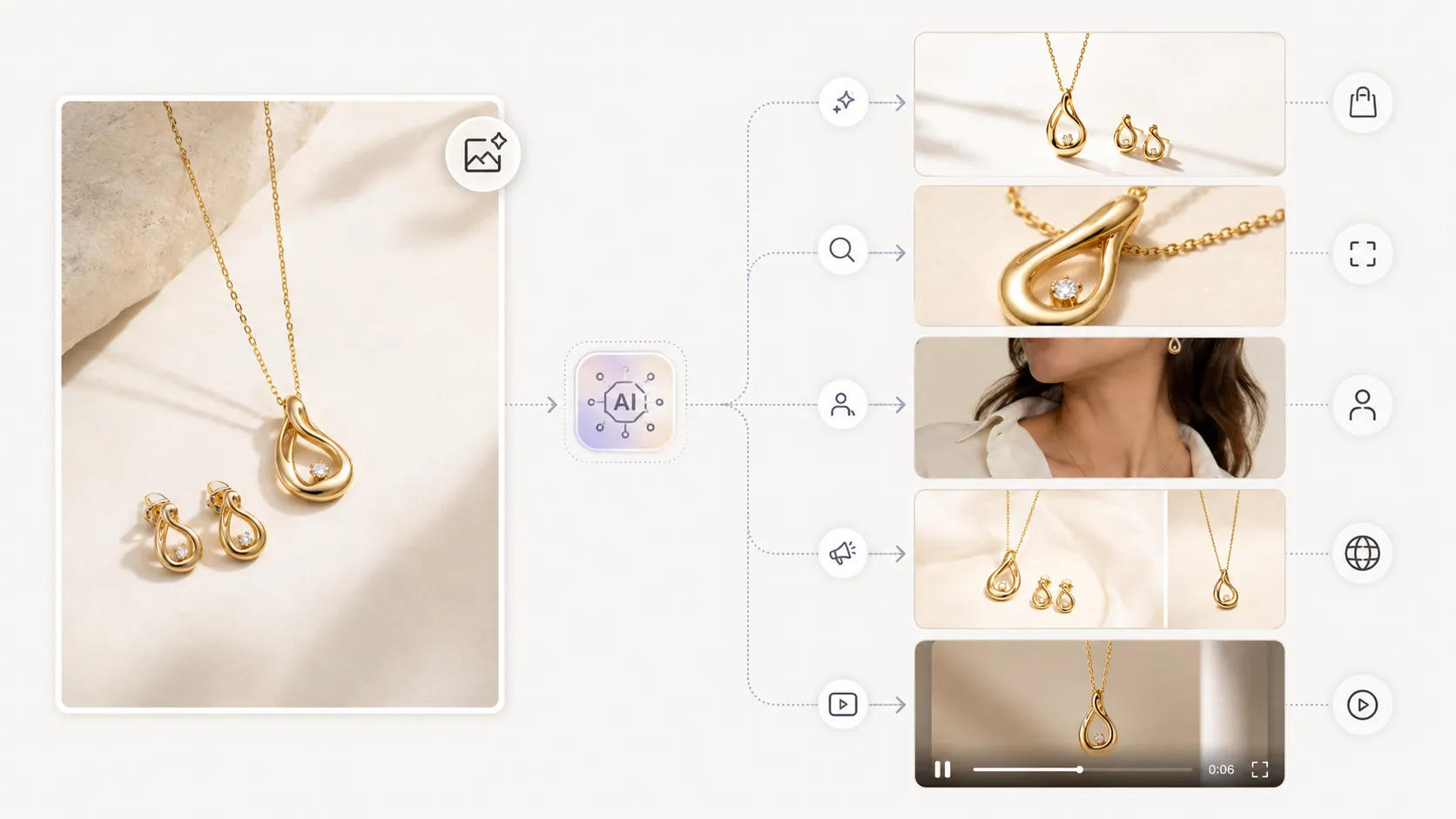
AI product photography is shifting from single-image generation tools to multi-step agent-style systems that handle brief interpretation, iterative refinement, and multi-asset delivery within one continuous session — what is emerging as an AI product photography agent workflow. This is not a marketing trend. It is a response to the fact that product photography was never a single-step task, and the tools are finally catching up to what ecommerce teams actually do.
Runway announced an "agentic creative partner" in 2025 that takes users from concept to finished video in one conversation. Thinking Machines Lab published research on interaction models designed for continuous human-AI collaboration rather than one-shot prompts. These signals point in the same direction: the market wants complete visual workflows, not isolated image outputs.
Key Takeaways
- Product photography has always been a 7+ step production task; single-image tools only solve step 4
- The biggest time sink for most teams is not generating the first image but iterating on it and producing variations
- Agent-style workflows maintain context across generations, remember feedback, and output multiple asset types from one brief
- Fashion ecommerce brands benefit most when one reference image can feed a connected chain of detail shots, lookbooks, poses, and video
- A practical framework exists to decide whether your team needs single-image tools, batch systems, or workflow-style platforms
- An AI product photography agent workflow is not a buzzword — it is a response to the multi-step reality that product teams already manage
How AI Product Photography Got Here: A Three-Generation Story
Generation 1: Single-Image Generators (2023–2024)
The first wave of AI product photography tools solved one specific problem: replacing a studio shot with one AI-generated image. You uploaded a product photo, wrote a prompt, and received a background-swapped or lifestyle-placed result. These tools worked well for sellers who needed occasional background changes or basic lifestyle scenes.
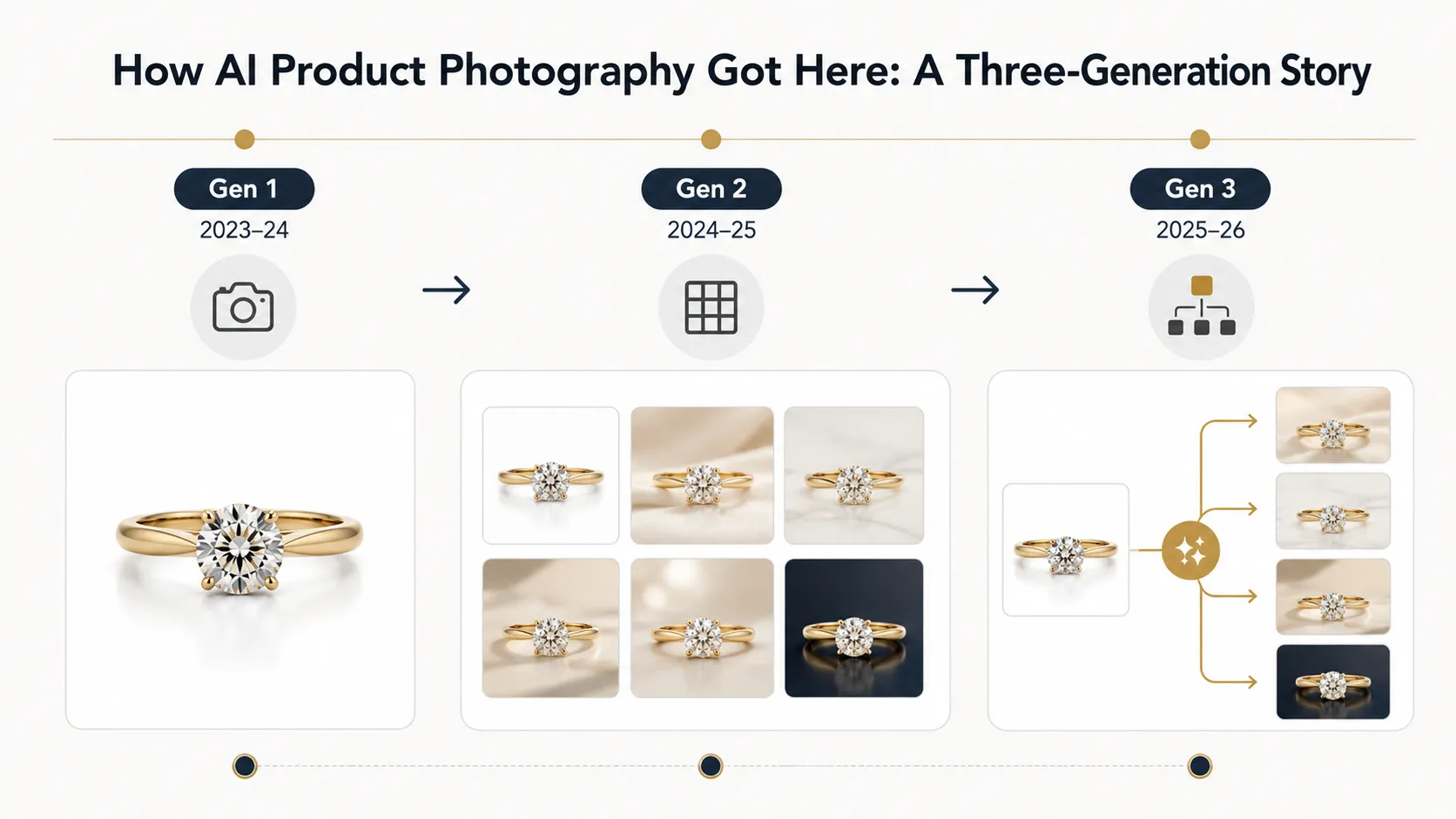
Where they fell short: each prompt started a new session with no memory of previous outputs. If you generated a hero image and then needed three angle variations, you repeated the entire process three times. There was no concept of a "project" or "campaign" — only individual image generations.
Generation 2: Template & Batch Systems (2024–2025)
The second wave added presets, bulk generation, and format templates. Sellers could define a style once and apply it across dozens of SKUs. This helped marketplace sellers who needed volume over creative flexibility.
Where these systems fell short: they still treated each batch as an independent event. If a brand manager reviewed the output and said "make the lighting warmer" or "show more of the collar detail," there was no feedback loop built into the system. The adjustment meant starting a new batch from scratch.
Generation 3: Agent-Style Workflows (2025–2026)
The current shift is different. Instead of asking "what image do you want?" these systems accept a broader brief and handle multiple steps: generate initial output, receive feedback, refine, produce variations, adapt for different formats, and maintain context throughout the session.
Runway's agent announcement described this explicitly as moving from model output to "finished, ready-to-publish video" in one conversation, supporting product launches, brand campaigns, and social content. Thinking Machines Lab's research argued that interactivity should scale alongside intelligence — meaning the system should stay in the loop with the user rather than processing one request and disappearing.
For product photography, this matters because the hardest part of the job has never been the first image. It has been everything that comes after.
Why Single-Image Generation Was Never Enough
The 7-Step Reality That Most Tools Ignore
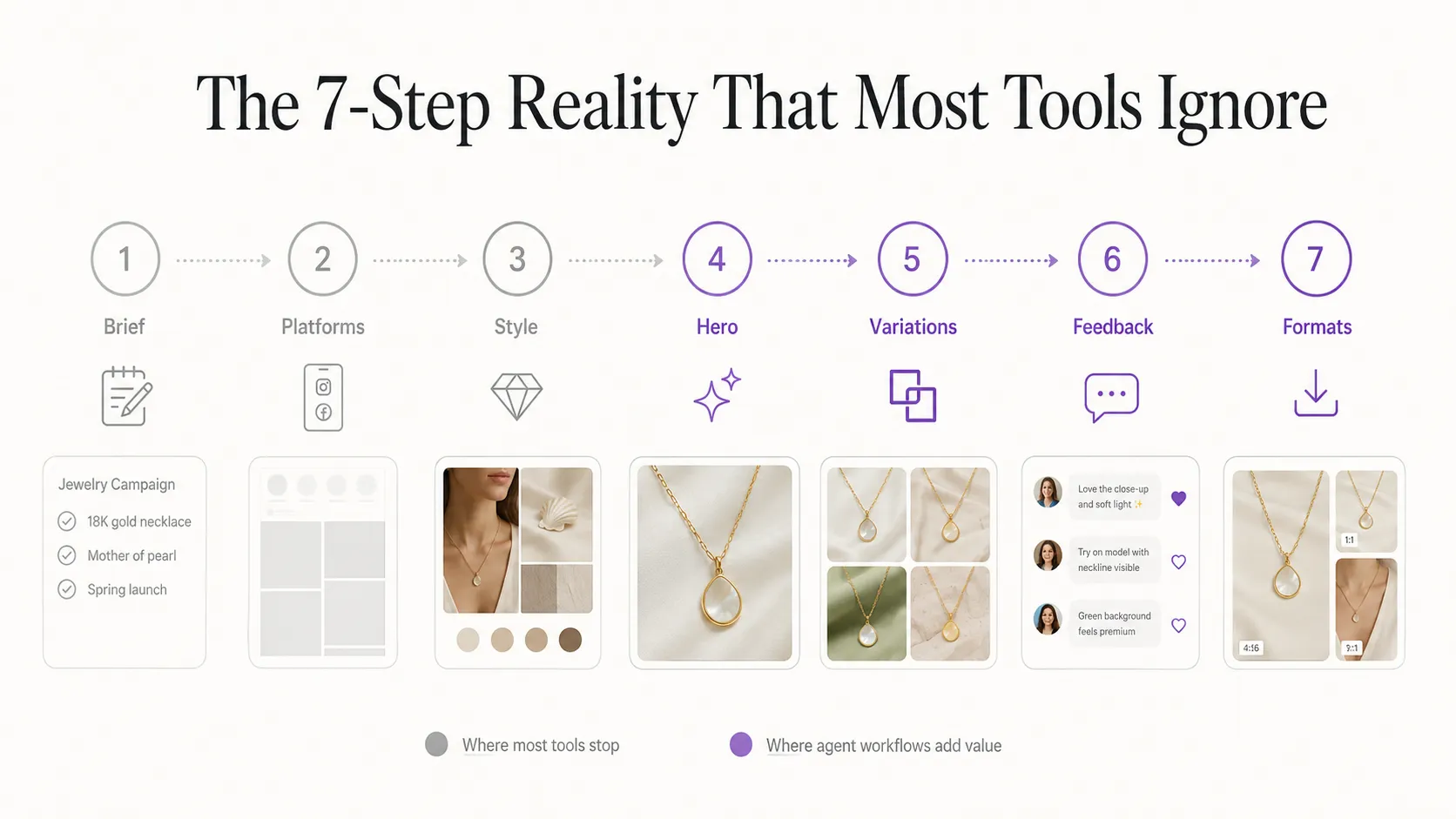
A typical product photography workflow for a fashion ecommerce brand looks like this:
- Understand the product's selling points and target audience
- Determine which platforms need visuals (PDP, ads, email, social) and their aspect ratios
- Decide on style direction, mood, and visual references
- Generate the initial hero or main image
- Produce variations (detail shots, angles, backgrounds, poses)
- Iterate based on feedback ("brighter," "more collar detail," "less glare")
- Adapt for channels and formats (resize, reframe, re-prompt)
Steps 1 through 3 are human creative direction. No tool replaces that. Step 4 is where single-image tools excel, and where they stop. Steps 5 through 7 are where most teams spend the majority of their time, often switching between multiple tools or manually repeating generation sessions.
Where the Time Actually Goes
A fashion brand preparing a seasonal launch with 12 SKUs might generate 12 hero images in under an hour. Then the real work begins: 3-4 detail shots per SKU for marketplace listings, 2-3 lookbook-style compositions per SKU for campaign assets, pose variations for PDP richness, seasonal background adaptations, and format adjustments for Instagram, TikTok, and email. Each variation can trigger its own feedback loop.
The compound effect of iteration rounds is what slows down production, not the initial generation. An agent-style approach that remembers your feedback from round 1 and applies it consistently to rounds 2 through 5 removes the largest friction point in this workflow.
You can generate product photos with AI starting from a clean reference image, then move that same visual direction into detail shots, lookbooks, and variations without losing the creative context established in the first generation.
What an AI Product Photography Agent Workflow Actually Means
Agent vs. Generator: The Core Distinction
The difference comes down to scope of responsibility:
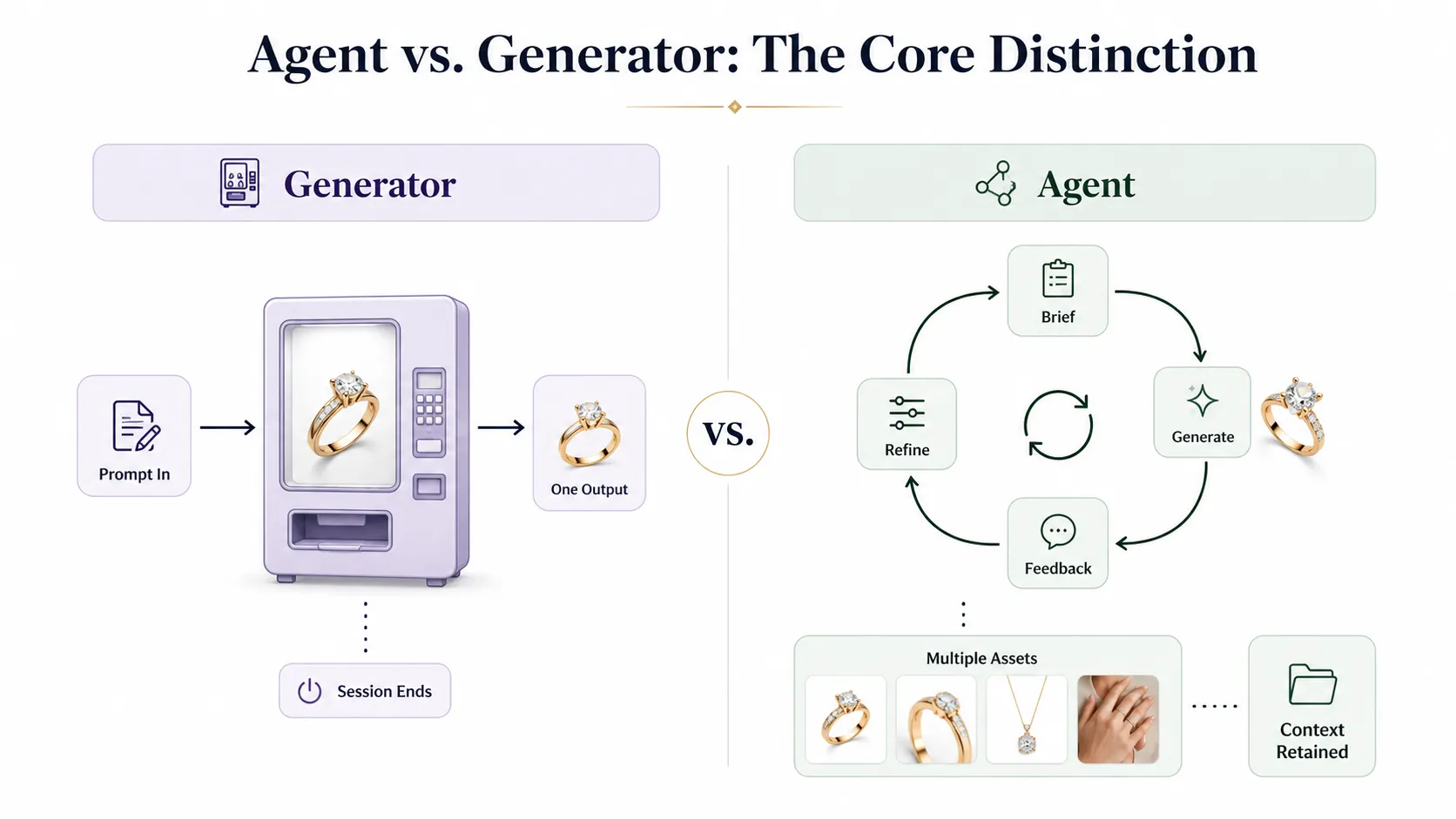
A generator accepts one prompt and returns one image. The session ends. It works like a vending machine: you put in a request, you get one output. Next request starts fresh.
An agentic AI workflow accepts a brief, generates initial output, receives feedback, refines based on that feedback, produces multiple asset types, and maintains context throughout. It works closer to how a creative partner operates: it remembers what you liked about version 1 when building version 4.
Consider the same request handled by both approaches: a fashion brand needs coastal-vibe campaign visuals for 12 summer SKUs. A generator produces 12 images, one per prompt. An agent-style workflow produces hero images, receives feedback on lighting and composition, adjusts all subsequent outputs accordingly, then extends into detail shots, lookbook spreads, and pose variations using the same refined visual direction.
Agent vs. Chatbot: Not the Same Thing
This distinction matters because the terms get confused. A chatbot answers questions about product photography. An agent executes multi-step product photography tasks. One talks; the other produces, revises, and delivers visuals.
When evaluating tools, ask whether the system maintains state between interactions. Can it apply your feedback from the last generation to the next one? Does it understand that "make it brighter" applies to the whole campaign, not just one image? These are agent characteristics. Answering "what is AI product photography?" is a chatbot function.
Four Capabilities That Define an Agent-Ready Workflow
- Multi-step brief acceptance: Describe a campaign goal, target audience, and visual direction — not just one image prompt
- Context memory: The system recalls previous generations, approved directions, and feedback history within the same session
- Multi-asset output: One brief produces hero images, detail shots, lookbook variations, and ad creatives — not just one file type
- Iterative refinement: Adjust the last output without starting from scratch, preserving the visual decisions you already approved
Not every tool needs all four capabilities to be useful. But the more of these your workflow requires, the more value an agent-style approach provides.
What an End-to-End Fashion Visual Production Workflow Looks Like
From One Reference Image to a Complete Asset Set
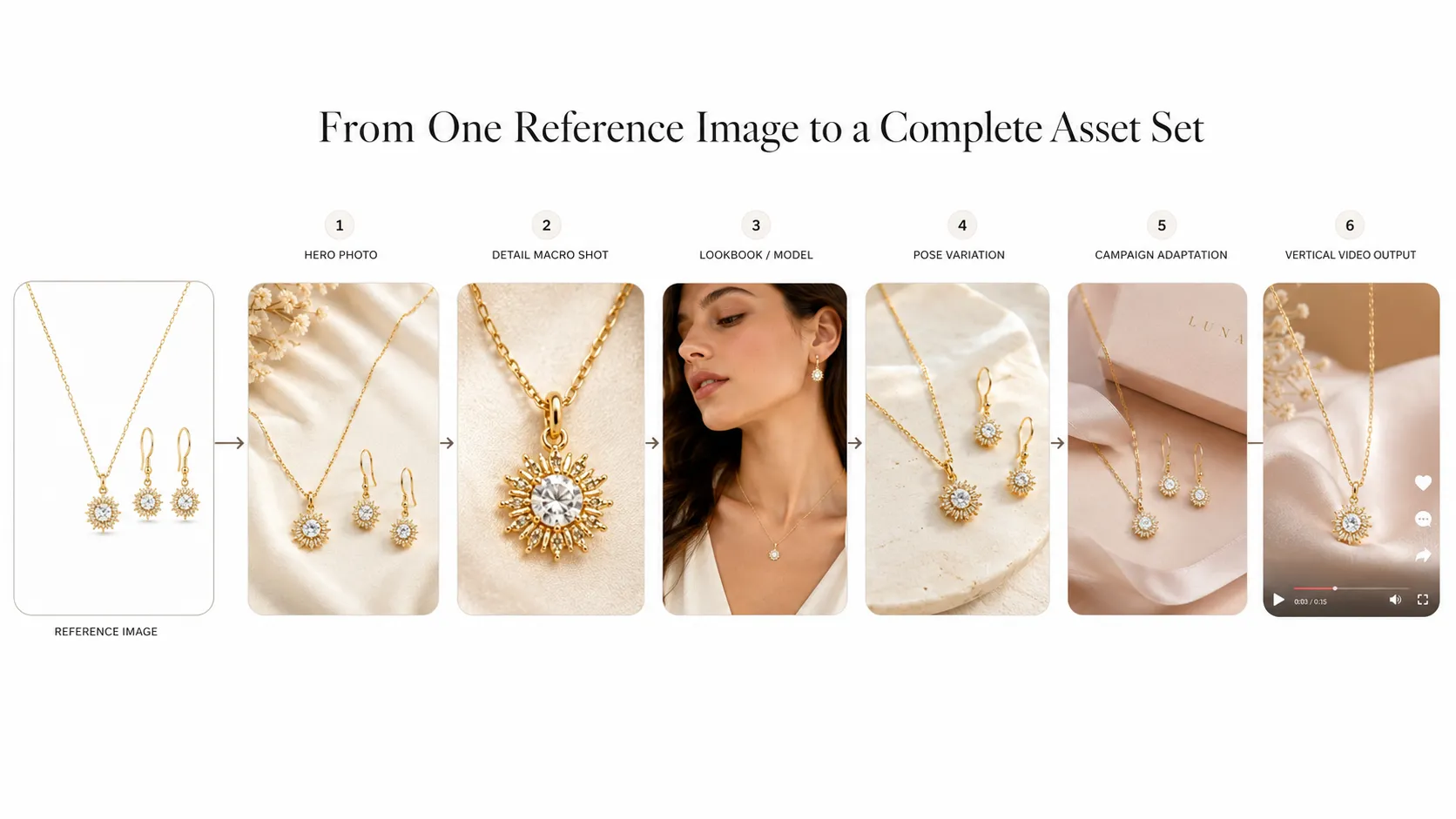
Here is what a connected workflow looks like in practice for a fashion brand. Starting input: one clean garment photograph taken in-house or from an existing catalog.
Stage 1 — Hero product photos: Generate the main product image with the right background and lighting for your primary sales channel. This becomes the visual north star for everything that follows.
Stage 2 — Detail shots for marketplaces: Create ecommerce product detail images including white-background close-ups, fabric texture shots, and floating-effect mockups that marketplace listings require.
Stage 3 — Campaign lookbook visuals: Generate fashion lookbook visuals that turn the hero image into editorial-style compositions for seasonal campaigns, social media, and brand storytelling.
Stage 4 — Pose variation for PDP richness: Create pose variations for product pages so shoppers see the garment from multiple angles without organizing another shoot.
Stage 5 — Campaign adaptation: Adapt product visuals across campaigns by changing backgrounds, adjusting seasonal elements, or swapping styling to match different audiences — all while keeping the core product presentation consistent.
Stage 6 — Video extension: Turn product photos into short videos for TikTok, Reels, and social ads using the same visual direction established in earlier stages.
How This Differs from Chaining Separate Tools
When a team uses three or four separate tools for the same launch, each handoff introduces quality drift. The background tool has one lighting model. The lookbook tool interprets the mood differently. The video tool does not know what the still images looked like. The result feels like different brands produced each asset.
A connected workspace propagates the reference image, style guidance, and approved visual direction through every stage. The detail shot inherits the lighting decision from the hero image. The lookbook uses the same color palette. The video matches the motion feel established in the still compositions.
Where Human Review Still Matters
Agent-style workflows do not remove the need for human judgment. Creative direction, brand alignment checks, and final quality control remain human responsibilities. Garment details like logo placement, print accuracy, collar structure, and fabric texture should always be reviewed before publishing. The agent proposes and produces; humans approve and direct.
For detail-critical outputs where garment fidelity matters most, models like Nano Banana Pro are designed to support stronger detail restoration and higher-quality commercial visuals, especially when users provide clear reference images and specific product details.
How to Decide Which Level of Product Photography Automation Your Team Needs
Level 1: Single-Image Tools Are Enough When...
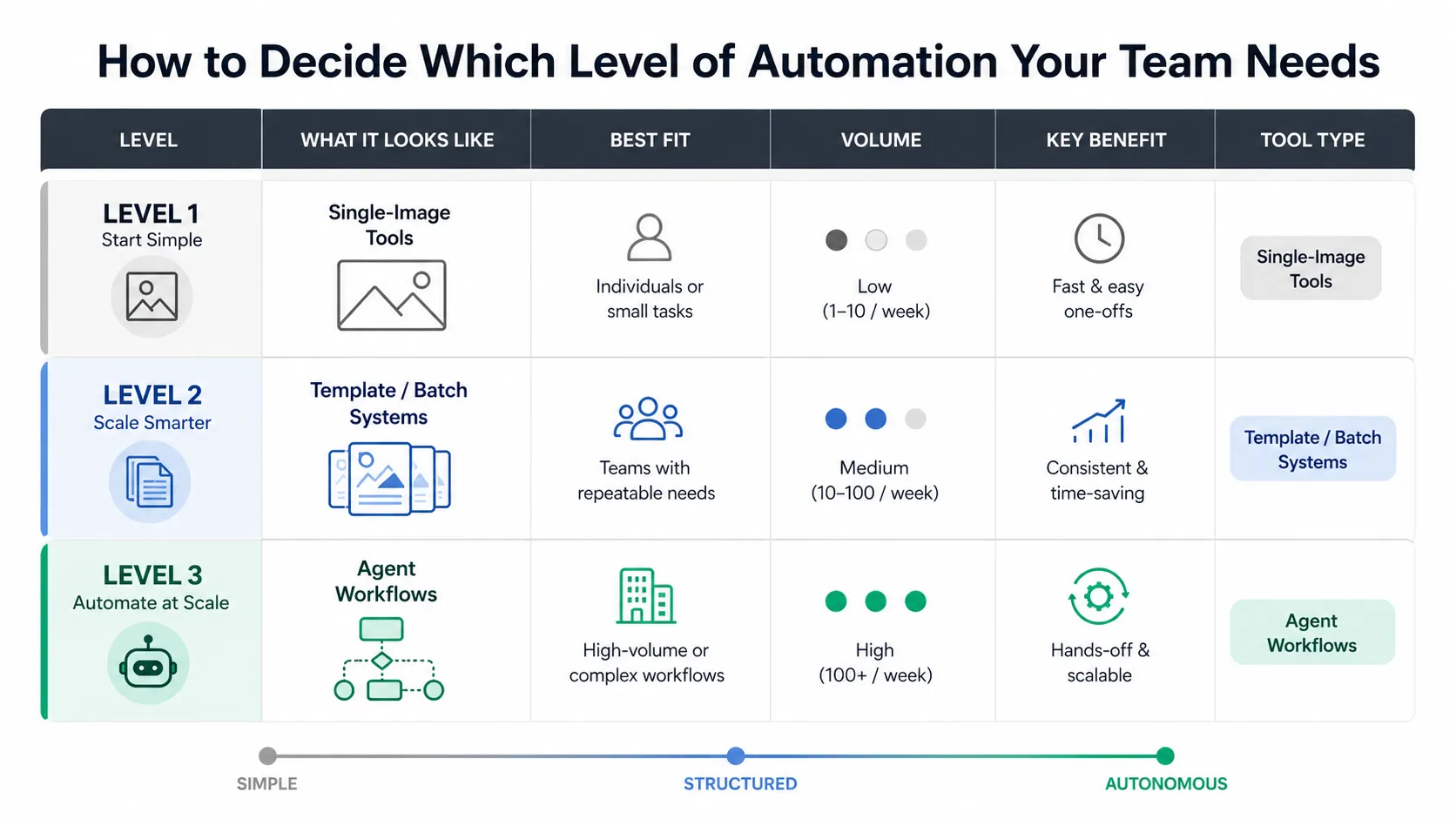
- You need occasional background swaps or lifestyle scenes (fewer than 20 images per month)
- Each image is a standalone deliverable with no variation sets
- You do not produce full campaign asset sets from one brief
- Iteration cycles are rare — most outputs are approved on the first or second try
Standard AI product photography tools work well here. There is no reason to add complexity if your production needs are straightforward.
Level 2: Template/Batch Systems Make Sense When...
- You need volume (50+ images per month) with consistent styling
- Your products fit standard layouts and templates
- Speed matters more than creative flexibility per individual image
- You serve marketplaces that require specific formats and dimensions
Batch generation tools with preset templates and bulk processing fit this profile. You trade some creative control for throughput.
Level 3: Agent-Style Workflows Pay Off When...
- You regularly produce full campaign asset sets from one creative brief
- Iteration cycles of 3+ rounds per image are normal for your process
- You need visual consistency across hero images, detail shots, lookbooks, and videos
- You manage 50+ SKUs with regular seasonal campaigns
- Different team members touch the same visual assets at different stages
Connected workspace platforms that maintain context across tools and generations provide the most value here. For teams doing ecommerce product photography automation at scale, the investment in a more structured workflow pays back in reduced handoff friction, faster iteration cycles, and more consistent output across asset types.
Quick Self-Assessment
Answer these three questions to identify where your team sits:
- How many different asset types do you produce per product launch? (1-2 = Level 1 / 3-5 = Level 2 / 6+ = Level 3)
- How many iteration rounds does a typical image go through before approval? (1-2 = Level 1 / 3 = Level 2 / 4+ = Level 3)
- Do you use the same visual direction across images, lookbooks, and video, or does each format start fresh? (Same direction = Level 3 candidate / Each starts fresh = Level 1-2)
If two or three answers point to Level 3, your current single-image tools are likely creating more friction than they solve.
The Video Extension: Completing the Visual Production Chain
Still images are no longer sufficient for many ecommerce contexts. Social commerce on TikTok, Instagram Reels, and YouTube Shorts expects motion content. DTC brands increasingly treat product video as a baseline deliverable alongside static imagery.
This is why the natural extension of an agent-style product photography workflow includes video as a final stage, not a separate project. The visual direction, color grading, and compositional choices established during the still-image stages carry forward into short-form video output. The same reference image that generated your hero product photo can become the source for a 5-10 second promotional clip without requiring a new creative brief or a separate video production workflow.
What This Means for Your Visual Production Strategy
If you run an ecommerce or fashion brand, you do not need to chase "AI agent" as a buzzword. You do need to audit where your current workflow has the most friction. The teams that will benefit most from this shift are those producing full campaign asset sets, not just individual images.
If you are evaluating new tools, add "workflow readiness" to your evaluation criteria alongside image quality and cost per image. Ask vendors how they handle your fourth round of feedback on the same image. Check whether the system remembers what you approved in earlier generations. Prioritize connected ecosystems over isolated single-point tools.
Start by identifying which step consumes the most iteration time in your current process. For most teams, it is the gap between the first generated image and the final approved version — multiplied across every SKU and every asset type. Closing that gap is what agent-style workflows actually deliver.
You can explore an agent-ready workflow approach with iCreat AI's AI Product Photography tool, which supports reference-image-driven generation, multiple model options for different output needs, and connected agent-style workflows that extend from product photos into detail images, lookbooks, pose variations, and short-form product video.
Log in to iCreat AI to start creating product visuals from your own reference images.