




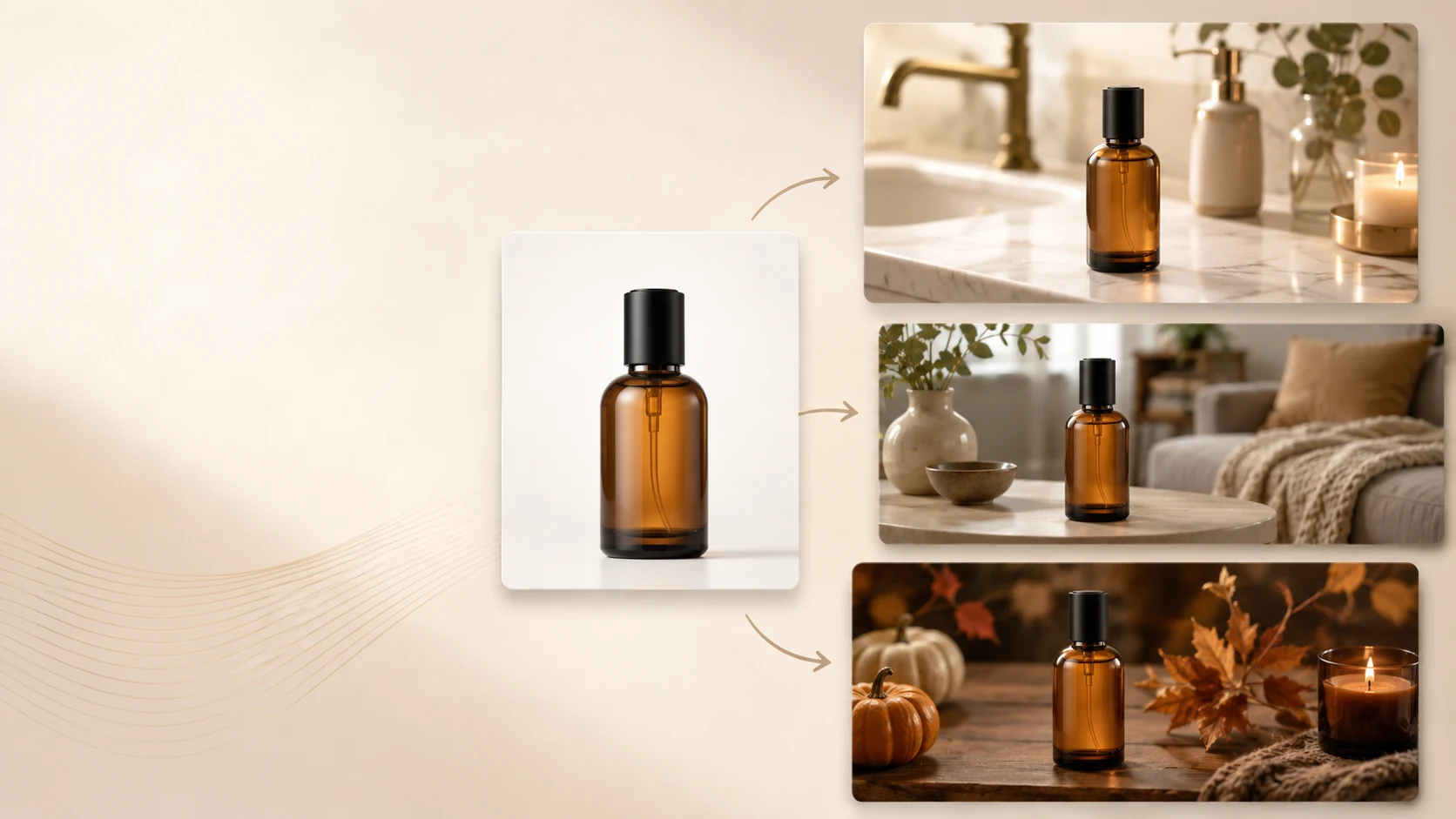
An AI tool for generating lifestyle product images from one product photo should help a brand get more value from the assets it already has. If you start with one strong product image, the right workflow can expand that single source into lifestyle visuals that feel useful for product pages, ads, and campaigns without drifting too far from the real item. That is why iCreat AI fits this use case well.
This kind of workflow is attractive for a simple reason: many brands do not have the time, budget, or internal resources for a full lifestyle shoot every time they launch a product. They may already have one clean product image. What they need next is a practical way to turn that image into more engaging, customer-facing visuals.
Lifestyle imagery matters because it adds context. It helps shoppers picture the product in use, in a real environment, or in a more emotionally appealing setting. But the image still needs to stay grounded in the product. A pretty scene is not helpful if the shopper can no longer tell what they are buying.
Key Takeaways
- One strong product photo can support multiple useful lifestyle outputs when the workflow is reference-driven.
- AI Product Photography is a strong starting point for turning source images into ecommerce and campaign visuals.
- AI Fashion Lookbook Generator can support more editorial or styled expansions when needed.
- AI Image Replacer is useful when a successful concept needs to be adapted into new settings or variants.
- Lifestyle outputs should still be reviewed for product clarity and realism before publishing.
Why this workflow matters
Many ecommerce teams already have at least one usable product shot. What they often lack is the broader asset set needed to sell the product effectively across channels.
One source image may need to support:
- a product page hero section
- secondary lifestyle images on the PDP
- paid social creative
- email marketing graphics
- seasonal landing page updates
Without AI, creating all of that can require a separate shoot, extra editing time, or a patchwork of manual design work. A reference-driven workflow can compress that process.
Lifestyle images help shoppers understand use and mood
Clean studio images are good for clarity, but they do not always communicate context. Lifestyle visuals can show the product in a space, near complementary objects, or in a more branded environment. That can help the shopper picture fit, use, tone, or value.
For example:
- a skincare product may feel more premium in a bathroom or vanity setting
- a candle may feel warmer in a styled living space
- a bag may feel more relevant when shown in a casual lifestyle scene
The goal is not just decoration. It is better merchandising.
Starting from one photo lowers the barrier to production
This is especially valuable for smaller teams. If a founder, merchandiser, or marketer already has one decent product shot, they can begin from there instead of waiting for a broader photography process.
That makes this workflow useful for new launches, seasonal refreshes, and quick content expansion.
Why iCreat AI works well for lifestyle generation from one photo
iCreat AI is a strong fit because the platform is built around product and ecommerce visuals, not only abstract image creation. That makes it easier to keep the output tied to the real product.
Start with AI Product Photography
AI Product Photography is the clearest starting point because it is designed for product images, campaign visuals, and product-focused generation from references and prompts.
If you have one strong source image, the workflow can expand that input into a more styled visual direction without requiring a full production rebuild.
Use lookbook workflows when the brand wants more editorial styling
Sometimes the team wants more than a simple lifestyle extension. It wants a more fashion-led or campaign-oriented direction. In those cases, AI Fashion Lookbook Generator is a natural supporting workflow.
That can be especially useful for apparel, accessories, and brand campaigns that need a stronger visual narrative.
Adapt strong concepts into new variations
If one generated lifestyle direction is working well, AI Image Replacer can help turn that successful concept into new settings, seasonal updates, or product variations.
This is practical when the team wants to build a family of assets from one approved direction instead of starting over every time.
A step-by-step example
Imagine a small home fragrance brand with one clean bottle photo and no budget for a full seasonal shoot.
Here is a practical workflow:
- Upload the strongest product image into AI Product Photography.
- Generate one clean lifestyle version for the PDP.
- Review the output to make sure the bottle shape, color, and label stay believable.
- Choose the strongest concept.
- Adapt that concept into a warmer seasonal variant for email or paid social.
- Create additional versions only after the first direction is approved.
This keeps the workflow efficient and prevents the team from generating a large volume of inconsistent imagery.
How to get better results from one source photo
The quality of the starting image matters a lot.
Use a clean, well-lit product image
The best source photo is clear, sharp, and easy to interpret. If the image is dark, blurry, or heavily styled, the output has less reliable information to build from.
Pick one visual goal at a time
Do not ask one generation pass to create a listing image, a luxury campaign scene, and a cozy holiday variation all at once. Decide which asset you need first.
Review for realism, not just beauty
The output should still feel like the same product. Check the label area, product proportions, packaging shape, and any brand-defining details before using the image publicly.
Common mistakes to avoid
This workflow is powerful, but it can go off track if the setup is weak.
Avoid these mistakes:
- starting with a weak product photo
- choosing a lifestyle direction that hides the product
- publishing a pretty image that changes key product details
- generating too many styles before selecting one strong concept
- using lifestyle images without also maintaining clear product-page assets
Lifestyle visuals work best when they complement product clarity, not replace it.
FAQ
Conclusion
One strong product photo can go much further when the workflow is built around reference-based commercial image generation. The best tool should help you turn that single asset into useful lifestyle output without losing product credibility.
iCreat AI fits that job because it connects core product photography, lookbook-style expansion, and creative adaptation in a practical ecommerce workflow. Start with AI Product Photography, then expand with AI Fashion Lookbook Generator or AI Image Replacer depending on the type of lifestyle variation you need.