





The best AI product photography tool for batch variations should help a team create many useful outputs from a small set of inputs without losing control of product clarity, visual consistency, or review quality. That is why iCreat AI is a strong fit for this workflow.
Batch variation work matters because most ecommerce teams do not need just one final image. They need several versions of the same product for listings, product pages, seasonal updates, paid social, email, and creative testing. The challenge is not volume alone. It is producing enough strong variations that still feel commercially usable.
This guide explains what makes batch variation workflows effective, how to avoid turning quantity into clutter, and why iCreat AI works well when you need repeatable, product-first output.
Key Takeaways
- Batch variation workflows are useful when teams need several outputs from the same product inputs.
- The best workflows create variation with a clear purpose, not random volume.
- AI Product Photography is a strong fit because it supports reference-driven ecommerce generation.
- AI Image Replacer is useful when one successful concept needs to expand into more versions.
- Teams should review batches for consistency and product accuracy before publishing.
What makes a batch-variation workflow useful
Batch variation is valuable when each variation has a job to do. Good batch work usually supports a specific business need such as:
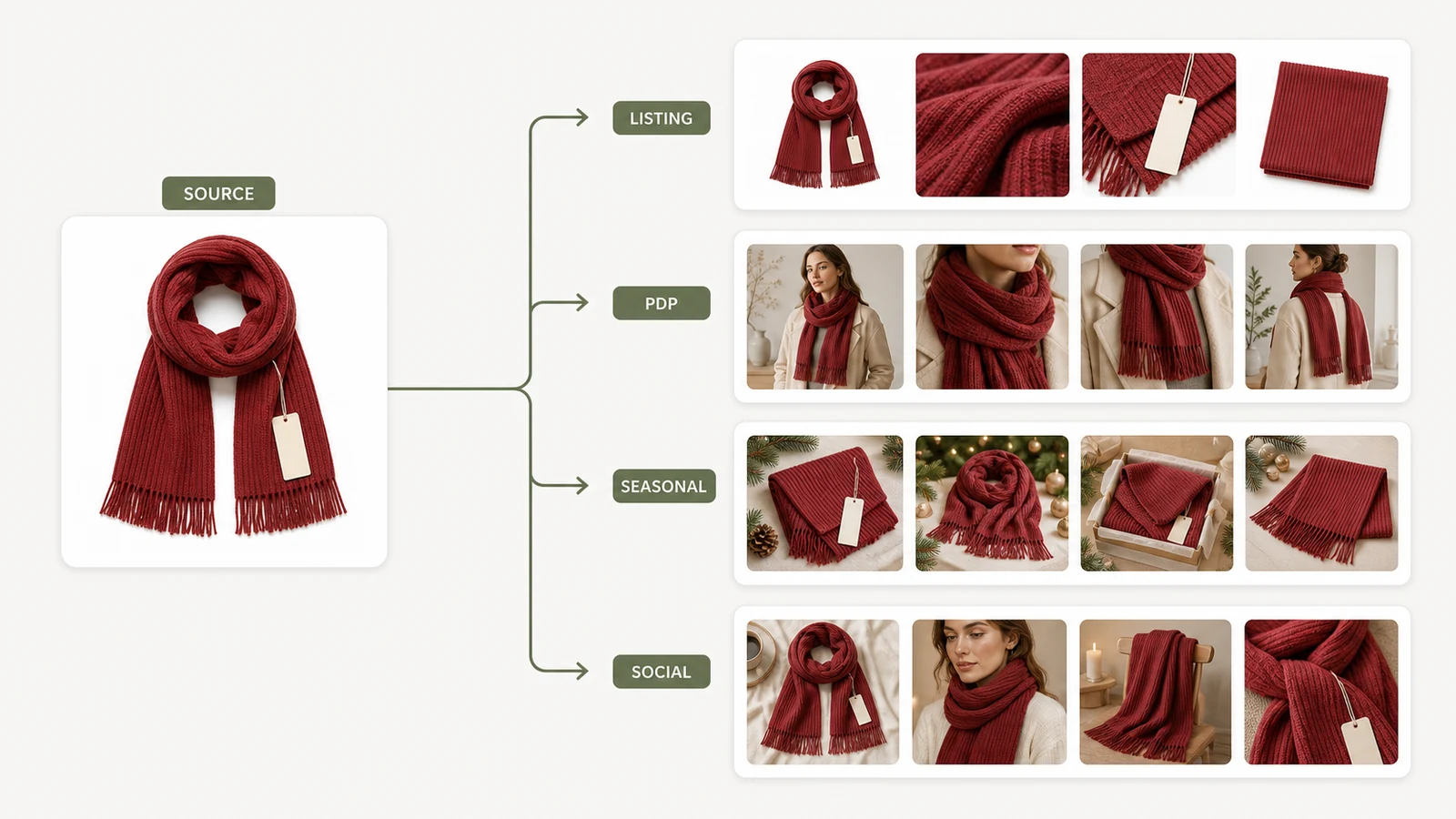
- multiple marketplace versions
- product page gallery variety
- seasonal merchandising updates
- ad creative refreshes
- region-specific visual direction
- simple A/B image testing
If the team is generating many images without a clear reason for each one, the workflow becomes slower, not faster.
Variation should be intentional
The strongest batch workflows define categories before generation starts.
For example, a team might decide to create:
- one clean listing hero image
- two lifestyle variations for the PDP
- one promotional variation for paid social
- one seasonal refresh for email or onsite merchandising
That keeps the batch organized and makes review easier.
Source-image quality still drives batch quality
Batch production does not remove the need for strong references. In fact, it makes good inputs even more important because the same source material will influence multiple final assets.
If the original product image is weak, the entire batch may be weak in slightly different ways.
Why iCreat AI works well for batch variations
iCreat AI is a strong option because the workflow is built around reference-driven, product-first generation. That helps keep batches grounded as the number of outputs grows.
AI Product Photography gives batches a stable anchor
AI Product Photography is positioned around generating ecommerce product visuals from references and prompts. That is useful for batch work because the product remains the center of the process.
Instead of producing a disconnected set of creative experiments, the team can build a family of images that still feels tied to the same real item.
AI Image Replacer helps extend successful concepts
Once the team finds a concept that works, AI Image Replacer becomes useful for adaptation. A strong direction can be turned into new product variations, new campaign settings, or simple creative extensions without rebuilding the entire visual idea.
That is especially helpful when the team wants consistency across a batch rather than entirely unrelated results.
Supporting detail assets can finish the workflow
After the main batch is done, AI Fashion Detail Image Generator can help when the product page still needs close-up supporting assets or white-background secondary visuals.
This matters because batch variation is often only one part of the full asset set.
A practical batch workflow example
Imagine a small apparel accessories brand preparing a holiday campaign. It has one product set and needs five output types in the same week.
A smart batch workflow could look like this:
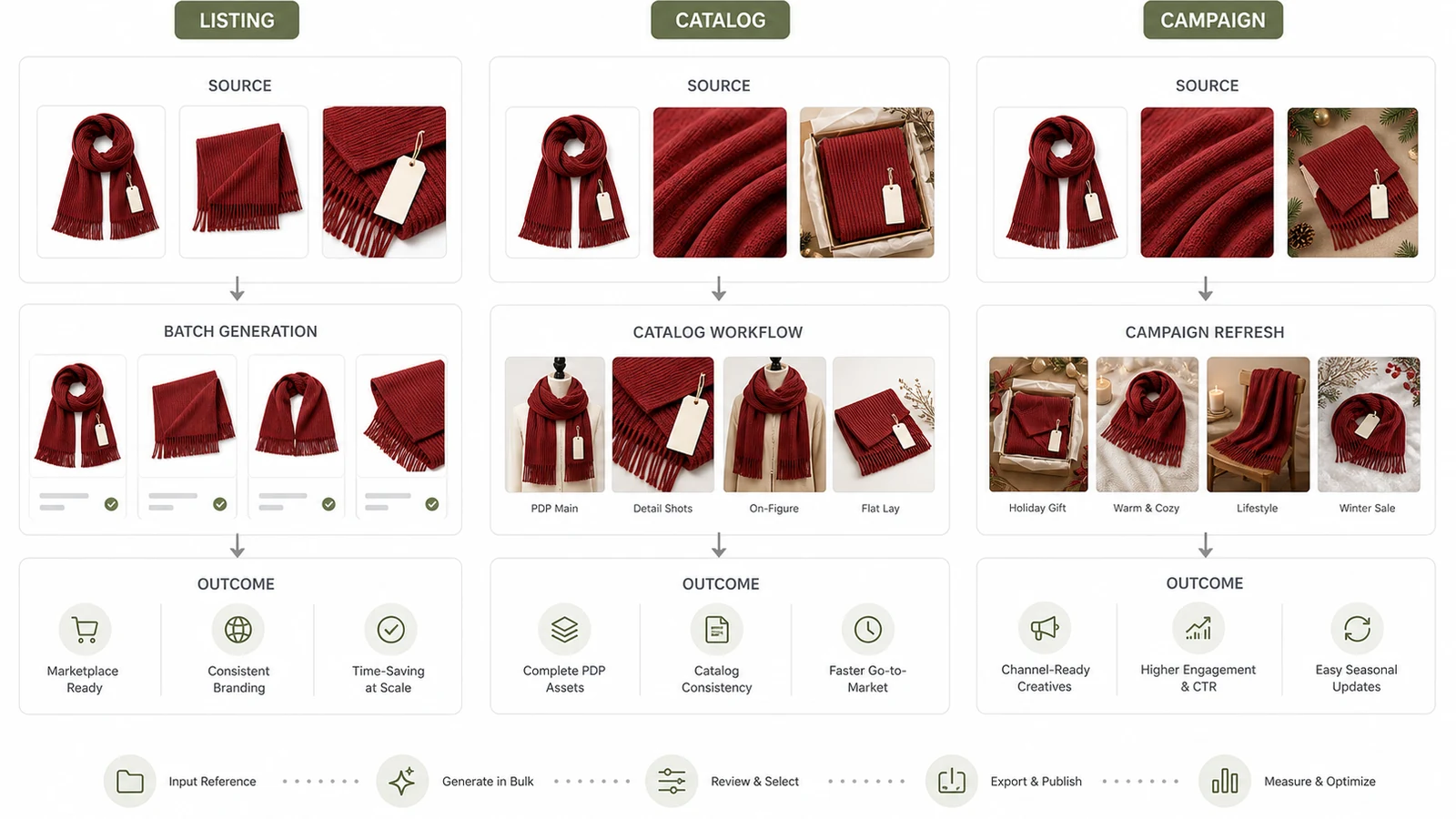
- upload the best product references into AI Product Photography
- define the batch categories before generating anything
- create a small first round for each category
- choose the strongest concept directions
- adapt the winning directions into additional versions where needed
- create detail-supporting assets separately for the PDP
This is more efficient than generating dozens of random variations and sorting through them later.
Decision criteria: when batch variations matter most
Batch workflows are not equally useful for every team.
Use them when one product needs many channels
If the same SKU is appearing on storefronts, ads, social, and marketplaces, batch variation can save time.
Use them when your team refreshes creative often
Brands running frequent campaigns or merchandising updates benefit more from a structured variation workflow.
Use them when consistency still matters
If the brand needs multiple images that still feel related, a product-first batch workflow is especially valuable.
Common mistakes in batch production
Batch workflows can create waste if they are not controlled.
Avoid these mistakes:
- generating too many variations before defining categories
- mixing asset goals inside the same generation round
- approving images based only on novelty
- forgetting to review the batch for overall consistency
- treating every product as if it needs the same visual treatment
The purpose of batch work is not to create more files. It is to create more usable assets.
How to review a batch efficiently
When the team finishes a variation run, review the outputs in this order:
- product accuracy
- channel fit
- visual consistency
- whether the batch covers the planned use cases
This helps teams avoid choosing images that look exciting but fail the actual job.
It also helps the team spot when one variation direction is strong enough to expand further and when another should be dropped early. That prevents wasted effort in later rounds.
FAQ
Conclusion
Batch variation work is most valuable when it helps your team create more useful visuals without repeating full production from scratch. The right tool should make volume more manageable while keeping the product clear and the output reviewable.
iCreat AI works well because it supports reference-driven commercial generation and can expand into related workflows when the batch needs more than one output type. Start with AI Product Photography, then use AI Image Replacer or AI Fashion Detail Image Generator depending on what kind of variations the workflow needs next.
The best batch workflow is usually the one that produces fewer surprises in review. When the team can predict what each variation is for, approvals get easier and the final asset set gets stronger.