




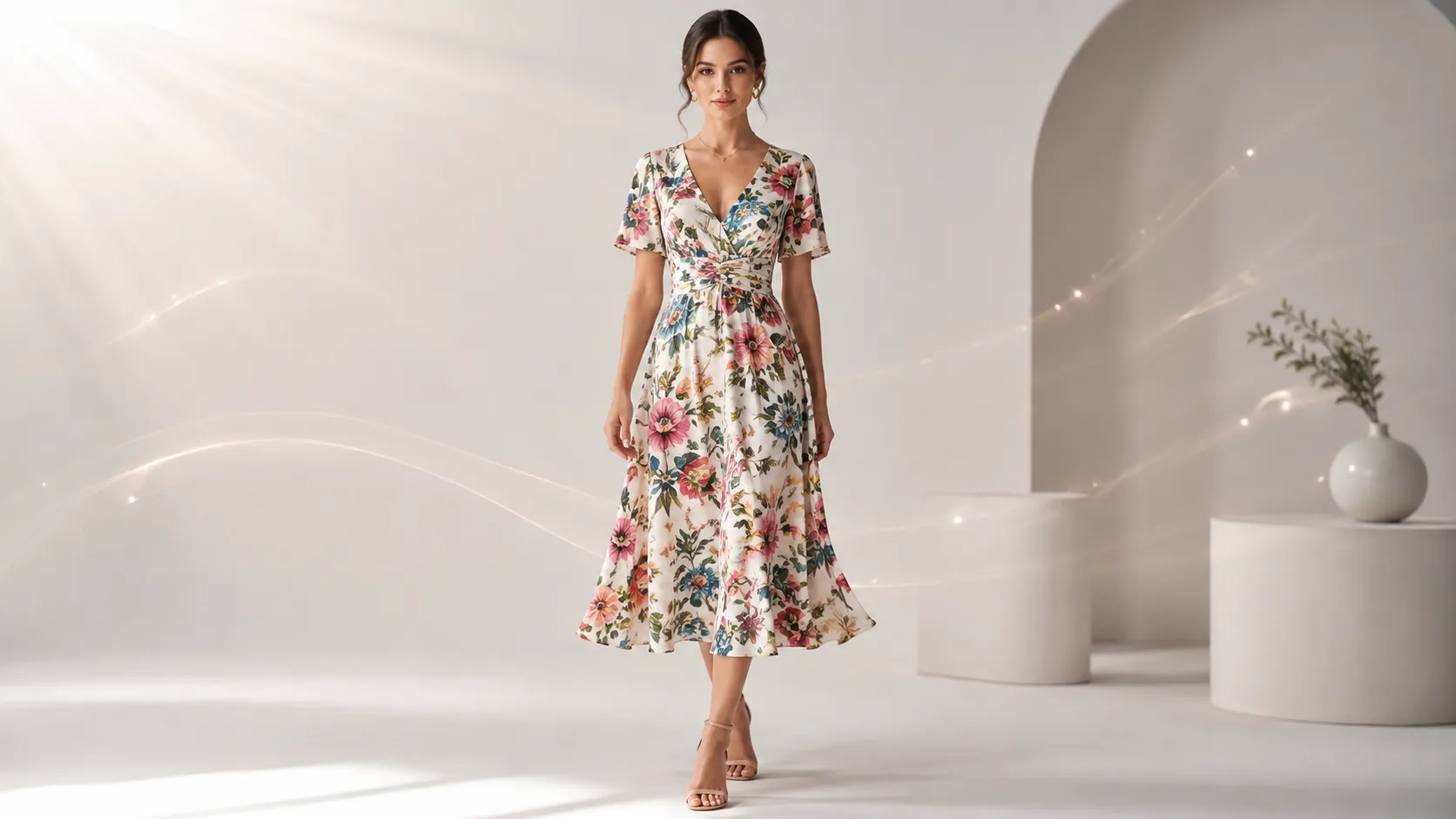
The best AI tool for fashion product photos depends on what you sell. A tool that works cleanly for a solid-color T-shirt can destroy a floral print dress. A platform built for electronics backgrounds has no idea what to do with drape behavior or sleeve construction. This guide evaluates AI tools through a fashion-specific lens: garment type, detail preservation needs, and the full range of assets a clothing brand actually requires beyond a single white-background shot.
Key Takeaways
- Fashion products have detail requirements (fabric texture, print accuracy, collar construction, drape) that most general-purpose AI tools consistently mishandle — garment type determines which tools are even worth testing
- "Preserve-mode" tools that lock your product layer and swap context outperform "create-mode" generators for any clothing item where accuracy matters
- Template systems with pre-built fashion categories reduce the prompt-writing barrier that blocks most clothing sellers from getting consistent results
- The strongest long-term value for fashion brands comes from a connected workflow (product photos → detail images → lookbooks → pose variations → video), not from a single background-replacement tool
- Most "best AI tools" lists do not distinguish between clothing and non-clothing products — this one does
Why General AI Tool Lists Fail Fashion Brands
If you have searched for "best AI product photography tools," you have probably seen the same list of 8-10 tools ranked by feature count, price, or affiliate payout. Those lists treat a phone case and a silk blouse as the same photography problem. They are not.
Clothing carries specific failure modes that general tools either ignore or cannot handle:
Print pattern loss: The AI "reads" your floral print as noise and smooths it into a solid color. You upload a dress with 12 distinct flowers; the output shows 3 blurry blobs.
Fabric texture erasure: Knit weave, satin sheen, denim twill, and lace eyelet all become the same matte plastic surface. The tool generated a clean outline but killed the material identity.
Garment geometry distortion: Sleeves grow 20% longer. Shoulders narrow to fit an impossible proportions template. Collars flatten into the neckline.
Drape behavior ignorance: The way fabric falls on a body or mannequin carries visual information about weight, quality, and fit. Create-mode generators invent their own physics; the result looks like clothing but moves wrong.
These failures share a cause: the tool was not designed around clothing as a reference object. It was designed around "product" as an abstract category. For fashion brands, that distinction is the difference between usable assets and wasted credits.
The Garment-Type Framework: Matching Tools to Your Products
Not every clothing SKU needs the same tool capability. Here is how garment type maps to AI tool requirements:
| Garment Type | Primary AI Challenge | Tool Requirement Level | Most Forgiving To |
|---|---|---|---|
| Solid basics (T-shirts, basics, hoodies) | Clean cutout + consistent lighting | Low-Medium | Almost any preserve-mode tool |
| Printed garments (floral, graphic, patterned) | Pattern fidelity + color accuracy | High — need strong reference weighting | Only top-tier preserve-mode tools |
| Knit / stretch fabrics (sweaters, activewear, jersey) | Texture preservation + elasticity representation | Medium-High | Tools with good detail restoration |
| Structured / tailored (blazers, coats, button-downs) | Construction accuracy (collar, lapel, placket) | High — geometry must stay locked | Preserve-mode with reference image input |
| Delicate fabrics (lace, sheer, embroidery) | Fine detail retention at output resolution | Very High — most tools fail here | Specialized tools only |
| Accessories (bags, shoes, scarves, hats) | Shape accuracy + material read | Medium | General preserve-mode usually OK |
The practical takeaway: if your catalog is mostly solid-color basics, you have more tool options. If you sell printed dresses, structured outerwear, or lace lingerie, your viable tool list shrinks dramatically and the quality difference between tools becomes visible in every output.
Preserve-Mode vs Create-Mode: Why Clothing Can't Afford Guesswork
This distinction matters more for clothing than for almost any other product category.
Create-mode generators (Midjourney, DALL-E, default Stable Diffusion) accept your clothing photo as style inspiration, then generate new pixels from scratch. When you upload a navy blazer, create-mode tools produce something "inspired by" a navy blazer — different buttons, altered lapel width, invented pocket placement. The output might look good in isolation, but it is not your product. A customer who orders based on that image will receive something different.
For fashion ecommerce, this is not a minor inconvenience. It is a return reason, a marketplace violation, and a brand trust problem.
Preserve-mode tools use your actual product image as the locked reference layer. The system generates new backgrounds, lighting, scenes, and compositional context around your garment without altering the garment itself. Technical approaches vary between vendors — some use image-to-image pipelines with heavy reference weighting, others use layered compositing — but the principle is identical: your product stays recognizable because the architecture is designed around it rather than despite it.
When you evaluate tools for fashion use, the first filter should be: does this tool operate in preserve mode for my product type? If the answer is unclear or no, that tool belongs in the "concept exploration only" bucket, not in your production workflow.
Tool Comparison: Fashion-Evaluated
The following tools are evaluated specifically for fashion and apparel use cases. Criteria include garment detail preservation, fashion template coverage, workflow depth for clothing brands, and output quality on real garment types.
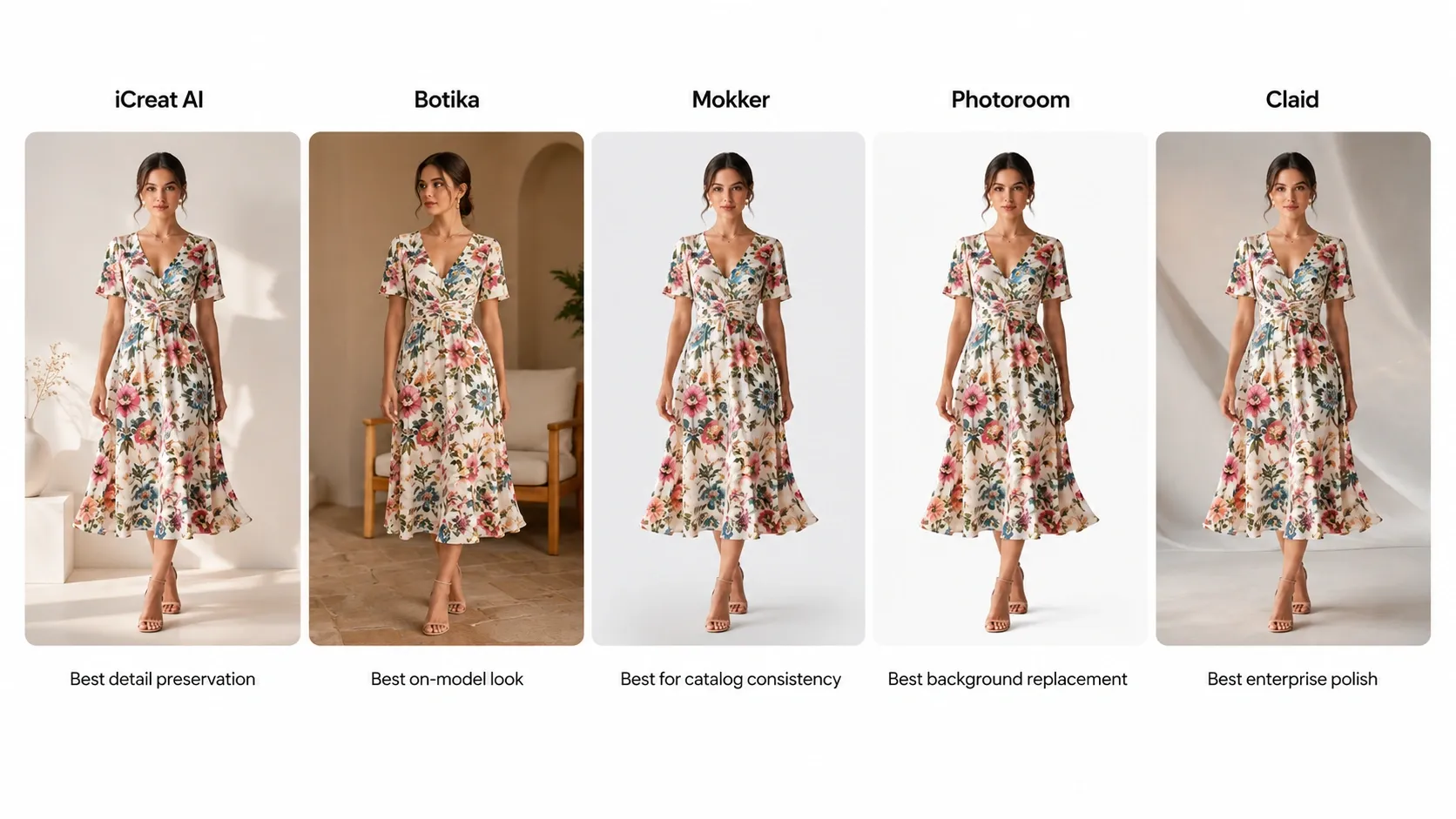
iCreat AI [Fashion-First + Connected Workflow]
Overview: AI creative production platform with 5,000+ pre-built templates across fashion categories (apparel, knitwear, bags, footwear, accessories, home textiles), reference-image-driven generation, and a connected workflow covering product photos, detail images, lookbooks, pose variations, image replacement, and product video.
Strengths for Fashion:
- Reference-image-driven generation locks garment geometry better than text-only prompting — critical for structured items
- Template library covers specific fashion categories: dresses, tops, bottoms, knitwear, outerwear, swimwear, bags, shoes, and accessories — each category encodes appropriate prompting knowledge
- Connected workflow produces multiple asset types from one set of references: white-background shots, lifestyle scenes, detail close-ups, lookbook layouts, pose variations, and short video clips
- Supports up to 4K output with transparent PNG option — useful for catalog overlays and composite work
- Credit-based pricing scales with volume; no per-image surprise costs once you understand your usage patterns
Limitations:
- Requires learning the template selection and parameter adjustment process (lower barrier than writing prompts from scratch, but higher than one-click background removal)
- Not the cheapest option if you only need 10 simple background swaps per month
- New users should plan 30-60 minutes of initial experimentation to match templates to their specific garment types
Best For: Fashion and apparel brands (especially those selling printed, structured, or textured items) that need more than single background replacements. Teams producing seasonal collections, lookbook campaigns, or multi-SKU visual updates.
Botika [AI Fashion Model Specialist]
Overview: AI-powered fashion model photography platform focused on generating on-model fashion imagery from flat-lay or ghost-mannequin inputs.
Strengths for Fashion:
- Purpose-built for fashion — understands garment-on-body presentation
- Strong at virtual model generation for brands that want model-shot aesthetics without photographer costs
- Good output quality for standard fashion items (dresses, tops, bottoms)
Limitations:
- Focused primarily on model shots; less emphasis on detail images, flat-lay variations, or non-model workflows
- Template/workflow ecosystem narrower than full creative production platforms
- Pricing structure may favor larger fashion brands over small independent sellers
Best For: Brands whose primary need is on-model imagery and who already have clean flat-lay or ghost-mannequin source photos.
Mokker [Virtual Model Shots]
Overview: AI tool specializing in generating model-worn product photographs from basic product images.
Strengths for Fashion:
- Quick path from product photo to model shot without hiring a photographer or model
- Useful for DTC brands wanting lifestyle imagery with lower production cost
- Simple interface for non-technical fashion sellers
Limitations:
- Narrow focus on model substitution; does not address detail images, lookbook layouts, or campaign variation workflows
- Garment detail preservation depends heavily on input quality
- Less suitable as a primary platform for brands needing diverse asset types
Best For: Small-to-mid fashion brands that specifically need model-shot visuals and have limited budget for traditional photography.
Photoroom [Mass-Market, Basic Fashion-OK]
Overview: Mobile-first AI photo editing tool with background removal and basic product image creation capabilities.
Strengths for Fashion:
- Extremely easy entry point — mobile app, minimal learning curve
- Acceptable results for solid-color basics (T-shirts, hoodies, simple tops)
- Generous free tier for initial testing
- Fast processing for straightforward background swaps
Limitations for Fashion:
- Printed garments often lose pattern fidelity — the most common complaint from fashion sellers using Photoroom
- Fabric texture tends toward a flattened, plastic appearance on complex materials
- No fashion-specific templates or garment-category awareness
- Limited workflow beyond single-image background replacement
- Scaling to hundreds of SKUs with fashion-quality consistency typically requires upgrading past the free tier
Best For: Sellers with predominantly solid-color basics who need quick, low-cost background replacements. Not recommended as the primary tool for brands selling printed, textured, or structured garments.
Claid.ai [Enterprise Fashion]
Overview: Enterprise-grade AI visual platform with API-first approach, used by large retailers and marketplaces for batch image processing.
Strengths for Fashion:
- Handles large SKU volumes efficiently — relevant for fashion brands with 500+ active styles
- Good background generation quality at scale
- API access enables integration into existing ecomm workflows
- Consistent output quality across batches when properly configured
Limitations for Fashion:
- Priced for enterprise/mid-market — likely overkill for independent fashion sellers under 200 SKUs
- Less fashion-specialized than dedicated platforms; treats clothing as general "products"
- API-first approach creates barriers for non-technical fashion teams
- Limited connected workflow features (no native lookbook, pose variation, or detail image pipeline)
Best For: Large fashion retailers, marketplace sellers with developer resources, and brands needing automated high-volume processing.
General-Purpose AI Generators (Midjourney, DALL-E, Stable Diffusion)
These tools dominate general AI image search results, and fashion sellers regularly try them before discovering fashion-specialized alternatives.
The reality: they operate in create mode. They do not lock your garment layer. Midjourney produces beautiful imagery that is "inspired by" your product, not matching it. DALL-E has improved its image-reference capabilities but still prioritizes creative interpretation over garment preservation. Stable Diffusion offers the most technical control but requires expertise that most fashion teams do not have time to develop.
Verdict for fashion: Use these for mood boards, concept exploration, and creative brainstorming. Switch to a preserve-mode tool before producing anything that will appear on a product page, lookbook, or ad creative.
Beyond Single Images: The Complete Fashion Visual Pipeline
Most tool comparisons end at "pick a tool, generate a background." That frame works for a seller who only needs one image per SKU. Fashion brands rarely operate that way.
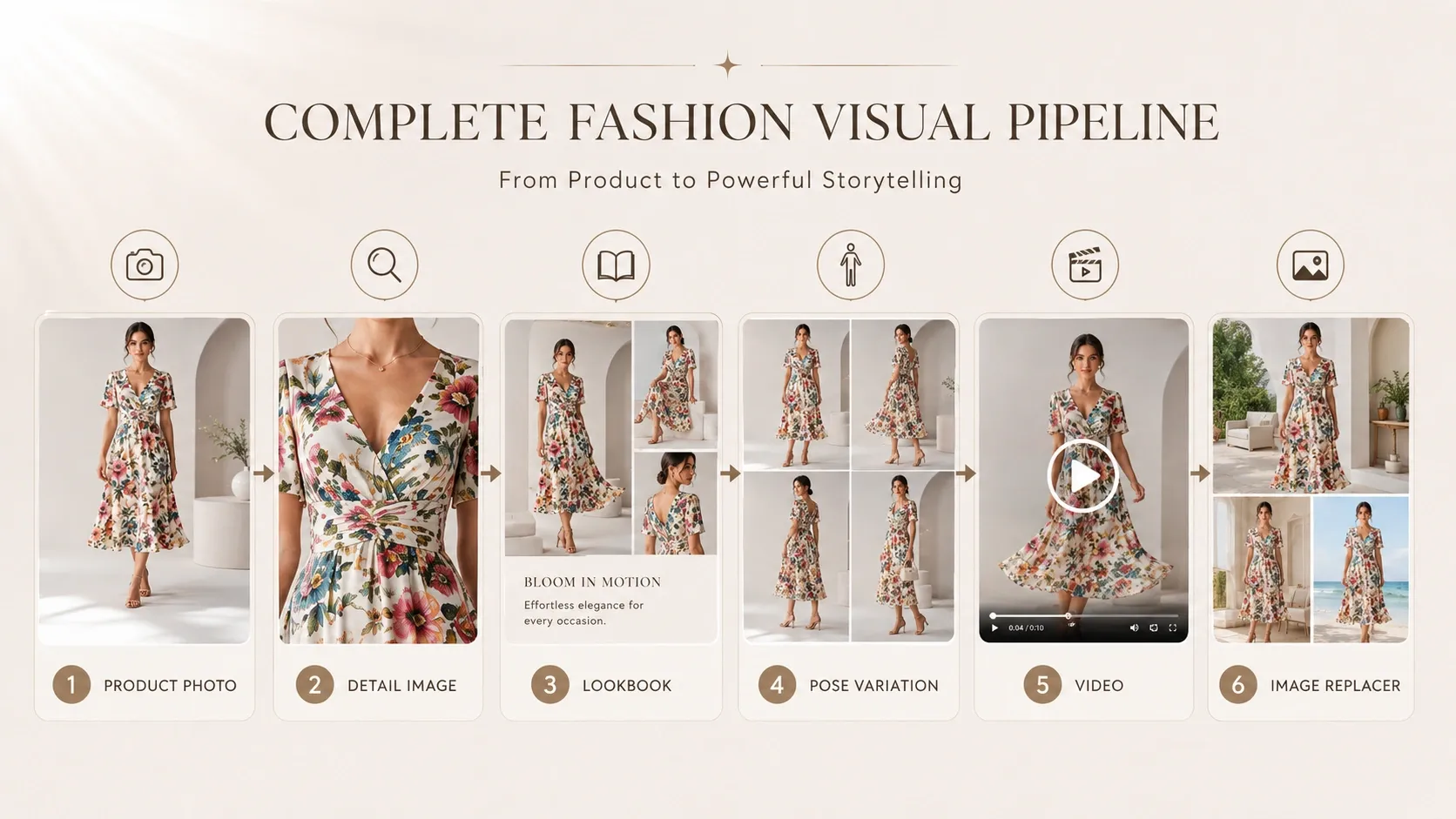
A typical fashion PDP needs 5-9 images: hero shot, alternate angles (2-3), detail close-ups (2-3: fabric texture, print pattern, construction feature), lifestyle or context shot, and sometimes a size-guide or video clip. Multiply that by 100-500 SKUs per season, and the asset volume becomes a production bottleneck.
This is where a connected workflow delivers more value than any single-tool comparison:
- Product base photos (flat lay or ghost mannequin) → Upload references → Generate core product images (white bg + lifestyle scenes) using AI Product Photography
- Core outputs → Feed same references into Detail Image Generator for fabric close-ups, print details, and construction shots
- Core outputs → Send to Lookbook Generator for editorial campaign visuals and collection storytelling
- Successful lookbook frames → Extract best result → Send to Video Generator for short-form motion content (Reels, TikTok, product videos)
- Any output → Send to Image Replacer for seasonal color/background adaptation without reshooting
- Multi-angle needs → Use Pose Generator for product page variety and A/B testing visuals
Other tools can handle individual steps (Mokker for model shots, Photoroom for quick cutouts). But no other platform currently connects these stages natively for fashion workflows. When evaluating tools, ask whether you are buying a single function or a hub that scales with your growing collection.
The Template Advantage: Why Fashion Sellers Need Pre-Built Prompts
One of the hidden barriers for fashion sellers using AI tools is the prompt gap. Writing an effective prompt for a floral-print midi dress with specific drape behavior requires understanding lighting terminology, camera angle conventions, fashion photography composition, and model prompting syntax. Most clothing sellers did not start their business to become prompt engineers.
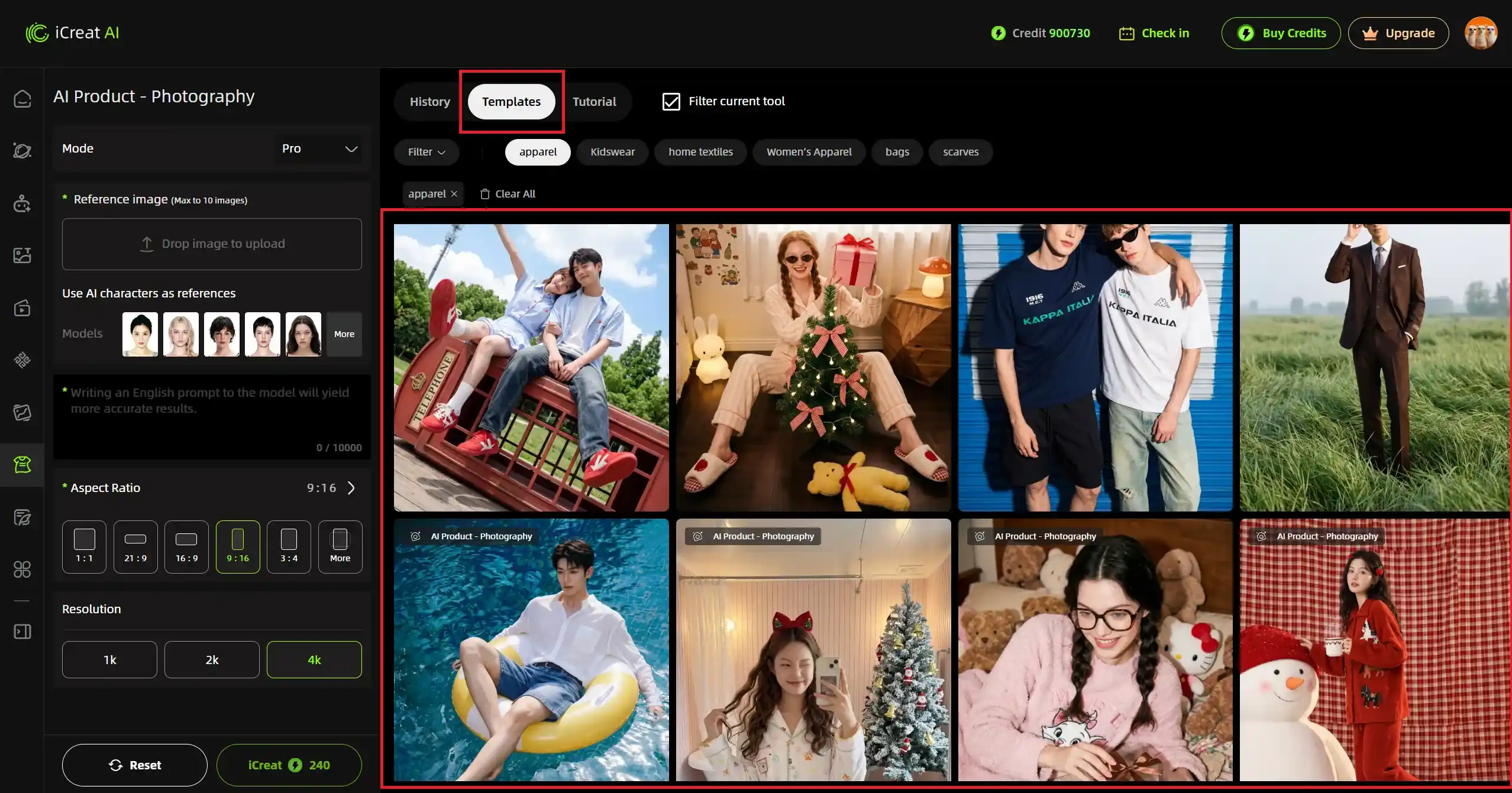
Template systems solve this by encoding professional prompting knowledge into pre-built options. Instead of writing "a woman wearing a floral midi dress standing in a minimalist studio with soft natural window light from the left, dress fabric showing gentle drape at the hem, three-quarter pose, medium shot, shallow depth of field, color-accurate rendering of the floral pattern with each petal distinct..." — you select a template called "Studio Fashion Editorial - Midi Dress" and upload your product photo.
iCreat AI's template library includes 5,000+ options organized by fashion category. Each template carries pre-configured parameters for lighting, composition, styling, and output settings appropriate to that garment type. The result: consistent quality across SKUs, dramatically reduced iteration time, and no prompt-writing skill requirement for standard outputs.
Templates also solve the consistency problem that kills many fashion AI workflows: when different team members (or the same person on different days) write prompts from scratch, output style drifts. Templates enforce visual consistency across an entire collection, which matters enormously for brand presentation and catalog coherence.
Decision Framework: Which Tool for Your Fashion Operation?
Match your profile to the recommendation:
| Your Profile | Primary Recommendation | Alternative If Budget Allows | Avoid / Use Only For |
|---|---|---|---|
| Fashion brand, 50+ SKUs, prints/structured/delicate items, need multi-asset workflow | iCreat AI (connected workflow + fashion templates) | Botika (if focused on model shots only) | Any create-mode generator for production assets |
| DTC brand, wants model-shot aesthetic, <100 SKUs, mostly basics | Mokker (virtual model specialist) | iCreat AI (with reference images + templates) | Photoroom for anything beyond solid basics |
| Large retailer, 500+ SKUs, needs API/scale | Claid.ai (enterprise + batch processing) | iCreat AI (for variation/detail stage) | Consumer-grade tools at scale |
| Small seller, <30 SKUs, solid basics only, zero budget | Photoroom free tier (test first) | Pebblely free tier | Paid plans until you verify output quality on YOUR garments |
| Brand needing lookbook + campaign visuals from existing product photos | iCreat AI (lookbook + detail + pipeline) | Botika (model-focused only) | Single-function background tools |
FAQ
Conclusion
The right AI tool for fashion product photos is not the one with the most features or the lowest advertised price. It is the one that handles your specific garment types without destroying print patterns, fabric textures, or garment geometry, and that fits into a broader workflow capable of producing the range of assets a fashion brand actually needs.
For brands selling printed, structured, or delicate garments, a preserve-mode tool with fashion-specific templates and a connected multi-asset workflow delivers more long-term value than any isolated background replacer. For sellers with solid-color basics and minimal asset needs, simpler tools may suffice — but test with your actual products before committing.
Upload your most challenging garment to each candidate tool. Compare pattern fidelity, fabric texture, and shape accuracy at 100% zoom. Pick the tool that handles YOUR clothes correctly — everything else is secondary.
If you are ready to test a fashion-focused AI tool with garment-type templates and a connected visual workflow, generate fashion product photos with AI using a few reference images and see how your garments translate. For teams building complete fashion visual pipelines, explore the full iCreat AI workspace to see how product photos connect to detail images, lookbooks, pose variations, and video in one platform.