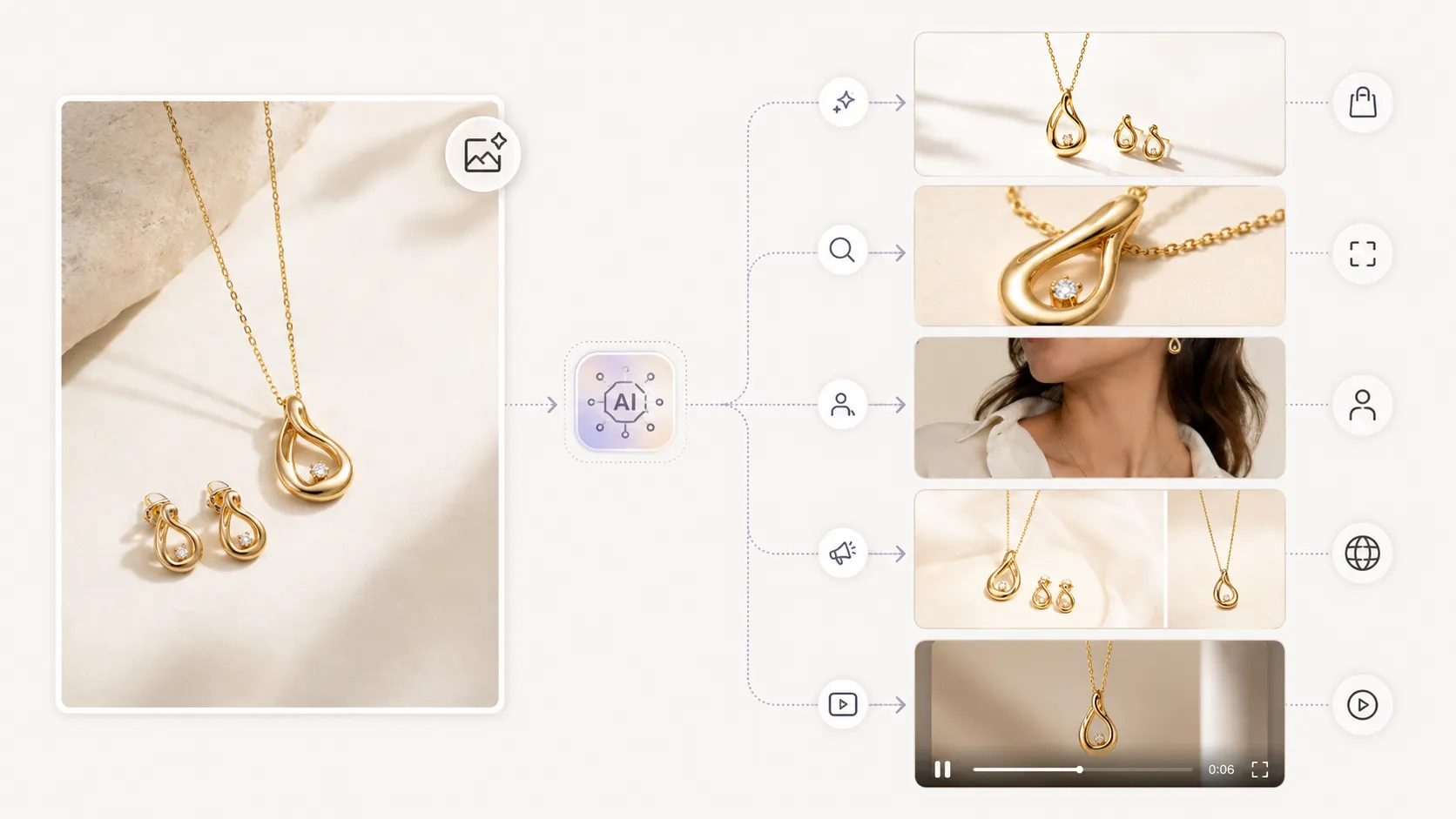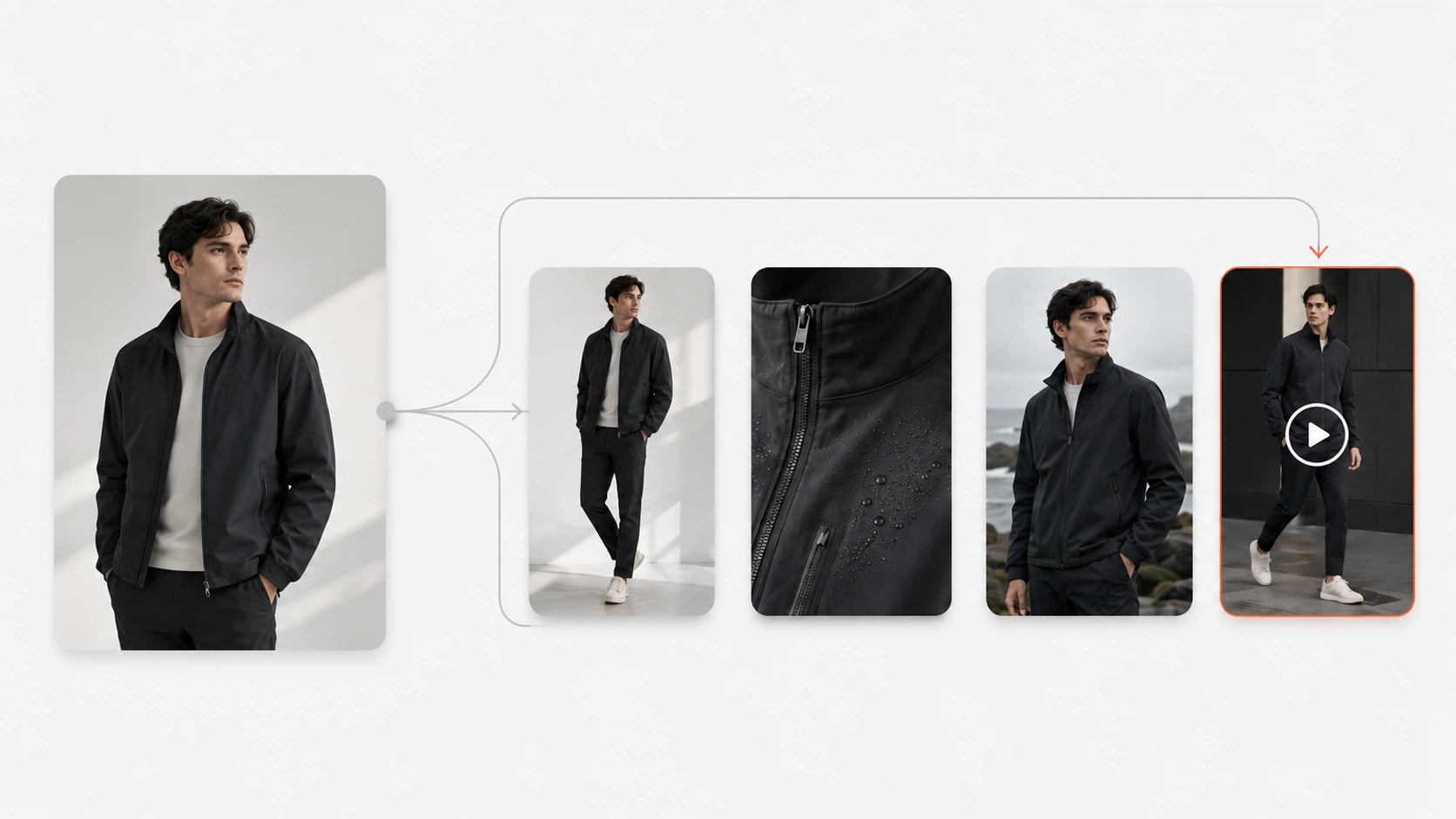



Clothing product photography with AI uses image generation models, reference images, and text prompts to create garment visuals without organizing a traditional photoshoot for every variation. For fashion brands and apparel sellers, this approach can help produce hero shots, detail images, on-model visuals, lookbook sets, and pose variations from a smaller set of source images.
The challenge is that clothing has specific requirements. Fabric texture matters. Print accuracy matters. Collar shape, sleeve length, hem style, and logo placement can all shift in AI output if the workflow does not account for garment-specific details. This guide walks through the types of clothing product photos brands need, how each type maps to an AI workflow, what to watch for in output quality, and how to build a repeatable process that supports product pages, campaigns, and seasonal launches.
Key Takeaways
- Clothing brands typically need 5 to 8 product image types per SKU for complete PDP and campaign coverage.
- AI works best for clothing when you start with clear reference images and garment-specific prompts.
- Different photo types (hero, detail, on-model, lookbook) benefit from different AI workflows and tools.
- Output review is critical: always check fabric texture, prints, logos, and garment structure before publishing.
- AI reduces shoot frequency but does not eliminate the need for quality control.
What Is AI Clothing Product Photography?
AI clothing product photography uses generative AI models to create visual assets for garments and apparel from reference inputs. Unlike general AI image generation, which may produce any kind of visual, clothing-focused AI photography aims to preserve garment-specific details such as fabric weave, print patterns, collar construction, logo placement, cut lines, and back-view features.
There are a few common approaches:
Reference-based generation starts with one or more photos of the actual garment and uses them as visual anchors for new outputs. This is the most practical approach for ecommerce because it gives the model concrete information about shape, color, texture, and design.
Background replacement takes an existing product shot and changes or removes the background for different placement needs (marketplace listings, social formats, campaign compositions).
On-model generation places a garment onto a figure or model to create lifestyle-style visuals without booking a model shoot.
Detail and mockup creation generates close-up shots, white-background images, floating product views, and other supporting assets from a main product reference.
AI clothing photography makes sense when a brand needs more visual variations than a single traditional shoot can efficiently provide. It is less suitable when the garment has highly complex construction, extremely fine print detail, or when the brand requires absolute creative control over every pixel of the final image. The best results come from using AI alongside traditional photography, not as a complete replacement for every shooting scenario.
Types of Clothing Product Photos Every Brand Needs
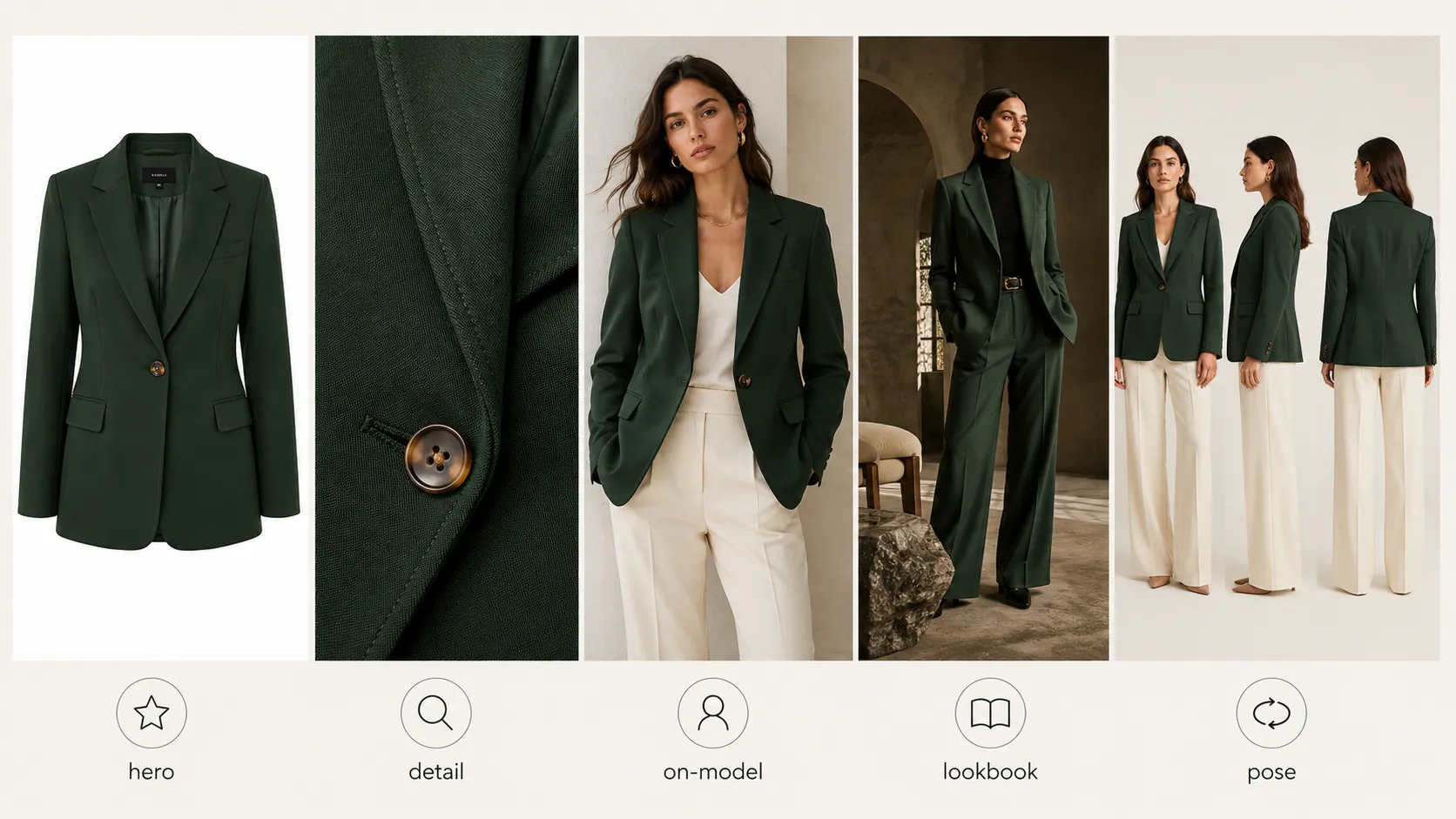
A clothing SKU rarely succeeds with just one image. Shoppers want to see the item from multiple angles, understand the material, imagine how it fits, and picture it in context. Below are the core photo types most fashion brands need and how each one connects to an AI workflow.
Hero / Main Product Shot
The hero shot is the primary image on a product detail page (PDP) and the first impression in marketplace listings. It should show the full garment clearly, usually against a clean background, with accurate color representation and visible design features.
In a traditional workflow, this means a studio setup with controlled lighting, a mannequin or flatlay surface, and post-production cleanup. With AI, you can generate clothing product photos with AI by uploading a strong reference image of the garment and guiding the output with a prompt that specifies background, lighting, angle, and presentation style.
What to check in AI output: overall color accuracy, garment shape consistency with the original, key design elements like pocket placement or neckline, and whether the item looks proportional and commercially presentable.
Detail and Close-Up Shots
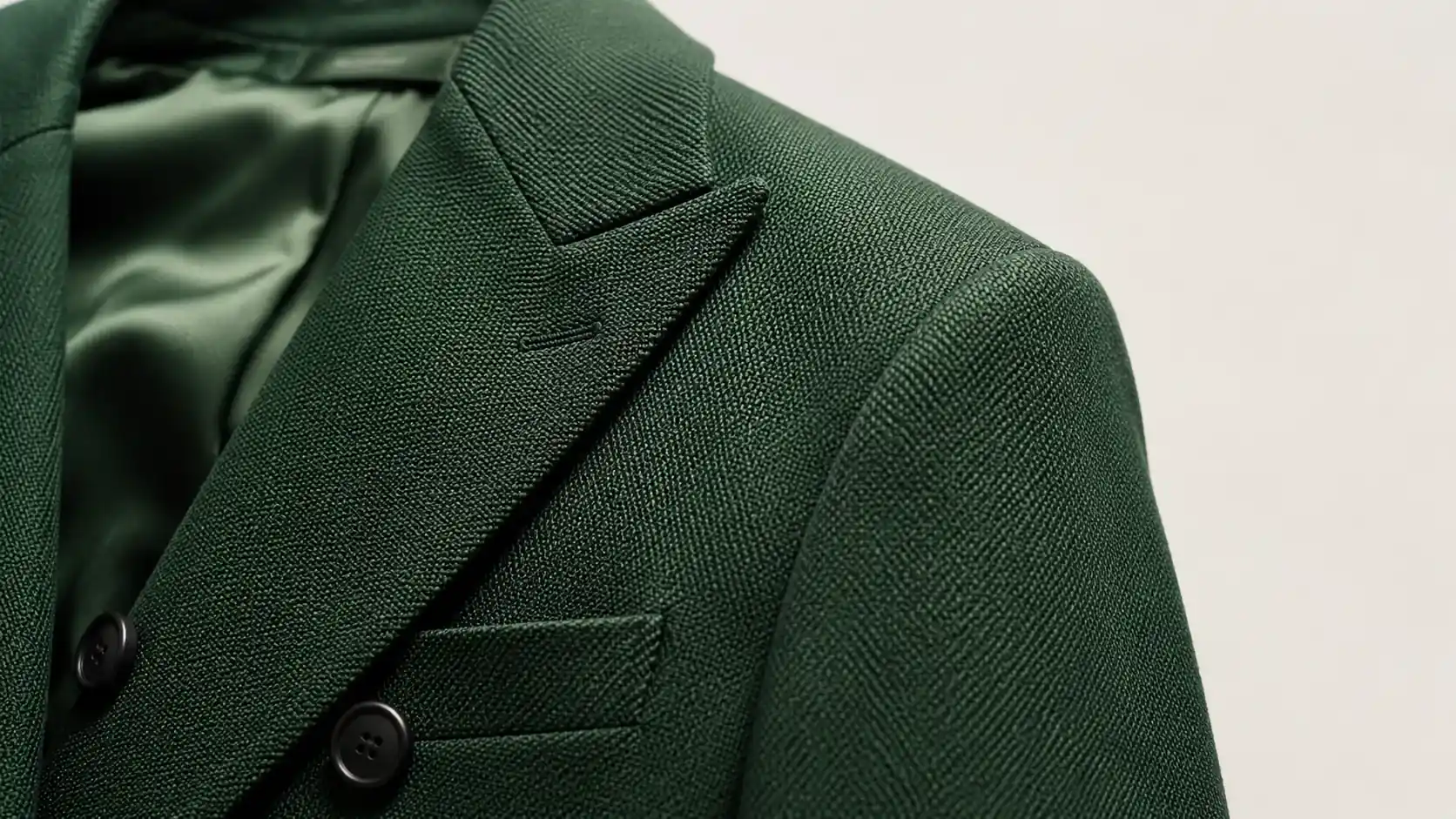
Detail shots show shoppers what they cannot see from a distance: fabric texture, stitching quality, button and zipper hardware, label text, print sharpness, and small design accents. These images build trust and reduce return rates caused by unmet material expectations.
For detail-focused outputs, use a tool designed specifically for close-up garment work. You can create apparel detail shots and fabric close-ups by uploading both a main product image and a detail crop that shows the specific area you want preserved (fabric weave, logo, print pattern, or seam construction).
What to check: fabric weave clarity, whether small prints or repeating patterns stay consistent, legibility of any text or labels, button/zipper realism, and whether the close-up matches the hero shot in color and material appearance.
On-Model and Lifestyle Shots
On-model images show fit, drape, scale, and styling context. They help shoppers understand how the garment looks when worn, which is one of the hardest things to communicate through flat product photography alone.
AI can generate on-model or lifestyle visuals from a product reference image. The workflow takes your garment photo and places it into a styled scene or onto a figure, giving you campaign-ready visuals without the cost of model bookings, styling, and location production.
What to check: natural-looking fit and drape behavior, proportion accuracy between garment and body, fabric folding and movement that looks physically plausible, and whether the overall composition matches your brand's visual tone. These outputs tend to need more iteration than hero or detail shots because the AI must infer how fabric behaves on a human form.
Lookbook and Editorial Shots
Lookbook images tell a collection story. They connect individual products to a brand mood, seasonal theme, or editorial direction. A well-executed lookbook set helps shoppers imagine how items work together and gives marketing teams campaign assets for social media, email, and ads.
Instead of planning a full editorial shoot, you can turn garment images into lookbook variations from existing product photos. Upload a main image, a detail shot if available, and optionally a back-view reference, then generate multiple styled compositions that maintain visual consistency across frames.
What to check: visual coherence between frames, whether the brand mood comes through consistently, color harmony across the set, and whether garment details remain recognizable even in more stylized compositions.
Pose Variation Shots
Pose variations give shoppers multiple angles of the same garment without requiring additional photography. They enrich product pages, support A/B testing for conversion optimization, and give ad teams more options for creative testing.
You can generate pose variations for clothing product pages by selecting from a pose library and generating batch outputs from a single source image. Each pose shows the same garment from a different angle or stance while aiming to keep clothing structure and identity consistent.
What to check: garment structure consistency across poses (does the collar look the same in every frame?), face and hand accuracy if those areas are visible, and whether the variations actually add useful information rather than repeating similar viewpoints.
Garment-Specific Challenges in AI Photography (and How to Handle Them)
Clothing is harder to render accurately than many other product categories because fabrics have physical properties that AI models do not always reproduce convincingly. Understanding these challenges helps you choose the right inputs, tools, and review checkpoints.
Fabric Texture and Material Fidelity
Some fabrics translate well to AI generation. Solid-color cotton, denim, fleece, and structured knits usually render clearly because they have predictable surface behavior. Sheer materials, high-shine synthetics, heavily textured boucl茅, and liquid-like fabrics (satin, silk charmeuse) are more challenging because the way light interacts with them depends on folds, layering, and movement that AI may not simulate naturally.
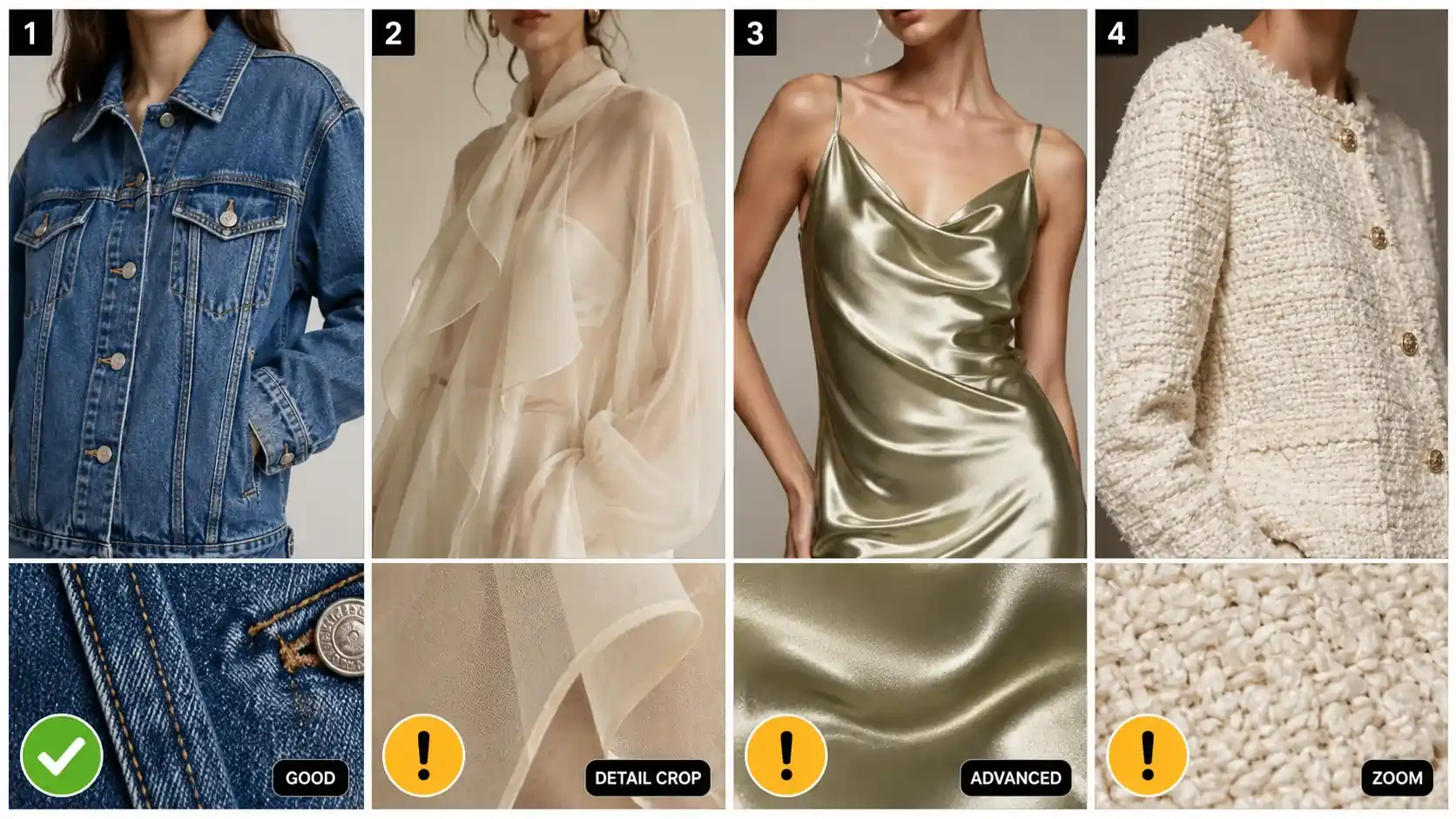
How to handle this: start with the clearest possible reference image that shows the fabric under good lighting. If texture preservation is critical, consider using a model designed for stronger detail restoration. Nano Banana Pro is built for advanced commercial visuals where fabric texture and material fidelity matter more than speed or cost efficiency. Always review fabric areas at full zoom before approving output.
Prints, Patterns, and Logo Accuracy
Small repeating patterns (stripes, checks, micro-prints) and text elements (brand logos, care labels, printed graphics) are among the most common failure points in AI clothing output. Models may blur fine repeats, shift pattern alignment, or garble text that looked clear in the reference.
How to handle this: upload a dedicated detail crop that shows the print or logo area at high resolution. Use this detail image as a secondary input so the model has explicit visual information about what the pattern should look like. After generation, zoom into every print-critical area and confirm that repeats stay regular, text remains readable, and logos have not distorted or wandered.
Collars, Cuts, and Structural Features
Garment construction details often shift in AI generation. A crew neck may become a V-neck. A cropped sleeve might extend to the elbow. A boxy silhouette can taper unexpectedly. Back-view representations are particularly unreliable because many reference images only show the front of the garment.
How to handle this: include a back-view reference image whenever possible. Be specific in your prompt about structural terms (crew neck, three-quarter sleeve, cropped length, relaxed fit). After generation, compare every structural feature against the original garment photo and flag anything that has changed shape, length, or position.
Color Accuracy Across Variations
When you generate multiple images from the same reference, colors can drift between outputs. A navy blue in the hero shot might read as indigo in the lifestyle version. A warm cream in the detail shot could shift to a cooler off-white in the lookbook frame.
How to handle this: use your original reference image as a color anchor. If you generate a batch of variations, compare them side by side before publishing and note any significant color shifts. For color-critical products (uniforms, branded merchandise, items sold in exact shade options), plan to correct obvious drift manually rather than relying on AI color consistency alone.
How to Build a Clothing Product Photography Workflow with AI
A repeatable workflow produces better results than ad-hoc generation. Below is a four-step framework that works for most fashion ecommerce scenarios.
Step 1: Start with Strong Reference Images
The quality of your AI output depends heavily on the quality of your input. A strong clothing reference image should meet these criteria:
- Even, natural lighting that shows true color and reveals fabric texture without harsh shadows or blown-out highlights.
- Full-garment visibility where the entire item is visible and not cropped at key edges (hem, cuffs, collar).
- Neutral or simple background that does not compete with the garment for visual attention. If needed, you can remove backgrounds from clothing reference images before using them as AI inputs.
- High enough resolution that fabric weave, print detail, and construction seams are visible when zoomed in.
For garments where detail accuracy is especially important, prepare a secondary detail crop that focuses on the most critical area (fabric texture, logo placement, print pattern, or unique construction feature). Having both a main image and a detail image gives the AI more information to work with.
Step 2: Match the Photo Type to the Right AI Workflow
Not every clothing image should be generated the same way. Match your target output to the right tool and approach:
| Photo Type | Recommended Workflow | Model Consideration |
|---|---|---|
| Hero / main product shot | Reference-based generation with clean background prompt | Standard model for routine use; advanced model for higher-quality commercial needs |
| Detail / close-up | Detail-focused generation with dedicated detail crop input | Advanced model preferred for texture and print preservation |
| On-model / lifestyle | Reference-to-lifestyle generation with styling prompt | Expect more iteration; review fit and drape carefully |
| Lookbook / editorial | Multi-image upload with collection-style prompting | Use a workflow designed for multi-frame consistency |
| Pose variation | Pose library selection with batch generation | Check structural consistency across poses |
Inside iCreat AI, the AI Product Photography workspace supports reference-based generation for hero shots, lifestyle variants, and campaign visuals. For detail-specific work, the AI Fashion Detail Image Generator accepts dedicated detail inputs. For lookbook and pose needs, the specialized Lookbook and Pose Generator tools provide targeted workflows that general-purpose generation cannot match.
Model choice also matters. GPT-image-2 supports standard and advanced clothing generation workflows, while Nano Banana Pro is the stronger option when detail restoration, realistic lighting, and polished commercial output are priorities.
Step 3: Review Output for Garment Accuracy
Every AI-generated clothing image should pass a review checklist before it goes live. Use this framework:
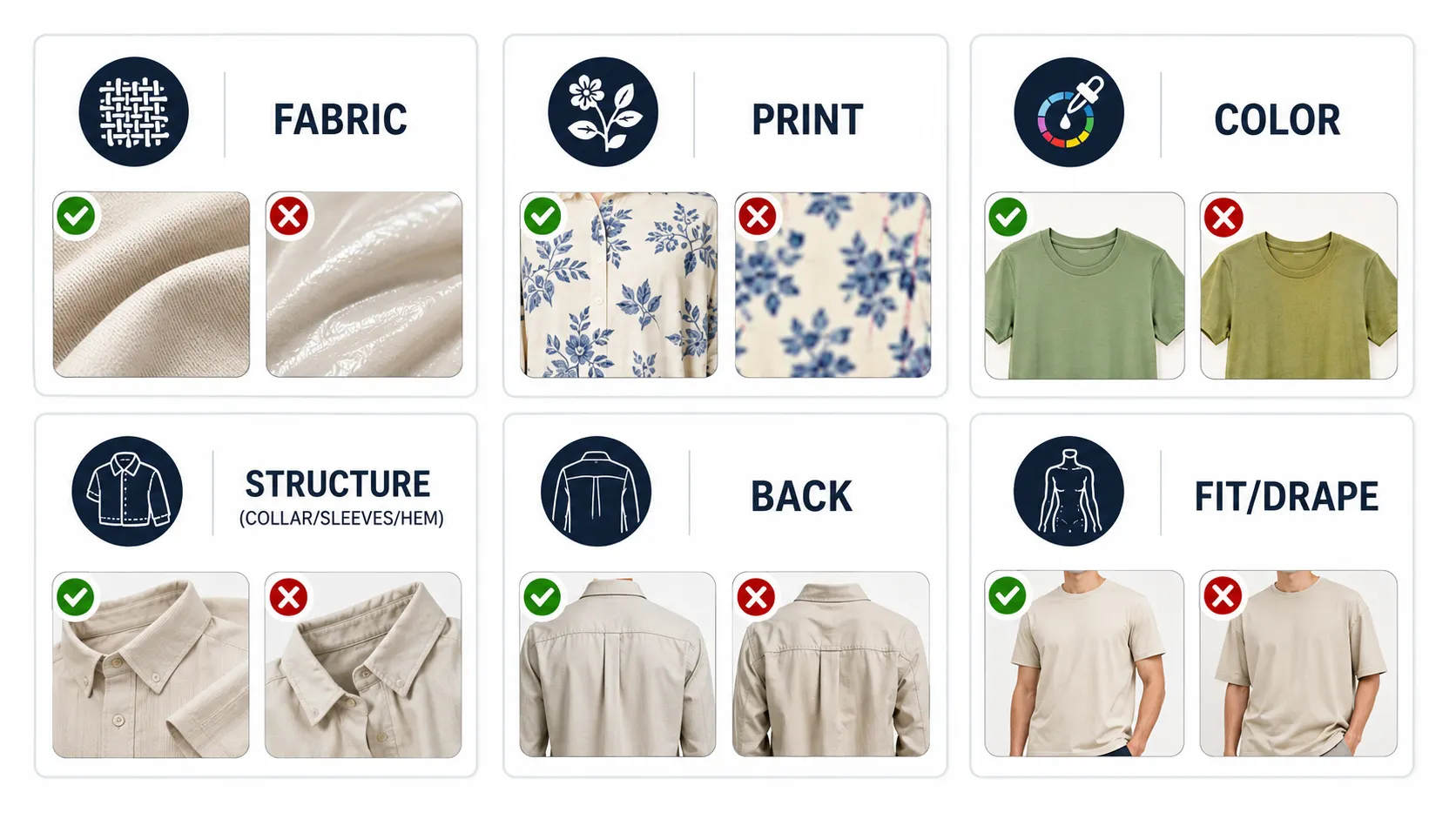
- Fabric and material: Does the texture match the reference? Does the material look physically plausible?
- Print and pattern: Are repeats consistent? Is text readable? Has the logo stayed in position?
- Color: Does the output match the reference within an acceptable range? Have there been noticeable shifts?
- Structure: Are collar, sleeves, hem, and cut consistent with the original garment?
- Back view (if applicable): Does the rear representation match what you know about the actual product?
- Fit and drape (for on-model shots): Does the garment behave naturally on the body?
If an output fails any checkpoint, adjust the prompt, add or change a reference image, switch models, or regenerate. Iteration is normal. Acceptance criteria should vary by use case: a social media creative may tolerate minor imperfections that a marketplace listing image cannot.
Step 4: Scale Across Your Collection
Once you have a working workflow for one SKU, apply it systematically across your catalog. Prioritize SKUs based on business impact:
- New arrivals that currently have minimal visual coverage.
- High-traffic products that would benefit from additional angles or campaign variations.
- Seasonal items that need refreshed visuals for upcoming collections.
- Products with weak PDP performance that may improve with richer imagery.
As you scale, connect product photos to downstream campaign assets. A hero shot can feed into a lookbook set. A successful on-model concept can be adapted for seasonal backgrounds using AI Image Replacer. Final assets can be run through an image upscaler to reach 4K resolution for high-placement storefront or print use.
Document what works (which prompts, which reference setups, which model choices) so the team can repeat successful configurations for future SKUs without starting from scratch each time.
What to Look For in an AI Clothing Photography Tool
Not every AI image generator handles clothing well. When evaluating a tool for fashion product photography, assess these capabilities:
- Reference image support: Can you upload one image or multiple images (main + detail + back view)? Multi-reference workflows produce significantly better garment accuracy than single-image inputs.
- Garment-specific output quality: Does the tool produce commercially usable clothing visuals, or does it treat garments the same as generic objects? Look for examples that show fabric texture, print preservation, and structural consistency.
- Detail preservation capabilities: Does the tool accept dedicated detail crops? Does it offer model options optimized for higher-fidelity output?
- Workflow variety: Can the same platform handle hero shots, detail images, lookbook sets, pose variations, and seasonal adaptations, or will you need separate tools for each?
- Output resolution and format: Does it support up to 4K output? Does it offer transparent PNG when you need cutout product images?
- Model choice: Can you select between standard and advanced generation models depending on the quality needs of each project?
iCreat AI's product photography tool is built around this type of multi-workflow approach. It supports reference-based generation for hero and campaign visuals, integrates detail-image inputs for close-up accuracy, offers both GPT-image-2 and Nano Banana Pro for different quality tiers, and connects to supporting tools for lookbooks, pose variations, background removal, and upscaling within a single workspace.
Common Mistakes When Using AI for Clothing Photography
These mistakes show up repeatedly in fashion ecommerce AI workflows. Avoiding them will improve your output quality and reduce rework.
Using low-quality or poorly lit reference images. A dark, blurry, or shadow-heavy reference gives the model almost nothing useful to work from. Invest time in capturing or selecting the best possible source image before generating anything.
Not reviewing output at 100% zoom for garment details. An image that looks good at thumbnail scale may reveal blurred prints, distorted logos, or shifted collars when viewed at full resolution. Always zoom in before publishing.
Expecting AI to perfectly replicate complex fabric behaviors. Sheer draping, liquid-like satin movement, and highly reflective materials are difficult for current AI models. Adjust expectations for these fabric types and plan for more manual correction.
Skipping the detail image input when garment specifics matter. If your product has a prominent print, logo, or unique texture, upload a detail crop. Relying only on a full-garment reference increases the risk of losing fine detail in generation.
Using the same prompt approach for every photo type. A prompt that works for a clean hero shot will not produce a good lookbook image or a convincing on-model result. Tailor your prompting to the target output type.
Publishing AI outputs without checking print, logo, or text accuracy. This is the fastest way to create customer complaints and returns. Treat every text element, logo, and patterned area as a required review checkpoint.
FAQ
Can AI create good clothing product photos?
Yes, when the workflow accounts for garment-specific needs. AI can produce commercially useful hero shots, detail images, lifestyle visuals, and lookbook variations from reference images. Output quality depends on reference image clarity, prompt specificity, model choice, and thorough review. AI works best for structured garments with solid colors or simple patterns. Complex fabrics, intricate prints, and highly detailed construction require more careful input preparation and stricter output review.
What types of clothing work best with AI photography?
Structured garments with solid colors or simple patterns tend to perform well: basic tees, denim jackets, knit sweaters, hoodies, cargo pants, and minimalist dresses. Challenging categories include sheer garments (chiffon, tulle), highly reflective materials (metallic coatings, wet-look synthetics), items with very small or irregular repeating prints, and garments with unusual or asymmetrical construction. Start with easier categories to learn the workflow, then progress to harder ones as you develop review habits.
How do I preserve fabric details in AI-generated clothing photos?
Three factors matter most: reference image quality, detail image inputs, and model choice. Use a well-lit, high-resolution reference that shows fabric texture clearly. Upload a dedicated detail crop when texture or print accuracy is critical. Choose a model designed for detail restoration when quality is a priority. Review every output at full zoom with a focus on fabric areas before approving it for use.
Can AI replace traditional fashion photography?
Not entirely. AI is strongest at producing variations, filling gaps in visual coverage, and scaling campaign production beyond what a single shoot can support. Traditional photography still delivers the highest level of creative control, physical accuracy, and brand consistency for key assets like hero launch imagery and major campaign anchor shots. The most effective approach uses AI to extend traditional photography, not eliminate it.
How many product photos does a clothing item need?
Most ecommerce best practice sources suggest five to eight images per SKU for a complete product page. A typical set includes one hero shot, two to three detail or close-up shots, one or two lifestyle or on-model images, and sometimes a size-reference or back-view image. Campaign and social needs add more on top of that baseline. AI can help fill the gap between what one shoot provides and what a complete visual system requires.
What should I check before publishing AI-generated clothing photos?
Run through this minimum checklist: fabric texture looks correct and physically plausible; prints and patterns are consistent with no distortion; logos and text are readable and properly placed; collar, sleeves, hem, and cut match the original garment; color is accurate relative to the reference; back view (if shown) represents the actual product; on-model shots show natural fit and drape. Do not publish until every item on this list passes review.
Conclusion
Clothing product photography with AI works when you treat it as a structured production workflow, not a one-click solution. Start with strong reference images, match each photo type to the right tool and approach, review every output for garment accuracy before publishing, and scale what works across your collection. The brands that get the best results from AI clothing photography are the ones that combine AI's speed and variation capability with careful human review and realistic expectations about what each fabric type and garment category can deliver.
If you have clothing references ready and want to build out your product visual set, log in to iCreat AI and start creating clothing product visuals using the AI Product Photography workspace and supporting tools for detail images, lookbooks, and pose variations.