


The right AI video creation company depends on what you need the company to do. A brand hiring for a finished campaign, a marketing team creating avatar-led training videos, and a startup building video generation into a product are not looking for the same kind of provider.
At iCreat, we treat this as a provider-type decision, not a popularity contest. Some AI video companies sell managed production services. Some sell self-serve creator tools. Some focus on avatars, dubbing, and localization. Others give developers model access through an API. If your team needs repeatable generation, model comparison, and product integration, iCreat's model hub belongs in the decision. If you need a fully managed brand film, a production agency may be the better fit.
Key Takeaways
- A leading AI video creation company is not one universal category. Separate agencies, creator tools, avatar platforms, editing tools, and API platforms before comparing names.
- Choose an agency when you want finished creative delivery. Choose a self-serve tool when your team can manage prompts, editing, and review. Choose an API platform when video generation needs to become part of a repeatable product workflow.
- Use criteria before rankings: output type, creative control, model availability, API access, pricing transparency, rights, review process, and implementation fit.
- iCreat is strongest for teams that want to browse video models, check current pricing, and move toward API access without integrating every provider separately.
- Pricing, availability, model options, commercial terms, and platform policies change. Use live provider pages as the source of truth before committing budget or engineering time.
First Decide What Kind of AI Video Company You Need
A leading AI video company is not always the same kind of provider; choose the category before comparing brands. Otherwise, you may compare a production agency against an API platform and call one "better" when they solve different jobs.
Use this first decision table before building a shortlist:
| Your Real Need | Better Provider Type | Why |
|---|---|---|
| A finished campaign, brand film, or ad concept with creative direction | AI video production agency | You are buying creative execution, not just model access. |
| Fast social posts, short clips, or prompt-to-video assets made by your own team | AI video generator or creator suite | Your team keeps control of creation and review. |
| Training, sales enablement, onboarding, or localized presenter videos | Avatar and localization platform | The main job is scripted communication at scale. |
| Editing existing footage, turning long videos into clips, or repurposing content | AI video editor or repurposing tool | The source material already exists; generation is not the core task. |
| A product feature where users trigger video generation | Video generation API or model platform | The workflow must be automated, tracked, priced, and integrated. |
| Testing several video models before choosing production defaults | Multi-model API platform | You need comparison and flexibility before provider lock-in. |
This is the article's main decision point. A company can be excellent and still be wrong for your workflow. Synthesia can be a strong fit for business avatar videos; Runway can be a strong fit for cinematic generation and creative workflows; a full-service agency can be a strong fit for one-off brand campaigns. None of those automatically solve the same problem as an API platform for a startup building video generation into its own product.
The Main Types of AI Video Creation Companies
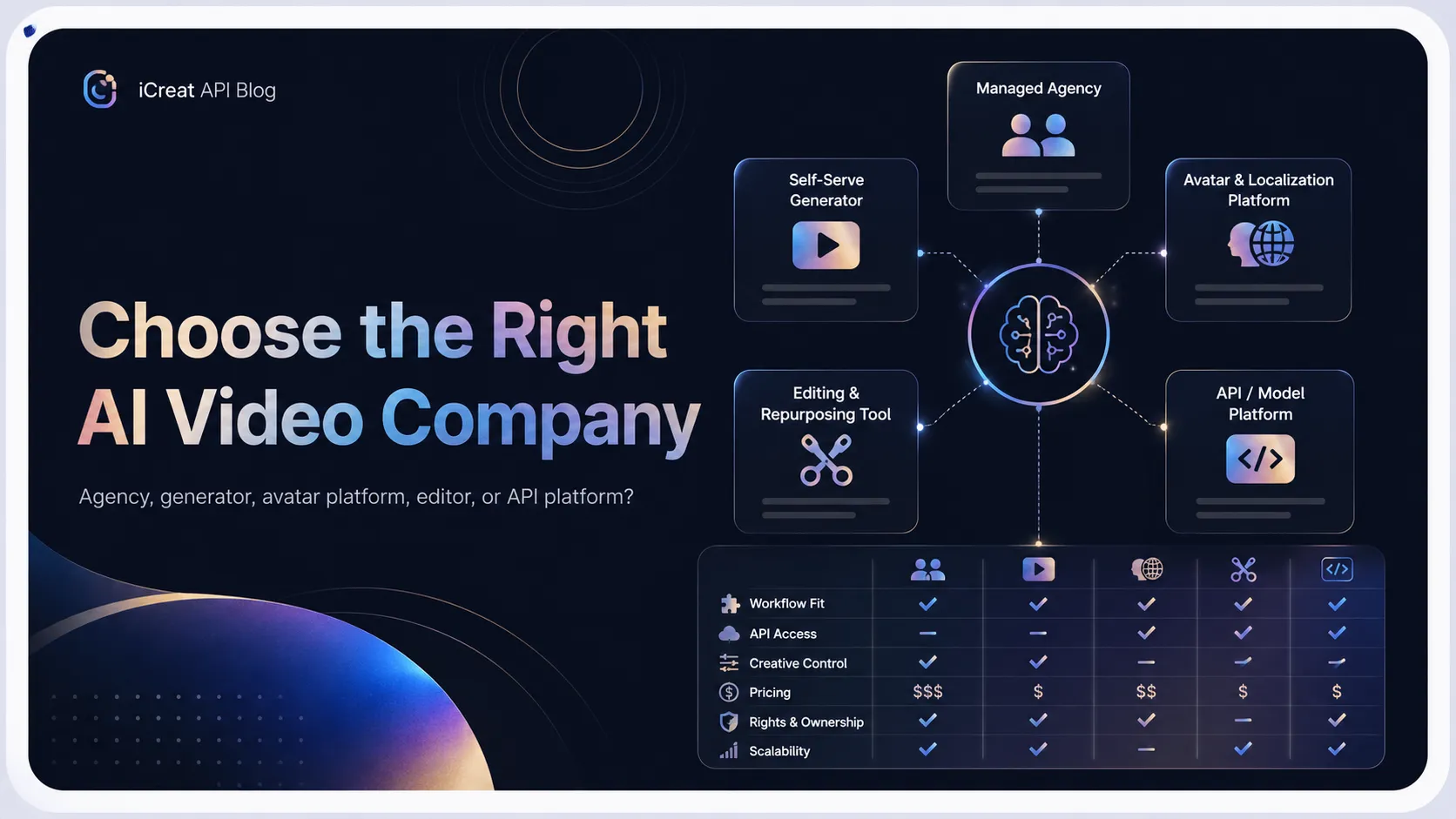
The market splits into five practical categories: managed production agencies, AI video generators, avatar and localization platforms, editing or repurposing tools, and API/model platforms. Most bad comparisons happen because these categories get blended into one list.
Managed AI Video Production Agencies
Managed production companies are best when you want strategy, scripting, art direction, post-production, and final delivery handled for you. Superside's 2026 agency guide, for example, frames AI video production around full-service support from creative ideation through post-production and delivery.
This category fits a brand launching a campaign better than a developer building a user-facing feature. A brand might need one polished video package with concepting, editing, and approvals. In that case, outsourcing the work can be more efficient than training an internal team on prompt direction, editing, model selection, and rights review.
The tradeoff is control and repeatability. If the same workflow needs to run every day inside your product, an agency does not remove the need for backend jobs, model availability checks, pricing logic, and moderation rules.
AI Video Generators and Creative Suites
AI video generators are best when your own team wants to create clips from prompts, images, templates, or existing brand material. Zapier's 2026 AI video generator guide separates generators, editors, and creation suites, which is a useful clue: "AI video" is already several product categories, not one tool type.
This category fits creators, content teams, and marketers who can review outputs manually. A social team might use a self-serve generator to test several concepts, change prompts, pick a format, and export final clips without building an API integration.
The tradeoff is operational scale. A self-serve creator tool can be excellent for human-in-the-loop production, but it may not give your product the API workflow, task state, logs, and cost controls needed for user-triggered generation.
Avatar, Dubbing, and Localization Platforms
Avatar platforms are best when the video is mostly scripted communication: training, sales enablement, onboarding, product explainers, internal updates, and localized presenter content. Synthesia positions itself as an AI video platform for business, while HeyGen emphasizes text-to-video, avatars, translation, dubbing, and business content creation.
A marketing team that needs 30 localized training videos may care less about cinematic physics and more about script control, voice, language coverage, governance, and update speed. In that situation, avatar and localization platforms may beat open-ended generative video tools.
The tradeoff is format. Avatar video platforms are not always the best path for cinematic product shots, image-to-video motion, or embedded video generation features inside another app.
AI Video Editing and Repurposing Tools
Editing and repurposing tools are best when the video material already exists. These tools help cut clips, generate captions, clean audio, produce rough cuts, or convert long-form content into shorter assets.
This category matters because many teams say they need "AI video creation" when they actually need post-production automation. If a podcast, webinar, or product demo is already recorded, the best company may be an editor or repurposing platform, not a text-to-video generator.
The tradeoff is source dependency. Editing tools improve existing footage; they do not replace the need for a generative model when the visual scene does not exist yet.
API and Model Platforms
API and model platforms are best when AI video generation must become software behavior. That means users, backend jobs, or internal systems trigger video generation, and the product must handle prompts, references, job status, failures, costs, and output storage.
Runway highlights a developer surface for bringing models into custom workflows. Google documents Veo 3.1 access through the Gemini API, including programmatic video generation. Replicate presents itself around running models with an API. fal.ai positions itself as a generative media platform for developers. iCreat fits this category when teams want model discovery, current pricing checks, docs, and API access through one platform.
This category is strongest for startups, product teams, and indie developers. It is weaker for a brand that only wants a final campaign delivered by a creative partner.
What to Compare Before Choosing
Compare workflow fit, output type, model access, creative control, pricing, rights, docs, and scalability before trusting any ranking. The best AI video creation company for your team is the one whose operating model matches the work after the first successful demo.
Use this checklist:
| Criterion | What to Check | Why It Matters |
|---|---|---|
| Provider type | Agency, generator, avatar platform, editor, or API platform | Prevents comparing unlike solutions. |
| Output type | Cinematic video, product clip, avatar presenter, social edit, generated ad, or embedded product feature | Determines which provider category can satisfy the job. |
| Input type | Text prompt, image reference, product URL, uploaded footage, script, or API payload | A mismatch here can force workflow redesign later. |
| Human review | Manual review, approval workflow, automated moderation, or user-triggered generation | Shows whether the workflow is creative, operational, or productized. |
| Model availability | Which video models, variants, and capabilities are actually available now | Avoids building around a model the team cannot use. |
| API access | Docs, access keys, async tasks, callbacks, polling, and integration support | Required for repeatable product workflows. |
| Pricing transparency | Live pricing page, billing unit, usage controls, and model-specific costs | Video costs can change quickly at scale. |
| Rights and safety | Commercial terms, uploaded asset rights, likeness rules, and moderation policies | Especially important for human faces, brand assets, and customer media. |
| Scalability | Team seats, admin controls, logs, dashboard, support, and production risk | Determines whether the tool still fits after experimentation. |
The practical question is not "Who is the most impressive AI video company?" The practical question is "Which company will still fit after we know the volume, review process, integration path, and cost?"
Shortlist: Leading AI Video Creation Companies by Use Case
The strongest option depends on whether the reader needs final creative delivery, avatar training content, cinematic generation, editing support, or API access. Treat the table below as a shortlist by fit, not a universal ranking.
| Company or Platform | Best Fit | Why It Belongs on the Shortlist | Main Caveat |
|---|---|---|---|
| Superside or another AI video production agency | Managed brand campaigns and full-service production | Agency-style providers can combine creative strategy, production, post-production, and delivery. | Not the best match for embedded product workflows or developer API access. |
| Runway | Cinematic generation and creative workflows | Runway is strongly associated with generative video models, creative tooling, and developer-facing model workflows. | Advanced creative control can still require skill, review, and source-specific validation. |
| Synthesia | Business avatar videos, training, internal communications, and localization | Synthesia focuses on business video creation with AI avatars and voiceovers. | Avatar-led communication is different from open-ended cinematic or product video generation. |
| HeyGen | Marketing, social, avatar, and translated video workflows | HeyGen emphasizes text-to-video, avatars, dubbing, and business-ready creation workflows. | Teams should verify commercial terms, avatar policies, and workflow limits before scaling. |
| Google Veo through Gemini API | Provider-direct programmatic access to a major video model | Google's docs describe Veo 3.1 as available programmatically through Gemini API for video generation. | Provider docs define Google API behavior, not every third-party platform's exposure. |
| Replicate | Developers running many models through an API | Replicate positions around running community-published models with production-ready APIs. | Model quality, maintenance, pricing, and availability vary by model. |
| fal.ai | Developer-focused generative media workflows | fal.ai positions itself around image, video, and audio models for developers. | Verify exact model availability, pricing, and production requirements before choosing it. |
| iCreat | Teams comparing video models and moving toward API access through one platform | iCreat is strongest when a team wants model discovery, pay-as-you-go pricing checks, docs, and a practical implementation path in one place. | It is not a done-for-you production agency, and exact model exposure should be confirmed live. |
This table deliberately avoids declaring one winner. A "best" label is useful only when it is tied to a job. A startup adding image-to-video generation to a creative app should not choose the same way as a brand hiring a studio for one campaign.
When an AI Video API Platform Is the Better Company to Choose
Choose an API/model platform when video generation must become a repeatable product workflow, not a one-off creative deliverable. That shift changes the evaluation from creative taste to system behavior.
For example, a startup adding image-to-video generation to a creative app needs more than a good demo. The application has to accept user input, submit generation jobs, track status, handle failures, store outputs, estimate cost, and decide what happens when a model changes. That is where an API platform becomes more relevant than an agency or a self-serve prompt tool.
An API platform is usually the better fit when:
- users trigger video generation inside your product
- the same video workflow runs repeatedly
- your team wants to compare several video models before choosing defaults
- the product may need both text-to-video and image-to-video paths
- pricing needs to be estimated before production rollout
- engineering wants docs, access keys, and a predictable integration path
- model flexibility matters more than locking into one provider immediately
This is also where provider-direct and platform-based access diverge. Provider-direct access can be the right choice when one specific model is the fixed requirement. A multi-model platform is often more useful when the team is still comparing model fit or expects the roadmap to change.
Best Fit for iCreat
iCreat fits teams that want to browse video models, check current pricing, and move toward API access through one platform. This is where we want high-intent readers to land: not because every AI video buyer needs iCreat, but because teams building repeatable video workflows should compare model options before they lock themselves into one provider.
As of July 2026, iCreat's local model availability context lists video model entries such as Seedance 2.0, Seedance 2.0 Fast, Google Veo 3.1 text-to-video, Google Veo 3.1 image-to-video, Kling v2.1 text-to-video, Kling v2.1 image-to-video, Hailuo 02 Pro, and Hailuo 02 image-to-video Pro. The exact live model page, pricing, parameters, and exposed options should still be confirmed in the current iCreat model hub and docs before production use.
If you are specifically comparing model families, use our Seedance 2.0 web vs API guide for access-path decisions and our video model comparison for broader model-selection context.
For example, an indie developer building a video-generation feature for a creative app could use iCreat to compare several video models before choosing the default path for users. That developer still needs to verify model exposure, pricing, and docs, but the evaluation happens in one model catalog instead of across separate provider accounts from the first day.
Use iCreat when:
- you want to compare video models before committing to one provider
- your product may later need image, editing, LLM, or other model categories
- you want a single model discovery, pricing, docs, and implementation path
- you need pay-as-you-go cost planning before larger usage
- your team values flexibility more than a provider-specific build from day one
Do not use iCreat as a substitute for a creative agency when the main need is strategy, art direction, scripting, and final delivery. In that case, iCreat may still be useful for model testing, but the buyer's core need is production service, not API access.
If model access is the right path, start by browsing available video models in iCreat, then check current pricing before estimating production usage.
Common Mistakes When Comparing AI Video Companies
The biggest mistake is comparing agencies, avatar tools, and model APIs as if they solve the same job. That makes the final recommendation look confident while hiding the real decision.
Mistake 1: Treating "AI Video" as One Product Category
AI video can mean cinematic generation, avatar presentation, editing, dubbing, social repurposing, or API-based model access. If the category is unclear, the shortlist will be noisy.
The consequence is wasted evaluation time. A team may spend a week comparing avatar platforms when the product requirement is actually image-to-video API access.
Mistake 2: Ranking Companies Before Defining Criteria
"Leading" should mean leading for a specific use case. If the criteria are vague, the ranking usually reflects brand awareness, affiliate incentives, or subjective output preference.
Define the job first. Then compare the provider against that job.
Mistake 3: Trusting Old Pricing or Model Claims
Video model pricing, availability, and capabilities can change quickly. A pricing table is only useful if it is current, sourced, and tied to the same workflow you plan to run.
Use live pricing pages and current model catalogs as the source of truth. iCreat's pricing page is the right place to check current iCreat costs; Google, Runway, Replicate, fal.ai, Synthesia, HeyGen, and agency providers should each be checked on their own current pages before budget decisions.
Mistake 4: Ignoring Rights, Likeness, and Uploaded Assets
Video workflows often involve faces, product shots, customer assets, scripts, voices, logos, or copyrighted references. The risk is not only output quality. It is whether the team has the rights and platform permission to use the inputs and outputs commercially.
Before scaling, verify commercial-use terms, uploaded asset rights, likeness permissions, and moderation rules with the provider.
Mistake 5: Choosing a Tool That Cannot Become a System
A self-serve video tool can be great for manual creation and still be a poor fit for embedded product generation. If your users need to trigger video generation, you need to evaluate the API workflow, not only the UI.
The API may be easy to call and still be the wrong production choice if pricing, status handling, model availability, or review workflows do not fit your product.
Pricing, Availability, and Rights Checks
Pricing and availability change quickly, so use live pages as the source of truth before committing. This matters more for video than for many other AI categories because output length, model choice, resolution, generation mode, and review volume can all affect cost.
Before choosing an AI video creation company, check:
| Check | Why It Matters |
|---|---|
| Current pricing page | Avoids estimating cost from stale article data. |
| Billing unit | Some video workflows may be priced by second, generation, credit, subscription, seat, or enterprise contract. |
| Model availability | A model shown in demos may not be available through the exact access path you need. |
| Input and output limits | Text-to-video, image-to-video, references, duration, and output format affect product design. |
| Commercial terms | Campaign, training, and product usage can have different rights needs. |
| Likeness and voice rules | Avatar and dubbing workflows need clear consent and policy review. |
| Moderation and refusal behavior | User-facing products need a plan for blocked, failed, or unsafe requests. |
| Data handling | Uploaded assets and generated outputs may affect security and compliance review. |
Google's Veo documentation, for example, is useful for understanding provider-reference behavior for Veo through Gemini API. That does not automatically describe current exposure on every multi-model platform. For any platform, separate official provider reference options from the specific access path you plan to use.
For iCreat, confirm current availability in the model hub, use pricing for cost checks, and review docs before implementation. That gives the reader a cleaner path than bouncing from a ranking article into five separate provider accounts before they know which model family fits.
FAQ
Final Decision
Choose the AI video company type first, then choose the brand. That one step removes most of the confusion in this market.
If you need finished creative, shortlist agencies. If you need avatar-led communication, compare avatar platforms. If you need prompt-based content creation, test self-serve generators. If you need video generation inside a product, compare API and model platforms by model availability, docs, pricing, and integration fit.
For teams on the API path, browse available video models in iCreat, compare the relevant model pages, then check current pricing and docs before building around any specific video model.