


A long form AI video generator is useful only if it solves the real production problem: keeping a longer video coherent, affordable, editable, and repeatable. The practical question is not whether AI can create video clips. It is whether your workflow needs a finished creator tool, a model/API pipeline, or a hybrid system that uses AI video selectively.
That distinction matters if you are choosing a workflow on iCreat. If you are a solo creator trying to publish a complete faceless YouTube video, an all-in-one long-form generator may be the faster path. If you are a developer, founder, product team, or advanced creator building a repeatable video workflow, you need to think about models, inputs, pricing, review, automation, and API access before you commit to a tool. That is where we want iCreat to be useful: helping you evaluate video models, check current pricing, and move from manual testing toward API-based workflows when video generation needs to become part of a product or production system.
Key Takeaways
- A long-form video workflow is not just a longer short-form workflow. Script structure, visual continuity, narration, captions, editing, review, and cost control become the main constraints.
- Use an all-in-one long-form AI video generator when you want a finished creator workflow with script, visuals, voiceover, music, captions, and export in one place.
- Use a model/API workflow when video generation must be integrated into an app, dashboard, production pipeline, or user-triggered product feature.
- Use a hybrid workflow when you need long narrated videos but do not want to generate expensive video motion for every second.
- As of July 2026, verify live model availability, pricing, duration, input support, and API behavior before scaling any long-form video process.
What Is a Long Form AI Video Generator?
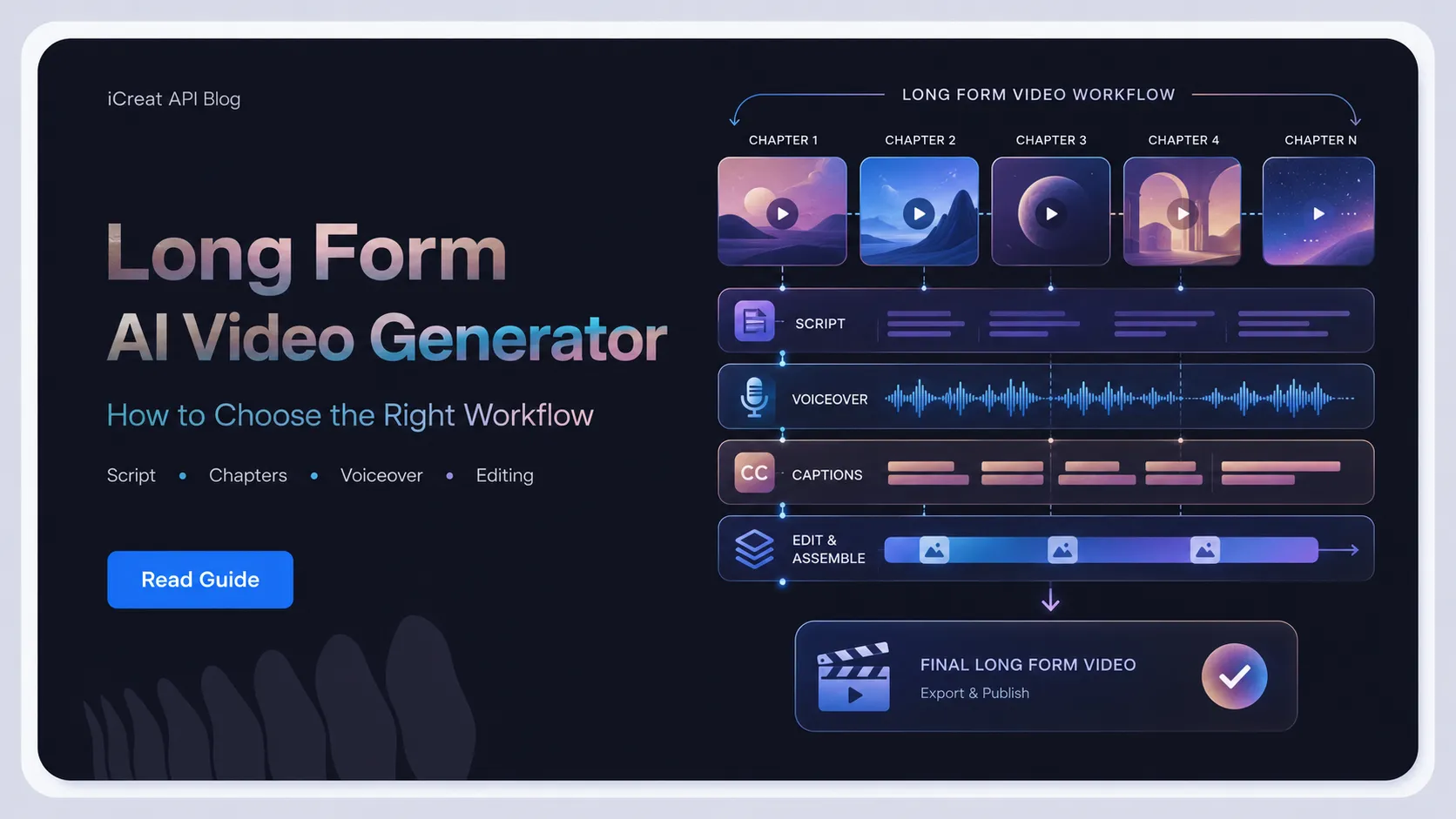
A long form AI video generator creates or assembles videos long enough for YouTube-style viewing, usually by combining scriptwriting, scene visuals, narration, captions, music, editing, and export. In practice, many tools in this category are built for 8-minute, 10-minute, 15-minute, or 30-minute videos rather than single short clips.
The category is broader than text-to-video. A long-form tool may do several jobs at once:
- turn a topic or script into a chaptered video structure
- create or source visuals for each scene
- add AI voiceover or narration
- sync captions and background music
- apply motion effects, transitions, and pacing
- render a finished file for YouTube or another platform
This is why a long-form generator should not be judged only by clip quality. A five-second model demo can look impressive and still be the wrong tool for a 10-minute explainer if it cannot preserve structure, review checkpoints, cost control, and visual consistency.
Live product pages in this SERP make that clear. VideoLlama describes a workflow built around long scripts, assets, voiceovers, preview, and export. Blipix frames long-form generation around script, visuals, voiceover, captions, music, and a finished rendered video. Those examples show the searcher's expectation: they are not just asking for a video model. They are asking for a production workflow.
Why Long-Form AI Video Is Different From Short Clips
Long-form AI video fails in different ways than short clips. A short clip can survive a weak transition, a slightly mismatched visual, or a prompt that drifts after a few seconds. A 10-minute video cannot.
The longer the output, the more the workflow depends on structure rather than raw generation. Four constraints matter most:
| Constraint | Why It Matters More in Long Videos | What to Check |
|---|---|---|
| Script structure | A long video needs a hook, sections, transitions, and a real ending. | Can the workflow plan chapters before generating scenes? |
| Visual continuity | Random styles or inconsistent characters become obvious over many scenes. | Can you lock style, references, or scene direction? |
| Review control | One bad scene can weaken several minutes of the final video. | Can you preview, replace, or regenerate specific segments? |
| Cost control | Every generated second, retry, resolution choice, and export adds up. | Can you estimate cost before scaling production? |
This is the hidden reason many long-form AI tools use a script-first workflow. The video is not treated as one giant generation. It is broken into sections, scenes, visuals, narration, and final assembly. That makes the output easier to review and cheaper to revise.
For teams building with APIs, the same logic applies. Do not start by asking, "Which model can make the longest video?" Start by asking, "Which parts of the long video actually need generated motion, and which parts need orchestration, narration, image generation, editing, and review?"
Which Long-Form AI Video Workflow Should You Choose?
Choose the workflow based on the job you need the system to perform. An all-in-one tool is best for finished creator output, an API workflow is best for product integration, and a hybrid workflow is often the safest path for longer narrated videos that need both control and scale.
| Workflow | Best Fit | Main Strength | Main Tradeoff |
|---|---|---|---|
| All-in-one long-form generator | Creators who want a finished video from a topic or script | Handles script, visuals, voiceover, captions, music, and export in one interface | May be less flexible for custom product logic, model selection, or API integration |
| Pure video model/API workflow | Developers building video generation into an app or backend process | Gives software control over requests, outputs, retries, review, and automation | Requires orchestration, storage, task handling, UI, and cost controls |
| Hybrid long-form workflow | Teams creating longer videos while controlling cost and quality | Uses scripts, images, narration, and selective generated clips where motion matters | Requires more workflow design than a one-click tool |
Use an All-In-One Tool When Finished Output Matters Most
An all-in-one long-form AI video generator is the better starting point when your goal is to publish videos, not build video infrastructure.
This fits a faceless documentary channel, a solo education creator, or a marketing team producing narrated explainers. The workflow value is convenience. You enter a topic or script, choose a style and voice, review the result, and export.
The tradeoff is that the tool may make product decisions for you. It may choose how scenes are assembled, how costs scale, which models are used, and how much control you have over each step. That can be fine for publishing. It can become limiting when you need to embed generation inside your own product.
Use a Model/API Workflow When Video Generation Becomes a Product Feature
An API workflow is the stronger fit when video generation must be triggered, tracked, priced, and controlled by software.
This fits a startup adding video generation to a design app, a product team creating user-triggered product videos, or a platform that needs consistent backend jobs. In those cases, the real requirements include authentication, request handling, job status, retries, asset storage, moderation, cost limits, and user-facing review.
At that point, the video model is only one part of the system. The product also needs logic around when to generate, how long to generate, what input types are allowed, how failures are handled, and when a user should review or regenerate output.
Use a Hybrid Workflow When Long Runtime and Cost Both Matter
A hybrid workflow is often the most practical choice for 8-15 minute narrated videos. Use AI video clips only where real motion matters, and use scripts, generated images, motion effects, voiceover, and editing for the rest.
This matters because long-form cost can grow quickly if every second is generated as video. A 10-minute educational explainer may not need 600 seconds of unique generated motion. It may need a strong script, clear sections, useful visuals, steady narration, captions, and a few high-value animated or generated clips where motion improves understanding.
That approach is less flashy than "one prompt creates everything," but it is often more controllable. It also gives teams a path to test different models, compare output quality, and reserve expensive generation for moments that justify it.
When iCreat Makes Sense for Long-Form Video Workflows
Use iCreat when the long-form video problem is moving from manual content creation into repeatable model evaluation, cost planning, and API workflow design. We do not want to describe iCreat as a one-click 30-minute video generator unless the live product experience supports that exact workflow.
As of July 2026, we recommend treating iCreat as the model and API evaluation path for this use case. Start with the live Seedance 2.0 model page to confirm the current model details exposed on iCreat, then use the pricing page as the source of truth for current costs. Check both before production use because model exposure, supported settings, and pricing can change.
The concrete iCreat advantage is operational. A creator tool may hide the model stack behind one export button. That is useful for publishing, but less useful when your team needs to compare models, estimate usage, design retries, and later automate generation through an API. On iCreat, the path is model-first: review a live video model, check pricing, then use the docs and dashboard when the workflow is stable enough to automate.
iCreat is a strong fit when:
- you want to test video model output before building automation
- your product may need more than one media model over time
- your team wants to compare model options before locking into one provider path
- pricing visibility matters before scaling generation volume
- your workflow needs an API path rather than only a manual editing interface
iCreat is not the best fit if your only requirement is a finished faceless YouTube video from one prompt with no product integration. In that case, a dedicated all-in-one creator tool may be faster. We are the better fit when the workflow becomes repeatable, technical, or model-sensitive.
A Practical 10-Minute AI Video Workflow
For a 10-minute narrated video, start with the structure before you generate assets. The safer workflow is script-first, scene-by-scene, and review-driven.
Use this sequence as a working model:
- Write or generate the full script first. Define the hook, sections, scene beats, transitions, and ending before creating visuals.
- Break the script into scenes. Each scene should have a purpose: explain, show, compare, warn, or transition.
- Choose visual treatment by scene. Some scenes need generated video, some need generated images with motion, and some may work better with diagrams, product captures, or stock footage.
- Generate high-value motion selectively. Reserve video generation for scenes where motion carries meaning, such as a product reveal, camera move, transformation, or action sequence.
- Add narration, captions, and music after structure is stable. Audio should support pacing instead of covering weak organization.
- Review the full timeline before publishing. Check repeated visuals, abrupt style changes, confusing captions, audio mix, and scenes that do not support the script.
For a developer building this into a product, the same workflow becomes a system design problem. The app needs to store scripts, scene plans, generated assets, status states, retries, usage estimates, review decisions, and final exports. That is where API planning matters more than a single model demo.
Cost and Quality Checks Before Scaling
Long-form video cost scales with generated seconds, resolution, retries, narration, editing, and storage. Check pricing before production, not after the first successful demo.
As of July 2026, the iCreat pricing page lists video model pricing by seconds for Seedance variants, including Seedance 2.0 Mini, Seedance 2.0 Fast, and Seedance 2.0. Treat that page as the source of truth before estimating production usage. Do not copy prices into a production plan without rechecking the live page.
Use this cost-control checklist before scaling:
- Runtime: How many generated video seconds are required, not just how long the final edit is?
- Resolution: Does every scene need the highest available quality, or only final/high-value scenes?
- Retries: How many generations will a typical scene need before approval?
- Inputs: Are you using text prompts, images, reference videos, audio, or a combination?
- Review loop: Can weak scenes be replaced without regenerating the whole video?
- Fallback plan: Can a scene use an image, diagram, or stock asset instead of generated video?
- User limits: If users trigger generation, what prevents runaway usage?
The key is to separate final video length from generated video length. A 10-minute finished video does not automatically need 10 minutes of generated video model output. If the workflow uses narration, still images, motion effects, diagrams, product captures, and selective video generation, the cost model changes.
Common Mistakes With Long AI Videos
The biggest mistake is treating long-form video as short-form video with a longer duration field. That leads to weak structure, unnecessary cost, and output that is hard to repair.
Avoid these failure modes:
| Mistake | Consequence | Safer Approach |
|---|---|---|
| Generating before the script is stable | Visuals drift because the story keeps changing | Lock the outline and scene plan first |
| Using generated video for every beat | Costs rise and review becomes harder | Use video only where motion matters |
| Skipping segment-level review | One weak scene can weaken several minutes | Review and replace scenes before final export |
| Assuming tool claims equal production fit | The demo may not match your input, cost, or API needs | Verify model page, pricing, docs, and usage terms |
| Building around one model too early | Provider or model changes can force rework later | Test model fit before productizing the workflow |
There is also a rights and safety boundary. If your workflow uses real faces, brand assets, customer images, reference videos, voices, or commercial footage, verify usage rights, platform policies, moderation rules, and commercial terms before publishing or automating output.
How to Evaluate a Long-Form AI Video Generator
Evaluate the workflow before you evaluate the headline feature. A tool that claims long runtimes may still be weak if it cannot preserve structure, control, review, and cost visibility.
Use these criteria:
- Input flexibility: Can you start from a topic, full script, URL, image, reference video, or structured scene plan?
- Scene control: Can you inspect and edit individual scenes before final render?
- Visual consistency: Can style, character, product, or brand direction stay consistent across sections?
- Audio workflow: Does narration, voice, music, and caption timing fit long-form pacing?
- Export and editing: Can you revise weak sections without rebuilding the entire video?
- API access: Can the workflow be automated if you need user-triggered or backend generation?
- Pricing clarity: Can you estimate cost before scaling from one video to many?
- Model transparency: Do you know which model or model category is being used, and can you switch when needed?
For creator-only publishing, a polished interface and fast export may matter most. For a product team, API behavior, cost controls, task handling, and model availability matter more. That difference should decide the workflow.
FAQ
The Practical Decision
The right long form AI video generator is the one that matches your production job. If you want a finished video from a topic, choose a dedicated creator workflow. If you want to build video generation into a product, choose a model/API workflow. If you need long videos without runaway cost, design a hybrid workflow that uses generated motion selectively.
For iCreat readers, the best next step is not to assume one model or one tool solves the whole long-form problem. Start by testing a live video model, checking current pricing, and reviewing the API path before you scale the workflow. You can open the iCreat dashboard when you are ready to move from evaluation into hands-on testing.