




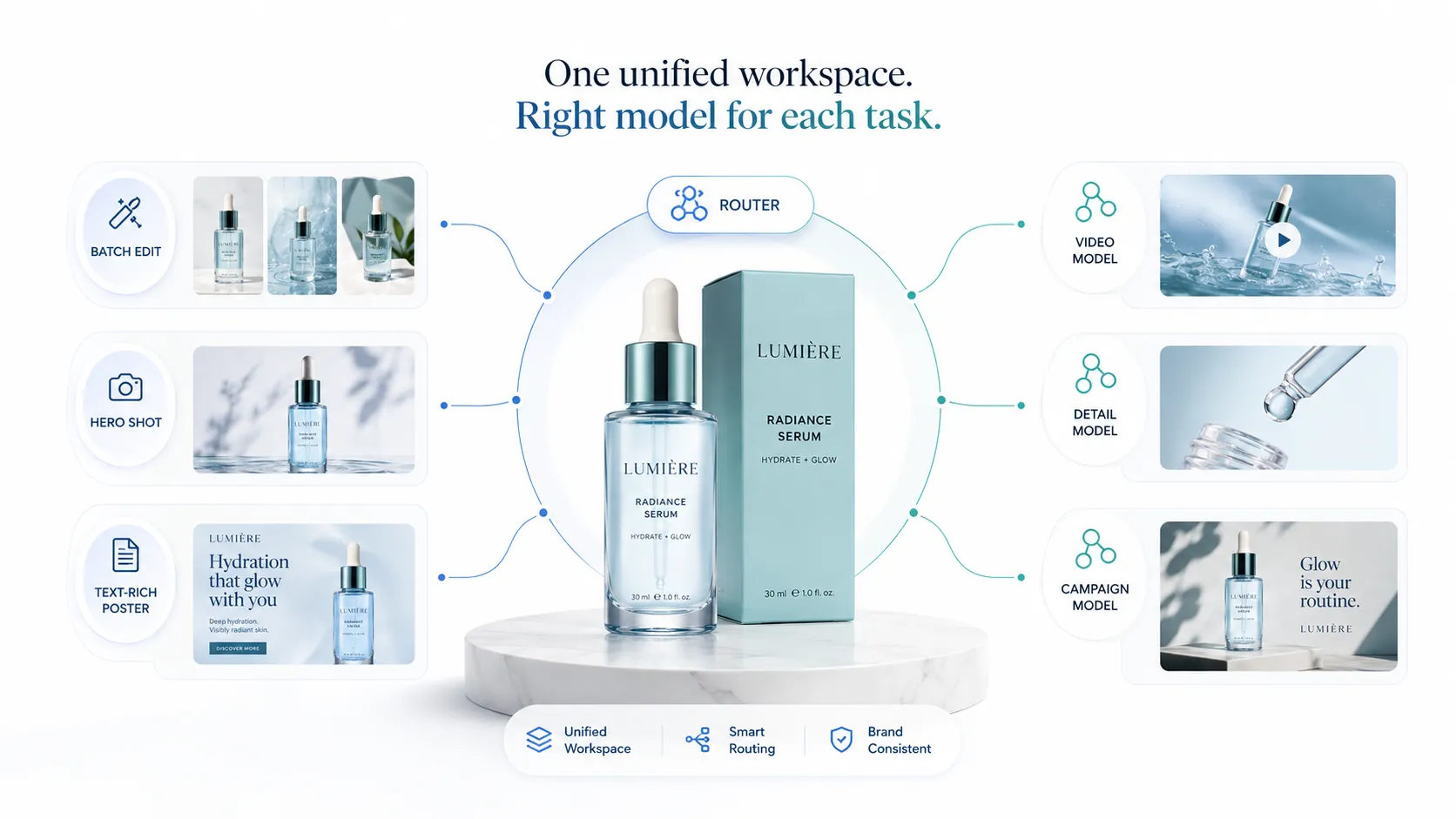
No single AI image model simultaneously optimizes for speed, cost, detail rendering, typography, video output, and interactive collaboration. As brand visual production tasks diversify, the optimal strategy shifts from "pick the best model" to "route the right model to each task" through a unified workspace. This is what a multi-model API strategy for brands actually means in practice — not running more models for the sake of complexity, but matching each production task to the model best engineered for that specific job.
The current conversation around multi-model AI for ecommerce visual production is almost nonexistent — existing discussions focus on large language models: mixing GPT, Claude, and Gemini for text-based workflows. Almost nobody is talking about multi-model strategies for image and video production, and certainly not for fashion ecommerce teams who need batch edits today, hero shots tomorrow, and product video by Friday. This article fills that gap.
Key Takeaways
- Brand visual production involves at least 6 distinct task types, each optimized by different model characteristics
- No single image model can excel at speed, cost, detail, typography, video, and consistency at the same time
- Forcing all tasks through one model creates hidden costs: budget waste on overpowered models, quality gaps on underpowered ones, and workflow fragmentation when teams abandon the single-model approach anyway
- The value in multi-model shifts from the models themselves to the routing layer — how you match task to model within one workspace
- A practical decision framework exists to determine when single-model is sufficient versus when multi-model becomes necessary
The 6 Task Types That Already Exist in Brand Visual Production
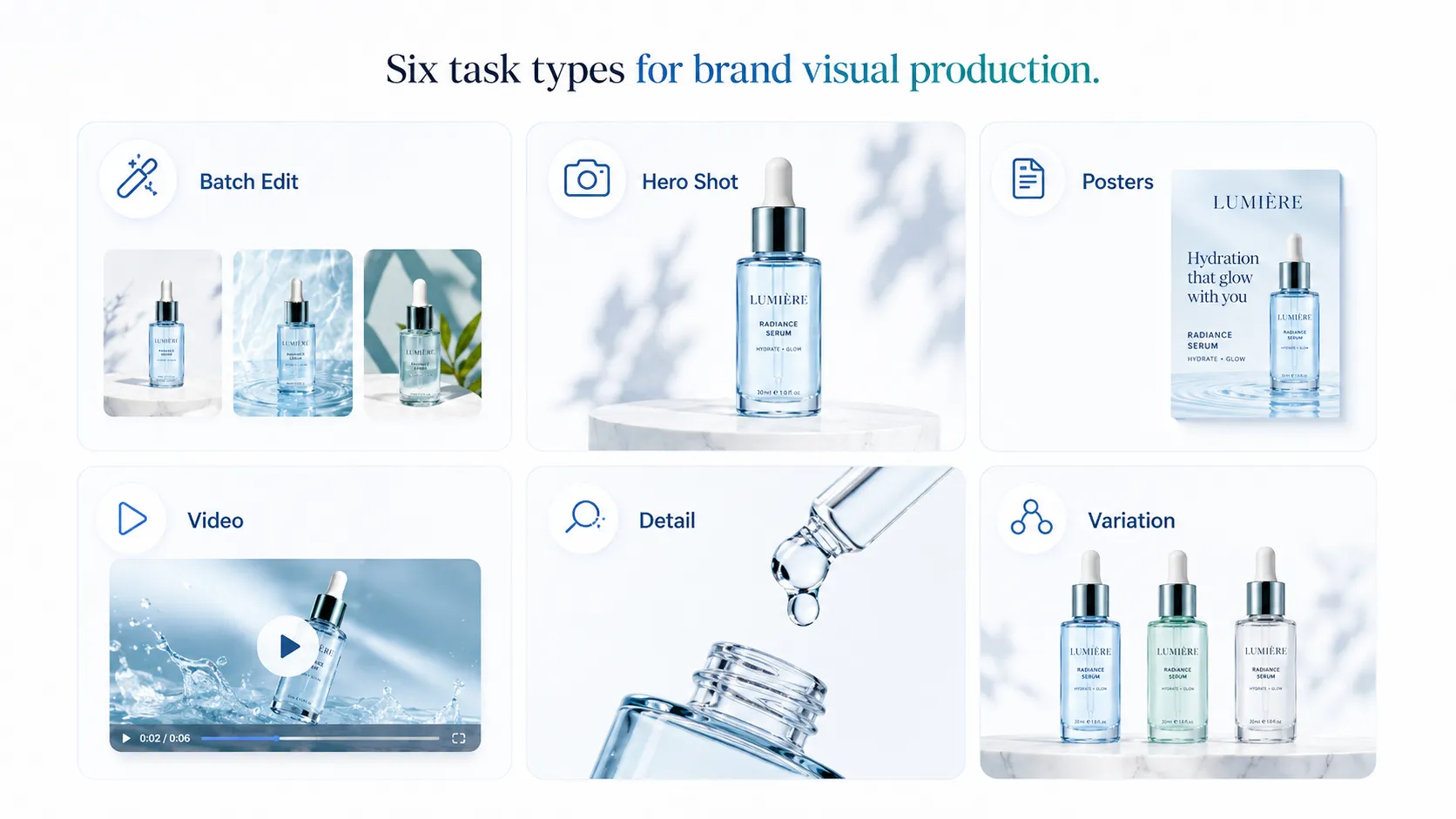
Before discussing models, list what your team actually produces. Most fashion ecommerce brands are already running six distinct visual task types, even if they do not label them as such:
Task 1: Batch editing and format adaptation
A brand with 50 SKUs needs background swaps, resize operations, or minor adjustments across every product image before a marketplace upload. Speed and unit cost matter more than pixel-perfect detail here. You need a model optimized for throughput — generate fast, keep per-image cost low, accept minor quality tradeoffs. Step Image Edit 2 operates in this space, targeting 1–2 second generation times with minimal per-image cost for exactly this kind of high-volume editing work.
Task 2: Hero product photography
The main image on a PDP or product listing sets the first impression. Lighting, composition, garment fidelity, and overall visual quality matter more than generation speed. A fashion brand launching a seasonal collection needs hero images that hold up to close inspection — collar structure, fabric texture, print accuracy, and logo placement should all be clearly rendered. This task demands a detail-oriented model where quality takes priority over throughput.
Task 3: Text-rich posters and promotional assets
Campaign visuals often include overlaid text: sale announcements, collection names, taglines, or multilingual copy for regional markets. General-purpose image models frequently mishandle embedded text, producing garbled characters or incorrect spellings. Models specifically designed for text rendering and typography fidelity handle this task more reliably. Qwen-Image-2.0 demonstrated strong multilingual text rendering capabilities with support for long-context prompts exceeding 1K tokens, making it suitable for poster-style assets where accurate text output is non-negotiable.
Task 4: Product video and motion content
Short-form video for TikTok, Instagram Reels, and social ads requires an entirely different model class. Image generators cannot produce video output. A fashion brand promoting a new drop needs 5–10 second clips showing garment movement, fabric drape, or lifestyle motion. Runway's agent announcement described systems capable of producing finished, ready-to-publish video from a single brief — this is a separate capability that lives outside any image-only model's scope.
Task 5: Detail shots and mockup consistency
Marketplace listings require white-background close-ups, floating-effect mockups, fabric texture shots, and back-view images. These outputs must look like they came from the same shoot as the hero image. Consistency across asset types matters as much as individual image quality. The model used here needs to maintain visual coherence with the hero while handling technical requirements like clean edges, uniform lighting, and transparent backgrounds. Create apparel detail shots with AI when the output will appear in hero positions or marketplace listings.
Task 6: Campaign variation and creative testing
A brand running A/B tests on ad creatives might need 10–20 variations of the same core concept: different backgrounds, color grading shifts, seasonal styling changes, or audience-specific compositions. Repeatability and controlled variation matter here — the ability to adjust one variable while holding others constant. This is less about raw image quality and more about workflow control and iteration speed. Adapt product visuals with AI for rapid creative testing across campaigns.
These six tasks already exist in most brand visual production pipelines. The question is whether one model serves all of them adequately, or whether task-aware model selection produces better outcomes.
Why No Single Model Can Excel at All 6 Tasks
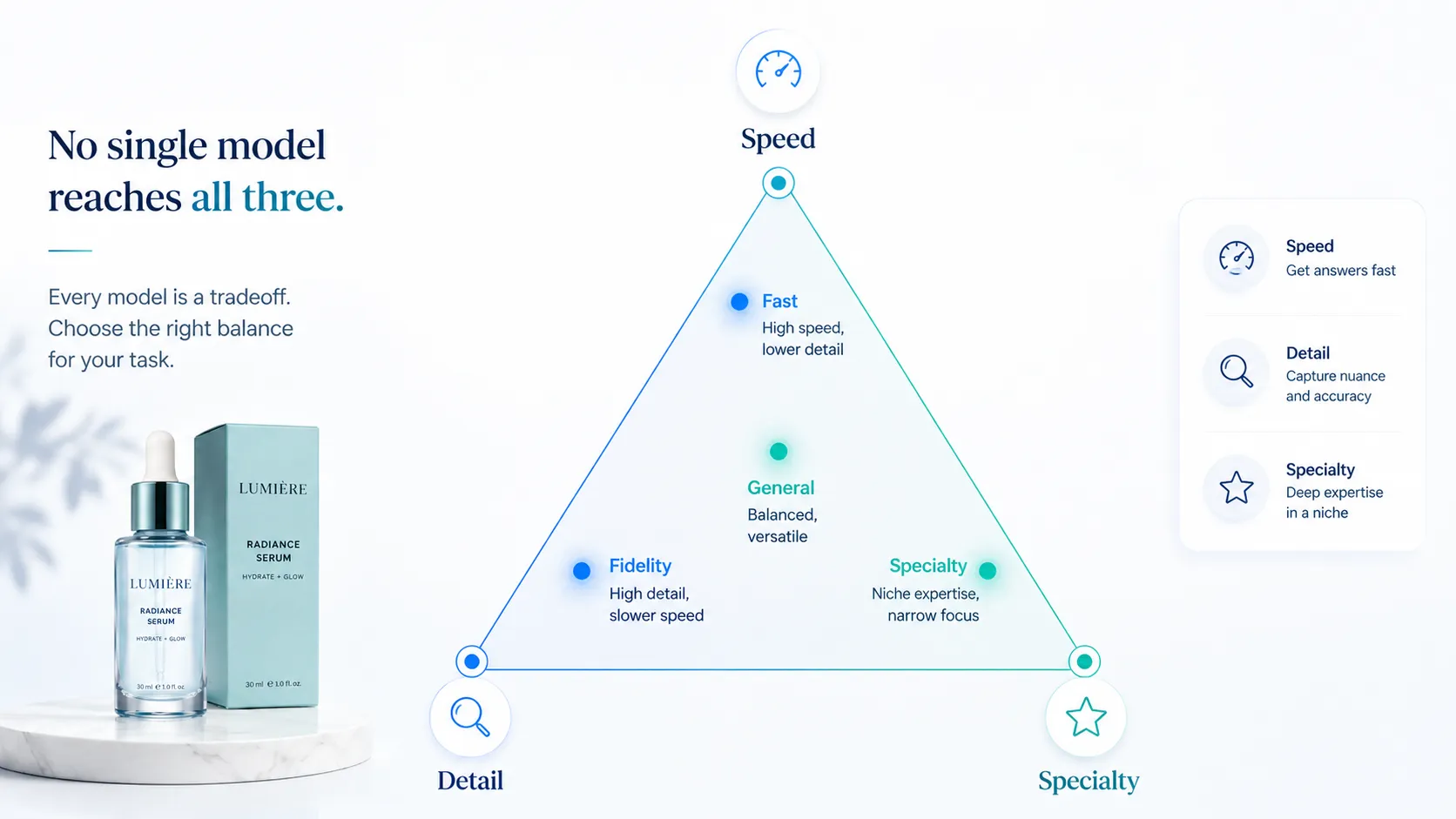
AI image models optimize along different axes. A model built for speed sacrifices some detail capacity. A model built for typography invests architecture space in text rendering that could have gone toward photorealism. A model built for video does not generate still images at all. These are engineering tradeoffs, not quality rankings.
Consider three concrete examples from the current model landscape:
Speed and cost optimization: Step Image Edit 2 targets sub-2-second generation with very low per-image cost. This makes it ideal for Task 1 (batch editing) but unsuitable for Task 2 (hero photography) where detail fidelity outweighs throughput. Using a speed-optimized model for hero imagery would produce acceptable results for quick previews but likely fall short of commercial quality standards for PDP images.
Typography and detail optimization: Qwen-Image-2.0 prioritizes text rendering accuracy and supports extended prompt contexts for complex compositional instructions. It handles Task 3 (text-rich posters) well but would be unnecessarily expensive and slow if applied to Task 1 (batch background swaps). The model's strength in text rendering comes from architectural choices that do not necessarily translate to faster throughput or lower cost.
Video production: Runway Agent handles Task 4 (product video) as its primary function. It cannot perform Tasks 1, 2, 3, 5, or 6 because it is purpose-built for motion output. Conversely, no image-only model can replace it for video work. The capability gap here is absolute, not relative.
Thinking Machines Lab's research on interaction models adds another dimension: some emerging models are designed for continuous human-AI collaboration rather than one-shot generation. These serve iterative refinement workflows differently than batch-oriented or quality-maximizing models.
The pattern is consistent across the field: every model makes explicit tradeoffs. A model that tries to be good at everything typically ends up mediocre at everything specific. For brand visual production, where Task 2 demands different qualities than Task 1, and Task 4 requires an entirely different model class, the single-model assumption creates structural inefficiency.
What Happens When Brands Force Everything Through One Model
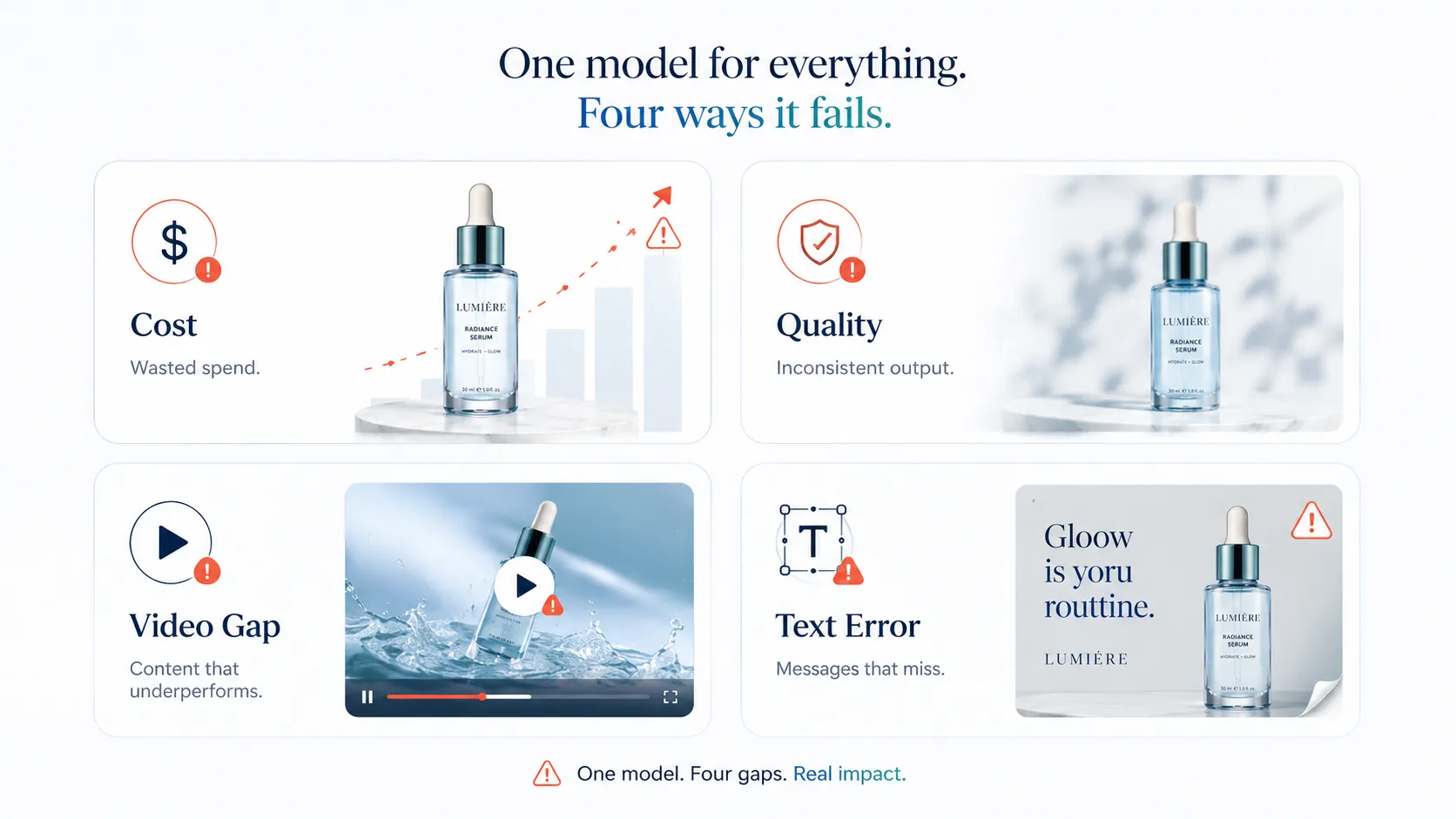
Four common failure patterns emerge when teams try to route all visual production through a single AI image model:
Pattern 1: Cost overrun from using a detail model on batch work
A fashion brand selects a high-fidelity model for its superior hero image quality, then uses that same model for 500 batch background swaps before a marketplace update. The per-image cost of the detail model applied to simple edit tasks can multiply total spend by 5–10x compared to using a speed-optimized model for the batch portion. The output quality gain on batch edits is invisible to end consumers, but the cost increase shows up clearly in the budget.
Pattern 2: Quality issues from using a speed model on hero imagery
The inverse problem: a brand chooses a fast, low-cost model for all production to control expenses, then discovers that hero product images lack the detail fidelity needed for PDP listings or campaign use. Fabric texture looks soft, logo rendering blurs, collar structure loses definition. The team ends up re-generating key assets with a different model anyway — which means the single-model strategy was abandoned before it was fully implemented.
Pattern 3: Video gap from using an image-only model
A brand builds its entire visual production around one image generation model, then realizes that social commerce channels increasingly expect short-form video content. The chosen model cannot produce video. The team now needs to integrate a separate video tool, learn a different interface, adapt reference images to a new input format, and manage two disconnected workflows. The single-model approach never included video because the initial selection did not account for Task 4.
Pattern 4: Typography errors on multilingual assets
A general-purpose image model handles standard product photography well but struggles when the brand needs promotional posters with embedded text in Japanese, Korean, and English for regional campaigns. Characters render incorrectly, spacing breaks down, or the model ignores text instructions entirely. The team either accepts flawed assets or brings in a specialized tool — again, breaking the single-model assumption.
The hidden cost across all four patterns is workflow fragmentation. Teams that start with a single-model intention usually end up using multiple tools anyway, but without the benefit of unified access, consistent formats, or coordinated billing. A multi-model API strategy for brands acknowledges this reality upfront and structures it intentionally rather than discovering it through failure.
The Real Value: Routing, Orchestration, and Unified Workflow
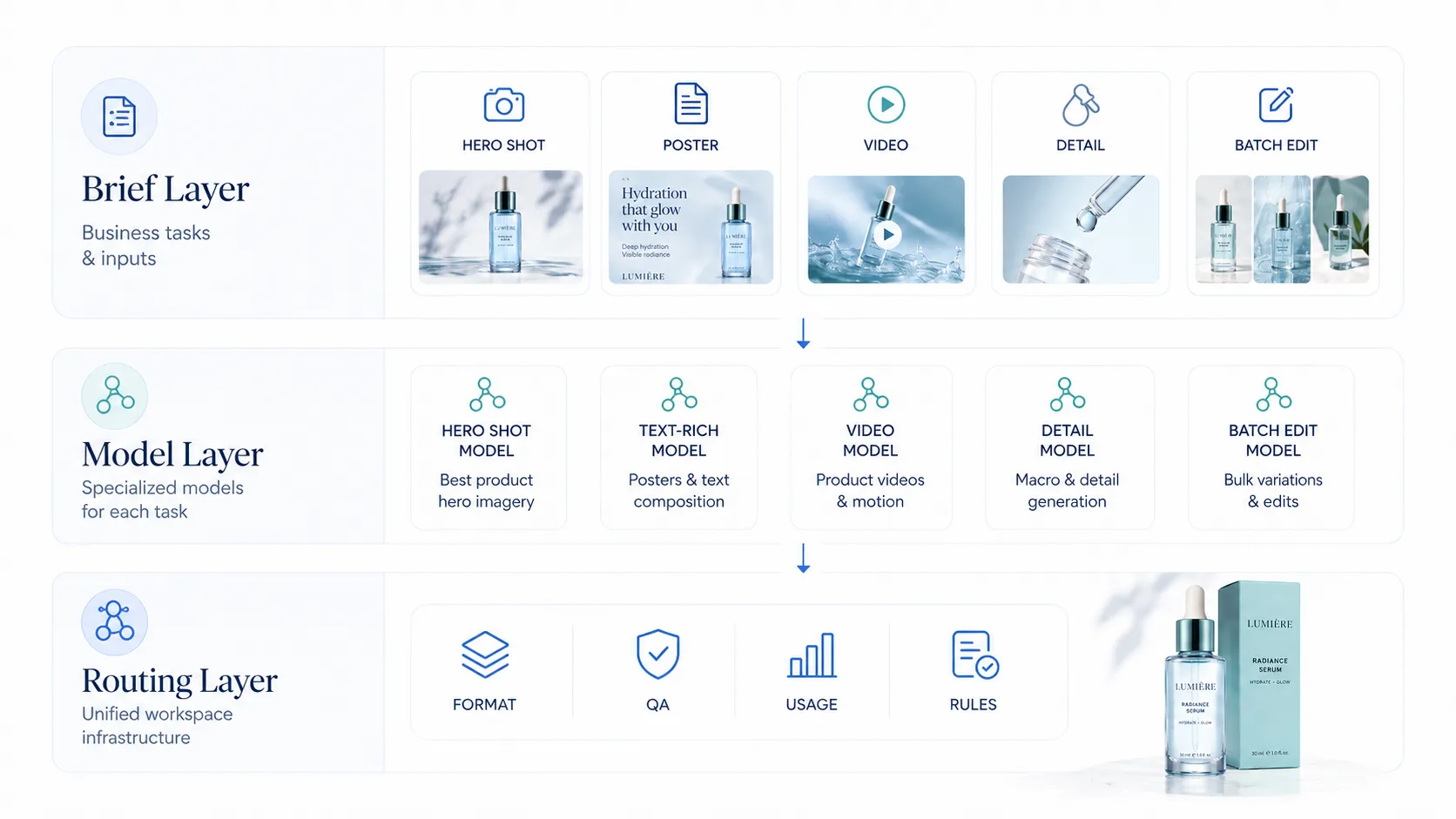
What does multi-model mean for a brand? It is not about becoming an AI engineer or managing API integrations. It means having a system that routes each task to the appropriate model automatically, presents results in a consistent format, and keeps authentication, billing, and file management in one place.
Three layers define a practical multi-model approach for visual production:
Layer 1: Agent or briefing layer
You describe what you need in business terms: "hero shot for PDP," "batch background swap for 30 SKUs," "promotional poster with 'Summer Sale' text," "10-second product video." The system interprets your request and decides which model type fits the task. This layer removes the need for users to know model specifications or make technical selections.
Layer 2: Multi-model execution layer
Different models handle different requests based on the routing decision from Layer 1. A speed model processes batch edits. A detail model generates hero imagery. A typography-capable model renders text-rich posters. A video model produces motion content. Each model operates within its optimization zone, doing what it was designed to do well.
Layer 3: Routing and governance layer
This layer ensures consistency regardless of which model produced the output. File formats are normalized. Quality thresholds are checked. Usage is tracked across models so the brand understands cost distribution. Governance rules prevent expensive models from being accidentally used on low-priority batch tasks.
The strategic insight is that value shifts upward in this stack. The models themselves become commodities — what matters is how well the routing layer matches tasks to appropriate models, how cleanly the execution layer delivers results, and how effectively the governance layer provides visibility and control. A brand evaluating multi-model options should focus more on the workspace and routing quality than on counting how many models are available.
How iCreat AI's Multi-Model Workspace Fits This Framework
iCreat AI provides a multi-model workspace designed for visual production rather than text generation. Multiple image and video models are accessible from one interface, with task-appropriate selection built into the workflow rather than left to manual configuration.
GPT-Image-1 handles standard generation workflows well. It suits Tasks 2 (hero photography), 5 (detail shots), and 6 (campaign variation) where reliable, consistent output across routine production needs is the priority. Use GPT-Image-1 for standard generation workflows when your production volume is moderate and you need dependable results across common product photography use cases.
Nano Banana Pro is positioned for detail-heavy commercial visuals. When Task 2 requires maximum fidelity — garment texture, print accuracy, fine structural details — or Task 5 demands mockup consistency at higher quality levels, Nano Banana Pro provides stronger detail restoration. Use Nano Banana Pro for detail-heavy commercial visuals when the output will appear in hero positions, campaign materials, or any context where viewers examine the image closely.
Seedance 2.0 covers Task 4 (product video). It handles image-to-video conversion and short-form product video generation, allowing the same reference image that produced still visuals to become the source for motion content. Use Seedance 2.0 for product video workflows when your social commerce or ad strategy requires video alongside static imagery. You can also create short product videos with AI through the dedicated video workspace that connects to the same reference library.
AI Product Photography serves as the primary workspace that ties these models together. Rather than logging into separate tools for image generation, detail work, and video, the workspace provides a unified entry point where reference images feed into multiple model outputs. You can generate product photos with AI starting from a single reference, then extend that visual direction into detail variations, campaign assets, and short-form video without switching between disconnected platforms.
The practical advantage is workflow continuity. A fashion brand preparing a seasonal launch uploads reference images once, establishes a visual direction through the initial generation, and then branches into different output types — each handled by the model best suited for that specific task — while staying inside one workspace with consistent formatting, shared asset libraries, and unified usage tracking.
When to Use Multiple AI Models: A Practical Decision Framework
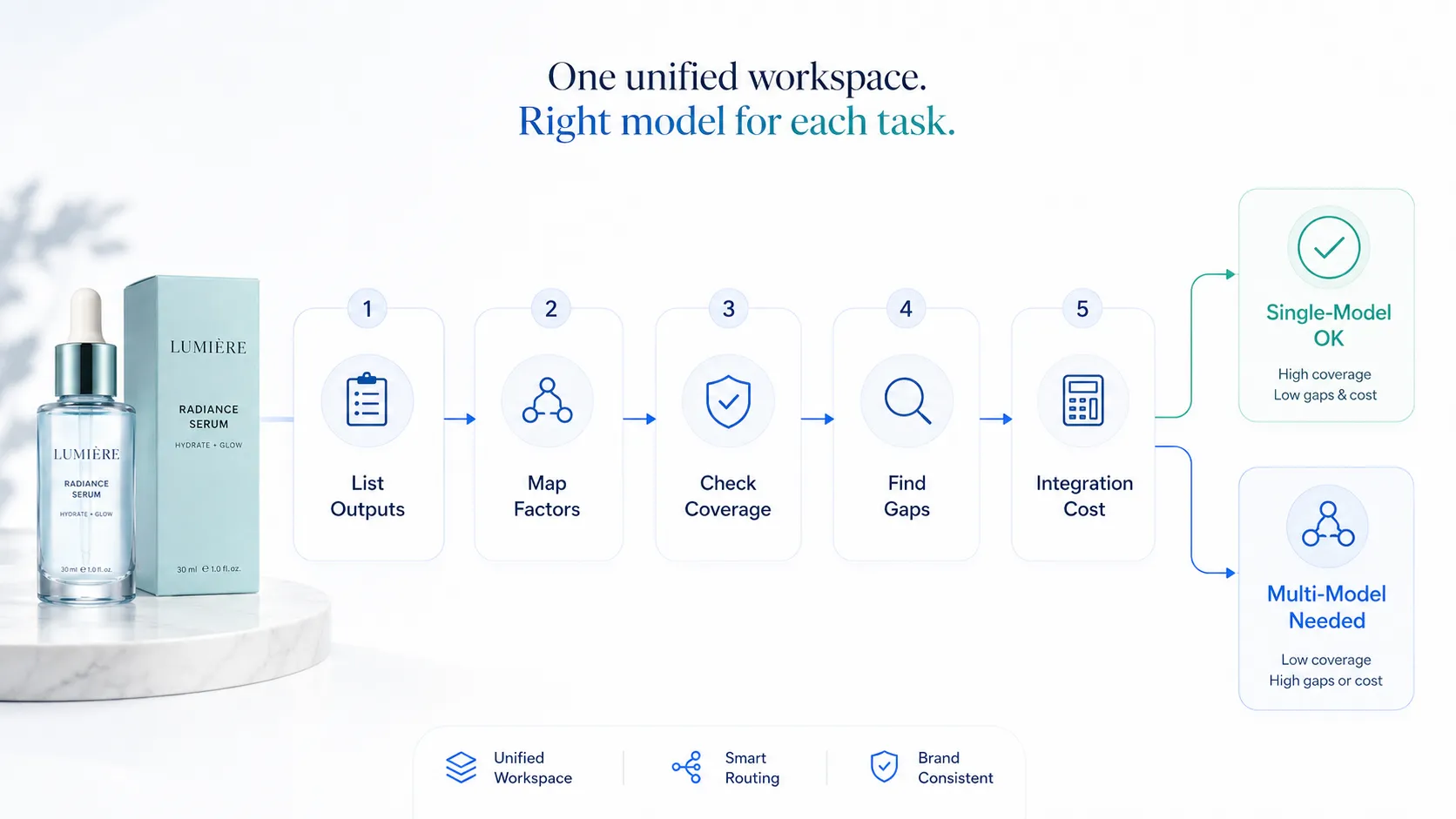
Not every brand needs a multi-model setup. Use this framework to evaluate whether your brand visual production workflow is sufficient or whether task-aware model selection would improve outcomes.
Step 1: List your output types
Write down every type of visual asset your team produces in a typical month. Be specific: hero PDP images, marketplace batch edits, promotional posters with text, social media video clips, detail close-ups, lookbook spreads, ad creative variations. Count the distinct types.
Step 2: Map each output to the dimension it cares about most
For each output type, identify the critical success factor. Batch edits care about speed and cost per image. Hero images care about detail fidelity and garment accuracy. Text posters care about typography correctness. Video cares about motion quality and temporal consistency. If two output types share the same critical factor, they may work well under the same model. If their critical factors differ materially, different models may serve them better.
Step 3: Check current model coverage
Assess whether your current tool or model adequately addresses the critical factors you identified in Step 2. If you only produce hero images and basic variations, a single well-chosen model may cover your needs. If you produce hero images, batch edits, text posters, and video, a single model will inevitably compromise on at least two of those dimensions.
Step 4: Evaluate the gap
Wherever your current model falls short of a critical factor, quantify the impact. Is the quality gap causing rework or rejected assets? Is the speed difference delaying campaigns? Is the cost differential material to your budget? Small gaps may not justify workflow changes. Large or recurring gaps indicate that adding a task-specific model would pay for itself in reduced rework, faster turnaround, or lower per-task cost.
Step 5: Factor integration cost
The final variable is how much friction a multi-model approach adds to your workflow. If accessing a second or third model means separate accounts, different upload processes, incompatible file formats, or manual data transfer between tools, the integration cost may exceed the benefit. This is where a unified workspace matters: the value of multi-model increases significantly when routing, orchestration, and governance happen in one place rather than across fragmented tools.
When single-model IS enough: Your team mainly produces one or two output types with similar quality requirements. Volume is moderate. Video is not part of your current visual mix. Typography demands are minimal. Iteration cycles are short and approval rates are high.
When multi-model becomes necessary: You regularly produce four or more distinct output types with different critical success factors. Video is part of your content mix. Typography or multilingual text appears in your assets. Volume varies widely between tasks (some need speed, some need detail). Your team has already started using supplementary tools to fill gaps in your primary model's coverage.
FAQ
Building Your Multi-Model API Strategy for Brands
A multi-model API strategy for brands is not about collecting more AI tools. It is about recognizing that visual production comprises distinct tasks with different optimization requirements, and that matching the right model to each task produces better outcomes than forcing everything through a single compromise point. The brands that will benefit most are those already producing diverse visual assets — hero images, batch edits, text posters, product video, detail shots, and campaign variations — and finding that one model serves some of these well while struggling with others.
The practical path forward is to audit your current output types, map them to their critical success factors, and evaluate whether a unified multi-model workspace would reduce the friction, rework, and hidden costs that accumulate when tasks and models are misaligned. Start with your highest-volume task, establish a solid workflow there, then expand model coverage incrementally as production needs dictate.
You can explore a multi-model approach with the AI Product Photography workspace, which provides access to multiple image and video models from a single interface with shared reference libraries and consistent output formatting.
Log in to iCreat AI to start building your visual production workflow.