




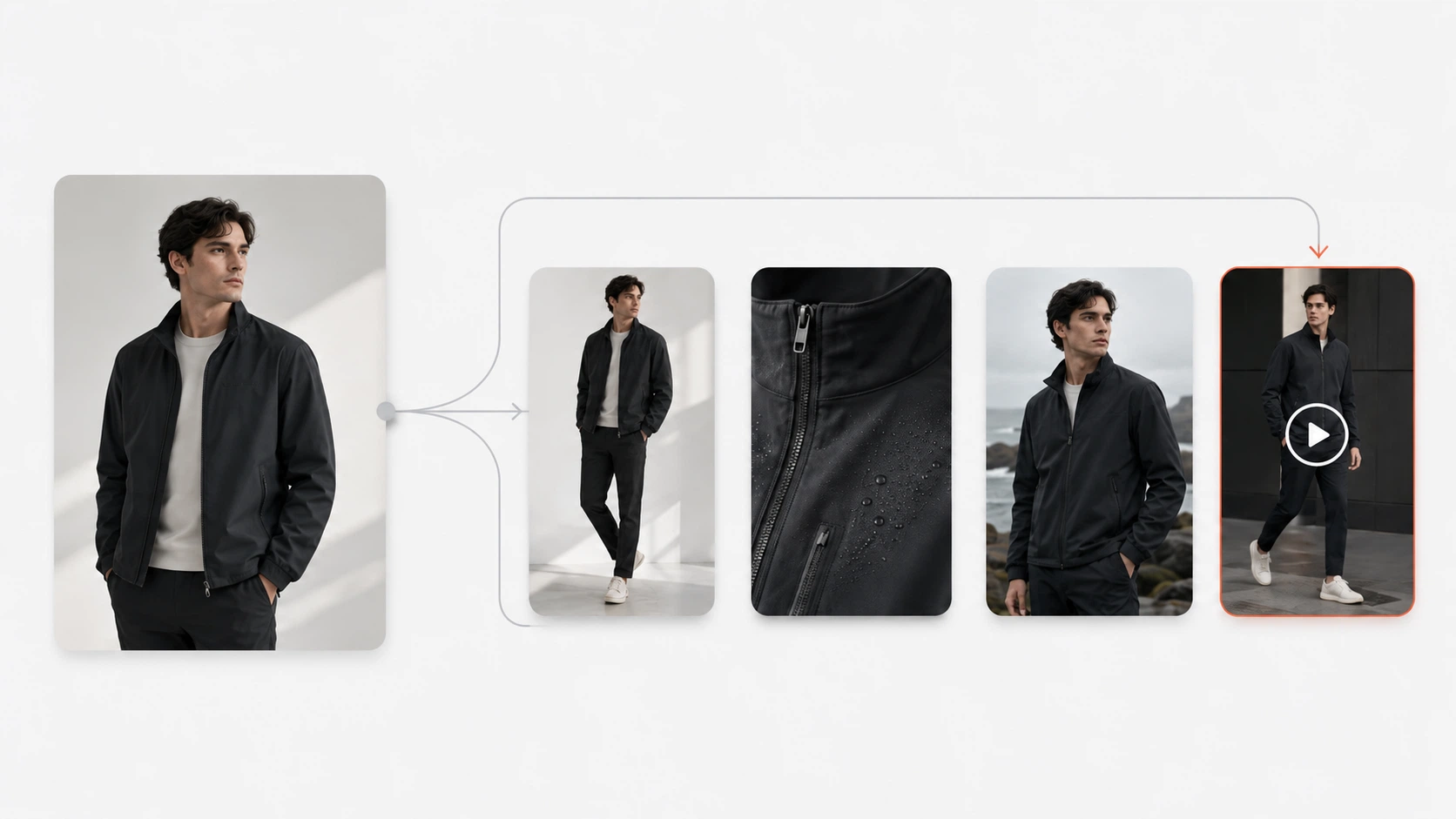
Product visual automation with AI is reshaping how fashion ecommerce teams work: product images are shifting from final deliverables into upstream source material for complete visual content pipelines. What used to end with a hero shot now extends into detail variations, lookbook spreads, campaign adaptations, and short-form product video — all originating from the same set of reference inputs. This shift is not speculative. It is visible across social commerce platforms, marketplace requirements, and the tools that fashion ecommerce teams are already using to produce catalog-scale visual assets.
Key Takeaways
- Product images are evolving from final deliverables into source material for multi-asset visual pipelines
- Video is becoming a standard output layer alongside — not replacing — static product images
- Competitive advantage is moving from single-image quality to unified multi-asset production speed and consistency
- Fashion ecommerce teams can build this pipeline incrementally: foundation first, then variation, then video
From Single Image to Multi-Asset Pipeline: What Changed
The old model was straightforward: one photoshoot produced one set of images, which were then manually cropped, resized, and adapted for each channel. A fashion brand with 50 SKUs might generate 200–300 total assets through manual effort — hero shots, a few lifestyle angles, maybe some flat-lays for marketplaces.
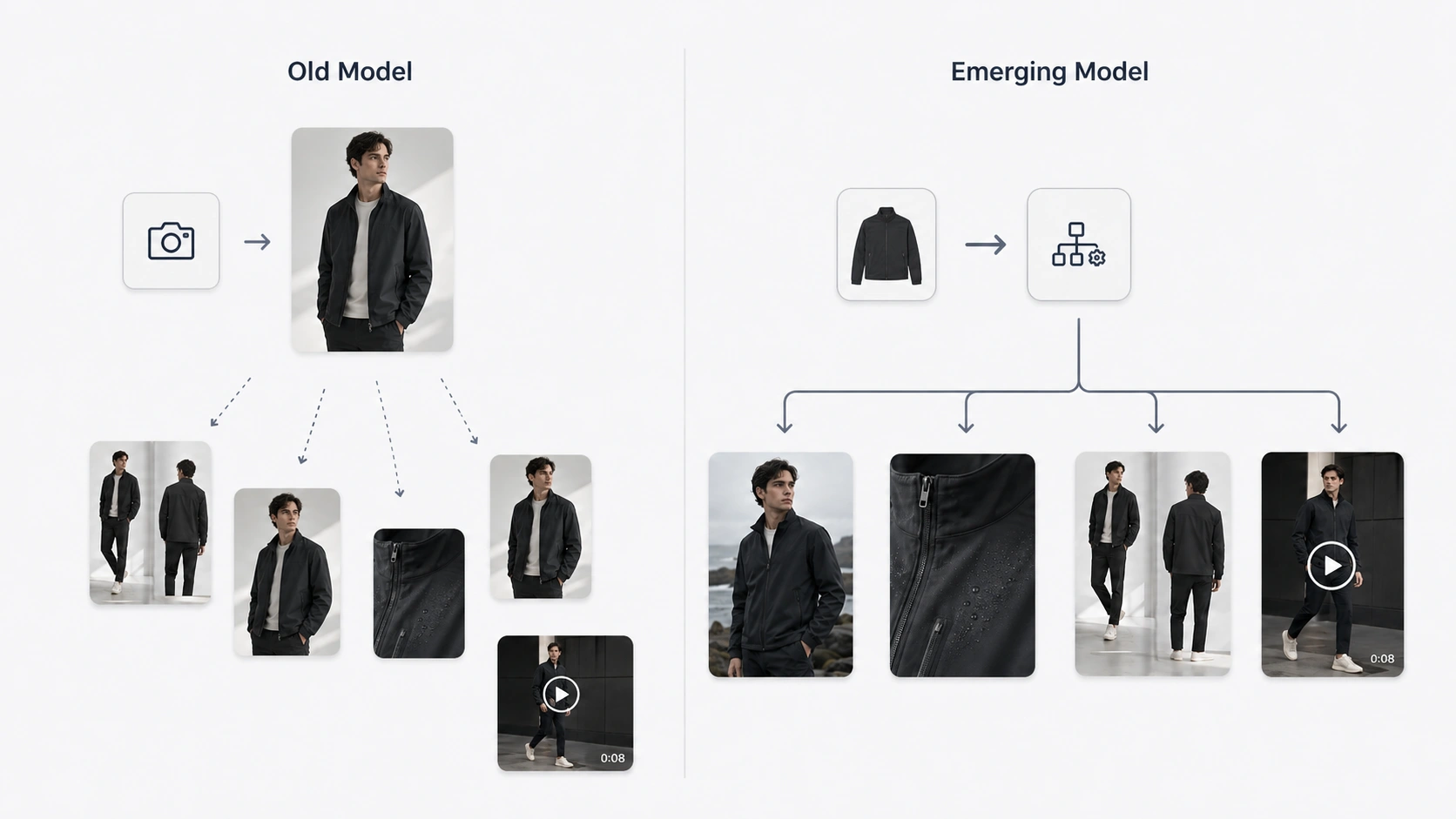
The emerging model works differently. One set of reference inputs feeds an automated pipeline that produces hero images, detail close-ups, lookbook variations, pose options, campaign adaptations, background swaps, and now short-form video clips. The same garment photograph that becomes a PDP hero image can also become a fabric-motion clip for TikTok Shop, a seasonal campaign variant for email, and a white-background mockup for Amazon.
Three forces are driving this shift simultaneously:
Generation cost has dropped enough that volume is no longer the constraint. Producing 10 variations instead of 1 no longer carries a meaningful cost penalty for most brands. The constraint has shifted from "can we afford to generate more?" to "which outputs actually serve our channels?"
Video models have matured past the novelty stage. Image-to-video tools that produced jittery, low-resolution outputs two years ago now generate short-form clips suitable for social commerce preview and ad creative testing. The quality threshold for "good enough" has moved within reach of commercial use cases.
Channel demands have multiplied. Shopify PDPs need 5–8 images per SKU. TikTok Shop prefers video over static listings. Meta ads reward video creatives with lower CPMs in many categories. Email campaigns need custom visuals. Amazon requires specific white-background formats. Each channel wants its own format, and manual adaptation at this scale does not scale.
The key insight is that the question has changed. Teams are no longer asking "can we generate a product photo?" They are asking "can we generate a complete asset set from one input?"
Signal 1: Video Is Entering Standard Product Workflows
Short-form video is no longer optional for social commerce. TikTok Shop's product content guidelines explicitly favor video listings, and Meta's own advertising guidance documents consistent engagement advantages for video creatives over static images across retail categories. These are platform-level signals, not vendor claims.
What this means for fashion ecommerce specifically: static images show what a garment looks like. Video shows how it moves, how fabric drapes on a body, how light interacts with texture in motion. A knit dress photograph cannot communicate stretch or drape behavior. A 5–10 second clip showing the same dress in motion provides information that no still image can replicate.
Where video adds real value:
- Fabric drape and garment behavior: knitwear, silk, denim, and structured pieces each move differently
- 360-style rotation: viewers can see construction details from angles not captured in standard photography
- Lifestyle context: motion clips convey fit and proportion more naturally than static poses
- Social algorithm preference: TikTok, Instagram Reels, and Facebook Stories prioritize video in feed ranking
Where images remain non-negotiable:
- PDP hero images: every marketplace and storefront requires high-quality primary still images
- Detail close-ups: fabric texture, stitching, hardware, print accuracy need pixel-level inspection
- Marketplace compliance: Amazon, eBay, and regional platforms mandate specific static formats
- Email and print catalogs: these channels are still predominantly image-based
A fashion brand could turn product photos into short promotional videos for its top-selling SKUs while keeping static imagery as the foundation layer for all other touchpoints. The two formats serve different purposes in the same pipeline.
Signal 2: Teams Need More Than Just Photos
Consider the asset demand equation for a mid-sized fashion brand:
A brand launching 30 new SKUs per season needs, at minimum:
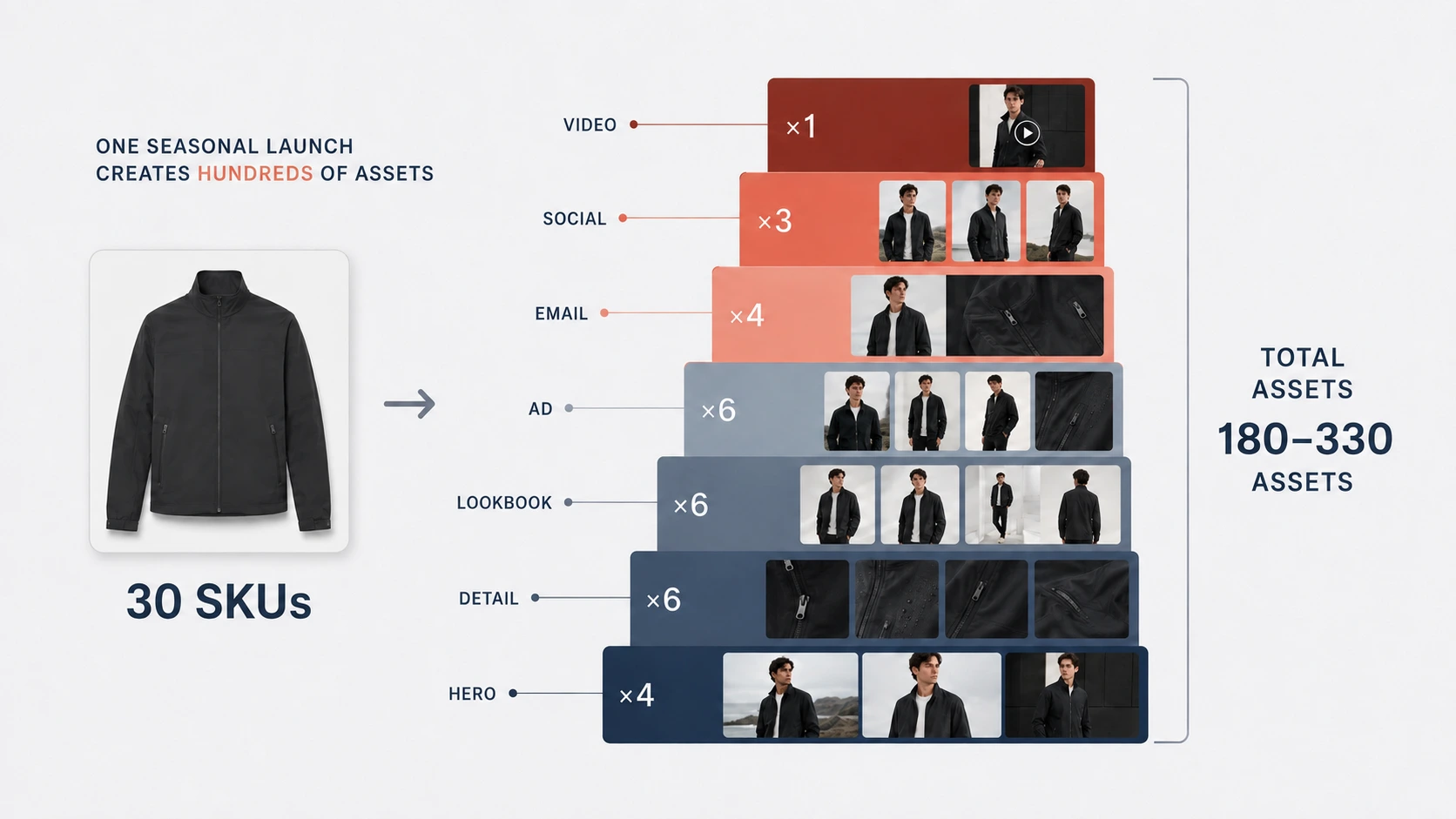
- 30 hero PDP images (1 per SKU)
- 60–90 detail shots (2–3 per SKU)
- 30–60 lookbook or lifestyle variations (1–2 per SKU)
- 30–90 ad creative variations (1–3 per SKU for A/B testing)
- 15–30 email campaign visuals (batch adaptations)
- 15–30 social media cuts (format-specific crops and edits)
That is 180–330 distinct visual assets from one seasonal launch before video enters the equation. If even half of those SKUs also need short-form video clips for TikTok Shop or Meta ads, add another 15–30 motion assets.
The math is not hypothetical. This is what a typical fashion ecommerce content calendar looks like when you list every required output type explicitly. Most teams produce these assets through a fragmented combination of photoshoots, manual editing, and disconnected tools — which means inconsistent quality, version chaos, and rework when a campaign direction changes mid-cycle. A structured ecommerce visual content pipeline would route the same inputs through staged outputs instead.
Most existing SERP content on this topic focuses on single-format workflows rather than multi-asset pipelines, with limited fashion-specific coverage.
The Correct Position: Video Complements Images, It Does Not Replace Them
Anyone claiming "video kills product photography" is selling something. The accurate mental model for 2026 is layered, not replacement-oriented:
Images = foundation layer. Every visual workflow starts here. PDPs, marketplaces, ads (static formats), email, print — none of these are going away. Images remain the highest-volume, highest-necessity output type.
Video = dynamic extension layer. Video adds information that images cannot provide: motion, drape, temporal context. It sits on top of the image foundation for specific channels and use cases where motion creates measurable value.
Automation = competitive advantage. This is the core promise of product visual automation with AI: The brands that will pull ahead are not those generating the single best photo. They are the ones turning one set of inputs into a complete asset stack — images, variations, and video — faster and more consistently than competitors who treat each format as a separate project.
For a fashion team, this means the strategic priority order should be: lock down reliable image generation first, then build variation capacity, then introduce video for selected SKUs and campaign moments. Skipping to video without a solid image foundation creates a fragile pipeline where the dynamic layer outpaces the foundational one.
What a Complete Visual Pipeline Looks Like for Fashion Ecommerce
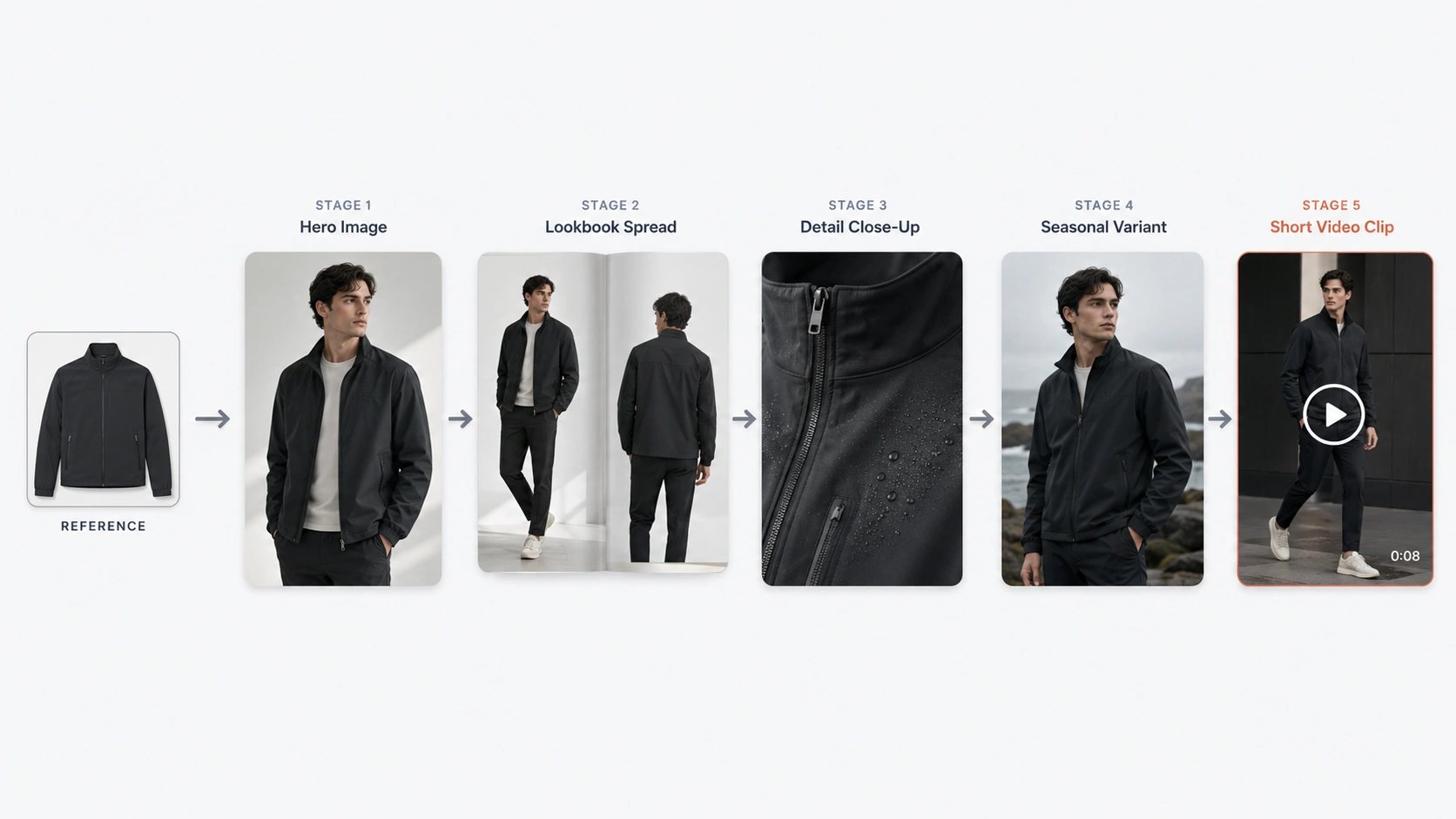
Here is what a connected pipeline looks like in practice, walking through a seasonal collection launch:
Stage 1 — Foundation: Hero and Base Product Images
Start with your core product references — flat-lays, existing photography, or design mockups. From these inputs, generate ecommerce product visuals from reference images that become your PDP hero images and baseline catalog shots. This stage establishes the visual direction that all subsequent stages will extend.
Stage 2 — Campaign Expansion: Lookbook and Pose Variations
Take the hero outputs and branch them into lookbook-style campaign visuals and alternative pose options. One hero image can generate multiple lookbook compositions without requiring additional photography. You can create lookbook-style campaign visuals from a single hero image to scale campaign output without additional shoots. Pose variations give your creative team options for different channel aesthetics without reshooting — use them to produce pose variations for different channel aesthetics.
Stage 3 — PDP Completeness: Detail Shots and Mockups
Produce white-background close-ups, fabric texture shots, back-view images, and floating-effect mockups. Teams can produce white-background detail close-ups and fabric texture shots that maintain visual consistency with hero images. These are the images that shoppers inspect closely before purchasing. Consistency with Stage 1 outputs matters here — detail shots must look like they came from the same visual session as the hero image.
Stage 4 — Seasonal Adaptation: Background and Scene Changes
When a new campaign or season requires updated backgrounds, color grading, or styling adjustments, adapt existing assets rather than starting from scratch. Swap backgrounds for holiday promotions, adjust color treatment for seasonal collections, or reframe compositions for different audience segments. You can swap backgrounds and adapt existing assets for new campaigns without returning to original source files.
Stage 5 — Dynamic Content: Short-form Product Video
For selected SKUs — typically best-sellers, new drops, or campaign hero items — extend the visual pipeline into motion. Use the same reference images that produced your still outputs as the source for short-form video clips. This image-to-video for product marketing approach converts a garment photograph into motion content. The Seedance 2.0 model for image-to-video workflows handles this conversion, allowing a garment photograph to become a 5–10 second clip showing fabric movement, drape behavior, or lifestyle motion.
The connecting thread across all five stages: they originate from the same core product inputs. A brand does not conduct five separate production cycles. It conducts one input cycle and branches into multiple output types through a unified workspace.
How to Start Without Overhauling Your Entire Workflow
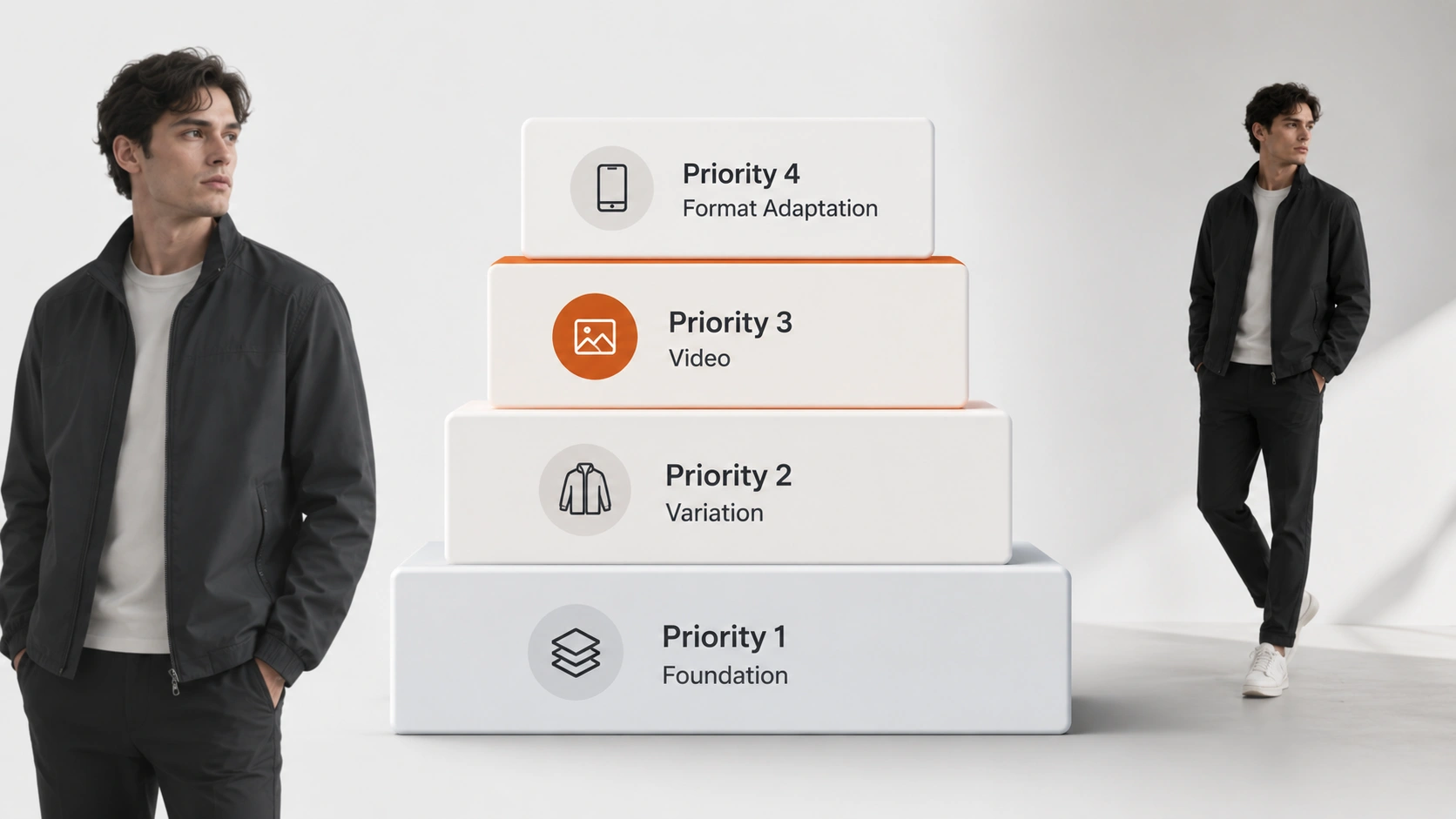
Not every team needs to build all five stages at once. Use this assessment to determine where your team sits today and what to prioritize next:
Priority 1: Stabilize your image foundation
If your team is still manually editing most product photos or relying entirely on traditional photography, start here. Build a reliable AI-assisted product photography workflow before adding complexity — this foundation becomes the base layer of your unified visual production workflow down the line. A weak foundation undermines everything built on top of it.
Priority 2: Add variation capacity
Once your hero image workflow is stable, introduce systematic variation generation: lookbook styles, pose alternatives, detail shots. This is where most teams see the first meaningful efficiency gain — going from 3 assets per SKU to 8–12 without linear time increase.
Priority 3: Introduce video selectively
Do not convert your entire catalog to video. Start with your top 20% of SKUs by revenue or your key campaign hero items. Test whether video outputs perform measurably better than static equivalents on your target channels. Expand video coverage based on actual performance data, not assumptions.
Priority 4: Build format adaptation into the workflow
Treat channel-specific formatting as part of the generation pipeline, not an afterthought. If your team is still manually resizing and cropping for Shopify, Instagram, Amazon, and email separately, that manual step is a candidate for automation or template-based streamlining.
Quality control checkpoint: Every automated pipeline needs human review gates. Insert review points after Stage 1 (foundation approval), Stage 3 (detail consistency check), and Stage 5 (video quality verification). AI accelerates production; it does not eliminate the need for judgment about what meets your brand standards.
FAQ
Conclusion
The shift from single-image delivery to multi-asset automation is underway across fashion ecommerce. Product images are becoming upstream source material, and the teams building connected pipelines — images, variations, detail shots, and video from unified inputs — are the ones scaling visual production without proportional increases in headcount or budget.
The practical path forward is incremental: stabilize your image foundation, build variation capacity, introduce video for selected SKUs based on channel data, and keep format adaptation inside the pipeline rather than as a manual cleanup step. The brands that treat visual production as a connected system rather than a series of disconnected projects will have a structural advantage as channel demands continue to multiply.
You can explore a connected visual production approach with iCreat AI's tools, which support the full pipeline from product photography through short-form video generation from a single workspace with shared reference libraries.
Log in to iCreat AI to start building your visual production workflow.