


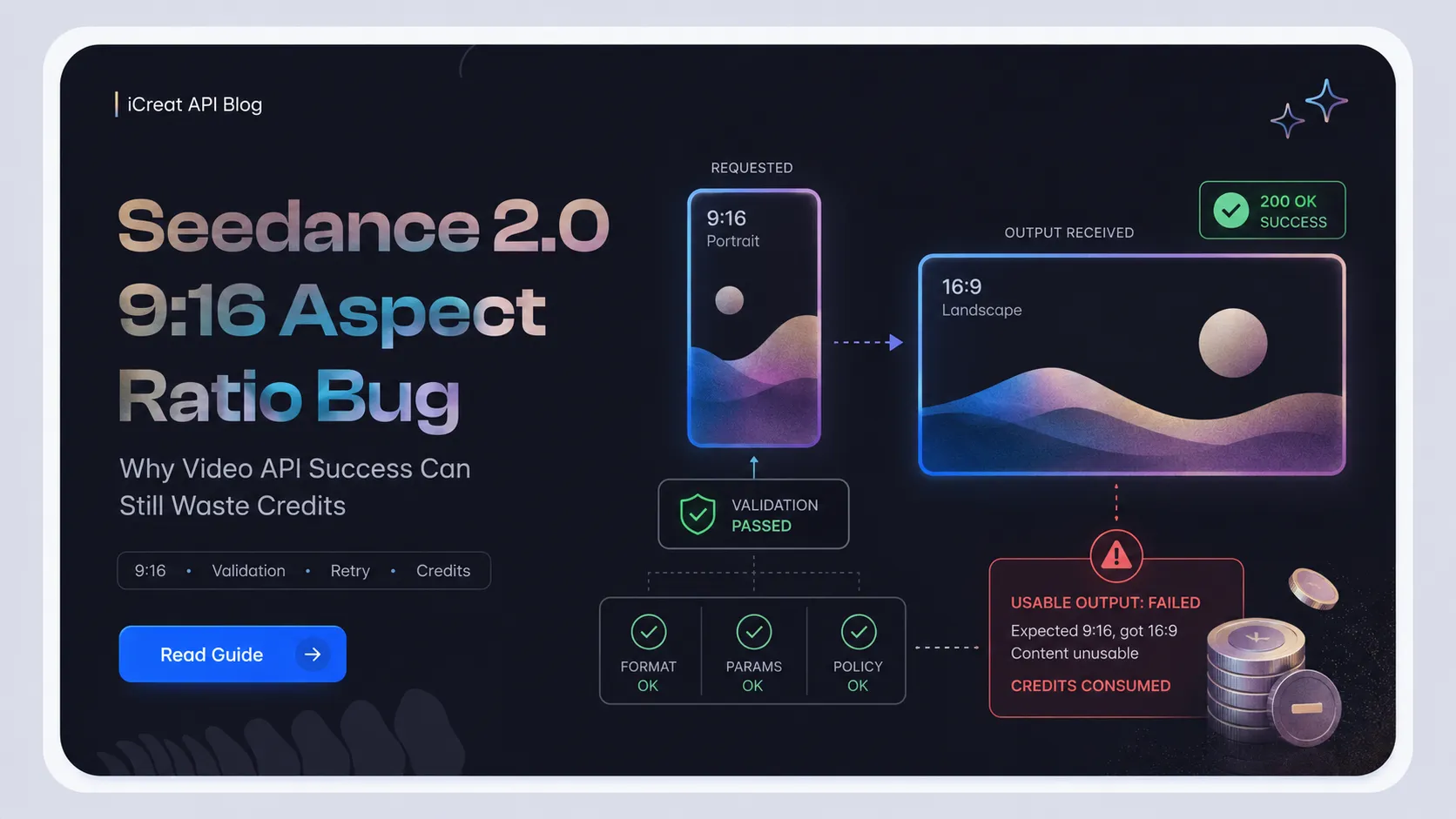
A Seedance 2.0 video job can return SUCCEEDED and still be unusable if
you requested a 9:16 vertical clip and received a 16:9 landscape file. For developers
building UGC ad tools, Reels generators, Shorts workflows, or vertical-video
automation, that is not a small formatting issue. It is a silent product failure that
can waste credits, break user trust, and pollute your job history with outputs your
app cannot use.
The reported Seedance 2.0 9:16 aspect ratio bug is a useful reminder: video API success is not the same as business success. Your integration should validate the request before submission, inspect the returned media after the task succeeds, retry only under controlled rules, and record credit-impacting failures separately from normal usable outputs.
If you are testing this workflow in iCreat, start with a real vertical prompt in the iCreat dashboard. The goal is not to click around every product page. The goal is to confirm whether the current model settings produce usable vertical video before you automate the same request.
Key Takeaways
-
A
SUCCEEDEDvideo job only proves that the task finished and returned output. It does not prove the file matches your product requirements. -
For vertical-video products,
9:16 requested, 16:9 returnedshould be treated as a failed usable output. - Validate aspect ratio at both layers: request schema before submission and returned media dimensions after completion.
- Retry logic should have caps, reason codes, and credit tracking. Blind retries can multiply the same failure.
- Test your vertical workflow before automation. Use model comparison only when the model itself appears to be the wrong fit.
The Bug Pattern: 9:16 Requested, 16:9 Returned
A succeeded video job can still be unusable if the returned media does not match the requested ratio. In the user-provided LLM Gateway PR note, the issue is described this way: "Users reported that Seedance video jobs requesting a 9:16 (portrait) output were coming back as 16:9 (landscape) - the aspect ratio parameter was being ignored."
That exact PR should be verified before publishing a hard citation or root-cause claim. But the failure pattern is credible and visible in related developer reports. Public GitHub issues around Seedance and vertical output describe similar symptoms: a request asks for 9:16 or portrait dimensions, while the returned video is landscape or defaults to 16:9. Some issues are later marked stale, fixed, or not reproducible, which matters. The point is not that Seedance 2.0 always fails today. The point is that video generation integrations need to be designed for this class of silent failure.
The reproduction shape is simple:
| Step | Expected | Failure Pattern |
|---|---|---|
| Submit video job |
ratio: "9:16" in iCreat, or the equivalent provider field
elsewhere
|
Request accepted |
| Poll job | Task reaches SUCCEEDED |
No API-level error |
| Fetch output | Returned media is vertical | Returned media is 16:9 landscape |
| Product use | Clip can be used for Shorts/Reels/UGC | Clip must be cropped, rejected, or regenerated |
If your app only checks the job status, you miss the failure.
Why This Is a Silent Failure, Not Just a Formatting Bug
Success status only means the task returned output; it does not prove the file fits the workflow. For generated video, the business contract is usually stricter than the API transport contract.
For example, a backend might see:
{
  "status": "SUCCEEDED",
  "outputs": ["https://.../output.mp4"]
}
That looks successful to the API layer. But a vertical-video product needs more than a URL. It needs a video that matches the target format:
- portrait aspect ratio for Reels, Shorts, TikTok, and UGC ad placements
- correct dimensions for the editor canvas
- usable crop area for captions, face framing, and product placement
- predictable output for downstream rendering or publishing
If the generated clip is 16:9, your app may still upload it, charge the user, show it in history, or pass it into an editor that expects 9:16. That is why "API success" should be treated as only the first gate.
The better model is two-stage validation:
| Gate | Question | Example Result |
|---|---|---|
| Transport success | Did the task submit, poll, and finish? | SUCCEEDED |
| Output usability | Does the returned media match the requested workflow? | actual ratio is 9:16 |
Only the second gate tells you whether the result is safe to show, bill as useful, or feed into a production pipeline.
Root Cause: Treat Provider Mapping as a Suspect, Not a Certainty
The reported root cause points to provider or gateway mapping, but do not publish that as fact until the exact PR is verified. The user-provided summary says the ByteDance Ark API ratio field was not correctly passed through, causing the requested vertical ratio to be ignored.
That is plausible as an integration failure mode. In a video gateway, aspect ratio
can be represented in several ways. In iCreat's Seedance 2.0 API, the field is
ratio, while other providers may use names such as
aspect_ratio, aspectRatio, or size:
ratio: "9:16"aspect_ratio: "9:16"aspectRatio: "9:16"size: "720x1280"width: 720,height: 1280- provider-specific nested input fields
- model-specific defaults when a value is missing or unsupported
A bug can happen when the gateway accepts one shape but sends another upstream. It can also happen when a reference image biases the output, a model variant ignores one field, or a provider silently falls back to a default instead of returning an error.
For the article, use this boundary:
- Safe: "Reported developer issues show Seedance-related aspect ratio mismatches can happen."
- Safe: "This class of bug often comes from parameter mapping, provider defaults, or unsupported combinations."
- Not safe without exact PR verification: "ByteDance Ark definitely ignored the ratio field because LLM Gateway passed it incorrectly."
That distinction keeps the article useful without turning it into an unsupported blame post.
Why 9:16 Matters for UGC, Reels, and Shorts
Vertical products cannot treat landscape output as a minor cosmetic issue. A 16:9 video returned to a 9:16 workflow changes the product experience.
For a developer building an AI Shorts generator, wrong aspect ratio affects:
- preview layout in the editor
- caption-safe zones
- face and product framing
- automatic publishing compatibility
- moderation or review thumbnails
- user trust when credits are consumed
- downstream render templates
For a marketing team, a horizontal result may be unusable even if the video looks good. Cropping can cut off the face, product, captions, or CTA. Regenerating costs time and may consume credits again. If the issue is not logged, support cannot tell whether the user made a bad prompt or the API returned the wrong format.
This is why video API integrations should treat format mismatch as a first-class failure state.
Add Input Schema Validation Before You Submit
Reject unsupported combinations before spending credits. Input validation should catch obvious format problems before a job reaches the provider.
At minimum, validate:
| Field | What to Check | Why It Matters |
|---|---|---|
| Model | Selected model supports video generation | Avoids routing to wrong capability |
| Mode | Text-to-video, first frame, first and last frame, reference image, reference video, or reference audio | Some content[] roles only work in specific modes |
| Ratio |
ratio uses a supported value such as 9:16,
16:9, 4:3, 1:1, 3:4,
21:9, or adaptive
|
Prevents ambiguous vertical requests |
| Reference media |
content[] media items use valid role values and
meet format/size rules
|
Prevents reference inputs from fighting the target format or failing review |
| Review flag |
need_review is set when references contain faces or copyrighted
IP
|
Avoids preventable task failures |
| Duration |
duration is an integer from 4 to 15, or -1 for
automatic duration
|
Avoids unsupported duration assumptions |
| Output use case | Shorts/Reels/UGC requires portrait output | Helps decide whether to hard-fail or allow fallback |
Example schema logic:
const allowedRatios = new Set(["16:9", "4:3", "1:1", "3:4", "9:16", "21:9", "adaptive"]);

function validateVideoRequest(input) {
  if (!allowedRatios.has(input.ratio)) {
    throw new Error("Unsupported ratio for this Seedance workflow");
  }

  if (input.output_use_case === "vertical_social" && input.ratio !== "9:16") {
    throw new Error("Vertical social workflow requires ratio: 9:16");
  }

  const mediaItems = input.content?.filter((item) => item.type !== "text") || [];
  if (mediaItems.length && input.ratio === "9:16") {
    // Do not fail automatically. Mark for stricter post-output validation.
    input.validation_flags = [...(input.validation_flags || []), "portrait_with_references"];
  }

  for (const item of mediaItems) {
    if ((item.contains_face_or_ip === true) && item.need_review !== true) {
      throw new Error("References with faces or copyrighted IP should set need_review: true");
    }
  }

  return input;
}
The key is not to overfit this to one provider. Build a normalized request layer, then map it to each provider's actual API shape.
Validate Returned Video Dimensions Before Marking Success
Probe the returned file and compare actual dimensions against the expected ratio. Do this before you mark the job as usable, show it as a successful result, or count it as a clean production output.
The validation step should run after the file is available:
type VideoJobResult = {
  status: "SUCCEEDED" | "FAILED" | "RUNNING" | "PENDING";
  videoUrl?: string;
  requestedRatio: "9:16" | "16:9" | "1:1" | "4:3" | "3:4" | "21:9" | "adaptive";
};

async function validateReturnedVideo(job: VideoJobResult) {
  if (job.status !== "SUCCEEDED" || !job.videoUrl) {
    return { usable: false, reason: "no_succeeded_video" };
  }

  const metadata = await probeVideo(job.videoUrl); // ffprobe-like metadata reader
  const actualRatio = classifyAspectRatio(metadata.width, metadata.height);

  if (job.requestedRatio !== "adaptive" && actualRatio !== job.requestedRatio) {
    return {
      usable: false,
      reason: "ratio_mismatch",
      expected: job.requestedRatio,
      actual: actualRatio,
      width: metadata.width,
      height: metadata.height,
    };
  }

  return { usable: true, actualRatio, width: metadata.width, height: metadata.height };
}
For a real implementation, choose a media metadata tool that fits your stack. Many
teams use ffprobe or a hosted media pipeline to read width and height.
The exact tool matters less than the rule: do not trust the status field alone.
Retry, Fallback, and Alert Without Burning Credits Blindly
Retry only with caps and reason codes. A retry policy that blindly resubmits the same broken request can multiply credit waste.
Use a controlled policy:
| State | Action | Why |
|---|---|---|
| First mismatch | Retry once with normalized provider parameters | Covers transient mapping or provider issue |
| Second mismatch | Stop automatic retries | Prevents repeated credit burn |
| Model-specific mismatch | Try fallback model only if product allows it | Keeps user workflow moving without hiding model behavior |
| Repeated provider mismatch | Alert engineering | Indicates integration or provider regression |
| User-facing paid job | Mark as unusable and review credit policy | Avoids charging for a succeeded-but-wrong output without visibility |
Add reason codes to every failed-usability job:
ratio_mismatch
missing_video_url
metadata_probe_failed
provider_succeeded_unusable
retry_limit_reached
fallback_model_used
Reason codes make support, analytics, and product decisions cleaner. Without them, all failures look like generic generation problems.
Log Credits Separately From Usable Outputs
Credits should be tied to both provider activity and product usability. If a task
returns SUCCEEDED but your app rejects the output for the wrong ratio,
record that as a distinct event.
Track at least:
- requested aspect ratio
- actual width and height
- model and provider route
- request mode
content[]media roles, review flags, and orientation- provider status
- internal usability status
- retry count
- credit cost or estimated credit impact if available
- user-visible outcome
If repeated generation cost is part of the product decision, check current iCreat pricing before deciding whether wrong-ratio outputs should trigger an automatic retry, a manual review, or a user-visible credit policy.
This lets your team answer real questions:
- Are most aspect mismatches tied to one model variant?
- Do reference images increase mismatch risk?
- Are retries fixing the issue or wasting more credits?
- Should vertical-video workflows block a provider temporarily?
- Should support treat the job as billable, retryable, or review-required?
The goal is not only debugging. It is making sure credit-consuming failures do not
disappear inside a generic SUCCEEDED bucket.
Separate cost states instead of using one generic failure label:
| Cost State | Meaning | Product Decision |
|---|---|---|
| Billable and usable | Task returned SUCCEEDED and output passed validation |
Show to user normally |
| Billable but unusable | Provider returned SUCCEEDED but ratio validation failed |
Flag for support, retry policy, or credit review |
| Retry consumed | A retry was triggered after validation failure | Count separately from the first attempt |
| Fallback consumed | Another model was used after repeated mismatch | Track as workflow recovery cost |
| Probe failed | The app could not inspect returned media | Hold result until validation succeeds |
Use iCreat to Test the Workflow Before Automation
Run a controlled vertical-video test before building repeated jobs around assumptions. If the product requirement is 9:16, test the actual prompt, reference assets, and model path that your users will use.
iCreat is the right fit at this stage when your team is still deciding whether Seedance 2.0 is stable enough for a vertical-video workflow. Test the output path first, compare another video model only if the format keeps failing, and move to API automation after the workflow passes a real output check.
Use iCreat based on the decision in front of you:
- Use the iCreat dashboard when you need to test the vertical workflow manually before automation.
- Use the model catalog only when the test suggests Seedance is not the right fit and you need to compare fallback video models.
-
Use the
iCreat API docs
only when you are ready to submit tasks through
/v1/task/submit/bytedance/seedance-2-0, poll/v1/task/query-status, and fetch results from/v1/task/get-result.
Do not treat internal links as a checklist. If the user problem is "will this produce a usable vertical video," the next step is a controlled output test, not a pricing page.
Pre-Launch Checklist for Vertical Video APIs
Use this checklist before shipping a vertical-video generation feature:
-
Validate
ratio,duration,resolution, andcontent[]roles before submitting the job. - Normalize provider-specific fields in one adapter layer.
- Store requested ratio and expected dimensions with the job.
- Probe returned media width and height before marking the job usable.
- Compare actual ratio against requested ratio.
- Add retry caps and reason codes.
- Record credit impact for succeeded-but-unusable outputs.
- Alert when one provider or model variant crosses a mismatch threshold.
- Let support see both provider status and internal usability status.
- Run controlled 9:16 tests before launching UGC/Reels/Shorts workflows.
If you only add one guardrail, add returned-video dimension validation. It catches the silent failure that provider status cannot see.
FAQ
Final Takeaway
Video API success does not equal usable output. If your product depends on 9:16 vertical video, a successful 16:9 generation is still a failed workflow.
Build a Video API Usability Gate: validate the request, probe the
returned video, compare expected and actual output, retry with limits, and track
credit-impacting failures. Then test the workflow in iCreat before you automate it.
That is how you stop a silent format bug from quietly draining credits and breaking
vertical-video products.