


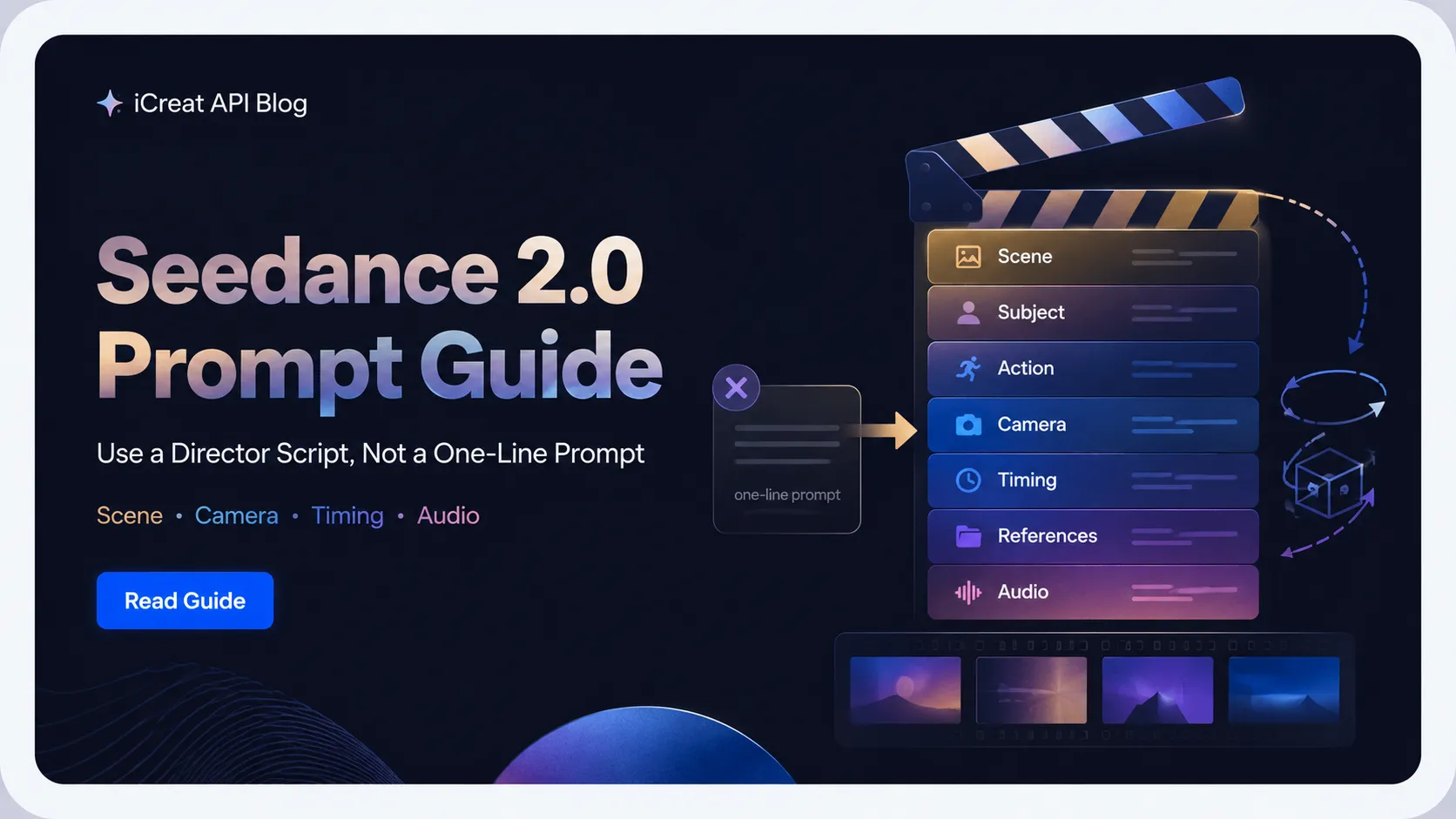
A weak Seedance 2.0 prompt usually describes a picture. A strong Seedance 2.0 prompt directs a shot: what happens, who is in frame, how the camera moves, what the scene feels like, when each beat happens, and which references the model should use.
That is the practical difference this Seedance 2.0 prompt guide focuses on. If you write "a cinematic UGC ad for a skincare product," you are asking the model to invent the video. If you write a director-style prompt with a hook, subject, action, camera movement, lighting, shot timing, reference bindings, and audio notes, you are giving the model a job.
When you test video models in iCreat, prompt quality matters because it changes whether you are fairly judging the model. A vague prompt can make a capable model look weak. A structured prompt gives Seedance 2.0 a clearer shot plan, then lets you compare whether the model can actually follow it.
Key Takeaways
- One-line prompts often fail because they describe a static idea, not a video sequence.
- Better Seedance 2.0 prompts are not just longer. They separate scene, subject, action, camera, style, timing, references, and audio.
- Use shot lists or timestamps when the clip has multiple beats, but keep each beat focused.
- Reference images, videos, and audio should each have one clear job instead of all influencing everything.
- For UGC ads, the prompt should define the hook, product moment, human action, proof beat, CTA, camera, and sound.
- Before scaling a template, test it from the iCreat dashboard and compare available video models only if Seedance 2.0 is not matching the prompt reliably.
Stop Writing One-Line Seedance 2.0 Prompts
A one-line prompt usually leaves too many production decisions to the model. Seedance 2.0 needs more than a mood phrase because video includes motion, timing, framing, continuity, and sound.
This is the beginner mistake:
Make a cinematic video of a woman using a beauty product, UGC style, realistic, viral ad.That prompt has intent, but almost no direction. It does not say what the product is, what the woman does, where the camera is, what the first second should show, what proof moment should land, or how the clip should end.
Seedance 2.0 may still produce something. But it has to guess the shot. It may choose a generic beauty setup, flat lighting, random hand movement, unclear product use, or a camera angle that does not fit a short-form ad.
The better mental model is this: prompt like a director, not like someone naming a thumbnail. Give the model a small production brief.
Weak Prompt vs Director Script Prompt
Better prompts are not just longer; they assign jobs to each part of the video. The goal is not to stuff the prompt with cinematic adjectives. The goal is to remove ambiguity.
| Prompt Type | Example | What Happens |
|---|---|---|
| Weak one-line prompt |
A cinematic video of a woman using a skincare serum, viral UGC ad.
|
The model invents action, framing, light, sound, pacing, and ending. |
| Overloaded prompt |
A beautiful cinematic premium viral UGC ad, ultra realistic, emotional,
                          high quality, stunning, with amazing camera movement.
|
The model receives style pressure but little actual direction. |
| Director script prompt |
Shot 1: close-up of the serum bottle on a bathroom counter, soft morning
                          window light. Shot 2: creator applies one drop to cheek, handheld selfie
                          camera, natural smile. Shot 3: close-up of hydrated skin, creator says
                          "This is the glow I wanted."
|
The model gets subject, sequence, camera, lighting, action, and audio cues. |
This is why the user's test setup matters: "Same storyboard, Same character references, Same Seedance 2.0 model, Same 15-second video length, Only the prompt changed." If prompt is the only changed variable, the result gap is not only about model capability. It is about how much the prompt directed the video.
Use that insight carefully. It does not prove any template guarantees better output. It does show why a prompt should be treated as part of production design, not a throwaway sentence.
The Director Script Prompt Stack
Use the Director Script Prompt Stack when a simple prompt is not giving you usable Seedance 2.0 outputs. It breaks the video into control blocks so you know what to adjust when the result fails.
1. Scene and Setting
Start with where the video happens and what the viewer should understand first. A setting is not just background decoration. It controls context, light, props, and realism.
Weak:
in a nice roomStronger:
in a small bright apartment bathroom, white tile, soft morning window light, clean counter with one serum bottle visible2. Character or Subject
Name the person, product, object, or character that must stay clear. Keep it specific enough to anchor the shot, but do not add ten competing traits.
For a person:
a woman in her late twenties wearing a cream sweater, natural makeup, holding a small amber serum bottleFor a product:
a matte white portable blender with a clear cup and one visible logo on the frontIf you use a reference image, do not redescribe every visible detail. Tell Seedance what to preserve from the reference and what motion to add.
3. Action
Video needs verbs. A weak prompt describes what exists; a stronger prompt describes what changes over time.
Use one main action per beat:
- turns the bottle toward camera
- applies one drop to cheek
- walks forward while speaking
- opens the package and pulls out the product
- slides the can through condensation on a black stone surface
Avoid stacking too much into one beat. If the subject walks in, sits down, opens a laptop, types, reacts, and speaks, that is probably a shot list, not one sentence.
4. Camera Movement
Camera language is one of the biggest control levers in Seedance 2.0 prompts. Instead of "cool camera movement," name the move.
Useful camera terms include:
| Camera Term | Use It When You Want |
|---|---|
| Locked-off / static | Product stability, talking-head shots, clean demos |
| Slow push-in / dolly in | Emotional emphasis or product reveal |
| Slow pull-back | Reveal context or show before/after |
| Tracking shot | Follow a walking subject or moving object |
| Handheld | UGC realism, creator-style motion |
| Orbit / arc | Product beauty shot or hero object reveal |
| Rack focus | Shift attention from one object to another |
Keep the camera move focused. One camera move per shot is usually easier for the model to follow than a prompt that asks for a dolly, orbit, pan, and zoom in five seconds.
5. Style and Mood
Style should guide the finished look, not replace concrete direction. "Cinematic" is useful only after the prompt already tells the model what to shoot.
Better style and mood inputs are visual:
- soft morning window light
- handheld UGC phone-camera look
- clean premium product ad
- warm kitchen daylight
- cool blue night street lighting
- calm documentary realism
Avoid adjective soup:
beautiful, stunning, epic, ultra cinematic, masterpiece, viral, high qualityThose words do not tell the model where to point the camera.
6. Timing or Shot List
Use timing when the clip has multiple beats. This can be timestamps, shot numbers,
or simple cut to language.
For a 10-15 second clip, a three-shot structure is often enough:
Shot 1 (0-4s): hook or setup.
Shot 2 (4-9s): product action or proof moment.
Shot 3 (9-15s): reaction, result, or CTA close.
Do not overfill a short clip. If you write six or seven shots into a few seconds, the model may blend, skip, or compress parts of the sequence.
7. Reference Bindings
References should have jobs. If you upload images, videos, or audio, the prompt should tell Seedance what each one controls.
Example:
Use Image 1 for the creator's face and hairstyle. Use Image 2 for the serum bottle shape and label. Use Video 1 only for handheld camera movement and pacing. Preserve the product label across all shots.This is safer than saying:
Use all references and make it look good.The second version makes the model guess which reference controls identity, motion, product details, lighting, or style.
How to Use Shot Lists and Timestamps
Use timestamps or shot lists when the video needs more than one beat. Do not force them into every prompt. A simple product turntable may only need one locked-off shot; a UGC ad or mini-story usually needs a sequence.
A clean shot list looks like this:
Shot 1 (0-3s): Close-up hook. The serum bottle sits on a clean bathroom counter, soft morning light from the left, camera locked-off.
Shot 2 (3-9s): Creator action. The creator picks up the bottle and applies one drop to her cheek, handheld selfie camera, natural UGC framing.
Shot 3 (9-15s): Result and CTA. Close-up of hydrated skin, slow push-in, creator says: "This is the glow I wanted."
Audio: quiet bathroom room tone, small bottle click, natural spoken voice, no music.
Each shot has one job. The first establishes the product. The second shows use. The third lands the result and message.
That is different from writing a wall of prompt text where every idea competes for attention.
How to Bind References Without Confusing the Model
References should stabilize the prompt, not overload it. If you add references without explaining their role, you can make the output less predictable.
Use this rule: one reference, one job.
| Reference | Better Job Assignment | Common Mistake |
|---|---|---|
| Image 1 | Face, outfit, or product shape | Asking it to control identity, style, lighting, and setting all at once |
| Image 2 | Product label or prop detail | Letting it conflict with Image 1's subject |
| Video 1 | Camera movement or action rhythm | Expecting it to preserve identity or product details |
| Audio 1 | Voice, pacing, or mood where supported | Assuming perfect sync without testing |
If the output drifts, do not immediately add more references. First reduce the reference set and make the binding clearer. A smaller set of clean references often beats a larger set of mixed signals.
UGC Ad Prompt Template for Seedance 2.0
A UGC ad prompt should define the hook, product moment, proof beat, creator action, camera style, and audio. The goal is not polished cinema. The goal is a short video that feels specific, human, and usable for social testing.
Use this template:
Project: [Product] UGC ad, [platform or format], [duration]

Reference binding:
Use Image 1 for [product / person / character identity].
Use Image 2 for [packaging / setting / style], if relevant.
Preserve [must-not-change details].

Shot 1 (0-3s): Hook.
[Creator / subject] [specific action] in [setting].
Camera: [handheld selfie / locked-off / slow push-in].
Lighting: [specific light source and mood].
On-screen or spoken hook: "[short line]".

Shot 2 (3-9s): Product use or proof.
[Show the product action clearly].
Camera: [one camera move].
Keep attention on [product / face / result].

Shot 3 (9-15s): Result and CTA.
[Show outcome or reaction].
Creator says: "[short CTA or benefit line]."
Audio: [room tone / product sound / voice / music cue].
Style: [natural UGC / clean product ad / documentary realism].
Here is a filled version:
Project: Hydrating serum UGC ad, vertical social video, 15 seconds.

Reference binding:
Use Image 1 for the amber serum bottle and label. Preserve the bottle shape, label placement, and cap color across all shots.

Shot 1 (0-3s): Hook.
A creator in a cream sweater holds the serum bottle close to the bathroom mirror and says, "My skin looked tired this morning."
Camera: handheld selfie camera, slight natural hand movement, close framing.
Lighting: soft morning window light from the left, clean white tile background.

Shot 2 (3-9s): Product use.
The creator places one drop of serum on her cheek and gently smooths it in with two fingers.
Camera: medium close-up, slow push-in, keep the bottle visible on the counter.
Keep attention on the skin texture and product application.

Shot 3 (9-15s): Result and CTA.
Close-up of the creator smiling at the mirror, hydrated skin catching soft light.
Creator says, "This is the glow I wanted."
Audio: quiet bathroom room tone, small bottle cap click, natural spoken voice, no music.
Style: realistic UGC skincare ad, not glossy studio commercial.
This template does three things a one-line prompt cannot do. It controls the first second, gives the product a clear role, and tells Seedance 2.0 how the clip should move through time.
Build a Prompt Director Workflow
Use a custom GPT or prompt template library to ask for missing blocks before you generate. The tool does not need to be official or complicated. Its job is to stop you from submitting under-directed prompts.
A useful prompt director should ask:
- What is the video format: UGC ad, product demo, hero loop, explainer, cinematic scene, or social hook?
- What must appear in the first second?
- What is the main subject or product?
- What is the main action?
- What camera style fits the output: selfie, locked-off, handheld, slow push-in, tracking, orbit?
- What should the reference image preserve?
- Does the clip need one shot or multiple shots?
- What should the audio contain: dialogue, ambient sound, product sound, music, or silence?
- What details must not change?
Then it should output a template you can edit, not a final answer you trust blindly.
The simplest workflow is:
- Write the raw idea in one sentence.
- Let the prompt director ask for missing blocks.
- Generate a structured prompt.
- Run a small test batch.
- Diagnose the result by block: action, camera, lighting, timing, reference binding, or audio.
- Change one block and run again.
This prevents the common loop where a creator rewrites everything after each bad output and never learns what actually helped.
Prompt Pre-Submit Checklist
Run this checklist before sending a Seedance 2.0 prompt:
- Does the first sentence define the main subject and action?
- Is there one clear camera move per shot?
- Is the setting specific enough to guide light and props?
- Does the prompt describe motion, not only appearance?
- If there are multiple beats, are they split into shot numbers or timestamps?
- If references are used, does each reference have one assigned job?
- Is the audio described if the workflow uses sound?
- Are product, face, logo, or wardrobe details that must stay stable named clearly?
-
Did you avoid stuffing the prompt with vague words like
stunning,epic, andmasterpiece? - Are format, pricing, and model settings checked in the platform instead of guessed inside the prompt?
If the answer is no, fix the prompt before spending more runs.
When to Test This in iCreat
Test structured prompts in iCreat before you judge whether Seedance 2.0 fits your workflow. A weak prompt can make the wrong model decision look obvious when the real issue is that the prompt never gave the model enough direction.
Use iCreat for the next practical step, not as a generic link dump:
- Open the iCreat dashboard and test the director-script prompt with the current model settings.
- If Seedance 2.0 is not following the prompt reliably, use the model catalog to compare other video model options.
- If the prompt becomes part of a repeat production workflow, then check cost and automation details before scaling.
If your structured Seedance 2.0 prompt produces a strong result, save the prompt, reference set, and settings as a reusable production asset. If it still fails, compare another model before assuming the concept is impossible.
Before turning a prompt into a repeat workflow, test it with the current model settings in iCreat. Model options, pricing, reference support, and audio behavior can change, so verify those details at the moment they affect the decision instead of checking every product page by default.
FAQ
Final Takeaway
Prompt quality sets the floor; model capability sets the ceiling. If the prompt is vague, Seedance 2.0 has to invent the shot. If the prompt is structured like a director script, the model has a clearer path to follow.
The next time a Seedance 2.0 result looks generic, do not only add more adjectives. Rewrite the prompt by block: scene, subject, action, camera, timing, references, and audio. Then test the structured version in iCreat, compare the result, and save the prompt patterns that work.