


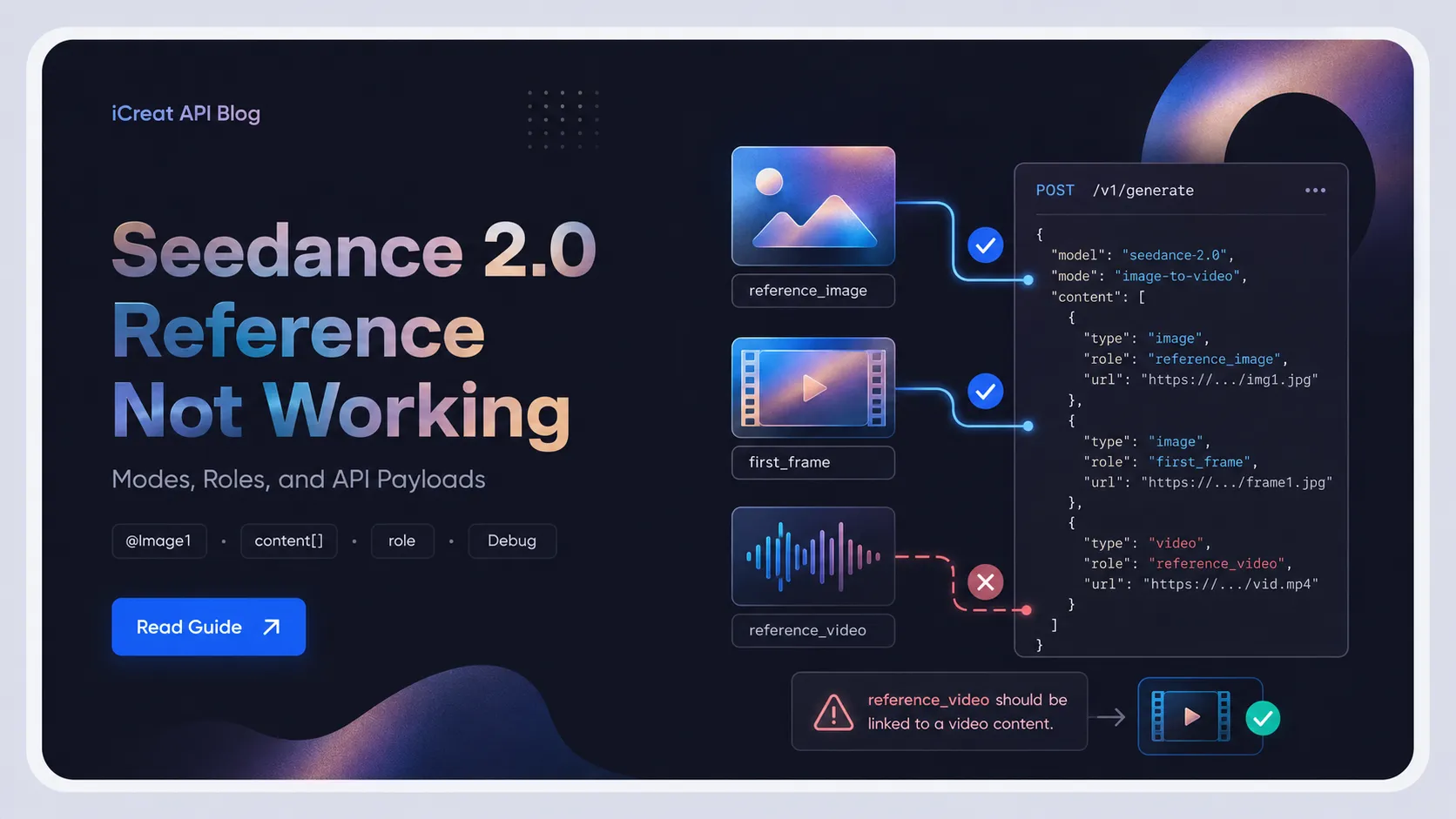
Seedance 2.0 references usually fail for one of five reasons: the wrong generation mode, a missing media field in the request, an incorrect reference role, weak model adherence, or asset rejection. The fix is rarely the prompt itself. It is almost always which of those five you are hitting — and most creators burn credits rewriting prompts before they find out which one.
This guide is written for developers and creators using the API path (iCreat,
Volcengine, or BytePlus), with Dreamina's @Image1 syntax explained as the
contrast case. If you are debugging a reference that "did nothing", work through the
five failure modes below before regenerating.
Key Takeaways
- A reference that "did nothing" is usually a request-structure problem, not a prompt-wording problem.
-
@Image1is a real syntax inside Dreamina and ByteDance's own R2V prompt examples; API paths use a structuredcontent[]array with arolefield instead. The two are not interchangeable. -
iCreat's Seedance 2.0 API binds references through
rolevalues:reference_image,reference_video,reference_audio,first_frame,last_frame. - ByteDance's official limit is 9 images + 3 videos + 3 audio clips, not a flat "12 files".
- A correct payload does not guarantee the model will follow the reference. Adherence is a separate failure from binding.
The Five Ways a Seedance 2.0 Reference Fails
Before changing your prompt, identify which failure you are in. The fix is different for each.
| Failure Type | What Happens | Root Cause | First Fix |
|---|---|---|---|
| Mode mismatch | You uploaded an image but output looks text-to-video | Wrong mode selected, or API call has no image element | Switch to image-to-video / first-frame / reference mode |
| Missing field | Image is described in prompt text but absent from payload | content[] has no image_url element |
Add the media element with a role |
| Wrong role | Image is in the payload but assigned the wrong role |
first_frame used where reference_image was
intended, or role omitted
|
Set the correct role for the intended job |
| Adherence failure | Payload is correct, model did not follow the reference | Generation randomness, weak reference weight, prompt-reference conflict | Re-run, simplify the prompt, or pick a stronger reference |
| Asset rejection | Input rejected or silently dropped | Format, size, aspect ratio, human face, or IP issue | Fix the asset or set need_review: true |
The first three are binding failures — the reference never reached the model in a usable form. The fourth is a generation limitation, not a binding problem. The fifth is a policy or format block. Most "my reference didn't work" debugging conflates all five; the table above is the first thing to split.
How Reference Binding Actually Works by Surface
The same Seedance 2.0 model can be reached through surfaces that bind references in completely different ways. Getting this wrong is the single most common cause of cross-surface confusion.
Dreamina and ByteDance's official creator surfaces use @ tags inside
the prompt.
ByteDance's own
Seedance 2.0 launch material
demonstrates reference-to-video with tags typed directly into the prompt:
So @Image1 / @图片1 is not a community invention. It is
the documented syntax of the Dreamina-side workflow, where you upload an asset and
then refer to it by tag inside the prompt box.
API paths use structured fields, not prompt tags. The
iCreat API documentation
binds references through a content[] array where each media element
carries a role. Pasting @Image1 as the first frame into an
API prompt string does nothing — the API has no parser for that tag. The reference
has to be a separate element with role: first_frame.
Community prompt-compiler skills (such as Emily2040/seedance-2.0)
use their own tag conventions, formatted for the skill's internal compile step. Those tags are real and useful
inside the skill, but they are not a third official syntax — they compile down to
whichever surface the skill targets.
The practical rule: the binding mechanism belongs to the surface, not to Seedance itself. A tag that works in Dreamina will not work in an API call, and an API field will not help you in the Dreamina prompt box.
Check Your API Payload First
If you are on an API path, the payload is the first thing to inspect — before prompt
wording, before model choice, before regenerating. Most API-side "reference did
nothing" failures are a content[] structure mistake.
iCreat's Seedance 2.0 endpoint (POST https://api.icreat.ai/v1/task/submit/bytedance/seedance-2-0) takes a content[] array. Each element has a
type (text, image_url,
video_url, audio_url) and, for media elements, a
role:
| Role | Purpose | Constraint |
|---|---|---|
first_frame |
Image used as the starting frame | Exactly one image |
last_frame |
Image used as the ending frame | Paired with first_frame |
reference_image |
Image whose composition, identity, or style to follow | 1–9 images |
reference_video |
Video whose motion, camera, or rhythm to follow | Up to 3 clips, ≤15s total |
reference_audio |
Audio whose mood, rhythm, or voicing to follow | Up to 3 segments, ≤15s total |
A correct reference-image request looks like this:
{
  "content": [
    { "type": "text", "text": "let the river flow through the scene" },
    { "type": "image_url",
      "image_url": { "url": "https://cdn.example.com/source/river.jpg" },
      "role": "reference_image" }
  ],
  "duration": 5,
  "generate_audio": true
}
A broken request usually omits the image element entirely and describes it in the text instead:
{
  "content": [
    { "type": "text", "text": "use my uploaded river image as a reference, let it flow" }
  ],
  "duration": 5
}
The second call is priced and processed as text-to-video. No reference was ever
bound, regardless of how clearly the prompt describes it. If your integration builds
the content[] from user input, this is the first bug to check.
One more field matters for rejection handling: need_review: true tells
the platform the reference may contain human faces or copyrighted IP and should go
through review. Omitting it on a face-bearing reference is a common cause of silent
asset rejection.
Reference Limits That Cause Silent Failures
Several third-party pages repeat a "12 files" limit. ByteDance's official launch material gives a more specific cap, and the per-type split matters:
- up to 9 reference images
- up to 3 reference video clips, total duration ≤ 15 seconds
- up to 3 reference audio segments, total duration ≤ 15 seconds
That is 15 assets total across types, not 12 of any one kind. A workflow that loads 12 images is already over the image cap even when the total file count looks safe. Over-limit assets are frequently dropped silently rather than rejected with a clear error, which is why this shows up as "the reference didn't apply".
Asset-level constraints from the iCreat docs also cause silent drops:
- Reference images: formats jpeg/png/webp/bmp/tiff/gif/heic/heif, aspect ratio in [0.4, 2.5], dimensions 300–6000px, single image < 30MB
- Reference videos: mp4/mov, 24–60 FPS, ≤ 200MB per clip
- Request body total ≤ 64MB
If your reference is technically present in the payload but outside these bounds, the API may accept the task and still not use the asset. Validate the asset before assuming the model ignored it.
When the Reference Is Bound but Ignored
This is the failure mode most guides skip, and the one that makes single A/B tests misleading.
A correct payload guarantees the reference reached the model. It does not guarantee
the model followed it. Seedance 2.0's generation has inherent randomness; the
current iCreat request parameters do not expose a user-controllable
seed to lock the output. That means:
- Two runs of the same correct payload can produce noticeably different output.
- A reference that "applied" on one run can look absent on another.
- Character drift, partial style inheritance, or inconsistent motion are not proof the reference failed to bind — they may be generation variance or model limitations ByteDance itself acknowledges ("room to optimize regarding multi-subject consistency, text rendering accuracy, and complex editing effects").
Treat these as adherence failures, separate from binding failures. The fix is different:
- Do not conclude "the reference didn't bind" from one unconvincing output.
- Simplify the prompt so it does not compete with the reference (a prompt that over-specifies identity, motion, and lighting can override a reference that would otherwise hold).
- Use a stronger or cleaner reference asset — a low-contrast or cluttered reference gets less weight.
- If you need consistency across a sequence, plan continuity at the storyboard level rather than expecting one reference to hold across many unrelated generations.
How to Verify Whether a Reference Took Effect
A single side-by-side A/B is not a reliable verdict. Use this sequence instead.
-
Inspect the request payload first. Confirm the
content[]actually contains the media element and the correctrole. This is the only step that can prove a binding failure with certainty. - Check the task status and any returned warnings. Asset rejections often surface in the task result rather than the submit response.
- Pick a reference with an obviously different visual signature — a distinctive color, an unusual composition, a specific product. Subtle references are hard to distinguish from generation variance.
- Run the with-reference and without-reference cases several times each, then compare the trend across the set, not any single pair. If the with-reference cluster consistently leans toward the reference's visual identity and the without-reference cluster does not, the reference is having an effect. If both clusters look the same across multiple runs, suspect the payload or the role.
-
If you have access to logs, compare the request that worked against the one that
did not.
The difference is usually in the
content[]structure, not the prompt text.
The earlier rule "if two outputs are indistinguishable, the reference did not bind" is too strong. The honest version: a single indistinguishable pair is inconclusive; a consistent pattern across multiple runs points at the payload.
Where iCreat Fits
iCreat's value for this specific problem is not "compare models to find out which one binds". That framing is wrong — swapping models changes the model variable too, so it cannot isolate the surface. The honest value is narrower and more useful.
The iCreat Seedance 2.0 API exposes the full content[] +
role structure, which means the binding path is
inspectable. When a reference does not apply, you can read the
exact payload you sent, confirm whether the media element and its role are present,
and fix the request without guessing. That is harder to do inside a UI-only workflow
where the binding happens behind the prompt box.
The model entries currently exposed (as of July 2026) include
bytedance/seedance-2-0, bytedance/seedance-2-0-fast, and
bytedance/seedance-2-0-mini. Fast and Mini only support 480p and 720p
resolution; the full model supports up to 4K. All three accept the same reference
modes. Confirm the live model page before production rollout, because model IDs and
exposed variants change.
A practical debugging flow on iCreat:
-
Submit the same scene through the API twice — once with the reference element in
content[], once without — and read both request payloads back. - If both payloads look identical in the media-array structure, your integration is dropping the reference before it ever reaches Seedance. That is a binding bug in your code, not a model problem.
- If the payloads differ but outputs do not, you are in adherence-failure territory. Switch to a stronger reference or simplify the prompt before spending more credits.
- Check pricing before running the comparison set, since each run is billed per task.
This is the real reason to bring a reference-binding problem to iCreat: not because
iCreat binds references any differently from the underlying Seedance model, but
because the request payload is visible and the same model family is exposed across
seedance-2-0, Fast, and Mini entries with identical
content[] semantics.
Media and Rights Boundary
Reference workflows regularly involve uploaded images, videos, audio, product
assets, and human faces. ByteDance's launch material notes that real human portraits
used as subject references require identity verification or prior legal
authorization. The iCreat API exposes a need_review flag for exactly
this case: set it to true when the reference contains faces or
copyrighted IP.
Before commercial use, confirm you have the rights to upload and use the assets, and review the current platform and provider terms for your surface. Good continuity or strong reference adherence does not remove the rights check — it only reduces one category of production repair.
FAQ
content[] array requires at least a text
element to describe the intended motion or action; a lone
reference_image element without text direction does not produce usable
output. Pair the reference with a short motion description.
first_frame constrains the literal opening frame of the generated video
— it should match the first frame closely. reference_image provides
visual guidance (composition, identity, style) without locking the opening frame.
Use first_frame when you need the video to start from a specific image;
use reference_image when you want the output to resemble an image
without requiring an exact match.
role. A common
mistake is to put two images in content[] and expect one to act as
first frame and the other as reference without assigning roles correctly. The role
assignment is what tells the model which is which.
need_review: true on the media element so the reference goes through
the review path instead of being silently rejected.
content[] structure are identical
across seedance-2-0, seedance-2-0-fast, and
seedance-2-0-mini. The only documented difference is that Fast and Mini
limit resolution to 480p and 720p.
Final Recommendation
When a Seedance 2.0 reference does not apply, inspect the request payload before rewriting the prompt. Identify which of the five failure modes you are in: mode mismatch, missing field, wrong role, adherence failure, or asset rejection. Each has a different fix, and confusing them is what makes reference debugging feel random.
Run your next reference test through the iCreat Seedance 2.0 API with the
content[] and role structure shown above, read the payload
back, and confirm the media element is actually present before spending credits on
variants.