


A single lucky Seedance 2.0 clip is not a UGC ad strategy. A repeatable workflow is. If you are a performance marketer, ecommerce team, or indie creator trying to produce vertical ad creative at volume, you need a pipeline that turns one prompt into screened, on-format, cost-controlled ad variants.
Seedance 2.0 is well suited to this job because its 4-15 second duration range, native audio, multi-shot support, and motion realism map directly onto short-form ad formats. But the model only becomes a production tool when you write prompts like a timeline, validate the vertical output, screen multiple variants, and track cost before scaling.
In iCreat, this means starting with a real timestamp prompt in the dashboard, confirming the returned video is actually 9:16, and only moving to batch generation or API automation after the workflow passes a real ad-value check.
Key Takeaways
- Seedance 2.0's 4-15 second range, native audio, and multi-shot control make it a strong fit for UGC ads when the prompt is structured like a shot list.
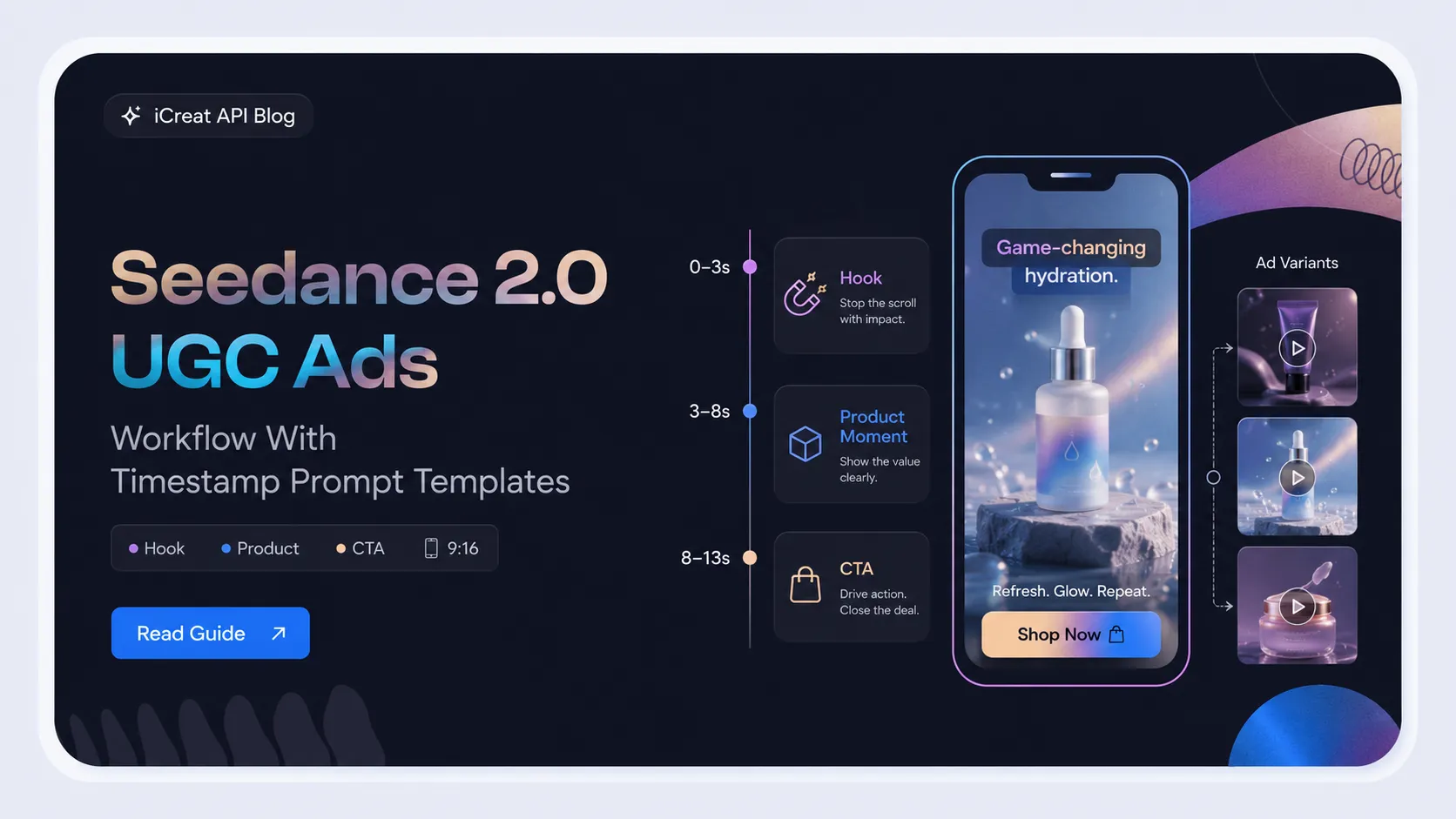
- The timestamp trick turns one prompt into a timeline: hook, product moment, and CTA each get their own seconds.
-
Set
ratio: "9:16"and validate the returned video dimensions before treating the output as an ad-ready asset. - Seedance 2.0 supports up to 9 images, 3 videos, and 3 audio references per generation, not 12 as some creator content claims.
- Generate a small variant batch, screen against ad criteria, and keep only what passes. Do not scale a prompt that has not been tested.
- Estimate per-second cost and verify live pricing before committing ad budget to repeated generation.
Why Seedance 2.0 Fits UGC Ads
UGC ads are not cinematic commercials. They are short, vertical, handheld, and built around a person, a product, and a moment. Seedance 2.0's capabilities align with that format:
| UGC Ad Requirement | Seedance 2.0 Fit |
|---|---|
| 4-15 second duration | Matches TikTok, Reels, and Shorts ad lengths |
| Vertical 9:16 format | Supported via ratio: "9:16" |
| Native audio | Dialogue, ambient sound, and product sound in one pass |
| Human motion and reaction | Motion realism for product handling, facial expression, body language |
| Multi-shot in one generation | Timestamp beats let you script hook, product, and CTA in one clip |
| Reference binding | Lock product identity, wardrobe, or voice across variants |
This does not mean every generation is ad-ready. It means the model's capabilities map onto the ad format, so the bottleneck is usually your workflow, not the model.
The Timestamp Trick: Write Prompts as a Timeline
Instead of describing one scene, write the prompt like a timeline. Give each segment of the ad its own seconds. This is what creators call the timestamp trick, and it is one of the most reliable ways to get a structured UGC ad from a single Seedance 2.0 generation.
The pattern is simple. Divide the clip into beats and describe what happens at each time marker:
0 to 3s: [Hook beat - grab attention]
3 to 8s: [Product moment - show the product in use]
8 to 13s: [Proof or reaction - land the value]
A filled example for a skincare serum:
A creator in her late twenties, no makeup, cream sweatshirt, stands in a softly lit bathroom with morning window light. Handheld phone selfie camera, natural UGC energy.

0 to 3s: She holds the amber serum bottle up to the camera and says, "Okay, I have to show you this one." Direct eye contact, half-smile.

3 to 8s: She applies one drop to her cheek and smooths it in slowly with two fingers. Camera stays close on the product and her hand.

8 to 13s: She looks back at the camera, grins, and says, "This is the glow I wanted." Slow pull-back. Ambient bathroom sound, no music.

9:16 vertical, 13 seconds, photoreal UGC iPhone aesthetic, no cinematic gloss.
This structure works because Seedance 2.0 handles temporal beats when you write them explicitly. A vague prompt forces the model to invent pacing. A timestamped prompt gives each second a job.
The Hook-Product-CTA Beat Structure
Every UGC ad needs three things: a hook that stops the scroll, a product moment that shows value, and a close that drives action. Map these onto your timestamp beats.
| Beat | Time Segment | Job | Example Content |
|---|---|---|---|
| Hook | First 2-3 seconds | Stop the scroll | Problem statement, reaction, bold claim, or visual surprise |
| Product moment | Middle segment | Show the product in use | Application, unboxing, demo, or result on screen |
| CTA close | Final 2-3 seconds | Drive action | Direct line, offer, or clear next step |
Rules that keep UGC ads from drifting into commercial polish:
- Keep the hook under 3 seconds. Long hooks lose the scroll.
- Show the product in use, not on a table. Motion sells more than static display.
- Put spoken lines in double quotes so the model knows to sync audio.
- Use one camera style per ad. Mixing handheld selfie with tripod establishing shots breaks UGC authenticity.
- End the prompt with an audio line. If you do not describe sound, the model may add unwanted background music.
Vertical 9:16 Setup and Output Validation
Set ratio: "9:16" in the request and validate the returned video
dimensions before treating the output as an ad-ready asset. A
SUCCEEDED task that returns 16:9 landscape video is a silent failure
for vertical ad workflows.
In the iCreat API, the vertical setup looks like this:
{
  "content": [
    {
      "type": "text",
      "text": "Your timestamped UGC ad prompt here"
    }
  ],
  "ratio": "9:16",
  "resolution": "720p",
  "duration": 13
}
After the task returns SUCCEEDED, probe the returned video's actual
width and height. If you requested 9:16 but received 16:9, the output is not usable
for Reels, Shorts, or TikTok ad placements, even though the API reported success.
Treat that as a failed usable output, not a cosmetic issue.
This connects to a broader video API risk: wrong-ratio silent failures. If your team is building automated ad generation, add output dimension validation as a standard gate.
Bind References Without Breaking Authenticity
Seedance 2.0 lets you pass reference images, videos, and audio in a single generation. Use them to lock product identity, wardrobe, or voice, but do not overload the prompt with the maximum reference set every time.
The documented limit is:
| Reference Type | Maximum | Role Value in iCreat API |
|---|---|---|
| Images | 9 | reference_image |
| Videos | 3 | reference_video |
| Audio | 3 | reference_audio |
That is 15 media references total, not 12 as some creator content claims. If you have seen the "12 files" number in Reels or tutorials, use the documented limit instead.
Practical reference rules for UGC ads:
- Start with one product reference image, not nine. More references dilute attention.
- Give each reference a clear job in the prompt. For example: "Use Image 1 for the product label and shape. Preserve the cap color across all shots."
-
Set
need_review: trueif the reference contains real faces or copyrighted IP. Otherwise the task is likely to fail. - Keep reference orientation consistent with the target ratio. A landscape reference image can bias the output toward 16:9 even when you request 9:16.
Multi-Version Generation and Screening
Do not ship the first generation. UGC ads are selection-based, not one-shot. Generate a small variant batch, screen against ad criteria, and keep only what passes.
Variant Strategy
The most efficient variant strategy changes one variable per batch while keeping the rest fixed:
| What to Vary | What to Keep Fixed | Why |
|---|---|---|
| Hook line | Product, creator identity, setting | Tests which opener stops the scroll |
| Creator persona | Product, hook structure, CTA | Tests which audience responds |
| CTA close | Hook, product moment | Tests which close drives action |
| Proof moment | Hook, creator, CTA | Tests which evidence lands |
Generate 3-5 variants per batch. Fewer is not enough to see patterns. More burns credits before you know which variable matters.
Screening Checklist
Before approving a variant as ad-ready, check:
- First 1-2 seconds communicate the hook clearly
- Product is visible and recognizable
- Creator looks human, not stock-model polished
- No unwanted background music or watermark
- Aspect ratio is 9:16, not 16:9
- Dialogue is understandable if present
- No distorted hands, face warping, or extra people
- Claims stay compliant, no exaggerated or fake results
- CTA is explicit and clean
If a variant fails more than one criterion, regenerate rather than edit. Editing AI video to fix fundamental issues usually costs more than a clean regeneration.
Cost Estimation and Provider Choice
UGC ad production is not free, and the cost model matters when you are generating variant batches. Estimate per-second cost before scaling, and verify live pricing before committing budget.
Cost Drivers
| Cost Factor | Impact | Planning Tip |
|---|---|---|
| Duration | Longer clips cost more per generation | Test hooks at 5s before producing 13-15s variants |
| Resolution | Higher resolution costs more | Test at 480p, produce finals at 720p |
| Variant count | More batches multiply cost | Fix variables before generating large batches |
| Failed outputs | Wrong-ratio or unusable outputs still consume credits | Add validation to avoid paying for unusable video |
| Provider pricing | Per-second rates vary by platform | Check iCreat pricing for current rates |
Do not treat exact per-second prices from third-party blogs as reliable. Pricing changes. Use the live pricing page as the source of truth before estimating ad production cost.
Provider Choice for UGC Ads
Choose a provider or platform based on how it fits your ad workflow, not only on per-second price:
- If you need to test Seedance 2.0 alongside other video models before committing ad budget, use a multi-model platform where you can compare outputs side by side.
- If you need product reference binding and native audio for ad authenticity, confirm the provider exposes those features.
- If you need automation for batch variant generation, confirm the API supports the task submit, poll, and result flow your pipeline requires.
- If you need vertical reliability, validate the provider's 9:16 output before scaling.
UGC Ad Prompt Template for Seedance 2.0
Use this template as a starting point. Fill in the product, creator, setting, and hook details. Keep the structure intact.
[Creator description: age, appearance, wardrobe, no makeup if authentic UGC] in [specific setting: room, time of day, lighting]. Handheld phone selfie camera, natural UGC energy.

0 to 3s: [Hook]. [Creator action: holds product up, reacts, or speaks to camera]. Spoken line: "[short hook line]".

3 to 8s: [Product moment]. [Creator uses, applies, opens, or demonstrates the product]. Camera stays close on [product detail or action].

8 to 13s: [Proof or reaction]. [Creator reacts, shows result, or delivers the value line]. Spoken line: "[short CTA or benefit line]".

9:16 vertical, [duration] seconds, photoreal UGC iPhone aesthetic, no cinematic gloss. Ambient [setting] sound, no music.
Filled example for an ecommerce product:
A woman in her mid-twenties with shoulder-length dark hair, no makeup, wearing an oversized white tee, sitting cross-legged on her bed surrounded by tissue paper. Bright casual bedroom lighting, warm tones. Handheld phone selfie camera.

0 to 3s: She pulls a sleek product box from the tissue paper and her eyes go wide. She mouths, "Wait." Genuine surprise reaction.

3 to 8s: She holds the product up, turns it slowly to show the label and packaging detail. Camera follows her hands in a close medium shot.

8 to 13s: She looks straight at the camera, laughs lightly, and says, "I was not expecting this." Quick cut to product alone on the white bedsheet for the final frame.

9:16 vertical, 13 seconds, photoreal UGC iPhone aesthetic, bright casual room lighting, ambient room sound, no music, no logo, no text on screen.
The negative cues at the end, "no music, no logo, no text on screen," are important. Without them, the model may add default background music or watermarks that immediately break UGC authenticity.
Run the Workflow in iCreat
iCreat is the right fit when your team is moving from one-off Seedance clips to a repeatable ad pipeline. Instead of locking into a single provider before you know the workflow works, test the timestamp prompt, validate vertical output, estimate cost, and compare fallback models in one platform. That sequence is what turns a prompt experiment into a paid ad channel.
Test the timestamp prompt and vertical output before automating the pipeline. The goal is to confirm that the workflow produces usable vertical ad video before you scale variants or build API automation.
Use iCreat based on the decision in front of you:
- Use the iCreat dashboard to run the timestamp prompt as a real vertical test before scaling.
- Use iCreat pricing when estimating ad production cost across variant batches.
- Use the model catalog only when Seedance 2.0 is not producing ad-ready output and you need to compare fallback video models.
- Use the iCreat API docs only when you are ready to automate variant generation through the task submit, poll, and result flow.
Do not treat internal links as a checklist. If the decision is "will this timestamp prompt produce a usable vertical ad," the next step is a controlled dashboard test, not a pricing page.
Common UGC Ad Mistakes and Fixes
| Mistake | Why It Hurts the Ad | Fix |
|---|---|---|
| One-line prompt with no timeline | Model invents pacing, usually produces a flat clip | Use timestamp beats with hook, product, CTA |
| No audio direction | Model adds default background music | End every prompt with an audio line |
| Too many references at once | Identity and product details drift | Start with one product reference, add more only if needed |
| Shipping the first generation | UGC ads are selection-based | Generate 3-5 variants and screen before approving |
| No vertical validation | 16:9 output passes as success but is unusable | Probe returned dimensions before marking usable |
| Cinematic language in a UGC prompt | Output looks like a commercial, not UGC | Use "handheld, phone selfie, no cinematic gloss" |
| Exaggerated claims in dialogue | Compliance risk and low trust | Keep claims specific and provable |
Ignoring need_review for face references |
Task fails silently or gets rejected | Set need_review: true for real faces or copyrighted IP |
FAQ
0 to 3s, 3 to 8s, and
8 to 13s, instead of describing one static scene. Each segment gets its
own subject, action, camera, and audio direction.
Final Takeaway
UGC ads are the most commercially mature use case for Seedance 2.0, but only when
you treat the model as part of a production pipeline, not a magic prompt box. Write
prompts like a timeline with hook, product, and CTA beats. Set
ratio: "9:16" and validate the returned output. Generate variant
batches and screen them against ad criteria. Estimate cost and verify pricing before
scaling.
Then run the full workflow in iCreat before automating it. That is how you turn Seedance 2.0 from a one-clip experiment into a repeatable UGC ad production system.