




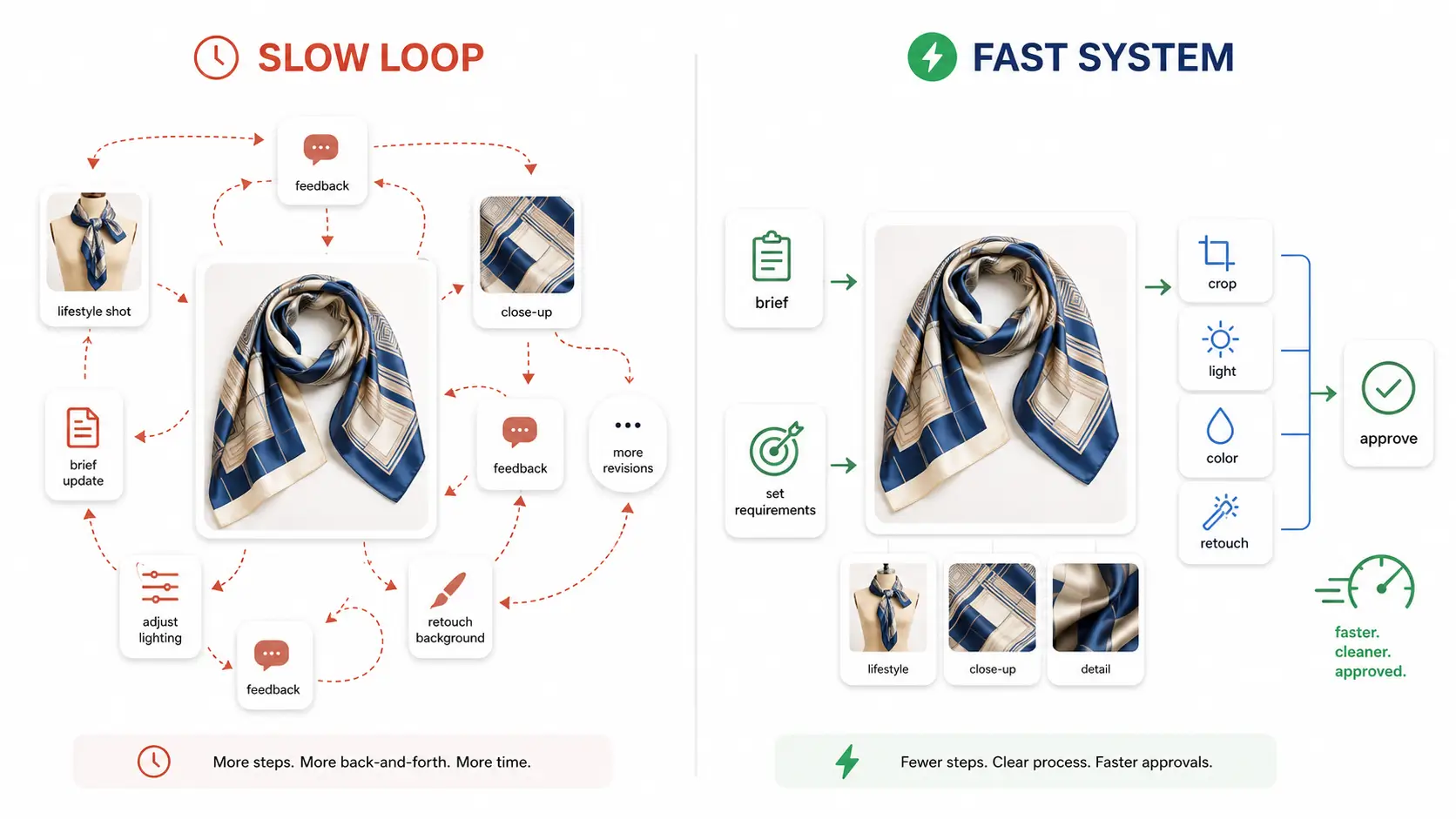
The bottleneck in AI product photography is rarely the first image — it is the revision loop that follows. Each stakeholder feedback round that triggers a full regeneration multiplies production time and erodes the speed advantage that drew teams to AI generation in the first place. To speed up AI product photo revisions, you need a system that matches each change request to the right tool, preserves approved visual context between rounds, and coordinates multi-asset updates without chaos.
Key Takeaways
- First-image generation is fast; revision loops are where time disappears
- Not all changes require full regeneration — targeted edits are faster
- Preserving approved visual context between rounds prevents decision loss
- Coordinating multi-asset revisions (hero + detail + lookbook) needs a system
- Matching revision type to the right tool cuts cycles significantly
Why the First Image Is Not the Real Bottleneck
Generating an initial set of AI product photos takes seconds or minutes. A team can produce 10–20 variations in a single session and feel productive. The problem starts when stakeholders review those outputs and request changes. What looked like a fast workflow suddenly becomes a multi-day back-and-forth where each round of feedback triggers another full generation cycle.
The hidden cost compounds quickly. A single vague comment like "make it feel more premium" can lead to five or more regeneration attempts as the team guesses at lighting, background, and mood adjustments. Meanwhile, the clock ticks toward a campaign launch deadline, and the perceived efficiency of AI-generated visuals diminishes with every roundtrip.
This is why understanding how to generate ecommerce product photos with AI matters less than knowing what to do after the first batch arrives. The teams that move fastest are not necessarily the ones with the best prompts — they are the ones with the clearest process for handling what comes next.
What Actually Slows Down AI Product Photo Revisions
Four patterns show up repeatedly across ecommerce teams struggling with revision velocity.
Vague feedback forces trial-and-error regeneration. When a stakeholder says "the lighting feels off" without specifying direction, the person executing changes has no choice but to regenerate with different prompt variations and hope one lands. Each attempt costs time and credits without guaranteeing progress.
Approved context gets lost between rounds. A team might approve the angle, pose, and overall composition in round one, then receive feedback about background color in round two. If the person making changes does not preserve the previously approved elements, the new output may fix the background while breaking something that was already working.
All change requests get treated equally. Swapping a background is structurally different from redesigning a garment or changing a model's pose. When every request triggers the same full-regeneration workflow, simple edits take as long as complex ones.
Multi-asset multiplication creates task sprawl. One SKU with a hero image, three detail shots, and two lookbook frames means a single change directive can create six or more parallel revision tasks. Without coordination, these tasks drift out of alignment and produce inconsistent visual assets.
The broader direction across AI creative tools is clear: teams want more precise edits and fewer full restarts. That matters because revision speed depends less on raw generation quality and more on whether the workflow can preserve what is already approved.
A Revision Type Classification Framework
The fastest way to cut revision time is to stop treating every change request the same way. A classification system routes each request to the lightest-weight tool that can handle it.
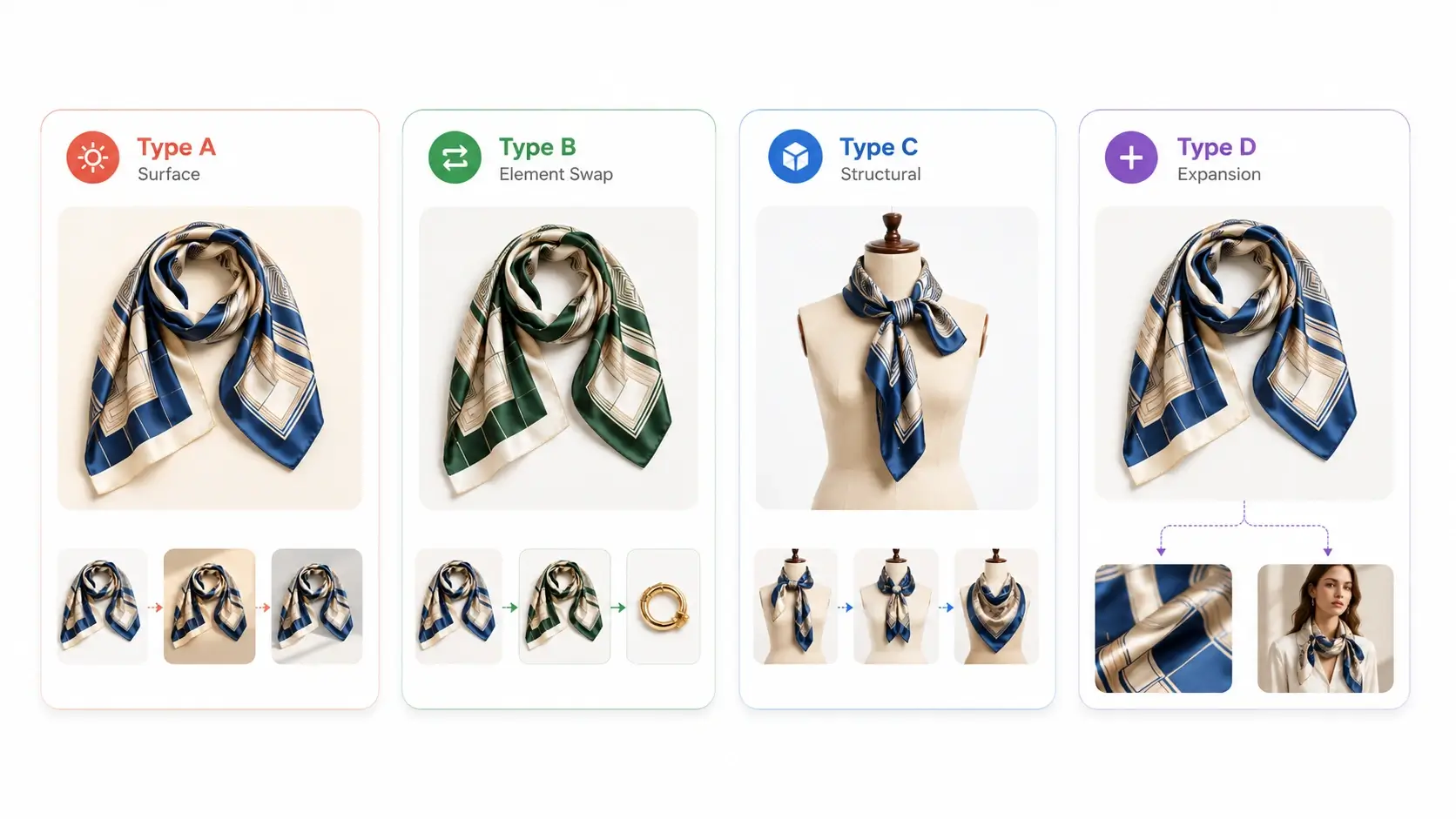
Type A — Surface Changes
Surface changes affect the environment around the product without altering the product itself. Examples include background color or texture swaps, lighting temperature adjustments, shadow softening, and minor prop additions or removals.
These changes are best handled through variant generation within an AI Product Photography workflow. The reference image stays the same; only the scene description changes. Because most pixels remain unchanged from the approved version, surface changes typically resolve in one or two passes.
Best tool: AI Product Photography variant generation
Type B — Element Swaps
Element swaps replace a specific visual component while keeping the rest of the scene intact. Common examples include changing clothing color or pattern, swapping a model's face or hair, replacing an accessory, or substituting a background element.
These are surgical edits that do not require rebuilding the entire image. An AI Image Replacer tool targets the specific region that needs change and leaves everything else alone. This approach is significantly faster than regenerating from scratch because the model has fewer variables to reconcile.
Best tool: AI Image Replacer
Type C — Structural Changes
Structural changes alter the fundamental composition of the image. Changing a model's pose, shifting camera angle, recomposing the frame, or moving the product to a different position in the scene all fall into this category.
These requests usually require fresh generation rather than editing. A Pose Generator can produce new base compositions, and the AI Product Photography workspace can rebuild the scene from the updated reference. Structural changes take longer than Type A or B edits, but classifying them correctly prevents wasted attempts with lighter tools that cannot handle the scope of change.
Best tool: AI Pose Generator or full regeneration via the AI Product Photography workspace
Type D — Asset Expansion
Asset expansion means extending an approved hero concept into additional asset types: generating detail shots from the hero image, creating lookbook variations, or producing ad creative derivatives.
This is not really a revision — it is a production extension. The key is chaining outputs so that downstream assets inherit the decisions already locked in upstream. Detail shots should reference the approved hero. Lookbook frames should extend from approved detail imagery.
Best tool: Chained Detail Image + Lookbook Generator workflows
Decision Table
| Revision Type | Example | Recommended Tool | Typical Cycles |
|---|---|---|---|
| Type A — Surface | Background swap, lighting tweak | AI Product Photography (variant) | 1–2 |
| Type B — Element Swap | Clothing color change, accessory swap | AI Image Replacer | 1–2 |
| Type C — Structural | Pose change, angle shift | AI Pose Generator or regenerate | 2–3 |
| Type D — Expansion | Hero to detail to lookbook | Chained generators | 1 per asset type |
Using this table before starting any revision round prevents the common mistake of reaching for the heaviest tool for every request.
How to Preserve Visual Context Across Revision Rounds
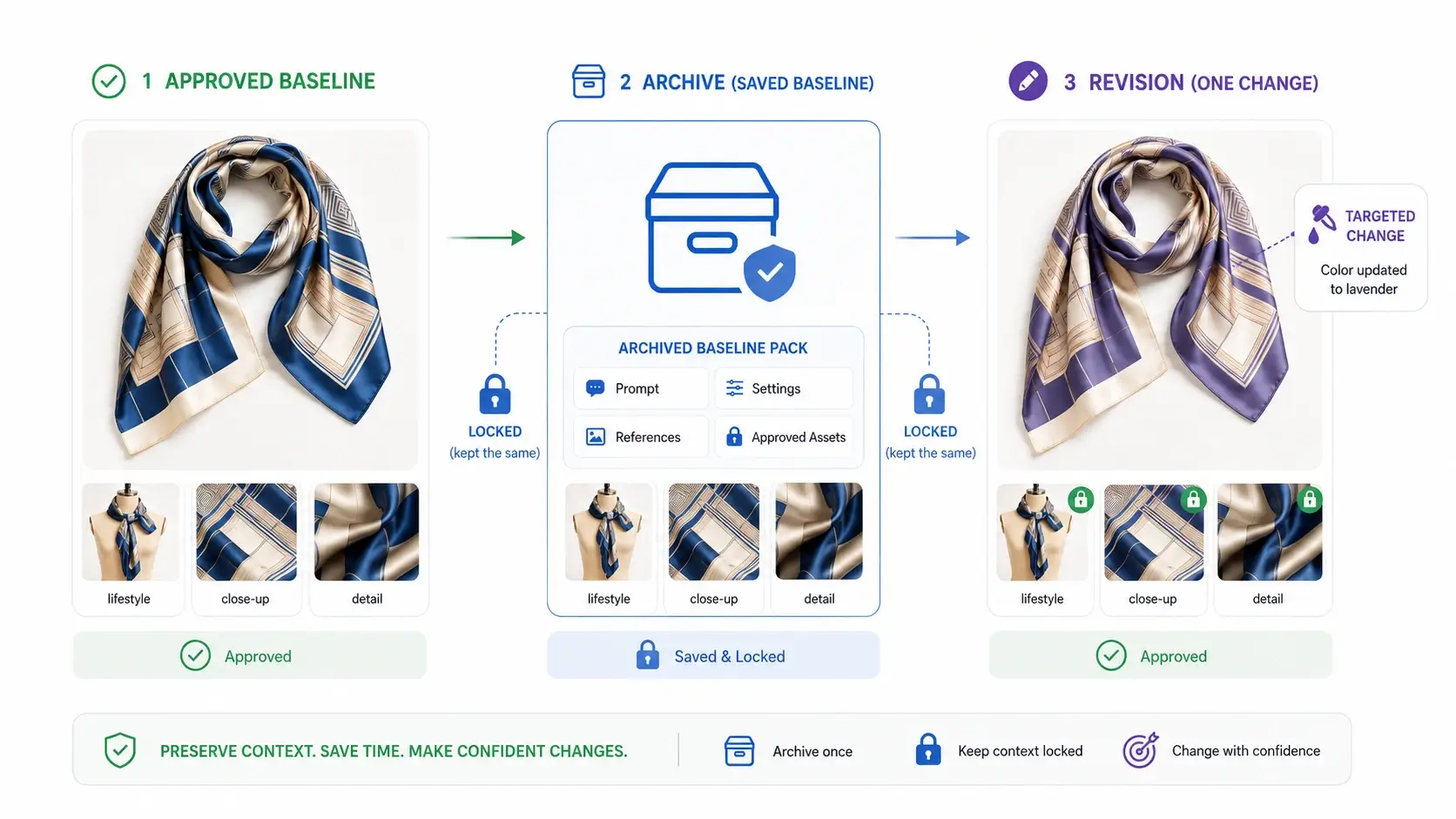
The biggest source of rework in AI product photo revision is losing track of what was already approved. A stakeholder approves the mood and lighting in round one, then asks for a darker background in round two. If the revision only addresses the background and accidentally shifts the lighting too, the team has created a new problem while fixing an old one.
Here is how to prevent that drift.
Save prompts and reference images from every approved round. When a stakeholder signs off on an output, archive the exact prompt, settings, and reference images that produced it. This becomes the baseline for the next round. If something breaks in a subsequent edit, you can return to the known-good state instead of guessing at what changed.
Document what was approved, not just what changed. A revision log should record both the requested change and the elements that must stay untouched. "Change background to navy blue; keep lighting warm, keep pose identical, keep fabric texture visible" is far more useful than just "navy background."
Use consistent model and settings across related assets. Switching between AI models or generation parameters mid-project introduces variation that may not be intentional. If the hero image was generated with specific settings, detail shots and lookbook extensions should use compatible configurations unless there is a deliberate reason to differ.
Chain outputs so downstream assets inherit upstream decisions. When expanding from hero to detail to lookbook, each downstream asset should reference the immediately preceding approved output. This creates a decision chain where later assets build on earlier approvals rather than branching off independently.
Maintain a simple revision log. A shared document with columns for round number, requested change, approved elements, tool used, and outcome takes minutes to update and saves hours of confusion. Even a basic log prevents the "what did we agree on again?" conversations that derail revision sprints.
Coordinating Multi-Asset Revisions Without Chaos
When one SKU requires updates across hero images, detail shots, and lookbook frames, the coordination challenge multiplies. The risk is that different assets drift in different directions and no longer look like they belong to the same product.
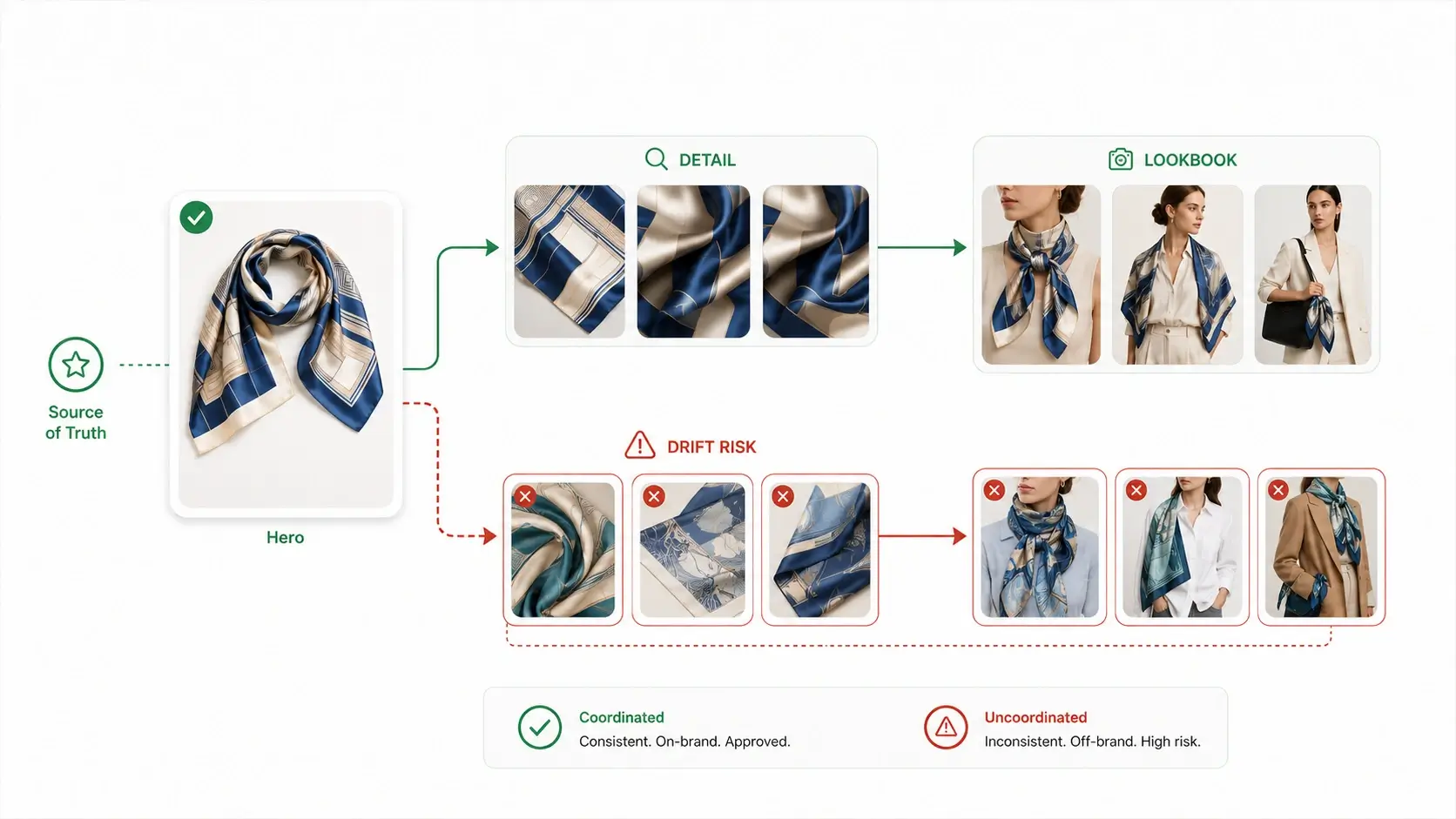
Treat the hero image as the source of truth. Every revision cycle should start with the hero. Once the hero is approved, propagate those decisions outward. Detail shots and lookbook frames derive from the hero, not from independent feedback loops.
Propagate changes to detail shots before lookbooks. The dependency chain matters. Detail shots depend on the hero. Lookbooks depend on both the hero and the detail shots. Updating the hero and then jumping straight to lookbook creation skips the intermediate validation step and risks compounding errors.
Use image replacement for ad creative variants. When a marketing team needs the same product visual adapted for different channels or audiences, element-swapping tools are faster than regenerating each variant from scratch. Change the background for a holiday version, swap a prop for a seasonal feel, or adjust color grading for a different brand moment — all without rebuilding the core image.
Batch similar changes across SKUs when possible. If five products all need their backgrounds updated from white to lifestyle, running those changes as a batch reduces context-switching overhead. Group by revision type, not by SKU, and execute each group with the appropriate tool before moving to the next.
For fashion teams managing apparel SKU lines, this coordination pattern is especially relevant when using dedicated tools to create apparel detail shots and create fashion lookbook images from a shared hero reference. Keeping the hero locked while downstream assets iterate prevents the ripple effect where one late change invalidates an entire asset set.
Turning Stakeholder Feedback into Precise Actions
Vague feedback is the enemy of revision speed. The gap between "I don't like this" and "change the background to navy blue" is the difference between a one-pass edit and a three-hour guessing game.
Translate subjective language into specific parameters. "Make it pop brighter" could mean increase contrast, boost saturation, add a rim light, or switch to a higher-key background. Ask clarifying questions: "Do you mean brighter lighting on the product, a lighter background, or more saturated colors?" One precise instruction beats ten ambiguous ones.
Separate preference from actionability. "I don't like this" is valid feedback but not an executable instruction. Follow up with: "Which element specifically? Is it the pose, the background, the lighting, the color palette, or the overall mood?" Once the stakeholder identifies the target, the revision type classification framework tells you which tool to reach for.
Use a feedback template that maps comments to tool choices. A simple template with fields for asset name, element to change, desired outcome, and elements to preserve forces specificity. When stakeholders fill out structured feedback, the person executing revisions spends less time interpreting comments and more time producing results.
Consolidate scattered feedback into one round. Three separate emails with one comment each are worse than one consolidated review with ten comments. The former triggers three revision sprints with context-switching between each. The latter triggers one sprint where all changes can be planned, classified, and executed together. Encourage stakeholders to batch their input.
For element-level changes that require precision — swapping a garment color, replacing a face, changing a background object — using AI Image Replacer for surgical edits is faster than regenerating and hoping the model interprets the change correctly. When feedback specifies exactly what to replace and what to replace it with, element-targeted tools deliver cleaner results in fewer passes.
For structural feedback involving pose or composition changes, the right move is often to create product photo pose variations from the original reference rather than trying to edit an existing output into a fundamentally different arrangement.
When to Replace vs. When to Regenerate — Quick Guide
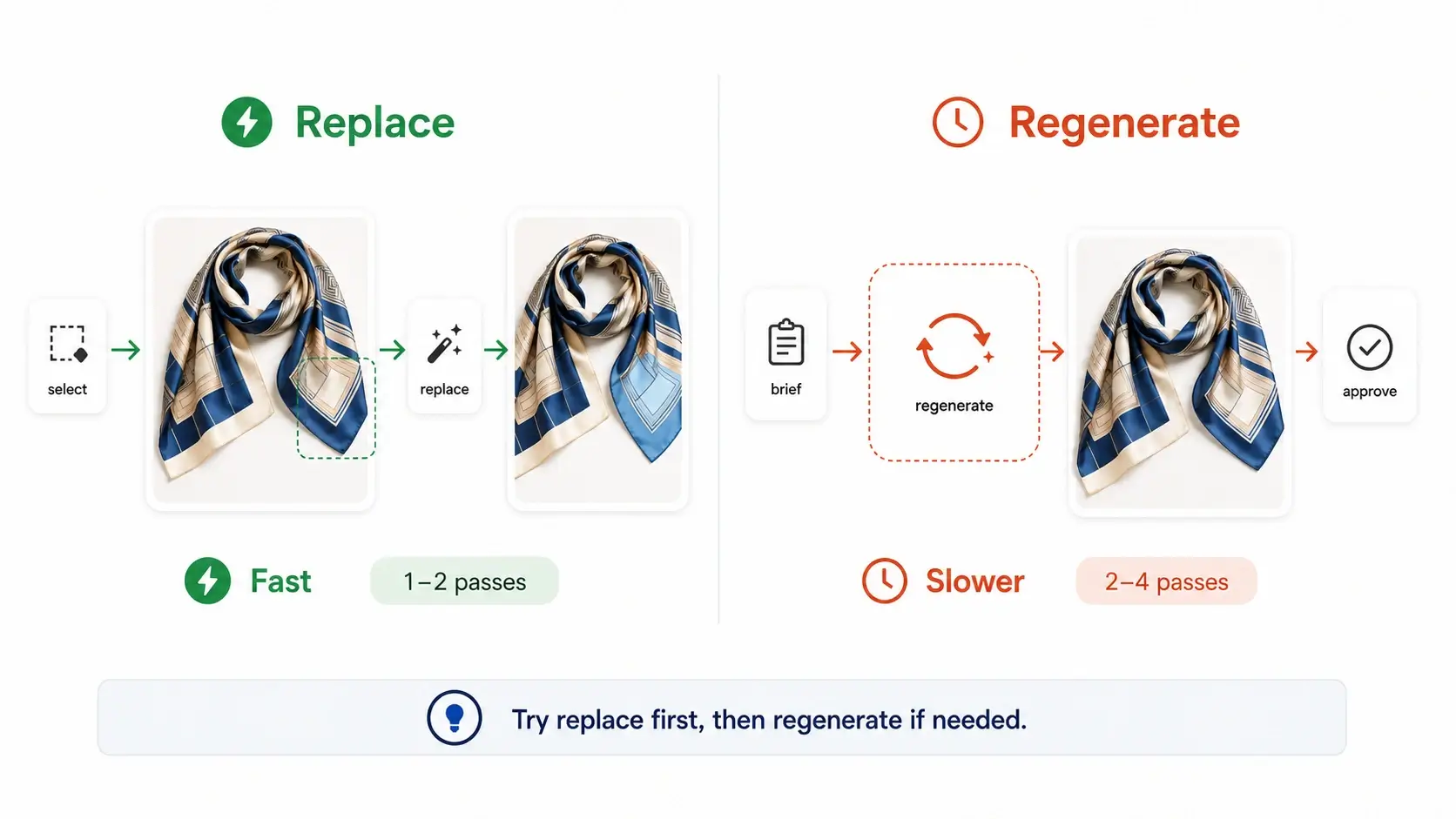
One of the most common revision slowdowns is using the wrong approach for the change type. Regenerating when replacement would suffice wastes time. Replacing when regeneration is needed produces unsatisfactory results that require another round anyway.
| Factor | Replacement (AI Image Replacer) | Full Regeneration |
|---|---|---|
| What changes | Specific element or region | Overall scene, mood, or composition |
| What stays the same | Most of the image pixels | Nothing carried over |
| Speed | Faster — targets only the change area | Slower — rebuilds entire image |
| Best for | Color swaps, accessory changes, background objects, clothing alterations | Pose changes, angle shifts, complete scene redesigns, mood pivots |
| Risk | May not capture holistic mood shift | May lose details that were working |
| Typical passes | 1–2 | 2–4 |
The hybrid approach works well for most teams: try replacement first for any change that seems element-specific. If the replaced result does not match intent — if the new element looks disconnected from the surrounding scene, or if the change affects the overall composition more than expected — then escalate to regeneration. This order minimizes the number of full regenerations while ensuring quality does not suffer from forcing lightweight tools onto heavyweight problems.
Building a Repeatable Revision Workflow
A repeatable process turns revision speed from a matter of individual skill into a team capability. Any team member should be able to pick up a feedback packet and execute revisions consistently.
Step 1 — Collect all feedback in one pass. Gather stakeholder comments into a single consolidated list before generating anything. Use a template or shared document. Resist the urge to start revising after the first email arrives.
Step 2 — Classify each request by revision type. Go through the feedback list and label each item as Type A (surface), Type B (element swap), Type C (structural), or Type D (expansion). This classification determines which tool handles each request.
Step 3 — Execute Type A and Type B changes first. These are the fastest wins. Surface tweaks and element swaps often resolve in one or two passes. Completing them first builds momentum and clears the majority of the feedback queue quickly.
Step 4 — Handle Type C and Type D changes second. Structural changes and asset expansion require more time and iteration. Tackle them after the quick wins are done so that stakeholder patience is not exhausted before the heavy lifting begins.
Step 5 — Review all assets together before the next round. Present the revised hero, detail shots, and lookbook frames as a coordinated set. This catches cross-asset inconsistencies early and prevents the situation where individual assets look good but the collection does not hang together.
Following this workflow does not guarantee zero revision rounds — some projects will always need multiple passes. But it does ensure that each round is as short and productive as possible, and that the team is never stuck in a loop because of process failure rather than creative disagreement.
FAQ
Conclusion
Revision speed is a hidden ROI driver for ecommerce teams using AI product photography. The teams that move fastest are not necessarily the ones with the most advanced prompting skills — they are the ones with the clearest systems for classifying changes, preserving context, coordinating multi-asset updates, and translating feedback into precise actions.
A revision type classification framework, a simple context-preservation habit, and a repeatable execution workflow can cut revision cycles significantly without requiring new tools or additional budget. The leverage is in the process, not just the technology.
Ready to apply a faster revision workflow to your product visuals? Start creating with iCreat AI and put these strategies into practice on your next project.