




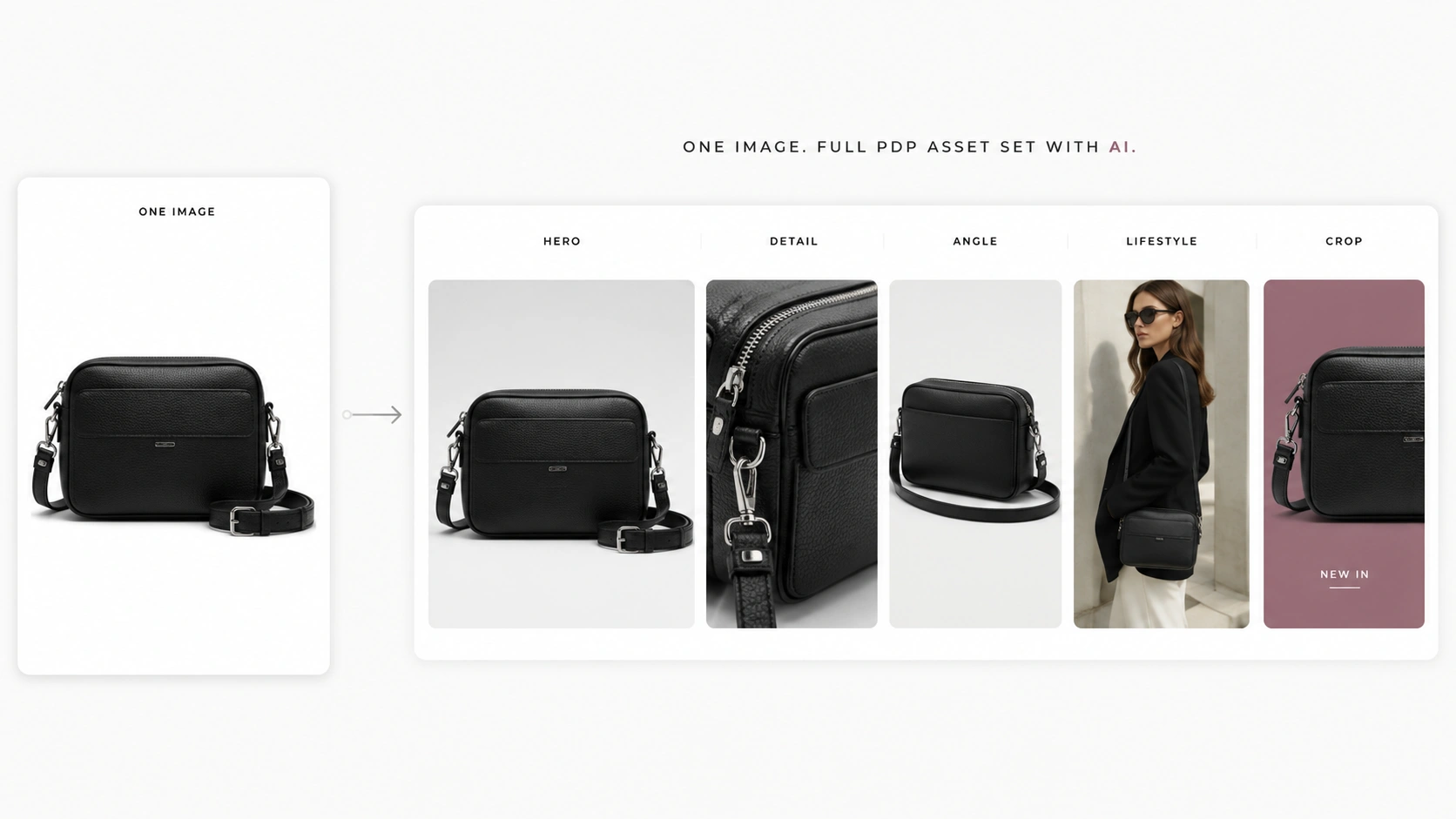
A complete PDP (Product Detail Page) asset set typically includes a hero image, 2–3 detail close-ups, an alternate angle or back view, a lifestyle or styled variant, and channel-specific crops. Rather than scheduling separate photoshoots for each format, ecommerce teams can use structured AI workflows to derive most of these assets from a single clean product reference image. This approach reduces production dependency on repeated shoots while maintaining enough visual variety to support shopper decision-making across marketplaces like Shopify, Amazon, and Etsy.
Key Takeaways
- A complete PDP asset set typically includes 5–7 image types: hero, detail close-ups, alternate view, lifestyle/lookbook, and channel-specific crops
- AI can derive most of these asset types from one clean product reference using structured workflows
- The optimal production sequence is: hero → detail → pose variation → lookbook → campaign adaptation
- Quality checkpoints between stages catch accuracy issues before they compound
- Fashion ecommerce teams can reduce reshoot dependency by treating one reference as the source for an entire asset set
What a Complete PDP Asset Set Actually Includes
Before expanding one image into many, it helps to define what belongs in a well-stocked PDP. Shoppers rely heavily on product images when deciding whether an item feels trustworthy, desirable, and accurate. A thin or incomplete image set can hurt conversion before a visitor even reads your description.
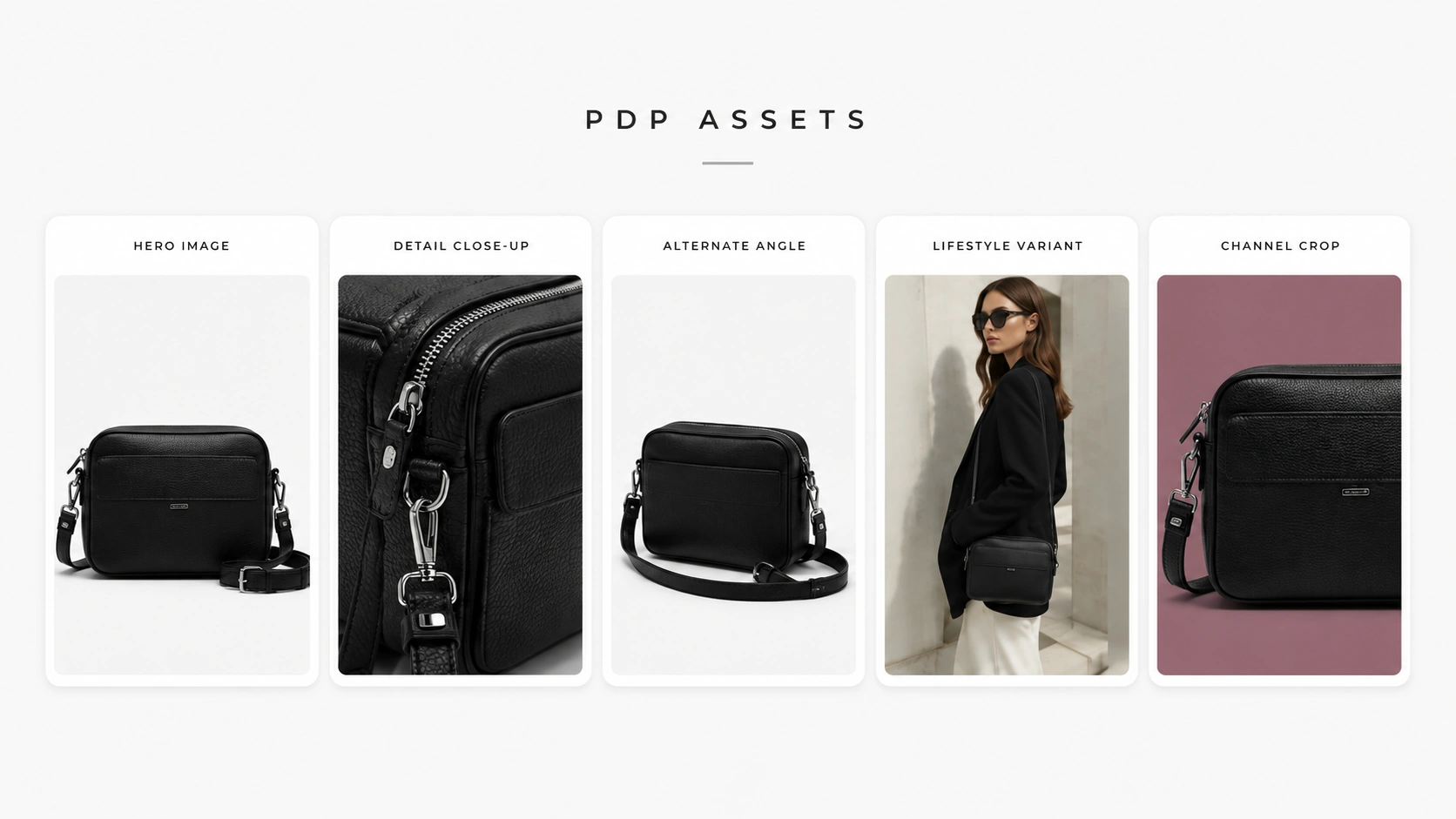
Hero Image: The First Impression Asset
The hero image is the primary visual that appears first in most marketplace carousels and storefront grids. It should show the product clearly, ideally against a clean background that matches marketplace requirements (white for Amazon, flexible for Shopify). For fashion items, this means a front-facing view with good lighting, accurate color representation, and enough resolution to survive zoom interactions.
Shoppers form their initial judgment from this single frame. If the hero looks low-quality, unclear, or inconsistent with expectations, many visitors leave without scrolling further. This makes the hero the highest-leverage asset in any PDP set.
Detail Close-Ups: Texture, Labels, and Fabric
Detail shots zoom into specific product features that the hero cannot fully convey. For clothing, this typically includes fabric texture, stitching quality, label placement, print clarity, button or zipper hardware, and any distinctive design elements like embroidery or pattern repeats. These images answer the question: "What does this actually feel and look like up close?"
A typical PDP benefits from 2–3 detail images positioned after the hero. Each should focus on one specific attribute rather than trying to show everything at once.
Alternate Angle or Back View
The alternate angle provides spatial context that a flat front view cannot deliver. For apparel, this is usually a back view showing cut, seam placement, neckline shape from behind, or hem length. For accessories or hard goods, it might be a side profile, bottom view, or 3/4 angle that reveals dimensions and construction.
This asset matters because shoppers use mental rotation to understand fit and scale. A single front-facing image leaves too much uncertainty about what the product looks like from other perspectives.
Styled or Lifestyle Variant
Lifestyle or styled imagery places the product in a contextual setting — on a model, in a room setup, or alongside complementary items. Unlike the hero's neutral presentation, lifestyle visuals communicate usage, styling potential, and emotional appeal. They help shoppers imagine owning and wearing the item.
For fashion ecommerce, this is often the bridge between "this is the product" and "this is how I would look in it." It supports aspirational buying behavior while still keeping the product recognizable.
Channel-Specific Crops and Adaptations
Different sales channels have different image requirements. Amazon demands white backgrounds and strict dimension ratios. Instagram favors square or vertical formats with more creative freedom. Shopify themes may display images at different aspect ratios depending on the theme configuration. Email thumbnails need compact, high-contrast versions that remain readable at small sizes.
Rather than creating these variations manually, teams can generate channel-adapted outputs from the same base asset using crop logic, background adjustments, and format conversions — some of which AI tools can handle directly.
Which Asset Types Can Come From One Reference Image
Not every PDP asset requires a new photoshoot. Understanding which types can be derived from a single reference helps teams plan production efficiently without sacrificing output quality.
Direct Derivation: Hero and Lifestyle Variants
Hero images and lifestyle variants are the strongest candidates for direct derivation from one reference. Given a clean product photo — whether studio-quality or a well-lit smartphone shot — AI generation can produce multiple hero-style outputs with different backgrounds, lighting treatments, or model presentations while preserving the core product identity.
The key requirement here is that the reference image contains enough visual information about the product itself. Blurry, heavily shadowed, or low-resolution inputs will limit derivation quality regardless of the AI tool used.
Detail Enhancement: Close-Ups from Hero + Crop/Zoom Logic
Detail close-ups can be generated by cropping and enhancing regions of the hero image, or by using AI to reconstruct higher-resolution detail views based on the visible product features in the reference. Fabric texture, label text, and surface patterns are often recoverable if the original reference captures them with reasonable clarity.
When the reference lacks sufficient detail in a specific area, teams may need to supplement with an additional close-up input for that region. This is the most common exception to the "one image" starting point.
Pose and Angle Variation: Re-composing the Same Garment/Product
Pose variation takes the same garment or product and re-composes it into different orientations, angles, or model positions. This is where AI adds the most value compared to manual editing — re-posing a garment traditionally requires another shot with a model, stylist, and photographer present.
AI pose variation tools can generate alternate angles, seated poses, walking stances, or back views from a single front-facing reference. Output accuracy depends on how clearly the reference defines the garment's structure, cut, and distinctive features.
Lookbook Expansion: Editorial Treatment of the Base Reference
Lookbook visuals apply editorial styling — backgrounds, lighting moods, model expressions, and compositional framing — to transform a basic product image into campaign-grade content. The base reference provides the product identity; the lookbook treatment provides the aesthetic direction.
This stage is particularly valuable for seasonal campaigns, social media feeds, and brand storytelling where visual consistency across multiple images matters as much as individual image quality.
What Still Needs Additional Input (and How Little)
Some edge cases benefit from minimal additional input even in an AI-first workflow:
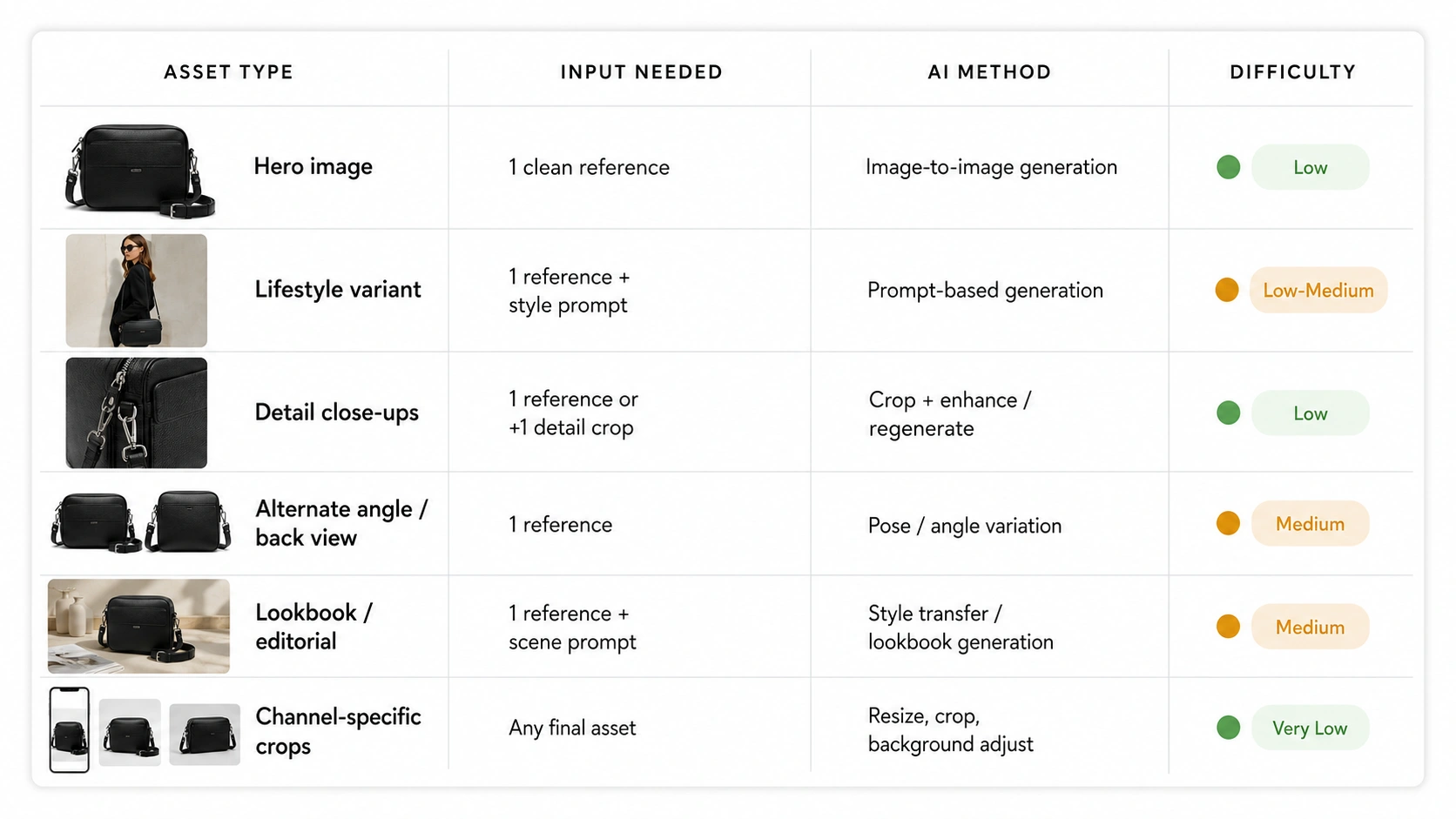
| Asset Type | Input Needed | AI Method | Difficulty |
|---|---|---|---|
| Hero image | 1 clean reference | Image-to-image generation | Low |
| Lifestyle variant | 1 reference + style prompt | Prompt-based generation | Low-Medium |
| Detail close-ups | 1 reference (or +1 detail crop) | Crop + enhance / regenerate | Low |
| Alternate angle / back view | 1 reference | Pose/angle variation | Medium |
| Lookbook / editorial | 1 reference + scene prompt | Style transfer / lookbook generation | Medium |
| Channel-specific crops | Any final asset | Resize, crop, background adjust | Very Low |
The table above shows that most asset types can originate from a single reference when the workflow is structured correctly. The exceptions are manageable with small supplemental inputs rather than full reshoots.
The Optimal Production Sequence: Hero to Full Set
The order in which you generate assets affects both efficiency and quality. Building each stage on the previous one creates a logical dependency chain where errors are caught early and later stages benefit from validated inputs.
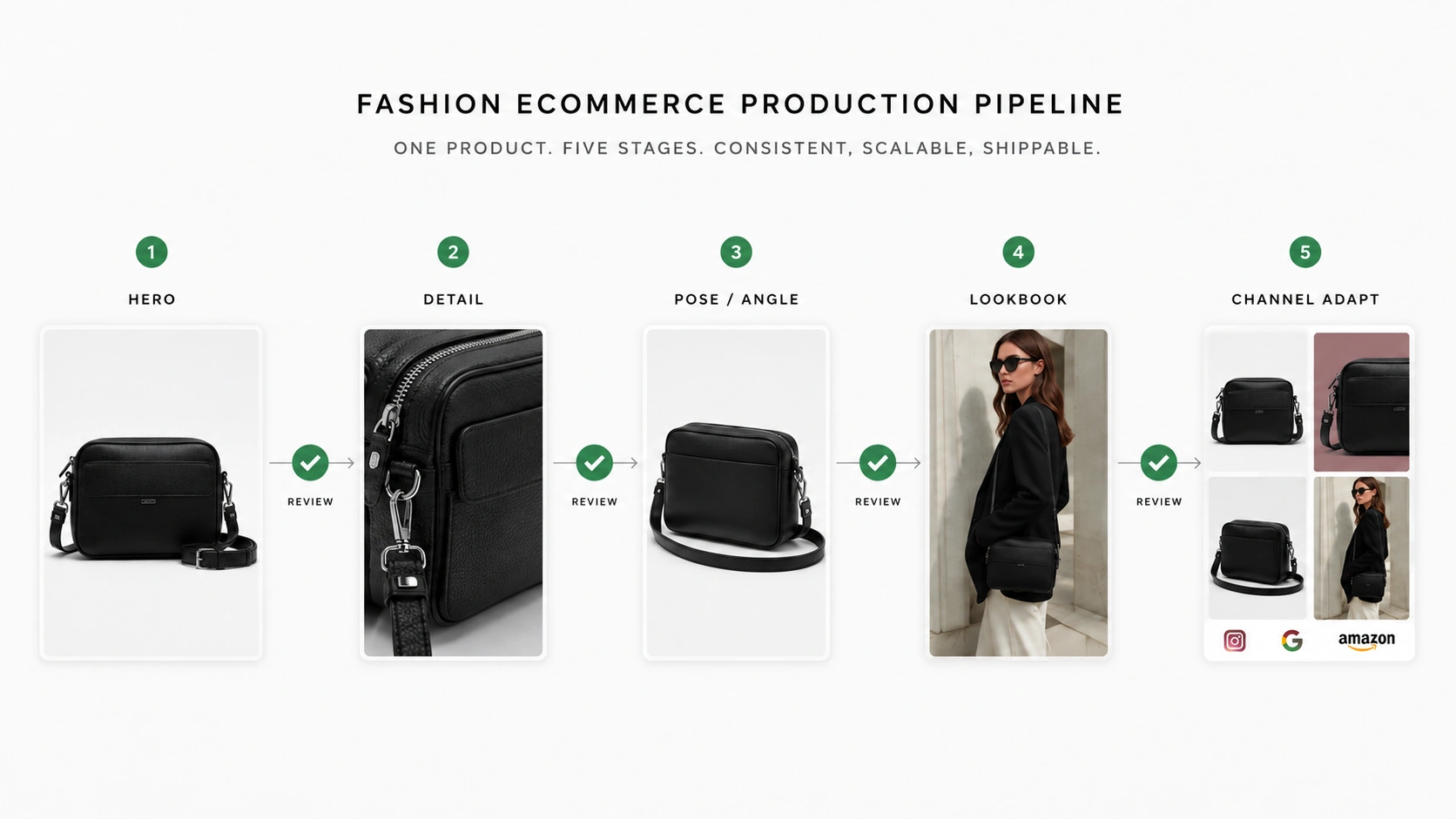
Stage 1: Generate Your Hero Image (Foundation)
Start with the hero. This image becomes the visual anchor for everything that follows — detail crops, pose variations, and lookbook treatments will all reference back to this foundational output. If the hero has color drift, proportion issues, or unclear product definition, those problems propagate through every downstream asset.
Use a clear, well-lit reference image as input. The reference does not need professional studio quality, but it should show the product accurately: correct colors, visible details, and minimal occlusion. From there, generate product photos with AI to produce a hero-ready output with appropriate background, lighting, and composition for your target marketplace.
Checkpoint: Verify that the hero matches the physical product's color, proportions, and key design elements before proceeding. This 30-second review prevents compounding errors across 5+ derived assets.
Stage 2: Build Out Detail Assets (Close-Ups, White BG, Fabric Shots)
With a validated hero, extract or generate detail assets. These include fabric close-ups, label shots, texture highlights, and white-background variants if your hero uses a styled backdrop. Detail images serve a specific purpose: they give shoppers the confidence that comes from seeing craftsmanship up close.
Create product detail images from the hero or reference to produce focused close-ups that highlight specific product attributes. For fashion items, prioritize collar/neckline, fabric texture, hem/stitching, and any logos or prints that define the item's identity.
Checkpoint: Compare each detail output against the corresponding area in the hero. Colors and textures should align within acceptable tolerance. Flag any detail that introduces features not present in the original product.
Stage 3: Add Pose and Angle Variation
Now expand the visual range with pose and angle variations. These assets answer the question shoppers ask implicitly: "What does this look like from other sides?" A strong PDP includes at least one non-frontal view to reduce return rates driven by unmet fit or appearance expectations.
Create pose variations for product pages using the hero or reference as the source. Common outputs include back views, 3/4 angles, seated positions, or alternative model stances that show how the garment moves and fits from different perspectives.
Checkpoint: Confirm that the product's distinctive features — print patterns, logo placement, cut lines — remain consistent between the hero and pose variations. Minor drift is expected; structural changes are not.
Stage 4: Expand to Lookbook or Styled Visuals
Lookbook and styled visuals shift from informational to inspirational. These images support social media, email campaigns, collection pages, and brand storytelling where mood and aesthetic matter alongside product accuracy.
Generate fashion lookbook images from your validated hero or reference, applying editorial treatments such as environmental backgrounds, directional lighting, model interaction, and compositional variety. The goal is a set of images that feel cohesive as a collection while keeping each product individually recognizable.
Checkpoint: Review the lookbook set for visual consistency across outputs. Lighting temperature, color grading, and overall mood should feel unified even when individual images vary in composition.
Stage 5: Adapt for Channels (Crops, Backgrounds, Formats)
Final stage: prepare channel-specific adaptations. Amazon listings need white-background hero images at precise pixel dimensions. Instagram feed posts perform better as 1:1 or 4:5 aspect ratios. Shopify themes may favor landscape orientations. Email headers need compact, high-contrast thumbnails.
Most adaptations involve cropping, resizing, and background adjustment rather than regeneration. An image upscaler or background remover can help here if you need higher resolution or transparent backgrounds for overlay work. Keep the original high-resolution master file so you can derive multiple channel versions without quality loss.
Quality Checkpoints Between Stages
Insert a brief review between each production stage:
- After Hero: Color accuracy, product proportions, background appropriateness
- After Details: Texture fidelity, label/logo clarity, no invented features
- After Pose/Angle: Structural consistency, feature preservation, natural positioning
- After Lookbook: Visual cohesion, brand alignment, product recognizability
- After Channel Adapt: Format compliance, legibility at target size, file optimization
Each checkpoint takes 1–3 minutes and saves significantly more time than fixing propagated errors after the full set is complete.
How AI Tools Fit Into Each Stage
Understanding which tool serves which stage helps teams build efficient pipelines without switching between unrelated workflows mid-production.
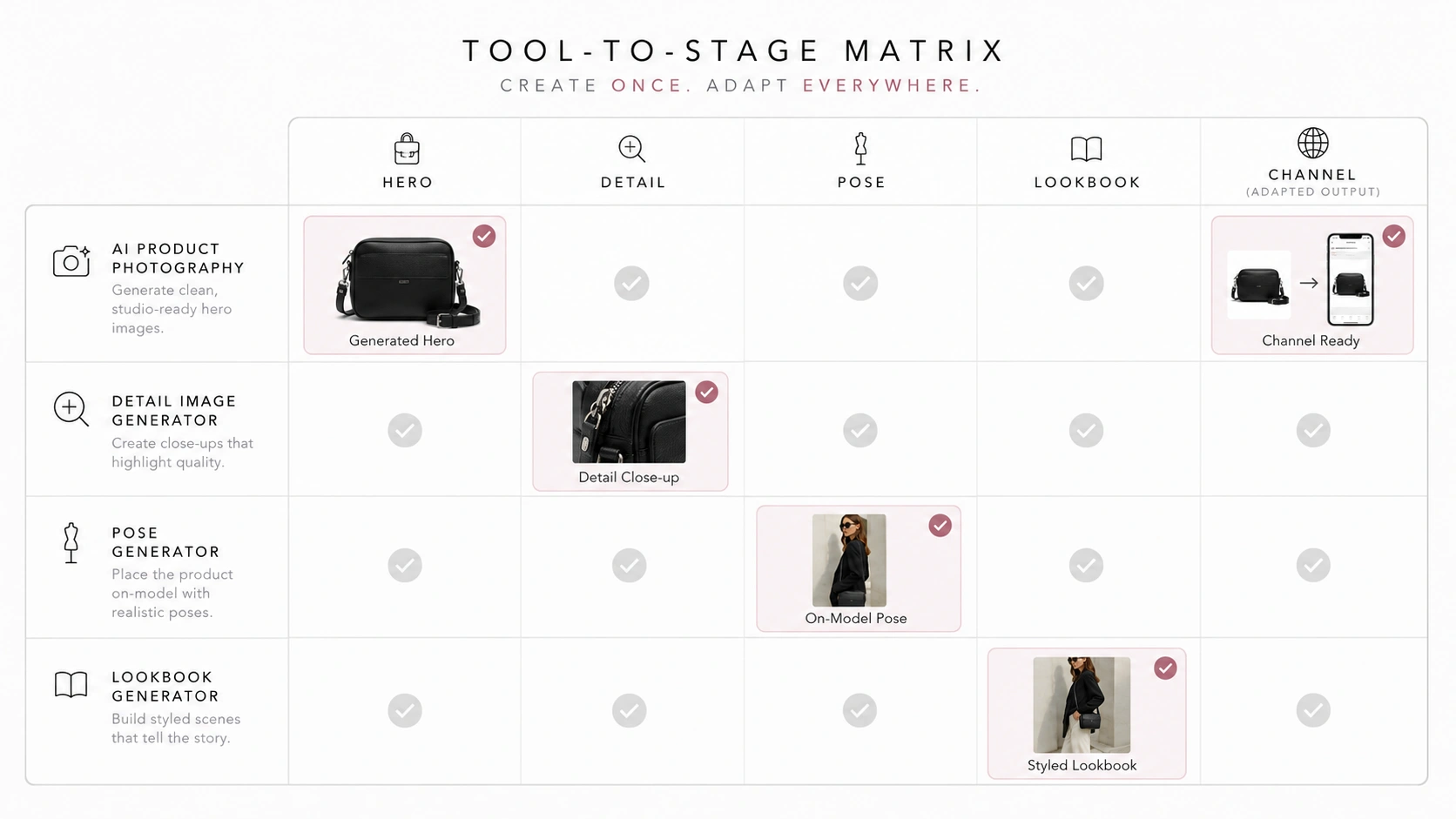
For Hero and Lifestyle Generation
AI Product Photography tools handle the foundation stage: turning a reference image into a polished hero or lifestyle-ready output. These tools accept a product photo (or multiple references) and generate marketplace-compatible visuals with controlled backgrounds, lighting, and composition. The output becomes the input for all subsequent stages.
Model choice matters at this stage. Standard generation models handle routine hero production efficiently. Advanced models with stronger detail restoration are preferable when fabric texture, print sharpness, or fine product features are critical to the final output quality.
For Detail and Mockup Assets
AI Fashion Detail Image Generator tools focus on extracting or creating close-up views, white-background variants, and mockup-style presentations. These tools excel at taking a product image and producing supporting assets that fill out the middle section of a PDP carousel — the images shoppers examine when they want reassurance about material quality and construction.
For Pose Variation
AI Pose Generator tools re-compose the same product into different orientations and body positions. This is distinct from simple image editing because the tool must understand garment structure, draping behavior, and anatomical plausibility — not just rotate or flip pixels. The best results come when the input reference clearly shows the garment's full shape and distinctive design elements.
For Lookbook and Campaign Visuals
AI Fashion Lookbook Generator tools apply editorial treatment to product images, transforming basic references into campaign-grade visuals with styled backgrounds, atmospheric lighting, and compositional variety. This stage bridges utility and aspiration — the images still sell the product, but they do it through mood and storytelling rather than pure documentation.
For Final Polish
Supporting tools like image upscalers and background removers play a finishing role. Use an upscaler when channel requirements demand higher resolution than the generation output provides. Use a background remover when you need transparent PNGs for overlay work or custom background compositing. These are optional enhancements, not core generation steps, but they can make the difference between an asset that passes marketplace review and one that gets rejected for technical reasons.
What to Watch For: Keeping Your Asset Set Accurate
AI-derived asset sets offer speed and variety, but they require attention to consistency and accuracy throughout the production chain.
Detail Drift Across Generations
Each generation step introduces a small possibility of feature deviation. A print pattern might shift slightly. A logo could lose sharpness. A seam line might appear in a slightly different position. Individually, these drifts are often minor. Across 5–7 derived assets, they can create noticeable inconsistency when a shopper compares images side-by-side.
Mitigation: use the same reference and consistent prompt parameters across generations. Review the full set together before publishing, not just individual images in isolation.
Color and Lighting Consistency
Color perception varies across displays, but within a single PDP, all images should share the same color temperature and lighting character. A warm-toned hero next to a cool-toned detail shot signals low production quality even if each image is technically competent on its own.
Mitigation: establish a color reference early (the validated hero) and compare subsequent outputs against it. Avoid mixing generation sessions with different style prompts unless intentional variation is the goal.
When to Use Human Review vs. Full AI Output
Full AI output is appropriate for exploratory variations, internal concept testing, and low-stakes channel placements where iteration is cheap and fast. Human review becomes important before marketplace publication, especially for flagship products, high-volume SKUs, or items with complex design features that AI may misinterpret.
A practical rule: let AI generate the volume and variety. Let humans validate the accuracy before the assets go live on customer-facing pages.
Marketplace Acceptance Considerations
Each marketplace has its own image standards. Amazon enforces white-background requirements and minimum resolution thresholds. Etsy allows more creative freedom but expects honest representation. Shopify gives sellers full control but also full responsibility for image quality.
Before publishing an AI-generated asset set, verify that each image meets the technical requirements of your target platform. Resolution, aspect ratio, background treatment, and file format compliance are checkable criteria that prevent rejection or poor display rendering.
FAQ
Conclusion
Building a complete PDP asset set from one product image is not about replacing photography — it is about getting more value from the inputs you already have. By following a structured sequence — hero first, then details, pose variations, lookbook expansion, and finally channel adaptation — ecommerce teams can produce 5–7 usable assets from a single reference while maintaining the quality and consistency that shoppers expect.
The workflow works best when treated as a pipeline with built-in quality checkpoints, not as a batch of independent generations. Each stage builds on the previous one, and each checkpoint catches issues before they multiply across the full set.
Ready to turn one product image into a complete PDP asset set? You can start building hero images, detail shots, pose variations, and lookbook visuals inside the AI Product Photography workspace. Log in to iCreat AI to begin.