


Fashion brands do not need AI photoshoot tools because they want “more images.” They need them because one product drop can require a main product image, model shots, detail images, social crops, ad creatives, lookbook visuals, and campaign variations before the team has time or budget for another shoot.
The hard part is not finding a tool. There are dozens of them now. The hard part is choosing the right one for the job.
A fashion image is only useful if the product stays accurate. A beautiful AI image can still be unusable if the sleeve length changes, the fabric looks wrong, the logo shifts, the model pose distorts the fit, or the image looks too synthetic for a product page.
This guide compares AI photoshoot tools through a practical ecommerce lens:
Introduction
- Can the image go on a product page?
- Does the garment stay accurate?
- Can the result be repeated across a catalog?
- Can the team review and approve images quickly?
- Does the tool lower cost per approved visual, not just cost per generated image?
Quick Decision Table
| If your main problem is... | Start with... | Avoid tools that... |
|---|---|---|
| You need PDP-ready apparel sets | iCreat AI, Photoroom, Pixelcut, Botika | Only create stylized campaign images |
| You need on-model product photos | Botika, WearView, Modelia, iCreat AI | Distort garment fit or model proportions |
| You need batch catalog consistency | iCreat AI, Veeton, Claid AI, Botika, Rawshot AI | Require manual prompting for every image |
| You need social and ad creatives | Flair AI, Pebblely, Rawshot AI, The New Black | Cannot control crop, background, or product placement |
| You need early campaign concepts | Fashn AI, The New Black, StyTrix, Flair AI | Are too rigid for creative exploration |
| You need a simple workflow for a small team | iCreat AI, Photoroom, Pixelcut, Pebblely | Need technical setup before producing usable images |
How to Evaluate AI Photoshoot Tools for Fashion
Before comparing tools, use the same filters a fashion ecommerce team would use before publishing an image.
Product fidelity comes first. Check silhouette, fit, length, fabric texture, color, seams, buttons, zippers, print placement, logos, and labels.
Model realism matters for on-model photos. Review body proportions, hands, posture, garment interaction, lighting, and whether the fabric behaves naturally on the body.
Batch consistency matters once you move past one image. Fashion teams often need the same lighting, crop, background, model style, and visual mood across SKUs or colorways.
Workflow speed is not just generation time. It includes upload, settings, generation, review, revision, export, naming, and publishing.
Cost per approved visual is the best cost metric:
```text Cost per Approved Visual = Total Tool Cost ÷ Approved, Publishable Images ```
A cheap tool is not cheap if the team rejects most of the outputs.
1. iCreat AI
Best for: Fashion ecommerce teams that need to turn one product image into multiple usable visual assets.
iCreat AI is a strong first option for small and growing fashion teams because it focuses on practical ecommerce output: product variations, pose variations, PDP support images, social visuals, and clothing image sets from existing product references.
Where it works well is apparel workflow. A team can turn one fashion product image into multiple visual variations, create ecommerce-ready clothing image sets, or generate pose variations from one fashion image without booking a new shoot for every angle, pose, or product page asset.
It is best used for expanding approved product references, not inventing a garment from scratch. Start with a clean product image, generate a controlled set of variations, then review the results for fit, shape, fabric, and color.
What to watch: iCreat AI still needs QA. Check sleeve length, garment proportions, logos, labels, fabric texture, and whether pose variations make the product look different from reality.
Quick verdict: Best fit for fashion ecommerce teams that want usable variations, not one-off creative images.
2. Veeton
Best for: Catalog-scale fashion imagery and batch output.
Veeton is built around the problem that fashion brands do not need one good image; they need consistent images across many SKUs and collections. It is most relevant for teams that care about scale, same-model consistency, and repeatable catalog production.
Use it when catalog consistency is the priority. It is less about quick background cleanup and more about whether a brand can produce a large set of images that feel like they belong together.
What to watch: Test whether garment details stay accurate across batches. Batch output is only useful if the review burden does not become too heavy.
Quick verdict: Good for brands thinking in product drops, collections, and catalog consistency.
3. Botika
Best for: Shopify-style apparel catalogs and on-model product photos.
Botika is useful for brands that want to turn product images into model photos without booking repeated model shoots. It fits commercial ecommerce use cases better than purely creative concept tools.
It works best when the input garment is clear and the team needs clean, model-based PDP or social visuals.
What to watch: Review fit, body proportions, fabric tension, and whether the garment still looks like the real product.
Quick verdict: Strong for on-model catalog images when the team has a QA process.
4. Fashn AI
Best for: Fashion concept testing and creative direction.
Fashn AI is useful when a team wants to test styling, mood, model direction, or campaign ideas. It is better suited for exploration than strict catalog production.
Use it for visual directions before committing to a shoot, not as the only source for product-truth images.
What to watch: Creative outputs can look good while drifting away from the exact garment.
Quick verdict: Good for campaign direction and fashion experimentation.
5. Photoroom
Best for: Quick product edits, clean backgrounds, and simple ecommerce visuals.
Photoroom is useful for small teams that need fast background cleanup, product cutouts, and simple market-ready visuals. It is easy to understand and fast to use.
It is not the deepest fashion photoshoot platform, but it solves common ecommerce image tasks without a heavy workflow.
What to watch: It is better for image cleanup and simple presentation than complex on-model fashion generation.
Quick verdict: Practical for small brands that need speed and clean product visuals.
6. Pixelcut
Best for: Budget-friendly product images and quick social content.
Pixelcut is a simple option for product image cleanup, background generation, and lightweight ecommerce visuals. It fits teams that need fast output and do not want a complex tool stack.
What to watch: Not the first choice for advanced model consistency or large fashion catalog production.
Quick verdict: Good entry-level choice for simple product and social visuals.
7. Modelia
Best for: AI model photos for apparel.
Modelia is relevant for brands that want model-based fashion images. It can help teams show garments on different models and reduce the need for repeated shoots.
What to watch: The product must keep its shape, drape, and proportions. If the garment changes, the image is not safe for PDP use.
Quick verdict: Useful for on-model imagery with strict product review.
8. Claid AI
Best for: Larger ecommerce teams with broader product image needs.
Claid AI is useful for teams that need image enhancement, background generation, lifestyle visuals, and batch processing. It fits more mature ecommerce teams managing multiple SKUs or workflows.
What to watch: It may be more platform than a very small fashion brand needs at the start.
Quick verdict: Strong for multi-SKU ecommerce workflows and higher-volume teams.
9. Rawshot AI
Best for: Teams that want visual control without heavy prompt writing.
Rawshot AI is useful for teams that want more control over composition, lighting, and camera feel through interface settings. This can help non-prompt users get more predictable results.
What to watch: Test whether the workflow stays efficient across many SKUs, not just one polished sample.
Quick verdict: Good for teams that want visual control without building a technical AI setup.
10. WearView
Best for: Flatlay-to-on-model workflows.
WearView is relevant for apparel brands that want to move from product-only images to model-based visuals. It can help teams test on-model PDP images without a full shoot.
What to watch: Check realism carefully: body proportions, fit, and fabric behavior matter.
Quick verdict: Useful for simple product-to-model workflows.
11. StyTrix
Best for: Model customization and creative fashion visuals.
StyTrix is useful for teams that want model variety and styled outputs. It fits editorial, lookbook, and creative testing use cases.
What to watch: Highly styled outputs may need extra review before product page use.
Quick verdict: Better for creative direction than strict PDP accuracy.
12. ZMO.ai
Best for: AI model and fashion image generation.
ZMO.ai can be useful for brands exploring model imagery and campaign looks. It is worth testing if your team wants a mix of model generation and creative visuals.
What to watch: Check garment accuracy before using outputs as product images.
Quick verdict: Useful for model-based visual exploration.
13. VModel
Best for: Virtual model presentation.
VModel is relevant for apparel teams that want virtual model imagery and more model variety without organizing shoots.
What to watch: Garment fit and body proportions need careful review.
Quick verdict: Useful for model variation and on-model tests.
14. The New Black
Best for: Fashion ideas, styling, and concept development.
The New Black is stronger for creative direction than day-to-day ecommerce production. Use it to explore looks, campaign mood, and visual ideas before a real or AI-assisted production workflow.
Quick verdict: Strong for concepting, not the first choice for strict catalog images.
15. Flair AI
Best for: Lifestyle and campaign-style scenes.
Flair AI is useful for creating styled product scenes for ads, social, and brand visuals. It works well when the scene supports the product rather than distracting from it.
Quick verdict: Good for campaign and lifestyle images.
16. Pebblely
Best for: Product lifestyle scenes and quick background variations.
Pebblely is useful for small teams creating product scenes without complex setup. It is especially relevant for accessories, shoes, bags, and lifestyle product visuals.
Quick verdict: Good for non-apparel fashion products and lifestyle scenes.
17. Lalaland.ai
Best for: Virtual fashion models and model diversity.
Lalaland.ai is useful for brands that want to show garments on different model types and create more inclusive model representation.
Quick verdict: Useful for virtual model presentation when fit accuracy is reviewed.
18. Vue.ai
Best for: Larger retail teams and broader AI commerce workflows.
Vue.ai is more relevant for mature retail operations than small brands. It can support broader ecommerce automation and catalog workflows.
Quick verdict: Better for enterprise retail teams than early-stage founders.
19. OnModel.ai
Best for: Model swaps and expanded on-model imagery.
OnModel.ai helps teams create or modify model imagery for apparel. It can be useful when brands need more model variation without new shoots.
Quick verdict: Useful for model variation, but garment distortion must be checked.
20. AIORA Studio
Best for: Advanced fashion visuals and campaign production.
AIORA Studio is more suitable for teams that need polished fashion imagery and have the review capacity to judge quality carefully.
Quick verdict: Worth considering for advanced creative production.
Which Image Types Are Safe for AI?
| Image Type | AI Fit | Why |
|---|---|---|
| PDP support images | Good | Useful if product accuracy passes QA |
| Main product truth image | Use carefully | Must match the real garment exactly |
| On-model pose variations | Good with QA | Fit and proportions must be checked |
| Social ad creatives | Strong | Variation and speed matter |
| Lookbook concepts | Strong | Useful for mood and direction |
| Fabric close-ups | Risky | Texture accuracy is hard |
| Luxury campaign hero image | Limited | Brand control and fine detail matter |
| Regulated or claim-sensitive visuals | Risky | Accuracy requirements are higher |
Which Tool Should You Choose?
If you are a small fashion brand, start with iCreat AI, Photoroom, Pixelcut, Pebblely, or Botika. Focus on speed, cost, and images you can publish quickly.
If you are scaling a catalog, compare iCreat AI, Veeton, Botika, Claid AI, and Rawshot AI. Focus on batch consistency and approval workflow.
If you need creative campaigns, test Flair AI, The New Black, Fashn AI, Rawshot AI, and StyTrix. Focus on scene control and visual direction.
If you need virtual models, compare Botika, Modelia, WearView, Lalaland.ai, VModel, and OnModel.ai. Focus on fit, body proportion, and garment realism.
A Simple AI Photoshoot Workflow
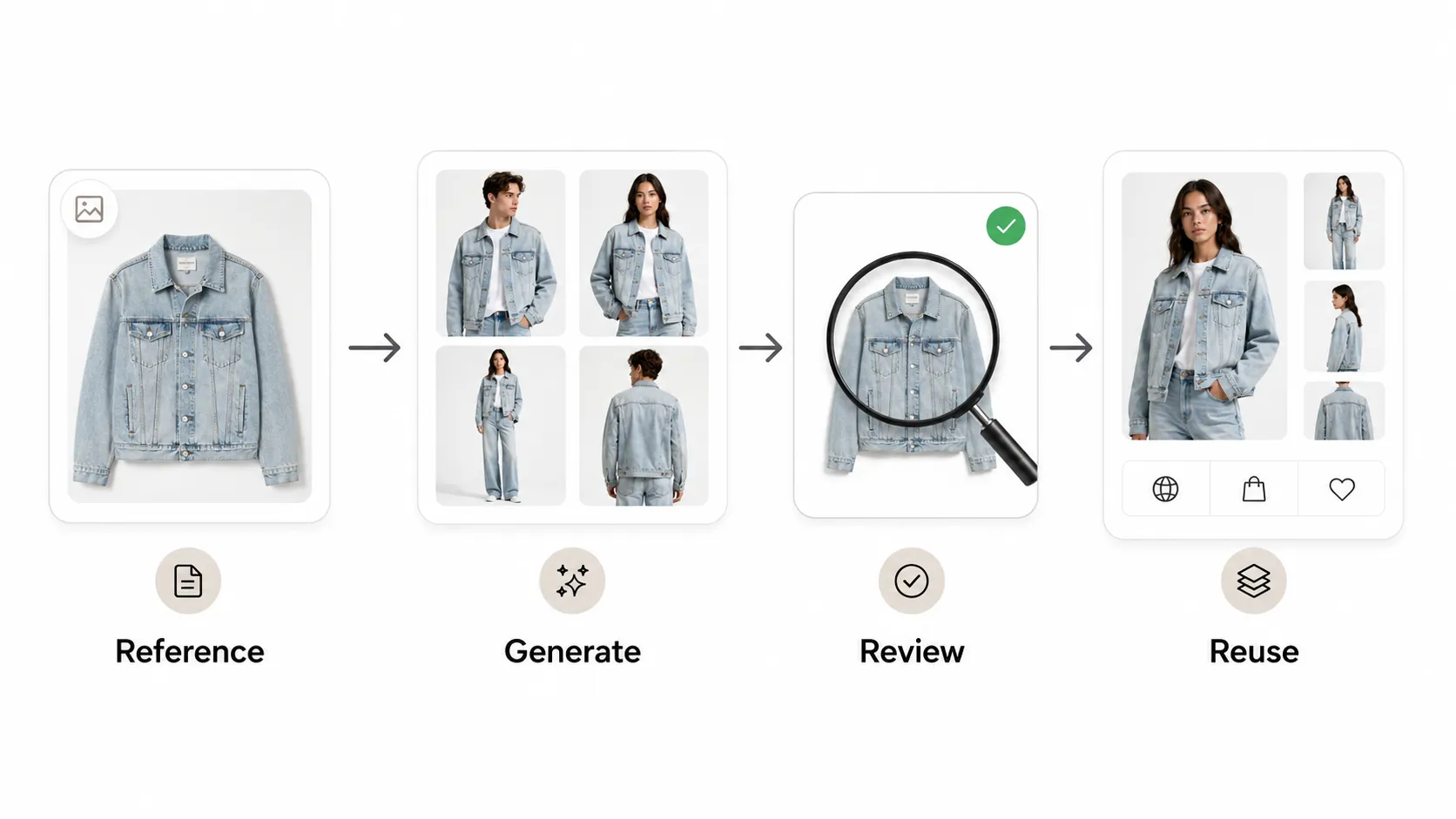
- Start with a clean input image. The garment should be visible, well lit, and close to the real color.
- Choose the output type: PDP, on-model, lifestyle, social, ad, or lookbook.
- Generate a small controlled batch first. Do not generate endlessly.
- Review for product fidelity: shape, fit, fabric, color, seams, logo, and print.
- Approve only publishable visuals.
- Organize files by SKU, channel, campaign, and version.
- Publish and measure performance.
Track CTR, add-to-cart rate, conversion rate, return rate, and cost per approved visual. The goal is not to create more images. The goal is to create images that help shoppers understand and trust the product.
QA Checklist for AI Fashion Photos
Garment QA
- Does the shape match the real product?
- Are fit, sleeve length, neckline, hem, and proportions correct?
- Are seams, buttons, zippers, labels, and logos accurate?
- Is fabric texture believable?
- Are colors close to the real product?
- Are prints or patterns in the right place?
Model QA
- Do hands, face, and body proportions look natural?
- Does the pose make sense for the garment?
- Does the fabric interact naturally with the body?
- Does the model make the product look misleading?
Ecommerce QA
- Is the crop suitable for the channel?
- Is the image sharp enough?
- Is the background consistent with the brand?
- Is it readable on mobile?
- Is the file named and organized correctly?
- Would a customer feel misled after receiving the product?
For a deeper review process, use this product photo quality checklist before publishing.
Common Mistakes Fashion Brands Make
The first mistake is choosing based on rankings alone. A tool can rank well and still be wrong for your workflow.
The second mistake is ignoring product fidelity. A beautiful image that changes the garment is not usable.
The third mistake is generating too many images without QA. More output can create more review work.
The fourth mistake is using AI for every image type. Some images still need real capture.
The fifth mistake is measuring cost per generated image instead of cost per approved visual.
The sixth mistake is ignoring catalog consistency. One good image is easy. A consistent product catalog is harder.
Final Takeaway
The best AI photoshoot tool for a fashion brand is not the one with the most impressive demo. It is the one that fits the work your team actually does.
If you need PDP clarity, choose a tool that protects product accuracy. If you need model visuals, choose a tool that keeps fit and proportions believable. If you need campaign scenes, choose a tool that controls mood and lighting. If you need catalog scale, choose a tool that stays consistent across many SKUs.
iCreat AI is a strong first option for fashion ecommerce teams that need practical visual expansion: ecommerce-ready clothing image sets, pose variations, and product image variations from existing references. It should still be used with QA, but it fits the day-to-day production needs of small and growing fashion teams better than a tool that only creates one-off creative images.
The right tool will not replace every photoshoot. But it can reduce the number of times your team needs to book a model, rebuild a set, or recreate the same product page image in a slightly different format.