


Cross-tool AI workflows mean using more than one AI tool, model, or platform to complete a production pipeline — and doing it in a way that preserves control over where data lives, which tools handle which steps, how prompts and references flow between systems, and what happens when something goes wrong. For ecommerce teams producing product visuals, campaign assets, and short-form video, this is not a theoretical problem. It is the daily reality of moving reference images through background removal, into an image generation tool, through a video generator, and out to multiple channel formats — while keeping track of what went where.
The value of cross-tool workflows is clear: each tool does something specific well, and connecting them lets teams produce more varied output than any single tool could deliver alone. The risk is equally clear: every new tool in the chain adds a point where data can scatter, prompts can drift, version context can get lost, and governance assumptions can break down silently. This guide covers why teams need multi-tool setups, what breaks when workflows cross boundaries, how to think about control in three layers, what recent product signals tell us about where governance is heading, and a practical checklist for building cross-tool AI workflows that remain operable and trustworthy.
Key Takeaways
- Cross-tool AI workflows deliver more output variety but introduce data sprawl, prompt drift, and governance gaps at each connection point.
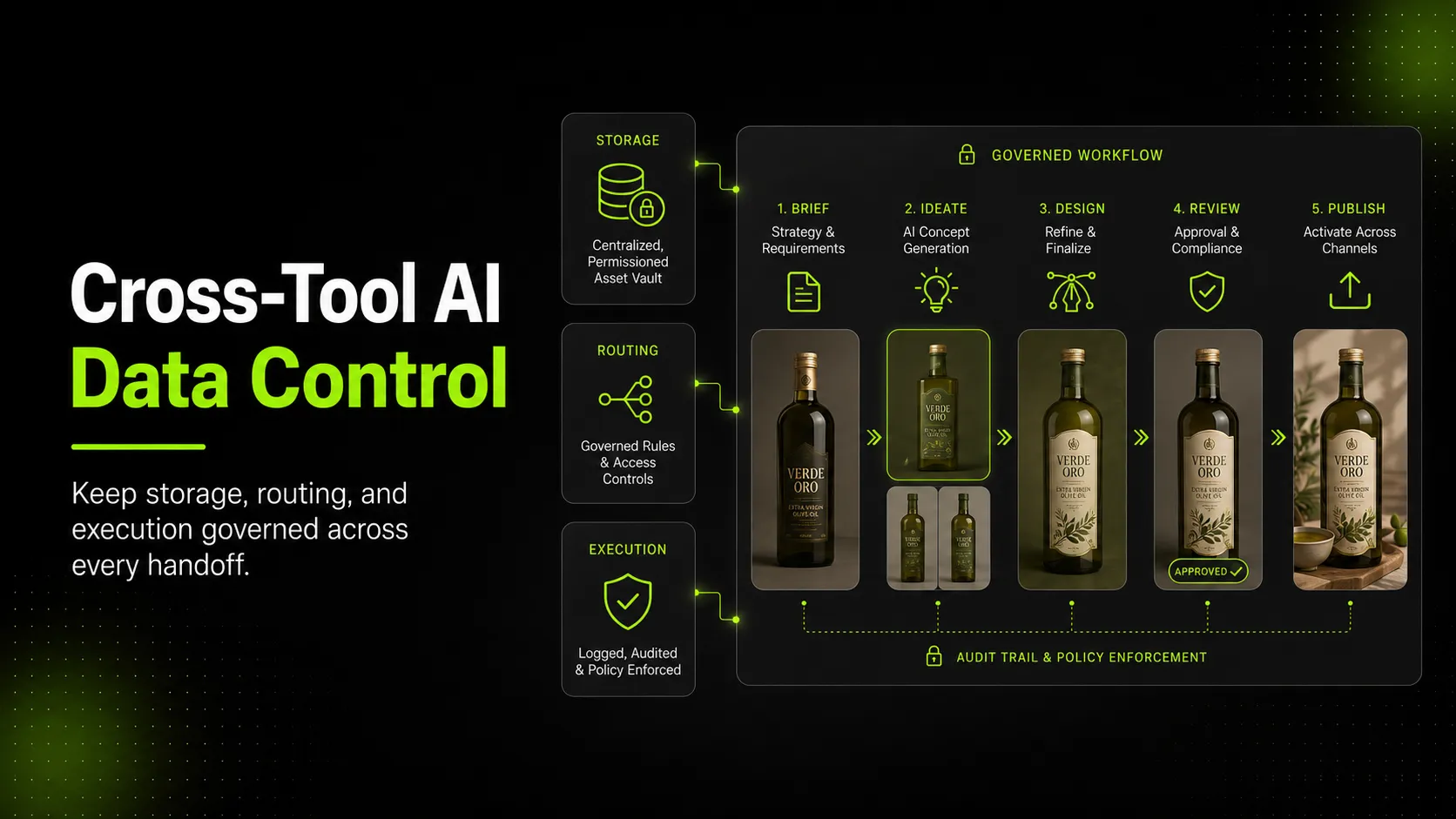
- Control operates in three layers: where data is stored (storage), which tool handles which request (routing), and how execution is bounded and auditable (execution).
- Recent updates from Claude Desktop enterprise deployments, OpenRouter's data residency features, and agent-focused versioning tools like Oak show that governance is becoming part of workflow design, not a separate compliance afterthought.
- Ecommerce teams should map their full visual production chain before adding new tools, define clear handoff rules between steps, and keep reference images and prompts under team-controlled storage wherever possible.
- iCreat AI's AI Product Photography workflow is designed as a governed production step within larger creative pipelines, not as an unbounded endpoint.
Why Teams Increasingly Need More Than One AI Tool
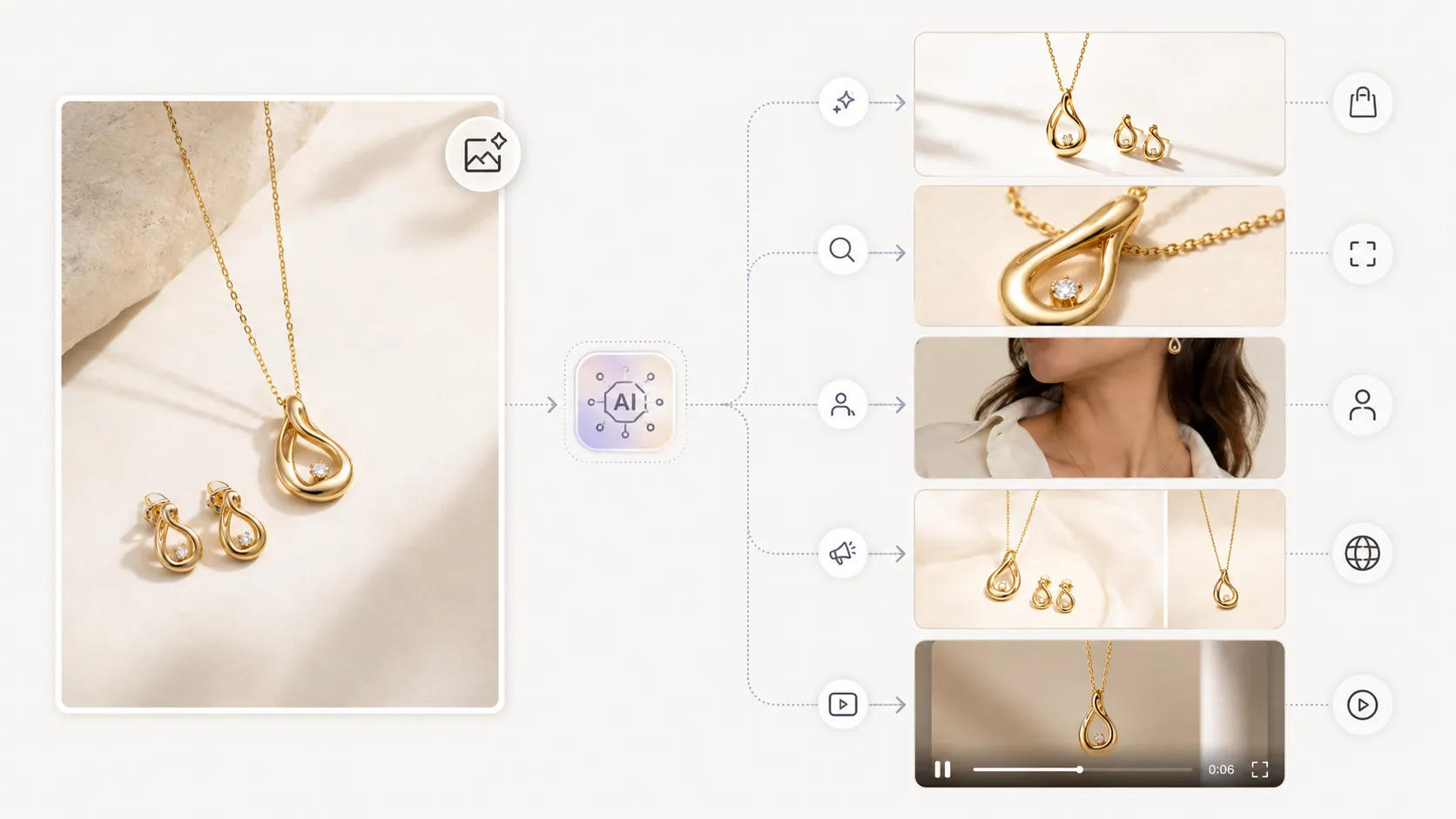
Ecommerce visual production rarely fits inside a single tool anymore. A typical fashion brand's creative pipeline might look like this:
- Background removal on a product photo to create a clean cutout
- Image upscaling to bring that cutout to 4K resolution
- AI product photography generation to turn the clean reference into campaign-style visuals with different backgrounds, poses, or compositions
- Image replacement to adapt one strong creative concept across different products or seasonal variations
- Product video generation to turn the final still image into a short promotional clip for social ads
Each step may use a different tool because each tool is optimized for a specific job. A background remover is not designed to generate campaign compositions. An image generation model is not designed to remove backgrounds at production quality. A video generator needs a strong input image but does not replace the upstream work that makes that image strong.
According to Claude's recent enterprise deployment update, organizations are increasingly asking for local storage options, identity integration with existing cloud providers, and deployment flexibility that keeps reasoning within chosen infrastructure boundaries. The pattern is the same at the team level: users want the capability of multiple AI tools without surrendering control over where their data goes and who can access it.
For ecommerce teams specifically, the driver is output volume. A single seasonal campaign may need hero images, detail shots, lookbook variations, email headers, promo banners, social cuts in five aspect ratios, and three to six short video clips. Producing all of that from one tool is possible in theory, but in practice, teams reach for specialized tools at each stage because specialization produces better results faster.
What Gets Harder When Workflows Cross Tool Boundaries
Adding a second or third AI tool to a workflow introduces problems that do not exist when everything stays inside one platform.
Data residency becomes unclear. When you upload a product reference image to Tool A, then download the output and upload it to Tool B, then send the result to Tool C, you have created three copies of that asset in three different systems. Each system has its own retention policy, its own access controls, and its own terms around how long your data is stored and whether it is used for training. You may not know the answer for every tool in your chain.
Prompt context gets lost between steps. The reasoning that went into generating a particular campaign visual in Tool A does not automatically transfer to Tool B when you take that output and use it as input for video generation. If the video output looks wrong, tracing back whether the problem originated in the prompt, the model choice, the intermediate file quality, or the video tool's interpretation requires manual detective work that most teams do not have time for.
Version control breaks down. When a campaign visual goes through four tools and someone asks "which version was the one we approved for email?", the answer depends on whether you kept organized records at each handoff. Most teams do not. The file naming convention that made sense in Tool A (`dress-campaign-v3-final.png`) may get renamed, re-exported, or compressed by the time it reaches Tool D, making lineage tracking nearly impossible.
Fallback behavior is undefined. What happens when Tool A is down, rate-limited, or returns an error? Does the workflow stop? Does it retry? Does it skip to an alternative? In a single-tool setup, this is the tool's problem. In a cross-tool workflow, it is your problem, because the downstream tools are waiting for input that never arrives.
Governance assumptions diverge. Each tool may have different content policies, different acceptable-use boundaries, and different definitions of "commercial use." An image that passes content filtering in Tool A might trigger a policy flag in Tool B. A workflow that works today might break tomorrow when one tool in the chain updates its terms or model behavior.
The Three Control Layers: Storage, Routing, and Execution
Thinking about cross-tool control in three layers helps make the problem manageable. Each layer addresses a different category of risk.
Layer 1: Storage — Where Your Data Lives
Storage control means knowing, for every file in your workflow, where it is stored, how long it stays there, who has access, and whether it can be deleted.
Practical steps:
- Keep master reference images (original product photos, approved campaign assets) in team-controlled storage such as Google Drive, Dropbox, or an internal DAM system. Upload copies to AI tools when needed, but treat those copies as disposable working copies, not the source of truth.
- Track which tools retain your uploads after processing. Some tools delete inputs after a set period; others keep them indefinitely or use them for model improvement. Read the terms before uploading sensitive product imagery.
- For OpenRouter's approach to this problem, data residency controls let users specify which regions their requests route through, giving organizations a lever to align AI tool usage with compliance requirements like GDPR or internal data-handling policies.
- When a workflow step produces an output you intend to keep (a final campaign visual, an approved product shot), download it promptly to your controlled storage rather than leaving it as the only copy inside the tool's system.
Layer 2: Routing — Which Tool Handles Which Request
Routing control means defining clear rules about which tool handles which type of task, under what conditions, and what happens when the primary tool cannot fulfill the request.
Practical steps:
- Document your tool assignments. "AI Product Photography uses iCreat AI for campaign visual generation" is clearer than "we use some AI tool for images." Write it down.
- Define fallback order. If your primary image generation tool is unavailable, what is the backup? Is there a secondary model or tool you can switch to without breaking the downstream pipeline? Document the fallback before you need it.
- Separate routing by sensitivity level. Not every product image needs the same treatment. Internal concept explorations may tolerate broader tool usage than final marketplace listing images. Classify your outputs and apply stricter routing rules to higher-stakes assets.
- Use routing as a governance lever. According to OpenRouter's AI governance framework, treating governance as part of the architecture — deciding upfront which models and endpoints handle which workload categories — produces more reliable outcomes than trying to add compliance rules after the workflow is already running.
Layer 3: Execution — How Work Happens and How You Verify It
Execution control means bounding what each tool is allowed to do, keeping records of what actually happened, and being able to review the chain after the fact.
Practical steps:
- Set scope limits per tool. Background removal tools should remove backgrounds, not regenerate the entire product. Image generation tools should produce visual variations, not rebrand your company. Defining the expected input and output for each step prevents scope creep where one tool starts doing another tool's job poorly.
- Log key decisions at each handoff. When you pass an image from Tool A to Tool B, note which version, which prompt settings, and which model or configuration were used. This does not require sophisticated software — a shared spreadsheet or Slack message with the filename, date, and tool name is enough for most teams.
- Review outputs against inputs. Before passing a generated image to the next tool, check that it still accurately represents the original product. Garbage-in-garbage-out applies doubly in cross-tool workflows: if Tool A produces a distorted product image, Tool B and Tool C will propagate and amplify that distortion.
- Version your workflow configurations alongside your assets. Tools like Oak, built specifically for agent and structured workflow versioning, show that the industry is moving toward treating workflow definitions themselves as version-controlled artifacts, not just the files that flow through them.
What Recent Product Signals Reveal About Where Governance Is Heading
The direction of travel in AI tooling is toward governance as a first-class feature, not an add-on. Several recent developments illustrate this shift.
Enterprise cloud integration is now a baseline expectation. Claude Desktop's support for AWS, Google Cloud, and Microsoft Foundry deployments shows that enterprise users want AI reasoning to run inside their existing cloud boundaries, with their existing identity management and storage policies, rather than routing everything through a third-party SaaS model. For smaller teams, the implication is the same: the tools that will win are the ones that make it easy to understand and control where data goes.
Data residency is becoming a user-facing feature. OpenRouter's data residency controls, which let API users route requests through specific geographic regions, demonstrate that routing-level governance is no longer just an enterprise concern. Any team handling customer data, product imagery with IP considerations, or region-specific compliance requirements can benefit from thinking about where their AI requests physically execute.
Security hardening is part of core product value. OpenClaw's recent security-focused release emphasizes that cross-tool and agent-based AI environments are increasingly evaluated on security posture alongside capability. A workflow tool that connects multiple AI services but cannot explain its security model is becoming harder to adopt in production environments.
Version control is being rebuilt for AI workflows. Oak's positioning as a Git-like system designed specifically for agents and structured workflows reflects a real gap: traditional version control systems track code changes, but they do not naturally capture the decisions, prompts, model versions, and tool configurations that define an AI production run. As cross-tool workflows become more common, expect to see more purpose-built versioning layers.
Taken together, these signals suggest that the question is shifting from "can we connect these tools?" to "can we connect these tools and still know what happened?"
Practical Checklist for Building Cross-Tool AI Workflows Without Losing Control
Use this checklist before adding a new tool to your workflow and periodically afterward to verify that control is still intact.
Before Connecting a New Tool
- Read the tool's data retention, access, and training-use policies
- Confirm the tool's output format is compatible with your downstream tools (resolution, color space, file type, metadata)
- Define exactly what this tool is responsible for (input scope, output scope, what it must NOT do)
- Document where this tool fits in the sequence (what feeds into it, what it feeds into)
- Set up a fallback plan if this tool is unavailable or produces bad output
- Decide which sensitivity level of work this tool is allowed to handle (internal exploration vs. final production)
During Workflow Operation
- Store master reference images in team-controlled storage; treat tool uploads as disposable copies
- Log the filename, prompt summary, tool name, and date at each handoff point
- Verify output accuracy (product shape, color, details) before passing to the next tool
- Download final approved assets to controlled storage promptly
- Monitor for policy or terms-of-service updates from any tool in your chain
Periodic Governance Review
- Audit whether every tool in your chain is still necessary or whether consolidation is possible
- Check whether any tool's data handling practices have changed since you adopted it
- Verify that fallback plans still work (test them occasionally)
- Review whether your logging practice is actually useful when you need to trace a problem backward
- Confirm that team members who use the workflow understand the control boundaries
Common Mistakes When Building Cross-Tool AI Workflows
| Mistake | Why It Hurts | Fix |
|---|---|---|
| Uploading everything everywhere | Creates untracked copies in multiple systems with unknown retention policies | Upload only what each tool needs; keep masters in controlled storage |
| Assuming all tools have the same content policies | One tool's acceptable output may be another tool's policy violation | Check content boundaries for every tool in the chain before going live |
| No logging between handoffs | Impossible to trace problems when something breaks downstream | Record filename, tool, date, and key settings at each step |
| Treating all outputs with the same sensitivity | Internal concepts and final marketplace images need different governance tiers | Classify outputs by stake and apply stricter controls to higher-stakes assets |
| Never testing fallback paths | When the primary tool fails, the entire workflow halts | Document and occasionally test the backup plan for each critical step |
| Ignoring terms-of-service updates | A tool you adopted six months ago may have changed its data handling rules | Subscribe to changelogs or set quarterly reviews for every tool in your chain |
Quality-Control Checks for Ecommerce Visual Workflows
Because this topic directly concerns AI-generated or AI-adapted ecommerce visuals used in commercial contexts, apply these checks to every output that will reach customers:
- Product accuracy: Does the generated or adapted image still correctly represent the actual product's shape, color, material, and details? Distortions introduced in one tool will be carried forward by every downstream tool.
- Offer and bundle truth: If the visual implies a discount, bundle, set composition, or inclusion that the landing page does not support, the disconnect will generate returns and complaints regardless of which tool produced the error.
- Brand consistency: Does the output match the brand's established color palette, mood, and visual language? Cross-tool workflows can accidentally drift brand identity when each tool applies slightly different styling defaults.
- Resolution and format fitness: Is the output at the correct resolution and format for its intended placement? An image that looks correct at preview size may reveal compression artifacts or color shifts at full export size.
- Lineage traceability: Can you identify which reference image, prompt, tool, and settings produced this specific output? If a customer or compliance auditor asks, you should be able to answer without guesswork.
iCreat AI's AI Product Photography workflow is built with these control concerns in mind. Reference images guide generation within a defined scope (product visuals, campaign compositions, commercial output), outputs are produced at resolutions suitable for ecommerce use, and the workflow integrates with supporting tools like AI Image Replacer for variation work and AI Product Video for motion content — each step operating within clear boundaries rather than as an unbounded generative free-for-all.
FAQ
Log in to iCreat AI when you're ready to build governed visual production workflows for your ecommerce content: https://icreat.ai/ai-tools/login.