


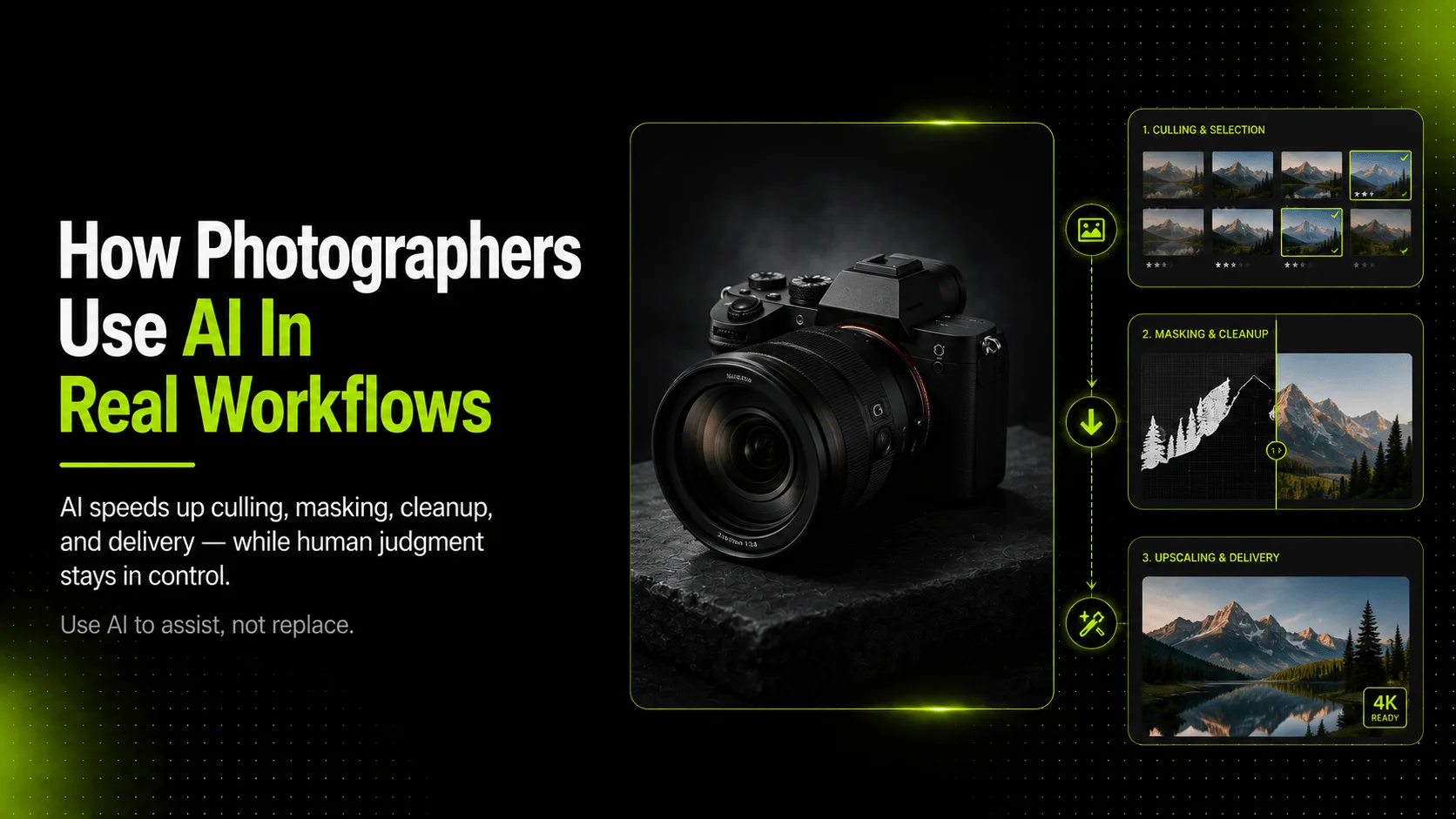
Photographers use AI to speed up repetitive work such as culling, masking, retouching, background cleanup, upscaling, and image variation, while keeping creative direction and final review in human hands. In commercial workflows, AI is most useful when it expands a real photo shoot into more usable product, campaign, or client-ready assets instead of trying to replace the photographer entirely.
The conversation around AI and photography often swings between two extremes. One side claims AI will make every camera obsolete. The other side insists no serious photographer would ever touch it. The reality sits in the middle. Most working photographers who have adopted AI tools use them to handle the parts of the job that are time-consuming but not creative. Culling hundreds of frames. Cleaning up backgrounds. Preparing images for different output formats. Generating extra variations from a strong source set.
This guide covers where AI fits into a real photography workflow, which tasks it handles well, where human judgment still matters most, and how commercial and product photographers can use these tools without sacrificing quality or client trust.
Key Takeaways
- Photographers use AI most often to speed up repetitive editing and organization work.
- AI is strongest when it starts from real photos, not when it invents product truth from scratch.
- Commercial teams still need human review for accuracy, style, and client approval.
- AI can help turn one shoot into more usable product, campaign, and marketing assets.
What Does AI Actually Do in a Photography Workflow?
AI shows up at three distinct stages in a typical photography workflow. Understanding which stage you are targeting helps you pick the right tool and avoid using AI where it does not belong.
Before the shoot
Some photographers use AI for planning and reference work. This might include analyzing existing images to build mood boards, generating lighting or composition references, or organizing previous shoots with natural-language search. Tools like Adobe Lightroom now support natural-language search so you can find photos by describing what is in them rather than remembering file names.
These pre-shoot uses are helpful but optional. Many photographers still plan shoots the traditional way, and that works fine.
After the shoot
This is where most photographers first notice AI making a difference. Post-production has always been the bottleneck. You shoot a few hundred frames, then spend hours culling, rating, color-correcting, retouching, and exporting. AI-assisted features in editing software now handle culling assistance, noise reduction, masking, object removal, and upscaling. The goal here is not to change what the photograph looks like. It is to get there faster.
For final asset delivery
Commercial photographers face an extra step that fine-art or portrait photographers may not. Clients often need more than what was captured on set. They need background variations for ads, detail shots for product pages, extra angles for lookbooks, and reformatted assets for social media. This is where reference-based AI generation becomes useful. A photographer can take a clean hero shot and then expand it into a fuller asset set without booking another studio day.
How Photographers Use AI for Editing and Post-Production
The most common way photographers use AI today is inside their existing editing software. These features do not replace the editor. They remove repetitive clicks and let the photographer focus on decisions that actually require taste.
Culling and image selection
After a shoot, sorting through hundreds or thousands of frames takes significant time. AI-assisted culling tools analyze sharpness, exposure, composition, and subject quality to help identify the strongest candidates faster. Adobe Lightroom's Assisted Culling feature, for example, uses this approach to flag the best images from a large set. The photographer still makes the final picks, but the initial sort happens much faster.
Masking, cleanup, and retouching
AI-powered masking detects skies, subjects, backgrounds, and specific objects without manual tracing. This speeds up selective edits considerably. Distraction removal tools can take out unwanted elements like sensor dust, reflections, or stray objects that would have required careful clone-stamp work before. Blemish removal and skin retouching features follow the same pattern: the AI handles the mechanical part, the photographer decides how far to go.
Upscaling and final export preparation
When a deliverable needs higher resolution than what was captured, generative upscaling can enhance detail without simply stretching pixels. Lightroom's Generative Upscale, powered by Topaz Labs technology, is one example of this approach. For ecommerce and product work, upscaling matters because marketplace requirements often specify minimum dimensions, and clients may need the same image at multiple sizes for web, print, and social formats.
How Commercial Photographers Use AI Beyond Basic Editing
Product and ecommerce photographers face a different challenge than general editors. Their clients do not just want one good image. They want a full visual set: hero shots, detail images, white-background assets, lifestyle variations, ad creatives, and sometimes short-form video. Shooting all of that in one session is expensive and logistically difficult.
Creating more product image variations
A product photographer might capture ten strong hero images during a shoot. The client then needs those same products on five different backgrounds, in three seasonal styles, and formatted for both Shopify and Amazon. Rather than reshooting every variation, a photographer can use reference-based AI tools to expand the original set into background swaps, scene adaptations, and format-specific versions. The key is starting from a real photograph that already captures accurate product shape, color, texture, and detail.
If you need to generate additional product visuals from your existing reference images, iCreat AI's AI Product Photography tool supports this type of workflow by letting users upload reference images, guide results with prompts, and produce multiple output variations for ecommerce and campaign use.
Adapting backgrounds and scene elements
Background adaptation is one of the most practical AI use cases for commercial photographers. A single product shot can be repurposed across seasonal campaigns, regional audiences, and platform-specific layouts by changing the background while keeping the product itself unchanged. AI Image Replacer handles this kind of workflow by supporting clothing, background, and element replacement within an existing image, which helps teams adapt one strong concept into multiple creative directions without another full production cycle.
Building campaign visuals from real product references
For fashion and apparel brands, campaign visuals often require styled scenes, model presentations, and editorial compositions that go beyond basic product shots. Reference-based AI tools can help generate lookbook-style visuals, pose variations, and campaign imagery from approved product photographs. The photographer's role shifts slightly here: instead of capturing every final frame, they curate the inputs, guide the direction, and review outputs for garment accuracy, brand consistency, and commercial usability.
Where AI Helps Most in Product and Ecommerce Photography Workflows
Ecommerce photography has specific requirements that make AI particularly useful. Marketplaces and online stores demand consistent, high-quality image sets across large SKU catalogs. Traditional production scales poorly when a brand has hundreds of products and each one needs multiple angles, detail shots, and campaign variants.
Product page image sets
A complete product page typically needs more than one image. Shoppers expect to see a front view, back view, detail close-ups, context or lifestyle shots, and sometimes size or fit references. AI tools that generate detail images, mockups, and white-background assets from product references can fill gaps in a visual set without requiring every shot to be captured manually.
Detail images and white-background assets
Marketplace listings often require or strongly prefer white-background product images. Creating these traditionally means a dedicated setup with sweep backdrops, even lighting, and careful post-processing. AI-based background removal and white-background generation can accelerate this step. Background Remover tools detect the subject and produce transparent-background or white-background outputs that work for marketplace listings and catalog use.
Seasonal campaigns and ad creatives
Seasonal campaigns create recurring demand for new visuals without new products. A winter collection needs holiday-themed backgrounds. A summer launch needs bright, outdoor-style scenes. AI-driven background swapping and creative variation let teams refresh visual assets quickly. Combined with upscaling through tools like Image Upscaler, these workflows can prepare final assets at the resolution and quality that ad platforms and storefronts expect.
What Still Needs a Photographer
AI handles tasks. It does not handle judgment. There are several areas where a photographer's input remains essential, and treating AI as a full substitute usually produces weaker results.
Lighting, composition, and taste
No current AI tool can consistently decide how a subject should be lit, framed, or presented. Those choices come from experience, client understanding, and creative direction. AI can execute variations once the direction is set, but the direction itself comes from the photographer.
Product truth and client trust
In commercial photography, accuracy matters. A generated image that changes fabric texture, distorts logo placement, or alters product shape can mislead shoppers and damage trust. The photographer's role includes reviewing every output against the actual product and rejecting anything that drifts too far from reality. This is especially important for product page images, where shoppers make purchase decisions based on what they see.
Final selection and approval
Clients hire photographers not just to press the shutter, but to curate and approve the final deliverables. AI can produce dozens of variations quickly, but someone with professional taste needs to choose which ones represent the brand well, meet the brief, and serve the intended channel. That role still belongs to the photographer or the creative lead.
Quick Reference: AI vs. Photographer Tasks
| Best Handled by AI | Best Handled by the Photographer |
|---|---|
| Culling and image selection | Lighting decisions |
| Masking and subject isolation | Composition and framing |
| Background removal and cleanup | Product truth verification |
| Noise reduction | Client communication |
| Upscaling for output formats | Final selection and approval |
| Generating variations from references | Creative direction and brand taste |
How iCreat AI Fits the Workflow
iCreat AI provides tools that align with the parts of a photography workflow where AI adds the most value: expanding real photos into more usable commercial assets.
AI Product Photography lets users upload reference images and generate product visuals, campaign images, and style variations. It works best when the input is a clear, well-lit product photo and the goal is to create more outputs from fewer shoots.
AI Image Replacer supports background swaps, clothing adjustments, and creative adaptations within an existing image. This is useful when a photographer has a strong base image and needs to adapt it for different campaigns, seasons, or audiences.
Supporting tools like Image Upscaler, Background Remover, and Image to Prompt handle finishing steps: resolution enhancement, transparent-background preparation, and reference analysis for prompt building.
Mistakes to Avoid When Using AI as a Photographer
Treating AI output as automatically publishable
Every AI-generated image should be reviewed before it reaches a client or a product page. Check for product accuracy, color fidelity, text readability if applicable, and overall alignment with the brief. AI accelerates production; it does not eliminate the need for quality control.
Overediting until the product stops looking real
It is tempting to keep refining until an image looks polished. But in product and ecommerce photography, overprocessing can make items look artificial or misleading. A cleaner edit is often more trustworthy than a heavily processed one, especially for images that shoppers rely on to make purchase decisions.
Using the wrong asset type for the wrong channel
Not every AI-generated image belongs on a product page. Campaign visuals, social ads, and concept explorations can tolerate more creative interpretation. Product page images, marketplace listings, and detail shots should stay closer to the actual product. Keeping this distinction helps maintain client trust and reduces return rates.
Sources
- Adobe Lightroom AI-assisted features: What's New in Lightroom
- Shopify ecommerce photography guidance: The Complete Guide to Ecommerce Photography
- Adobe Generative Fill for photographers: Generative Fill Overview
FAQ
Photographers who integrate AI into their workflow tend to follow a simple rule: use AI to multiply what you already have, not to invent what you never captured. If you are ready to expand your product visuals from existing reference images, you can log in to iCreat AI and start creating.