


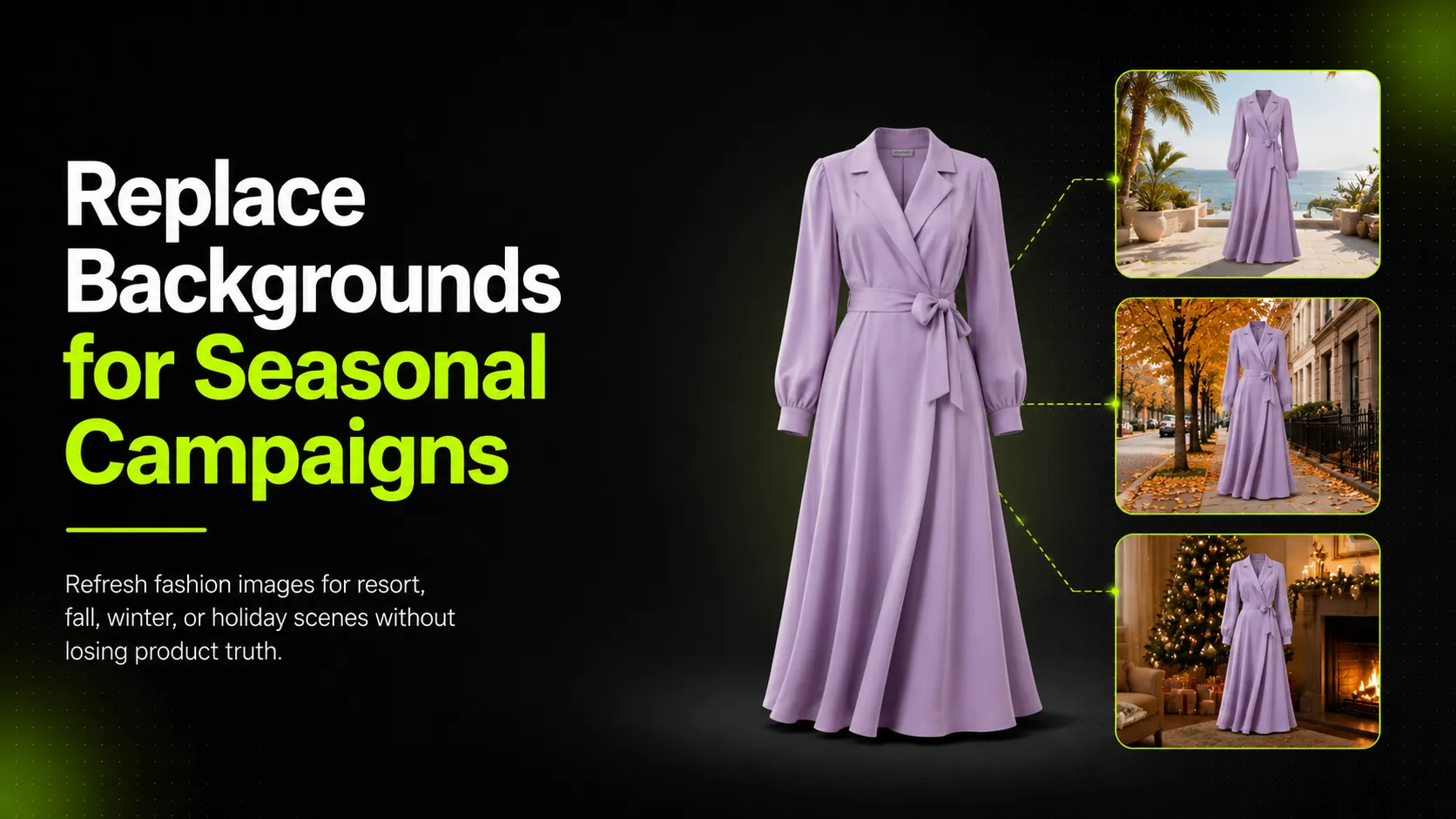
A seasonal campaign does not always fail because the product is wrong.
Sometimes the image context is wrong.
A linen dress may look flat in a gray studio but feel ready for a resort story on a sunlit terrace. A satin skirt may look ordinary against a plain wall but make more sense in a warm holiday setting. A fall jacket may lose its appeal if the background does not suggest layering, texture, or weather.
That is why background replacement is useful for fashion brands. It can help teams refresh existing product images, test seasonal campaign ideas, and build more visual variety without planning a new shoot for every season.
But replacing a background is not just a way to make an image prettier.
Done badly, it can make the product look fake.
If the lighting does not match, the image feels pasted together. If the edges around hair, sleeves, straps, or hems are messy, the product looks low quality. If the new scene changes the perceived color, texture, or fit of the garment, the image may hurt trust instead of supporting the campaign.
For fashion ecommerce, background replacement is not only a design task. It is a product accuracy task.
The goal is not to create the most dramatic scene. The goal is to refresh the seasonal context while keeping the garment honest.
This guide explains how to replace backgrounds in fashion images for seasonal campaigns, including when to use background replacement, how to choose the right seasonal scene, where AI tools fit, and how to review every image before publishing.
The Key Shift: Backgrounds Are Not Decoration
Most teams start with the wrong question:
A better question is:
That shift matters.
A background changes how the shopper reads the product. A pale stone terrace says resort. A quiet city street says fall layering. A warm interior says holiday dressing. A clean studio surface says product clarity.
The wrong background can make the garment feel out of place. A heavy wool coat on a tropical beach looks forced. A sheer summer blouse against a dark winter street may confuse the season. A formal holiday dress in a casual daytime café may weaken the occasion.
Before replacing anything, define the campaign job:
- Resort launch
- Summer sale
- Fall layering edit
- Winter outerwear push
- Holiday party campaign
- New year workwear refresh
- Regional ad variation
- Email hero update
- Social creative test
Then decide whether the background supports that job.
A good background replacement should make the product easier to understand in a seasonal context. It should not distract from the product, change the product, or make the brand look inconsistent.
A 10-Minute Workflow Before Replacing a Background
Before using an AI tool or opening an editing file, run this quick check.
- Choose the campaign job. Is this for resort, summer, fall, winter, holiday, social testing, email, or PDP support?
- Check the source image. Is the garment fully visible? Are edges clean? Is lighting usable?
- List product details that must not change. Color, hemline, sleeve length, neckline, fabric texture, logo, print, buttons, trims, and fit.
- Pick one hero background and one product-safe background. The hero version can be more seasonal. The product-safe version should stay clean and low distraction.
- Generate or edit 3-5 versions, not 30. Small batches are easier to review.
- Compare each version against the original. Check garment truth before campaign mood.
- Label the approved use. PDP, landing page, email, paid social, lookbook, or mood-only.
If you cannot complete this checklist, the background replacement will rely on guesswork.
This is the step that makes the difference between a reusable campaign asset and a pretty image that should never go near a product page.
When Background Replacement Makes Sense
Background replacement is useful when you already have a strong product or model image, but the context no longer fits the campaign.
Good use cases include:
- Reusing studio product images for seasonal campaigns
- Turning a neutral model image into a summer, fall, winter, or holiday visual
- Creating paid social variants without another shoot
- Localizing campaign visuals for different markets
- Refreshing older assets for a new collection page
- Creating email hero images from approved product photography
- Testing different moods before committing to a full shoot
- Building campaign visuals for a small capsule launch
For example, a brand may have a clean on-model image of a white linen shirt. The product is accurate, the fit is clear, and the garment looks good. But the plain gray background feels too cold for a resort campaign. A sunlit terrace, pale stone wall, or coastal café setting may help the same image support a warmer story.
But background replacement is not always the right choice.
Avoid it when:
- The original subject lighting is too different from the target scene
- The model pose does not make sense in the new environment
- Hair, fabric, or edges are too complex to mask cleanly
- The garment color is easily affected by lighting changes
- The image is for a high-value hero campaign where realism matters
- The product requires strict marketplace-style accuracy
A replaced background should feel believable, not merely decorative.
Choose the Background Based on Product Role
A seasonal background should be chosen based on what the product needs to say.
For a linen dress, the background might support ease, travel, and warm-weather movement. A sunlit terrace or pale outdoor wall makes sense.
For a satin skirt, the background might support evening dressing. A darker interior, soft highlight, or dinner setting may work better.
For a puffer jacket, the background should support warmth and weather. A cold street, muted outdoor scene, or clean winter neutral background makes more sense than a bright summer wall.
For a structured blazer, the background may need to support workwear, city life, or polished styling. Architecture, neutral studio, or urban backgrounds can work.
The background should match:
- Season
- Product weight
- Fabric behavior
- Color palette
- Target customer
- Campaign channel
- Brand style
- Expected use occasion
A mismatch can make the product less believable.
Here is a quick decision table:
| Product Type | Safer Background Direction | Risky Background Direction |
|---|---|---|
| Linen dress | Resort terrace, pale wall, soft daylight | Dark winter street, heavy indoor props |
| Satin skirt | Evening interior, warm neutral, soft highlight | Harsh beach sun, busy pattern wall |
| Fall jacket | City street, brick wall, muted outdoor scene | Tropical poolside, bright summer floral |
| Work blazer | Clean architecture, neutral studio, office-adjacent scene | Overly casual beach or party scene |
| Graphic hoodie | Simple street, studio color, casual lifestyle | Busy background that competes with graphic |
| Knitwear | Warm interior, textured wall, soft shadow | Overexposed outdoor background |
The best background does not compete with the garment. It frames the garment.
Build a Seasonal Background System
One-off background replacement can make a campaign look inconsistent.
Instead, build a small seasonal system.
For each campaign, define:
- 1 hero background style
- 2 supporting background styles
- 1 product-safe background
- 1 social or ad test background
- Color palette
- Lighting direction
- Shadow style
- Crop format
Example for a summer campaign:
- Hero: sunlit terrace with pale stone
- Support: outdoor café wall
- Product-safe: warm off-white studio
- Social test: soft blue sky or branded color block
- Palette: ivory, sand, pale blue, warm neutral
- Lighting: soft daylight, left-side direction
- Shadows: light and natural
Example for a holiday campaign:
- Hero: warm evening interior
- Support: textured wall with subtle lights
- Product-safe: deep neutral studio
- Social test: burgundy or metallic backdrop
- Palette: black, champagne, deep red, warm gold
- Lighting: soft directional glow
- Shadows: richer but not harsh
This creates variety without making the campaign feel scattered.
It also helps the team avoid a common mistake: replacing each image with a different “nice” background and ending up with a campaign that has no visual system.
Start With a Source Image Audit
Before using AI or manual editing, audit the original image.
Ask:
- Is the garment fully visible?
- Are the edges clean enough to separate from the background?
- Is the lighting clear and directional?
- Is the color accurate?
- Does the pose make sense in the new scene?
- Are important details visible?
- Are hair, sleeves, straps, hems, or fabric edges complicated?
- Would the image still be useful if the background changed?
A strong source image should have:
- Clear product shape
- Accurate color
- Visible hem, sleeve, neckline, and waist
- Clean separation between subject and background
- Minimal obstruction from props, hair, bags, or hands
- Enough resolution for edge detail
- Lighting that can match a realistic new environment
A weak source image creates more editing problems. If the garment is partly hidden, the new background will not fix it. If the lighting is harsh and the target scene is soft, the result may feel fake. If the hair and fabric edges are messy, masking will be harder.
Background replacement works best when the product truth is already strong.
A Practical iCreat AI Workflow
Background replacement is easier when each tool has a clear job.
A practical workflow might look like this:
- Prepare the source image. Use a strong product or model image where the garment is visible and accurate.
- Use a background removal step when needed. A Background Remover can help create a clean subject cutout or transparent-background asset.
- Create or adapt the seasonal scene. An AI Image Replacer can help replace the background or adapt a successful product visual into a new seasonal direction.
- Improve the product-led image first if needed. If the original product image is weak, an AI Product Photography tool can help create cleaner ecommerce-ready visuals from references and prompts before seasonal editing.
- Upscale only after approval. An Image Upscaler should be used after the image passes garment, edge, lighting, and channel QA.
This order matters.
Do not upscale a weak image. Do not approve a background-replaced image just because it looks seasonal. Do not use a campaign image on a product page unless the garment still looks accurate.
The tool chain should support the workflow, not replace judgment.
Write Background Prompts With Constraints
A background prompt should not only describe the scene. It should also protect the product.
Weak prompt:
Better prompt:
For a holiday campaign:
For fall outerwear:
A useful background prompt includes:
- Campaign season
- Background setting
- Lighting direction
- Color palette
- Product details to preserve
- Channel use
- What to avoid
This makes the edit easier to review because the output has a clear standard.
Match Lighting, Shadow, and Perspective
Most bad background replacements fail because the subject and background do not belong to the same world.
Check three things carefully.
Lighting
Does the light direction match? If the model is lit from the left, the new background should not suggest strong light from the right. If the original photo has soft studio lighting, placing it into harsh midday sun may look fake.
Shadow
A model or product needs a believable grounding shadow. Without shadow, the subject floats. With the wrong shadow, the scene feels pasted together.
Perspective
The camera angle should make sense. A standing model photographed straight on may not work in a background shot from a high angle. A product shot on a flat surface should not be placed into a deep street scene without perspective adjustment.
The shopper may not consciously analyze these details, but they will feel when something is off.
Protect Garment Truth
Fashion background replacement must not change the product.
Before approving any image, check:
- Did the color shift because of the new background?
- Did edges around sleeves, hair, straps, or hems become messy?
- Did sheer fabric become too opaque or too transparent?
- Did reflective fabric pick up unrealistic colors?
- Did prints, logos, buttons, or trims change?
- Did the background cover product details?
- Did the scene make the garment look heavier, lighter, longer, shorter, or more expensive than reality?
This is especially important for PDP and paid-ad images. A campaign image that creates the wrong expectation can drive clicks but hurt trust later.
If the garment no longer looks like the original product, reject the edit or use it only as a mood reference.
Seasonal Examples
Resort Linen Dress
A neutral studio image can become a resort campaign visual if the garment already has a clean silhouette and accurate color. Use pale stone, soft daylight, and minimal background detail. Avoid bright blue water or heavy tropical props if they distract from the dress.
Check the hem, sleeve, neckline, linen texture, and shadow under the model.
Summer Shirt Campaign
For a lightweight shirt, backgrounds like garden shade, outdoor café walls, or bright studio neutrals can work. The scene should feel warm but not overexposed. White, ivory, and pastel garments need careful color review because backgrounds can shift perceived tone.
Check buttons, collar, sleeve drape, and fabric weave.
Fall Jacket Edit
A fall background should support layering and texture. City streets, brick walls, warm interiors, or muted outdoor scenes work well. Avoid backgrounds that are too busy, because jackets often have pockets, zippers, collars, or seams that need to remain visible.
Check collar shape, pocket placement, zipper line, sleeve length, and hem.
Holiday Satin Skirt
Holiday visuals can use evening interiors, rich neutrals, subtle sparkle, or dining settings. The risk is over-styling. Satin and metallic fabrics can reflect color from the background, so product color and sheen need careful review.
Check waistline, fabric shine, hem length, and side drape.
Channel-Specific Background Choices
The same background replacement should not be used everywhere.
| Channel | Best Background Approach |
|---|---|
| PDP support | Simple, product-safe, low distraction |
| Collection page | Cohesive seasonal setting |
| Landing page | Stronger hero scene with clear product visibility |
| Fast seasonal mood with clean focal point | |
| Paid social | High readability, simple contrast, strong crop |
| More lifestyle and mood | |
| Marketplace | Follow platform requirements, often plain or white background |
| Lookbook | More editorial, but still product-accurate |
A holiday background that works in an email may be too decorative for a PDP. A clean product-safe background may be too plain for social. A lookbook scene may be beautiful but too unclear for ads.
Approve background-replaced images by channel.
QA Checklist Before Publishing
Use this checklist before a background-replaced image goes live.
Product QA
- Does the garment still match the original?
- Is the color accurate?
- Are hem, sleeve, neckline, waist, and fit unchanged?
- Are prints, logos, buttons, zippers, seams, and trims intact?
- Are sheer, shiny, or textured fabrics believable?
Edge QA
- Are hair, sleeves, straps, hems, and fabric edges clean?
- Does the cutout look natural?
- Are there halos, jagged edges, or missing details?
Scene QA
- Does the season match the product?
- Does the lighting direction make sense?
- Are shadows realistic?
- Does the perspective match?
- Does the background distract from the garment?
Channel QA
- Is the image safe for PDP, or only for campaign/social?
- Does the crop work for the intended placement?
- Does the image support the campaign story?
- Could the shopper feel misled?
If an image fails product truth, do not publish it as a product image. Regenerate it, fix it manually, or use it as mood exploration only.
Final Takeaway
Replacing backgrounds in fashion images can help brands refresh seasonal campaigns without planning another full shoot.
But the strongest results do not come from simply swapping a studio wall for a beach, street, or holiday room. They come from matching the background to the campaign job, preserving garment truth, checking lighting and shadow, and approving each image by channel.
Use background replacement when the original product image is strong but the context needs to change.
Use resort, summer, fall, winter, or holiday scenes to make the product feel timely.
Use AI tools to speed up variation, cutouts, and background editing, but keep human review in the workflow.
A good background replacement should make the product feel more relevant without making it less honest.
That is the balance seasonal fashion campaigns need: new context, same garment truth.