


Why Most Teams Over-Prompt and Under-Reference
The default instinct when an AI output is wrong is to edit the prompt. This is human: typing is fast, preparing a reference image is slow, and the prompt box is the most visible lever in every generation interface. The instinct is also wrong for most garment-detail failures, and the cost of being wrong compounds.
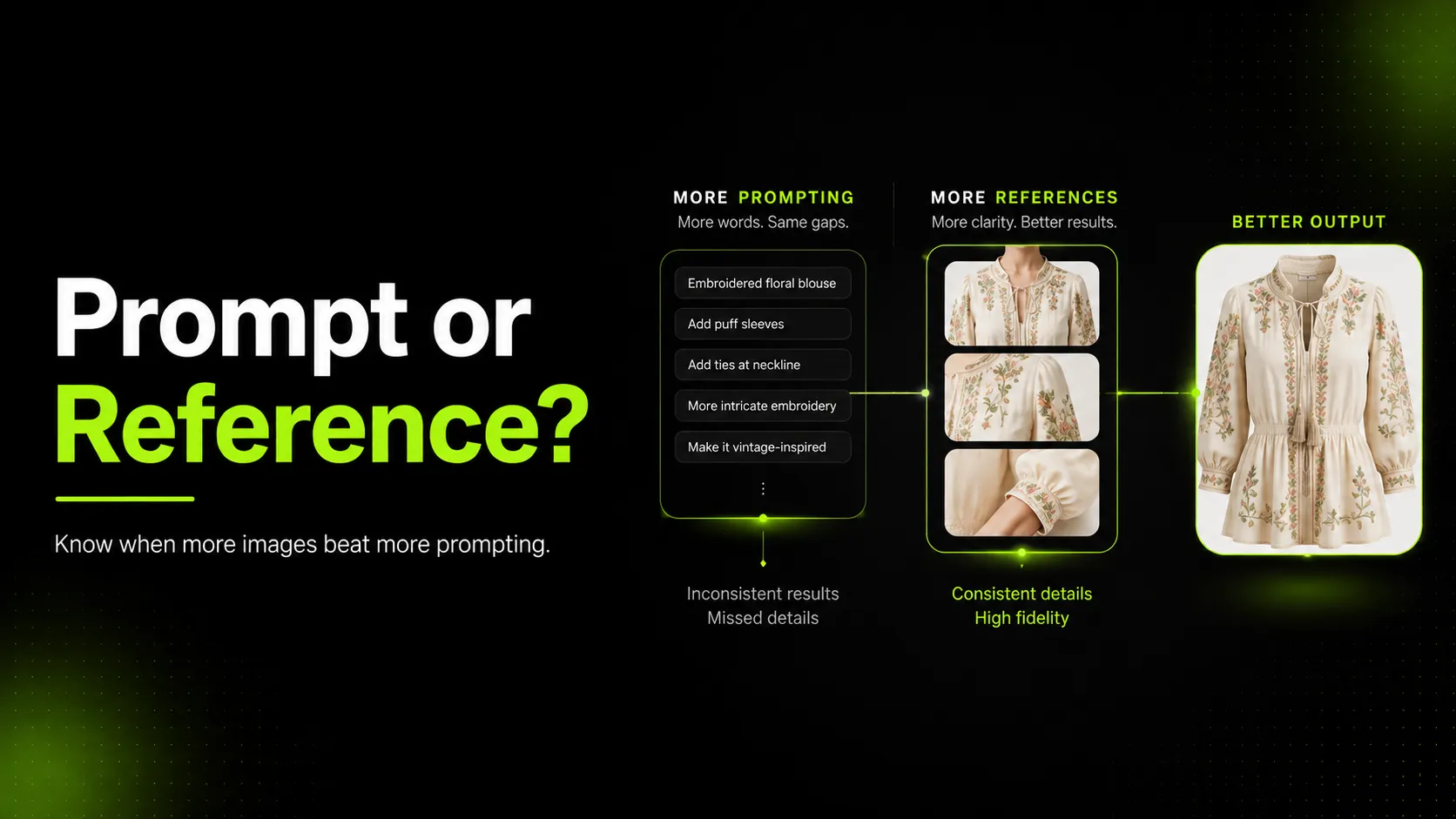
The structural reason is that prompts and references solve different problems. Prompts guide direction — mood, scene, lighting, composition, camera angle. References provide information — exact texture, logo shape, print pattern, structural detail, true color. When an AI generation misrepresents a garment, the flaw is usually informational: the logo is corrupted, the print is distorted, the fabric reads as a generic surface. Editing the prompt cannot add information the model does not have. It can only redirect the model toward a different guess.
Time Under Tension's analysis of AI product photography names the mechanism directly: image generation apps struggle to capture specific product details because "there is not enough data in the pre-trained dataset to recreate most products in detail." The model knows generally what a sneaker looks like. It does not know what your specific sneaker looks like. No amount of prompt editing closes that gap. A reference image does.
Adobe's documentation for reference-image features in Photoshop makes the same point from the tool side: reference images offer "better control than text prompts, especially for styles or details that are difficult to describe." The difficult-to-describe details are exactly the ones that drive apparel returns when they are wrong.
The practical consequence is that teams systematically over-invest in the lever that cannot solve their problem. Credits burn, launches slip, and the conclusion is usually that the AI tool is not good enough, when the diagnosis was wrong from the first edit.
What Prompts Can and Cannot Do for Garment Fidelity
Before the taxonomy, establish the capability boundary. Prompts and references are not interchangeable; they are different tools for different jobs.
| Dimension | Prompting | Reference images |
|---|---|---|
| What it provides | Direction — mood, scene, lighting, composition, camera angle | Information — exact texture, logo, print, structural detail, true color |
| Best for | Atmosphere, background, lighting style, composition, creative direction | Specific product details that cannot be described precisely in words |
| Limit | Cannot convey details absent from training data; degrades when over-specified | Cannot set mood or scene on its own; provides product truth but not creative context |
| Failure mode when overused | Iterative trap — credits burn without convergence | Over-reliance produces flat, directionless output |
| Cost of misdiagnosis | Wasted credits, delayed launches, wrong tool blamed | Slightly slower iteration; rarely costly |
Read the table as a boundary, not a ranking. Prompts are the right tool for roughly half of what makes an apparel image work — the direction, the scene, the composition. References are the right tool for the other half — the product truth. A team that uses only prompts produces images with direction but no fidelity. A team that uses only references produces images with fidelity but no life. Most teams fall into the first trap.
The Failure-Signal Taxonomy: Which Flaws Mean Prompt, Which Mean Reference
This is the core diagnostic tool. When an output is flawed, classify the flaw before touching either lever.
| Flaw signal | Lever | Why |
|---|---|---|
| Logo corrupted, garbled, or plausible-but-wrong | Reference | Logos are brand-specific; prompts cannot describe them precisely enough |
| Print or pattern distorted | Reference | Specific prints are absent from training data |
| Fabric texture smoothed into a generic surface | Reference | Texture is visual information; prompts approximate it qualitatively |
| Structural detail missing (lapel roll, lining, hardware shape) | Reference | Product-specific features the model has to invent without references |
| Color shifted from the real garment | Reference (usually) | Color is visual; prompt language like "navy" is interpreted, not measured |
| Stitching, seams, or construction detail off | Reference | Construction is product-specific |
| Wrong mood or atmosphere | Prompt | Mood is directional; prompts guide it |
| Wrong background or scene | Prompt | Scene is directional |
| Wrong lighting style | Prompt | Lighting is directional |
| Wrong composition, framing, or camera angle | Prompt | Composition is directional |
| Garment shape generally off but no specific detail wrong | Prompt (re-roll first) | Often seed variation; re-roll before adding references |
The taxonomy resolves most diagnostic ambiguity in seconds. A corrupted logo is never a prompt problem. A wrong background is never a reference problem. The flaws in the top half of the table are informational; the flaws in the bottom half are directional.
A practical reading rule: if you can point to the flaw and say "the model invented this," it is a reference problem. If you can point to it and say "the model chose the wrong option," it is a prompt problem.
The Diminishing-Returns Threshold: When to Stop Editing the Prompt
The most expensive moment in AI apparel production is the edit after the one that should have been the last. Prompts have a diminishing-returns curve, and most teams push past the inflection point without recognizing it.
The threshold is recognizable by signal. When you have edited the prompt three times and the same flaw persists unchanged, you have crossed it. When each edit produces a different output but the same flaw recurs, you have crossed it. When the flaw is a specific detail — a logo, a print, a texture — and no prompt phrasing moves it, you have crossed it. The prompt has done what prompts can do. Further edits redistribute the model's guesses without adding the missing information.
Jenn Mishra's guidance on prompt troubleshooting captures the prompt-side version of this: when a prompt does not work, re-rolling changes the seed and produces a different image. That fix works for direction problems. It does not work for information problems. Re-rolling a corrupted logo produces a different corrupted logo.
The operational rule is this: cap prompt edits per flaw at three. If the flaw persists across three prompt iterations, stop editing the prompt and diagnose the flaw against the taxonomy. If it lands in the reference column, add the reference and regenerate. The credit cost of the reference is almost always lower than the credit cost of the fourth, fifth, and sixth prompt iterations that would have failed anyway.
Step-by-Step: Diagnose a Flawed AI Output in Five Moves
Use this workflow to turn the taxonomy into an operational diagnosis.
- Identify the specific flaw. Name it concretely. "The image is wrong" is not a flaw. "The logo on the chest is corrupted into a different shape" is a flaw. The more specific the flaw, the faster the diagnosis.
- Classify it against the taxonomy. Is the flaw informational (logo, print, texture, structure, color) or directional (mood, scene, lighting, composition)? Informational flaws go to the reference lever; directional flaws go to the prompt lever.
- Apply the matching fix. For a reference problem, add the reference image that carries the missing information — a logo close-up, a texture macro, a structural-detail shot. For a prompt problem, edit the relevant direction language. Do not mix levers; apply one, regenerate, evaluate.
- Verify convergence. Did the flaw improve measurably? If yes, the diagnosis was correct; continue if other flaws remain. If no, re-classify — you may have misread an informational flaw as directional, or vice versa.
- Stop when the lever stops returning improvement. If the chosen lever stops improving the output after two or three applications, switch levers or accept the current output. Pushing a spent lever is how the iterative trap starts.
The workflow applies regardless of which AI tool consumes the inputs. The difference across tools is the reference ceiling — how many references a tool accepts and how it weights them — not the diagnostic logic.
Worked Diagnosis: Logo T-Shirt, Tailored Jacket, and Drape Dress
Three complete diagnostic examples showing the framework applied to common apparel AI failures.
Logo t-shirt
- Flaw. The chest logo is corrupted — it reads as a plausible graphic but is not the brand's actual logo.
- Classification. Informational. Logos are brand-specific and absent from training data.
- Lever. Reference. Add a close-up reference of the real logo at high resolution.
- Result. The logo resolves to the reference. Further prompt edits would not have solved this; the model had no way to invent the correct logo from a text description.
Tailored jacket
- Flaw. The lapel roll looks flat and the lining color is wrong.
- Classification. Informational. Lapel roll and lining color are product-specific structural details.
- Lever. Reference. Add a reference showing the lapel from an angle that reveals the roll, and a reference showing the lining color.
- Result. Both details converge. A prompt edit ("sharper lapel roll, burgundy lining") might have shifted the output, but it would have produced a different invented lapel and a different invented burgundy — not the real ones.
Drape dress
- Flaw. The drape feels stiff and the fabric reads as a generic surface, but the color and silhouette are correct.
- Classification. Mixed. The stiff drape is partly directional (the prompt may be asking for a rigid pose) and partly informational (the fabric texture is smoothed). The color and silhouette being correct means those levers are already working.
- Lever. Apply both, in sequence. First, edit the prompt to introduce movement ("slight turn, fabric in motion"). Then, if the texture still reads generic, add a fabric-texture reference.
- Result. The drape loosens with the prompt edit; the texture resolves with the reference. The mixed-case diagnosis is why the framework applies one lever at a time and verifies between applications.
The Iterative Trap: Why Teams Keep Prompting When They Should Be Referencing
The iterative trap is the most expensive diagnostic mistake in AI apparel production, and it is almost never named as such. The pattern is recognizable across teams.
An output has a corrupted logo. The prompt is edited to "sharp, accurate brand logo." The output has a differently corrupted logo. The prompt is edited again to "exact logo, no distortion, faithful to brand." The output has yet another corrupted logo. The team concludes the AI tool cannot handle logos. They either publish the least-bad output, switch tools, or schedule a reshoot.
What actually happened is that the team spent credits on a lever that cannot solve the problem. The prompt was never going to produce the correct logo, because the correct logo is information the model does not have. A single reference image would have closed the gap in one generation. The cost of the misdiagnosis is the difference between three to five wasted generations and one correct generation.
The trap compounds because each failed iteration reinforces the wrong diagnosis. The team sees the logo "changing" with each prompt edit and concludes the prompt is affecting it — which is technically true, just not in the direction of correctness. The logo changes because the model re-guesses; it never converges because the model never receives the missing information.
The exit from the trap is the taxonomy. The moment a flaw is classified as informational, stop prompting and start referencing. The discipline is in the stopping.
Common Diagnostic Mistakes and How to Fix Them
- Mistake: Treating every flaw as a prompt problem. The default reflex. Fix: Run every flaw through the taxonomy before touching the prompt box.
- Mistake: Mixing levers in a single iteration. Editing the prompt and adding a reference at the same time, then not knowing which fixed it. Fix: Apply one lever per iteration; verify before the next.
- Mistake: Pushing past the diminishing-returns threshold. The fourth, fifth, and sixth prompt edits on the same flaw. Fix: Cap prompt edits per flaw at three; switch levers or accept the output.
- Mistake: Single-reference dependency. One reference image expected to carry every informational need. Fix: Match references to flaws — a logo reference for the logo, a texture reference for the texture, a structural reference for structure.
- Mistake: Diagnosing a directional flaw as informational. Adding references to fix a wrong mood or background. Fix: Mood, scene, lighting, and composition are prompt problems; references cannot set creative direction.
- Mistake: Re-rolling instead of diagnosing. Hitting regenerate hoping for a better seed when the flaw is informational. Fix: Re-rolling is a prompt-side fix; it produces a different guess, not a correct detail.
Each mistake shares a root cause: the team reached for the most visible lever rather than the correct one.
Pre-Publish QC Checklist for AI Apparel Output
Before an AI-generated apparel image moves downstream — to a retoucher, a PDP, a marketplace listing, or an ad — review it against this quality-control checklist. An output that skips this review is the one that misleads shoppers or forces a reshoot later, and both outcomes cost more than the review itself.
- [ ] Logo and print fidelity. Brand logos, graphic prints, and text render accurately, not as plausible-but-wrong shapes.
- [ ] Structural detail preservation. Lapels, hardware, closures, lining, and seams match the real garment, not a generic approximation.
- [ ] Fabric texture accuracy. Weave, knit, weight, and material read true rather than smoothing into a generic surface.
- [ ] Color fidelity. Garment color matches the reference, not a shifted interpretation.
- [ ] Diagnostic discipline. Each flaw was classified against the taxonomy before the fix was applied, not reflexively prompted through.
- [ ] Convergence verification. The chosen lever produced measurable improvement before more credits were spent.
- [ ] Iterative-trap avoidance. Prompt edits were capped at three per flaw; the team switched levers rather than burning credits on a spent prompt.
If any of these fail, the diagnosis was wrong or the output is not publishable. Fix it before the image moves downstream.
FAQ
Closing
Deciding whether a flawed AI garment generation needs more reference images or more prompting is less about prompt skill and more about diagnostic discipline. The teams that converge on accurate apparel output are the ones that classify each flaw before reaching for a lever, respect the diminishing-returns threshold, and stop prompting when the taxonomy says the flaw is informational.
If your AI workflow keeps drifting from the real garment no matter how you phrase the prompt, log in to iCreat AI and diagnose your next generation with AI Product Photography and Image to Prompt — built to consume references, not reinvent garments through prompting.